
Welcome Guest ( Log In | Register )

Bump Topic Topic Closed RSS Feed
5 Pages < 1 2 3 4 5 >Bottom

Outline · [ Standard ] · Linear+

 Samsung LED TV Thread, owners pls share

views
     
Mea Culpa
post Jun 5 2014, 12:44 AM

Look at all my stars!!
*******
Senior Member
5,182 posts

Joined: Jan 2009
QUOTE(Par@dox @ Jun 4 2014, 09:59 PM)
Received my 60H6400 today and I have to say I am none to happy.

After watching my set for about 10 mins, I could make out quite obvious horizontal banding in certain scenes. After further testing, I found that the issue is obvious when the screen is showing scenes with grey or other pastel colours.

I then went into the smart hub menu screen and found the issue there as well.. here are some photos :-

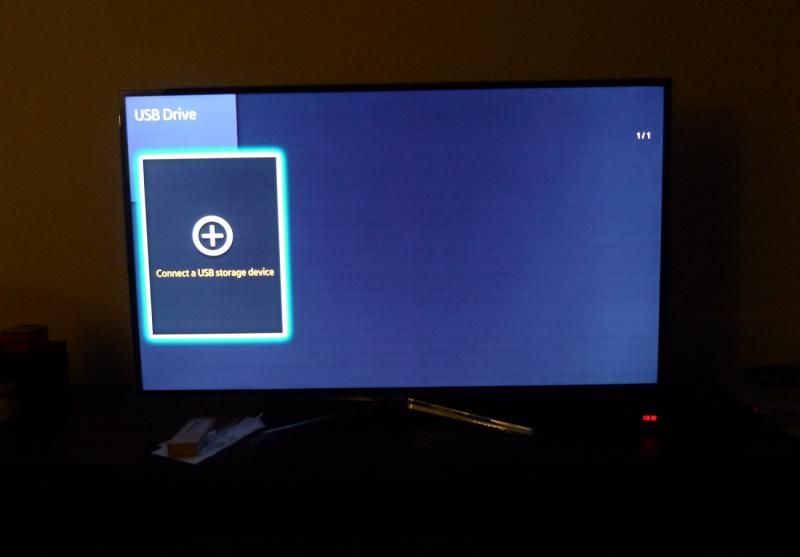
user posted image

user posted image

Is this normal or did I get a lemon?  shakehead.gif

I am starting to regret switching over the LED TV.. my Panasonic Plasma looks so much nicer in comparison. Sigh.  doh.gif
*
You have to really look for it to notice, so not really a problem. I mean u dont see it in normal picture program right?

This effect is called DSE or dirty screen effect, samsung panels is on "lottery system" depends on ur luck. Not just samsung, also present in sony , sharp , lg lcd/led tv

All sorts of lines, thickness, horizontal, vertical some even runs half screen.

This post has been edited by Mea Culpa: Jun 5 2014, 12:55 AM
Mea Culpa
post Jun 5 2014, 01:04 AM

Look at all my stars!!
*******
Senior Member
5,182 posts

Joined: Jan 2009
QUOTE(Par@dox @ Jun 5 2014, 12:59 AM)
Is this something that can be claimed under warranty? Or would Samsung consider it "normal"?

It's irritating the heck out of me..  vmad.gif

On the plus side, when it's showing a static image, the display appears to be uniform and there is backlight bleed.
*
As far as lcd manufactured after 2011 its pretty normal i would say, almost all have this effect to certain degree.

You can try another 1 see if it gets better.
Mea Culpa
post Jun 5 2014, 01:09 AM

Look at all my stars!!
*******
Senior Member
5,182 posts

Joined: Jan 2009
If the lines are not static or change post, moving, then probably its something else.
Mea Culpa
post Jun 6 2014, 01:19 AM

Look at all my stars!!
*******
Senior Member
5,182 posts

Joined: Jan 2009
Is this your 1st led tv?

they might let you change with no question, just that the new set might have the same issue too. The horizontal banding seems uniform through the entire screen.

Make sure the banding is not coming from your inputs.

Try displaying a full screen BMP, with 30,30,30 RGB. (Dark gray/ lighter black) 1920x1080 resolution, view it using USB. U can create the file with windows paint. View it with all major video processing turn off.


DSE/ Banding is a well known issue with LEDLCD TV. But they wont be noticeable on normal programs.

http://www.avsforum.com/content/type/61/id.../600/height/450

This post has been edited by Mea Culpa: Jun 6 2014, 01:26 AM
Mea Culpa
post Jun 18 2014, 11:22 AM

Look at all my stars!!
*******
Senior Member
5,182 posts

Joined: Jan 2009
QUOTE(Par@dox @ Jun 17 2014, 09:51 PM)
An update. I tested another unit in the showroom with some videos I saved up in my thumb drive and it has the exact same problem. Guess it is an issue either with this model or the current batch. You won't see it in the showroom when they are looping those ultra bright videos. But as soon as you bring one home and watch your usual programs, the banding is obvious almost in every scene with grey / pastel colors in it. Thus, be warned if you are thinking of getting a 60H6400.

The problem aside, I do like the Smart TV features and the new remote control.
*
hmm.gif no need to be so upset bro, actually ive seen worse than your h6400. At least urs the banding is somewhat uniform thru the entire screen. DSE is minimal on 40-42" lcd screens, when u go 46" and above then youll start seing these artifacts. This is some of the things buyers might consider when getting their led/lcd tv.

Plasma DSE Is a different story they are anti-glare filter related, but pretty rare and only visible at extreme angle.

Lcd manufactured before 2010 doesnt have this issue, could be a manufacturing process involved to reduce cost.

Like i said not just samsung but all brands, but i have yet to see it on uhd lcd sets.

This post has been edited by Mea Culpa: Jun 18 2014, 11:52 AM
Mea Culpa
post Jun 18 2014, 03:16 PM

Look at all my stars!!
*******
Senior Member
5,182 posts

Joined: Jan 2009
QUOTE(voncrane @ Jun 18 2014, 02:57 PM)
Hi, your posts just making me re-evaluate my finalised option to pick up the 55h6400. There's hope thought cuz it might just be a batch issue, also i read that its possible that the panel is just "warming up" and it should clear or get better after awhile. I doubt that since its happening with the display units in the showroom. Mind sharing which showroom this is? Also, can check and share if the panel is samsung or other brand?
Thanks.
*
I think the opposite is true. Panel uniformity get worse when hot due to the affects of heat generated by electrical components behind lcd screen, liquiid cyrstals are heat sensitive but that is about clouding issue.

DSE is a different thing. I dont think u can find a banding free led tv these days, especially on large displays 50"+. Ive seen it on sony, lg and philips, toshiba being the worse.

But still i dont think it is a problem. my 2010 lg has plenty of vertical bandings towards 1 third of the right screen since day 1, but its still ok lahh ... only visible on solid background.

If you want a screen with perfect uniformity, get a plasma instead.

This post has been edited by Mea Culpa: Jun 18 2014, 05:57 PM
Mea Culpa
post Sep 13 2014, 12:44 PM

Look at all my stars!!
*******
Senior Member
5,182 posts

Joined: Jan 2009
Its obvious samsung pull the plug for its F8500 plasma to make ways for their "new" UHD TV knowing that the plasma could kill all their uhd tvs in any viewing environment when it comes down to PERFORMANCE.

Most of entry level uhd or 4k tvs in the market are using WRGB in stead of RGB, using extra white subpixel to mimick an additional pixel.

The samsung uhd 7k is an ok tv, but nothing to wow about for its performance. black level at 0.057cd/m2 at calibrated setting, contrast ratio 2059:1. Color looks more natural, motion resolution average.

http://www.avforums.com/review/samsung-h70...tv-review.10391

This post has been edited by Mea Culpa: Sep 13 2014, 12:46 PM
Mea Culpa
post Sep 14 2014, 12:00 AM

Look at all my stars!!
*******
Senior Member
5,182 posts

Joined: Jan 2009
QUOTE(jimmyteng18 @ Sep 13 2014, 09:19 PM)
Bro mea, fyi, the H7000 is not an UHD TV, HU7000 is.
How about F7500 performance?
*
Ok my bad..

The F7500 is FHD i think not uhd.

Being group together in series 7 would mean similar PQ performance ; color gamut, black level and motion resolution.

Based on reviews their FHD version seems to perform better than their UHD/4k.
Mea Culpa
post Sep 14 2014, 03:10 PM

Look at all my stars!!
*******
Senior Member
5,182 posts

Joined: Jan 2009
QUOTE(jimmyteng18 @ Sep 14 2014, 08:53 AM)
Bro mea, yes,their FHD version are better. But the F7500 more expensive than H7000, both in 55".
Saw a F8000 65" selling rm10k.
*
I think the price for the FHD as being higher could be due to lcd refresh rate of 240hz on the F7500, the 4k model probably with lcd refresh most likely 120hz.
Mea Culpa
post Oct 10 2014, 04:51 PM

Look at all my stars!!
*******
Senior Member
5,182 posts

Joined: Jan 2009
QUOTE(voncrane @ Oct 7 2014, 10:12 PM)
Hmm. Well, there's some degree of smartness "always" running in the background. Video & audio processing etc but shouldn't run so hot. What's your TV model & how hot do you reckon it is? Warm to touch? Yes, almost burns palms hot? It shouldn't.
*
The processing bandwidth usage normally at max when "interpolation" is engaged, causing a further 150-450ms input lag. Turn it off for cooler video board.

This post has been edited by Mea Culpa: Oct 10 2014, 05:22 PM
Mea Culpa
post Oct 10 2014, 07:55 PM

Look at all my stars!!
*******
Senior Member
5,182 posts

Joined: Jan 2009
QUOTE(Dickong @ Oct 10 2014, 07:27 PM)
Log out the net connection to have cooler board right bro, other than log out any better suggestion.tq
*
networking apps doesnt really consume processing power but more towards memory usage, which should not be the cause.

Not so sure how hot is your mainboard, but generally enabling more video processing/enhancement option increase input lag, which is a sign processing power is being taken up. Eg, Auto motion plus set to max.

If picture is idle with min video enhancement, there could be something wrong with the TV.

This post has been edited by Mea Culpa: Oct 10 2014, 07:56 PM
Mea Culpa
post Oct 11 2014, 09:15 AM

Look at all my stars!!
*******
Senior Member
5,182 posts

Joined: Jan 2009
QUOTE(Dickong @ Oct 11 2014, 06:12 AM)
Actually when i mean hot i am compairing with my previous 55 in tv ( both also Samsung ) n its also same brand but i use the wrong word its not really that hot it should be slightly warmer than my older tv. I am thinking of ways to turn certain setting off n by the way the previous tv is 3d but not smart compare with my new tv is a smart tv, UHD n curve. My question, is there anyway to turn off the smart function while watching tv only n is the tv warmer bcos the processor n other smart function running behind when watching tv only.tq
*
Being a UHD means higher image processing power which translates to heat. I believe this is normal. You are not using 4k content all the time, so most of the time the video processor have to work more for the upscalling of any non-4k source to be displayed on the native 4k panel.

Backgound process thread normally takes little processing, the supposely "smart" OS would handle the "priority" tagged with the apps approprietely. Smart cant be turn off fully , its like an OS GUI. Just like windows they dont have CLI besides the GUI.

The warmer feel could be the mainboard is mounted well close to the outer casing, for better heat spreader. Should be of no concern the tv can handle the heat, its design to. unless the tv is being put in a bad ventilated cabinet.

This post has been edited by Mea Culpa: Oct 11 2014, 09:37 AM
Mea Culpa
post Oct 30 2014, 06:05 PM

Look at all my stars!!
*******
Senior Member
5,182 posts

Joined: Jan 2009
For films that contains SPECIAL EFFECTS, whether 1080p or 4k i doubt you'll seeing EXTRA details. Even on 1080p, film makers is using BLURRING effect or filter to mask artifacts by wrapping it around the CGI object.
Mea Culpa
post Nov 5 2014, 03:44 AM

Look at all my stars!!
*******
Senior Member
5,182 posts

Joined: Jan 2009
QUOTE(elainor @ Nov 4 2014, 08:00 PM)
Is it worth to change to hdmi 2.0 cable? If so which brand should I go for? Just recently bought a 65hu9000 TV. I just can't trust the hdmi cable given by Astro. Thanks!
*
You do not need HDMI 2.0 for Astro. A good quality HDMI 1.4b preferably with double shielded is already more than enough, you'll only need a high quality ones if your cable runs more than 5m say 10m in length.

Astro do not transmit 4k signal, so HDMI 2.0 is not need. It will be only required say if you use Media player or Blu-ray player that does 4K upscalling internally before outputting the signal to your TV.

This post has been edited by Mea Culpa: Nov 5 2014, 03:46 AM
Mea Culpa
post Aug 13 2015, 07:45 AM

Look at all my stars!!
*******
Senior Member
5,182 posts

Joined: Jan 2009
QUOTE(merk @ Aug 11 2015, 08:29 PM)
Update on this. Samsung technician came and replaced the power unit board and problem still exist. He will proceed to replaced the panel upon obtaining the stock. If problem still not fixed, he will help me get the whole unit replaced.

Will update again.
*
Could be overheating issue. Problem on the LED driver board perhaps. What is your setting for backlight? Max?

Make sure your TV gets proper ventilation.
Mea Culpa
post Aug 14 2015, 01:57 AM

Look at all my stars!!
*******
Senior Member
5,182 posts

Joined: Jan 2009
QUOTE(voncrane @ Aug 14 2015, 12:43 AM)
Wouldn't advise going for a 60" 5 series... Plasma or not. Samsung and other manufacturers have dropped production of plasma TVs and so support would be more difficult. For around your budget, at least aim for a decent 6 series TV, like the 55H6400 or newer 2015 models (packing the newer Tizen OS). Or if you'd rather get a plasma, willing to stretch your budget and can still find one, grab the F8500.
*
I disagree. Series 5 LED is quite good already. Uniformity is excellent. Black is just as good as series 6. The most practical serie minus the 3d.

Edge dimming features on series 6 and up are rubbish and nothing more than marketing gimmick.

If you're not a fan of those fake motion (auto motionplus)or smooth motion gimmick. You also do not want 3d or smart features. Save your money get Series 5 its more than enough.

This post has been edited by Mea Culpa: Aug 14 2015, 02:01 AM
Mea Culpa
post Aug 14 2015, 02:18 AM

Look at all my stars!!
*******
Senior Member
5,182 posts

Joined: Jan 2009
QUOTE(voncrane @ Aug 14 2015, 02:07 AM)
To each his own. Seems like you didn't bother to actually read and understand my previous post. Just as good or more than enough does NOT equal Good! As for your statement that dimming features on series 6+ is just a marketing gimmick. Either raise your standards or get your eyes checked. No offense meant. A 60 inch "just enough" sub-par panel is just that...Sub-par.
*
Bla bla bla.. Marketing BS!

EDGE dimming is RUBBISH full stop. can be proven using ANSI contrast checkered box test.

Run this test you'll see those edge LEDs shit their pants. The real dimming LED TV uses ARRAY orientation.

BTW the series5 plasma pawns any series 6 led in dark room viewing.beaten in almost all category except luminance.

This post has been edited by Mea Culpa: Aug 14 2015, 02:31 AM
Mea Culpa
post Aug 14 2015, 02:52 AM

Look at all my stars!!
*******
Senior Member
5,182 posts

Joined: Jan 2009
QUOTE(voncrane @ Aug 14 2015, 02:46 AM)
The average person's living room is not a dark room. Every motorcar or bike has a primary function... Move from point A to point B, yet we find some accelerate or handle turns better than others. Marketing gimmicks right? Plasma is regrettably dead. OLED is the future of TV tech, provided manufacturers can iron out a few bugs and lower the cost of production. Let me know when your plasma set doesn't quickly succumb to image burn/retention.
*
Dimming is a feature design specifically for dark room.

Regrettably FULL ARRAY LED also pretty dead ... Why? Exclusive for flagship only. Not marketing strategy to screw buyers?

Again why pay extra for something that doesnt work such as the PSEDO-dimming edge led? Not only that ..its also an annoyance. Fluctuating brightness and black caused by random popping of bright subtitles during dark scenes. Many have thought its a defect when in fact its a feature. Not gimmick u say? A feature best disabled.

Ps : ur car analogy is way off... Lol

This post has been edited by Mea Culpa: Aug 14 2015, 03:58 AM
Mea Culpa
post Aug 14 2015, 02:59 AM

Look at all my stars!!
*******
Senior Member
5,182 posts

Joined: Jan 2009
Series 5 and 6 is in the same level when it comes to picture quality minus 3d and auto motionplus.

Series 7 and up has better viewing angle.
Mea Culpa
post Aug 14 2015, 07:05 AM

Look at all my stars!!
*******
Senior Member
5,182 posts

Joined: Jan 2009
Seeing ppl posting BULL here.. too lazy to google.. so here you go

Local dimming was first developed to compete with plasma's performance for black level or MLL (minimum luminance level). It gives manufacturer the ability to LEGALLY and magically conjure up amazing phony figures for the contrast ratio.

It was and is still a GIMMICK to attract current plasma users to switch to LCD. My advice ignore this feature, look for PANEL type or code instead for better blacks and viewing angle.

It is a well known FACT they are just MARKETING.

SOURCE:

http://www.rtings.com/tv/learn/what-is-local-dimming

Micro Dimming is Samsung's marketing response to local dimming (which is why the name is similar). However, Samsung does not actually dim the LEDs of the backlight, so it is not really local dimming. Instead, it artificially tries to create a similar effect by changing the contrast of different zones of the picture. Micro Dimming Ultimate claims to have twice the number of zones (600) and changes the color and sharpness in addition to the contrast.

[B]Of course, this is mainly just a marketing feature and is nowhere near real local dimming. Video purists especially dislike it, because it messes with the video settings of their televisions, changing the contrast from frame to frame. That's why in all our reviews of Samsung TVs, we always set the mode to Movie to disable this feature.[/b].


Samsung TVs equipped with Micro Dimming are also equipped with CE Dimming. CE Dimming does dim the LEDs of the panel, but not locally. It dims the whole panel during darker scenes. Some people do not like it, because you can actually see the whole screen dim sometimes, like during the end credits of a movie. There is no option to turn CE Dimming off, even in the service menu.<== so Farkup.


If it aint Full Array LED, its useless. Sometimes its wiser to buy lower tier TV thats free from "faulty features."

This post has been edited by Mea Culpa: Aug 14 2015, 07:46 AM

5 Pages < 1 2 3 4 5 >Top
Topic ClosedOptions
 

Change to:
| Lo-Fi Version
0.1064sec    0.74    7 queries    GZIP Disabled
Time is now: 4th December 2025 - 09:40 AM