Welcome Guest ( Log In | Register )

Bump Topic Topic Closed RSS Feed
166 Pages « < 130 131 132 133 134 > » Bottom

Outline · [ Standard ] · Linear+

 Acer TimelineX 3820TG & 4820TG, Owners and visitors discussion

views
     
TScowithgun
post Apr 4 2011, 05:26 PM

A cow that can play notebook & phone
*******
Senior Member
2,248 posts

Joined: Sep 2010
QUOTE(hottemper @ Apr 4 2011, 03:06 PM)
guys, i lost the large beep sound when u charge your battery, and I miss it alot!

sifu sifu...................
*
how come? i tested it, it still beep when i plug my power when there is battery in the notebook... u change upgrade BIOS ka?
hottemper
post Apr 4 2011, 08:39 PM

Getting Started
**
Junior Member
248 posts

Joined: Feb 2006
From: KL


QUOTE(ngkhanmein @ Apr 4 2011, 03:09 PM)
u need that sound for what? no sound = best!
*
QUOTE(cowithgun @ Apr 4 2011, 05:26 PM)
how come? i tested it, it still beep when i plug my power when there is battery in the notebook... u change upgrade BIOS ka?
*
Somehow I felt insecure when there's no beeping sound. biggrin.gif

I just take a look at the BIOS, but found no setting regarding this issue. I never change my bios setting oso...


Added on April 4, 2011, 8:49 pmwell, i guess i uninstall realtek driver, which disable this beeping sound. Anyone know where can I get a digitally signed realtek driver?

This post has been edited by hottemper: Apr 4 2011, 08:49 PM
TScowithgun
post Apr 4 2011, 10:11 PM

A cow that can play notebook & phone
*******
Senior Member
2,248 posts

Joined: Sep 2010
so far i have not seen modded realtek driver! all realtek driver are signed properly. but u should be able to get it here:

http://www.realtek.com.tw/downloads/downlo...3&GetDown=false
hottemper
post Apr 4 2011, 11:06 PM

Getting Started
**
Junior Member
248 posts

Joined: Feb 2006
From: KL


installing the modded driver posted by lee... wish me luck~


Added on April 4, 2011, 11:15 pmafter installing the modded driver, now my reso is 800x600, brightness key lost, switchable graphics lost... helppppp!!!!!!!!!!!

This post has been edited by hottemper: Apr 4 2011, 11:15 PM
hottemper
post Apr 4 2011, 11:47 PM

Getting Started
**
Junior Member
248 posts

Joined: Feb 2006
From: KL


rclxms.gif

Attached Image
*DISCLAIMER : DO IT AT YOUR OWN RISK. I WILL NOT BE RESPONSIBLE FOR ANY DAMAGES, LOSSES, ETC.*

Here's how I make it work. ( Done with battery, not plugged in. )

1.Download (64Bit hybrid: ATI_11.3_W7x64_Alien9_Hybrid_v3_Beta) from
http://www.acer-userforum.de/acer-treiber/...html#post295652
2.Run the install.cmd and uninstall all existing ATI driver ( express uninstallation ). note : the directory must match the install.cmd directory.
3.Reboot and get into BIOS and change from SWITCHABLE TO DISCRETE.
4.Run the setup again and install it.
5.Reboot and change the BIOS from DISCRETE to SWITCHABLE.
6.Wait awhile and a notification pop up stated that INTEL HD GRAPHICS IS INSTALLED. You will be prompted to reboot your computer.
7. REBOOT AND DONE!!!!!!!!!!!!!

You now get to switch your graphics again, brightness key regained, and maybe increase in performance...


For those who dislike the BEEPING sound when AC Adapter plugged in, I found out a solution thru the net. ( applies to Realtek audio driver only )

1. go to Control Panel -> Hardware and Sound -> Sound -> Playback Tab
2.double-click speakers, under level tab you will see PC BEEP, change it and you can eliminate the beeping sound~

This post has been edited by hottemper: Apr 4 2011, 11:54 PM
SUSngkhanmein
post Apr 5 2011, 09:13 AM

カラカラ Karakara
*******
Senior Member
7,727 posts

Joined: Jan 2010
From: Ara Damansara, Petaling Jaya & Batu Pahat, Johor.


hottemper.. u solve ur problem? good luck amigo~
cowtihgun my bro seriously getting new lappy.. i asked him wait c around may got any new lappy coming in a not.. htc desire s is coming to m'sia i goin to grab it.. damn~ i'm coming home dirty $
Anime4000
post Apr 5 2011, 09:38 AM

Look at all my stars!!
*******
Senior Member
2,400 posts

Joined: Jul 2009
From: /dev/null


Good, I still not installing driver I think it would be good wait Catalyst 11.4 Preview until final,
TScowithgun
post Apr 5 2011, 09:48 AM

A cow that can play notebook & phone
*******
Senior Member
2,248 posts

Joined: Sep 2010
QUOTE(hottemper @ Apr 4 2011, 11:47 PM)
rclxms.gif
» Click to show Spoiler - click again to hide... «
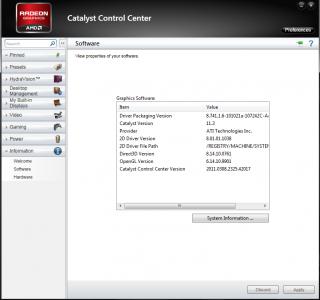
Here's how I make it work. ( Done with battery, not plugged in. )

1.Download (64Bit hybrid: ATI_11.3_W7x64_Alien9_Hybrid_v3_Beta) from 
http://www.acer-userforum.de/acer-treiber/...html#post295652
2.Run the install.cmd and uninstall all existing ATI driver ( express uninstallation ).     note : the directory must match the install.cmd directory.
3.Reboot and get into BIOS and change from SWITCHABLE TO DISCRETE.
4.Run the setup again and install it.
5.Reboot and change the BIOS from DISCRETE to SWITCHABLE.
6.Wait awhile and a notification pop up stated that INTEL HD GRAPHICS IS INSTALLED. You will be prompted to reboot your computer.
7. REBOOT AND DONE!!!!!!!!!!!!!

You now get to switch your graphics again, brightness key regained, and maybe increase in performance...
For those who dislike the BEEPING sound when AC Adapter plugged in, I found out a solution thru the net. ( applies to Realtek audio driver only )

1. go to Control Panel -> Hardware and Sound -> Sound -> Playback Tab
2.double-click speakers, under level tab you will see PC BEEP, change it and you can eliminate the beeping sound~

*
+1

This post has been edited by cowithgun: Apr 5 2011, 09:49 AM
TScowithgun
post Apr 5 2011, 09:51 AM

A cow that can play notebook & phone
*******
Senior Member
2,248 posts

Joined: Sep 2010
QUOTE(ngkhanmein @ Apr 5 2011, 09:13 AM)
hottemper.. u solve ur problem? good luck amigo~
cowtihgun my bro seriously getting new lappy.. i asked him wait c around may got any new lappy coming in a not.. htc desire s is coming to m'sia i goin to grab it.. damn~ i'm coming home dirty $
*
go buy 1 quickly! i also hope to see if nVidia 540M / 550M can overclock good or not! drool.gif if u like Asus, seem like N53SN is getting a lot of attention...
SUSngkhanmein
post Apr 5 2011, 09:53 AM

カラカラ Karakara
*******
Senior Member
7,727 posts

Joined: Jan 2010
From: Ara Damansara, Petaling Jaya & Batu Pahat, Johor.


paiseh bro.. i won't OC de.. hahaha play safe punya kaki here.. when wanna change new lappy then only will play OC laugh.gif not i like but my bro.. i goin suggest him N53SV cos N53SN over budget.. 2.7 still acceptable! no need icore7 lah but my bro said wan icore 7 2nd gen but i said u cant get cheaper than 3k so he bopian.. he wanna play diablo 3..
lee_what2004
post Apr 5 2011, 09:54 AM

*stare* ji--------
Group Icon
Elite
14,813 posts

Joined: Nov 2006


15R can get i7 mah tongue.gif
hottemper
post Apr 5 2011, 10:18 AM

Getting Started
**
Junior Member
248 posts

Joined: Feb 2006
From: KL


QUOTE(ngkhanmein @ Apr 5 2011, 09:13 AM)
hottemper.. u solve ur problem? good luck amigo~
cowtihgun my bro seriously getting new lappy.. i asked him wait c around may got any new lappy coming in a not.. htc desire s is coming to m'sia i goin to grab it.. damn~ i'm coming home dirty $
*
yup, problem solved~ and the graphics seems better + cooler~
SUSngkhanmein
post Apr 5 2011, 10:24 AM

カラカラ Karakara
*******
Senior Member
7,727 posts

Joined: Jan 2010
From: Ara Damansara, Petaling Jaya & Batu Pahat, Johor.


sifu lee u mean new inspiron 15R? my bro said dun1 same brand v me cos feel lauya.. hahaha..
nowadays youngster lcly de.. bopian he is my bro..


Added on April 5, 2011, 10:27 amseriously N5110 come with 525 GPU better pick asus lah more rm100 better audio & design.. but N5110 have better heat management than other.. i din open my casing just use the huge vacuum cleaner suck the dust.. now at air cond room play my lappy with my zalman.. the temp wont exceed 40 in idle mode..

This post has been edited by ngkhanmein: Apr 5 2011, 10:27 AM
lee_what2004
post Apr 5 2011, 10:29 AM

*stare* ji--------
Group Icon
Elite
14,813 posts

Joined: Nov 2006


The CPU or GPU that won't exceed 40 ? HDD ?

This post has been edited by lee_what2004: Apr 5 2011, 10:30 AM
SUSngkhanmein
post Apr 5 2011, 10:45 AM

カラカラ Karakara
*******
Senior Member
7,727 posts

Joined: Jan 2010
From: Ara Damansara, Petaling Jaya & Batu Pahat, Johor.


also.. hahaha.. air cond is old 1 hitachi.. 23 deg 1 level mode fan.. my zalman fan speed 55-60% nia.. idle mode lah wont exceed 40 if c movie won't exceed 45.. stable around 41-43.. last nite just checked it out.. hdd showing 39 nia if no mistake on idle mode.


Added on April 6, 2011, 8:52 amsifu lee my prove! y my HD0 & HD1 show 92% in speedfan? what it mean? TYVM~ icon_idea.gif sry that day said that 9v right? actually is 11++ volt.. cos i damn rarely charge o use my battery.. i just noticed.

This post has been edited by ngkhanmein: Apr 6 2011, 08:55 AM
Anime4000
post Apr 6 2011, 10:42 AM

Look at all my stars!!
*******
Senior Member
2,400 posts

Joined: Jul 2009
From: /dev/null


I wan ask you guys... "IF" I format to windows 7 Professional (MSDN Academic Alliance) what driver should I install first, due laptop have "switchable" graphics.

It need install "switchable" driver? or Install HD6550 either Intel HD?
SUSngkhanmein
post Apr 6 2011, 11:04 AM

カラカラ Karakara
*******
Senior Member
7,727 posts

Joined: Jan 2010
From: Ara Damansara, Petaling Jaya & Batu Pahat, Johor.


of cos intel 1st cos it is based (personally cos i din own 3820 o 4820).. that y i said switchable graphics leceh.. then only install hd 6550 but make sure u go bios change to discrete. then last only hybird driver. but u better follow hottemper procedure more details. but dont apply wrong driver ya.. like me apply desktop driver damn.. still 11.2 but now ok liau 11.3.. i made a mistake b4 hahaha but as long u face no problem no need uninstall previous driver.. if u got problem make sure u uninstall it clean like go safe mode o using driver sweeper & ccleaner to make sure 101% clean then restart it.. ready for the new driver..

This post has been edited by ngkhanmein: Apr 6 2011, 11:05 AM
Anime4000
post Apr 6 2011, 11:30 AM

Look at all my stars!!
*******
Senior Member
2,400 posts

Joined: Jul 2009
From: /dev/null


Installation Step:
1. HD6550 in Discrete Mode
2. Hybrid Driver in Switchable Mode
3. Intel HD

like that?
lee_what2004
post Apr 6 2011, 11:39 AM

*stare* ji--------
Group Icon
Elite
14,813 posts

Joined: Nov 2006


Don't install Intel HD, it will broke the switchable.
Intel HD is included in ATi driver..
or just follow this..
QUOTE(hottemper @ Apr 4 2011, 11:47 PM)
rclxms.gif

Attached Image
*DISCLAIMER : DO IT AT YOUR OWN RISK. I WILL NOT BE RESPONSIBLE FOR ANY DAMAGES, LOSSES, ETC.*

Here's how I make it work. ( Done with battery, not plugged in. )

1.Download (64Bit hybrid: ATI_11.3_W7x64_Alien9_Hybrid_v3_Beta) from 
http://www.acer-userforum.de/acer-treiber/...html#post295652
2.Run the install.cmd and uninstall all existing ATI driver ( express uninstallation ).     note : the directory must match the install.cmd directory.
3.Reboot and get into BIOS and change from SWITCHABLE TO DISCRETE.
4.Run the setup again and install it.
5.Reboot and change the BIOS from DISCRETE to SWITCHABLE.
6.Wait awhile and a notification pop up stated that INTEL HD GRAPHICS IS INSTALLED. You will be prompted to reboot your computer.
7. REBOOT AND DONE!!!!!!!!!!!!!

You now get to switch your graphics again, brightness key regained, and maybe increase in performance...
For those who dislike the BEEPING sound when AC Adapter plugged in, I found out a solution thru the net. ( applies to Realtek audio driver only )

1. go to Control Panel -> Hardware and Sound -> Sound -> Playback Tab
2.double-click speakers, under level tab you will see PC BEEP, change it and you can eliminate the beeping sound~
*
This post has been edited by lee_what2004: Apr 6 2011, 11:40 AM
SUSngkhanmein
post Apr 6 2011, 12:09 PM

カラカラ Karakara
*******
Senior Member
7,727 posts

Joined: Jan 2010
From: Ara Damansara, Petaling Jaya & Batu Pahat, Johor.


sifu lee ok ma my temp? i plan to format reinstall os scare need update window few hours is like damn..

166 Pages « < 130 131 132 133 134 > » Top
Topic ClosedOptions
 

Change to:
| Lo-Fi Version
0.0302sec    0.43    6 queries    GZIP Disabled
Time is now: 15th December 2025 - 10:21 PM
