

QUOTE(scorps @ Aug 21 2008, 01:41 PM)
how to run that as root aa??how??

sudo subut when i try ping google.com
still same, nothing happen
[Help!] Ubuntu Problems, everything related to ubuntu goes here
|
|
 Aug 21 2008, 01:14 PM Aug 21 2008, 01:14 PM
Return to original view | Post
#21
|
 
Senior Member
9,572 posts Joined: Jun 2005 From: Terengganu Darul Iman   
|
QUOTE(scorps @ Aug 21 2008, 01:41 PM) how to run that as root aa??how?? sudo subut when i try ping google.com still same, nothing happen |
|
|
|
|
|
Aug 21 2008, 02:44 PM
Return to original view | Post
#22
|
|
Senior Member
9,572 posts Joined: Jun 2005 From: Terengganu Darul Iman
|
good news,
my wifi connected (working good now)  but it happen after i reconfigure my network setup set the adsl modem as brigde mode, and set the wifi router as pppoe mode, so that my fault, before this i just use modem as pppoe mode, and the wifi router as dhcp and laptop with winxp can connect wifi very good but thanks all and how about to do network sharing between winxp and ubuntu? using samba?? any link to me?? thanks oshiri..  |
|
|
Aug 21 2008, 11:51 PM
Return to original view | Post
#23
|
|
Senior Member
9,572 posts Joined: Jun 2005 From: Terengganu Darul Iman
|
i have a new problem here,
my network shared can't access, |
|
|
Aug 22 2008, 12:07 AM
Return to original view | Post
#24
|
|
Senior Member
9,572 posts Joined: Jun 2005 From: Terengganu Darul Iman
|
QUOTE(ozs @ Aug 22 2008, 12:58 AM) more details?... owh sorry..error?.. 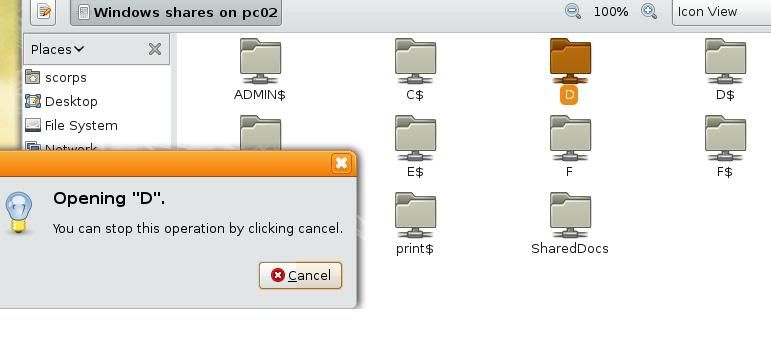 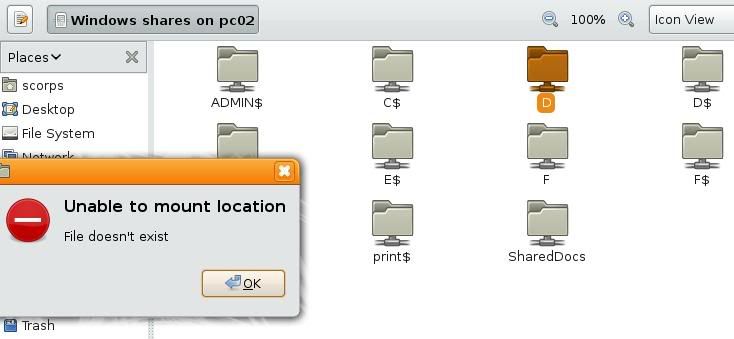 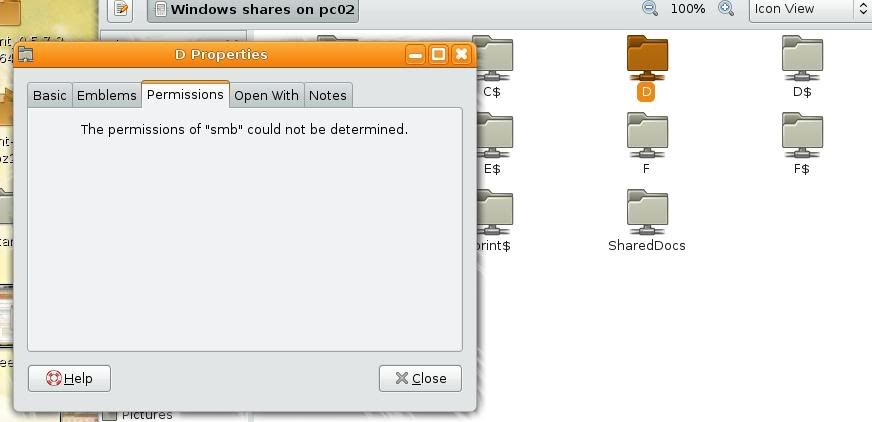 so what???   |
|
|
Aug 22 2008, 12:32 AM
Return to original view | Post
#25
|
|
Senior Member
9,572 posts Joined: Jun 2005 From: Terengganu Darul Iman
|
QUOTE(arafat @ Aug 22 2008, 01:26 AM) sorry,newbie.. sudo /etc/fstabwhat to do with the /etc/fstab? type in terminal? in terminal |
|
|
Aug 22 2008, 09:10 AM
Return to original view | Post
#26
|
|
Senior Member
9,572 posts Joined: Jun 2005 From: Terengganu Darul Iman
|
QUOTE(jordan86 @ Aug 22 2008, 08:58 AM) You got try edit the samba configuration file? i have edit it already,Until now im still not very sure how to setup the samba. lol... May be you can refer to some websites. Lastime i done edi, but sometime window can see the my share folder, sometime cannot. Then now i also lazy to setup edi. i follow these step http://ubuntuforums.org/showthread.php?t=202605 but still can't |
|
|
|
|
|
Aug 22 2008, 01:18 PM
Return to original view | Post
#27
|
|
Senior Member
9,572 posts Joined: Jun 2005 From: Terengganu Darul Iman
|
CODE scorps@scorps-laptop:~$ smbclient -L localhost Connection to localhost failed (Error NT_STATUS_BAD_NETWORK_NAME) scorps@scorps-laptop:~$ this what i got...  |
|
|
Aug 22 2008, 02:24 PM
Return to original view | Post
#28
|
|
Senior Member
9,572 posts Joined: Jun 2005 From: Terengganu Darul Iman
|
CODE [global] ; General server settings netbios name = scorps server string = workgroup = WORKGROUP announce version = 5.0 socket options = TCP_NODELAY IPTOS_LOWDELAY SO_KEEPALIVE SO_RCVBUF=8192 SO_SNDBUF=8192 passdb backend = tdbsam security = user null passwords = true username map = /etc/samba/smbusers name resolve order = hosts wins bcast wins support = yes printing = CUPS printcap name = CUPS syslog = 1 syslog only = yes ; NOTE: If you need access to the user home directories uncomment the ; lines below and adjust the settings to your hearts content. ;[homes] ;valid users = %S ;create mode = 0600 ;directory mode = 0755 ;browseable = no ;read only = no ;veto files = /*.{*}/.*/mail/bin/ ; NOTE: Only needed if you run samba as a primary domain controller. ; Not needed as this config doesn't cover that matter. ;[netlogon] ;path = /var/lib/samba/netlogon ;admin users = Administrator ;valid users = %U ;read only = no ; NOTE: Again - only needed if you're running a primary domain controller. ;[Profiles] ;path = /var/lib/samba/profiles ;valid users = %U ;create mode = 0600 ;directory mode = 0700 ;writeable = yes ;browseable = no ; NOTE: Inside this place you may build a printer driver repository for ; Windows - I'll cover this topic in another HOWTO. [print$] path = /var/lib/samba/printers browseable = yes guest ok = yes read only = yes write list = root create mask = 0664 directory mask = 0775 [printers] path = /tmp printable = yes guest ok = yes browseable = no ; Uncomment if you need to share your CD-/DVD-ROM Drive ;[DVD-ROM Drive] ;path = /media/cdrom ;browseable = yes ;read only = yes ;guest ok = yes [MyFiles] path = /home/samba/ browseable = yes read only = no guest ok = no create mask = 0644 directory mask = 0755 force user = scorps force group = scorps |
|
|
Aug 22 2008, 04:09 PM
Return to original view | Post
#29
|
|
Senior Member
9,572 posts Joined: Jun 2005 From: Terengganu Darul Iman
|
CODE [global] workgroup = WORKGROUP server string = Scorps map to guest = Bad User restrict anonymous = no guest ok = yes domain master = no preferred master = no max protocol = NT acl compatibility = winnt ldap ssl = No server signing = Auto security = user log level = 2 log file = /var/log/samba.log [My_Home_Folder] path = /home/scorps comment = home files read only = No guest ok = Yes well i got this error message CODE scorps@scorps-laptop:~$ sudo gedit /etc/samba/smb.conf [sudo] password for scorps: scorps@scorps-laptop:~$ sudo /etc/init.d/samba restart * Stopping Samba daemons [ OK ] * Starting Samba daemons [ OK ] scorps@scorps-laptop:~$ smbclient -L localhost timeout connecting to 203.106.203.238:445 timeout connecting to 203.106.203.238:139 Connection to localhost failed (Error NT_STATUS_ACCESS_DENIED) scorps@scorps-laptop:~$ This post has been edited by scorps: Aug 22 2008, 04:11 PM |
|
|
Aug 22 2008, 04:21 PM
Return to original view | Post
#30
|
|
Senior Member
9,572 posts Joined: Jun 2005 From: Terengganu Darul Iman
|
QUOTE(oshiri @ Aug 22 2008, 05:16 PM) Ip it trying to connect is suspicious. Probably you didn't declare localhost in /etc/hosts. ok got it ..Try : smbclient -L 127.0.0.1 CODE scorps@scorps-laptop:~$ smbclient -L 127.0.0.1 Enter scorps's password: Domain=[SCORPS-LAPTOP] OS=[Unix] Server=[Samba 3.2.1] Sharename Type Comment --------- ---- ------- My_Home_Folder Disk home files IPC$ IPC IPC Service (Scorps) folder to shared Disk Domain=[SCORPS-LAPTOP] OS=[Unix] Server=[Samba 3.2.1] Server Comment --------- ------- Workgroup Master --------- ------- WORKGROUP PC02 scorps@scorps-laptop:~$ next what?? |
|
|
Aug 22 2008, 04:24 PM
Return to original view | Post
#31
|
|
Senior Member
9,572 posts Joined: Jun 2005 From: Terengganu Darul Iman
|
CODE scorps@scorps-laptop:~$ smbclient //localhost/My_Home_Folder timeout connecting to 203.106.203.238:445 scorps@scorps-laptop:~$ smbclient //127.0.0.1/My_Home_Folder Enter scorps's password: Domain=[SCORPS-LAPTOP] OS=[Unix] Server=[Samba 3.2.1] smb: \> pwd Current directory is \\127.0.0.1\My_Home_Folder\ smb: \> ok then?? |
|
|
Aug 22 2008, 05:14 PM
Return to original view | Post
#32
|
|
Senior Member
9,572 posts Joined: Jun 2005 From: Terengganu Darul Iman
|
ok ..
let see this.. CODE scorps@scorps-laptop:~$ smbclient //127.0.0.1/My_Home_Folder Enter scorps's password: Domain=[SCORPS-LAPTOP] OS=[Unix] Server=[Samba 3.2.1] smb: \> pwd Current directory is \\127.0.0.1\My_Home_Folder\ smb: \> quit scorps@scorps-laptop:~$ smbclient -L //10.0.0.47/pc02 Enter scorps's password: Domain=[PC02] OS=[Windows 5.1] Server=[Windows 2000 LAN Manager] Sharename Type Comment --------- ---- ------- E$ Disk Default share IPC$ IPC Remote IPC D$ Disk Default share print$ Disk Printer Drivers SharedDocs Disk D Disk G$ Disk Default share F$ Disk Default share E Disk F Disk Printer2 Printer Microsoft Office Document Image Writer ADMIN$ Disk Remote Admin C$ Disk Default share Printer Printer Send To OneNote 2007 session request to 10.0.0.47 failed (Called name not present) session request to 10 failed (Called name not present) Domain=[PC02] OS=[Windows 5.1] Server=[Windows 2000 LAN Manager] Server Comment --------- ------- Workgroup Master --------- ------- scorps@scorps-laptop:~$ and now, how can i get access to that shared folder?? i go to network, go to workgroup , but nothing inside there,... Added on August 22, 2008, 5:22 pmwell, i can access my shared folder on ubuntu using winxp machine, so the setup is correct laa?? but why i can't access file on winxp using ubuntu??? my firewall turn off This post has been edited by scorps: Aug 22 2008, 05:22 PM |
|
|
Aug 22 2008, 11:54 PM
Return to original view | Post
#33
|
|
Senior Member
9,572 posts Joined: Jun 2005 From: Terengganu Darul Iman
|
bro, let see this
CODE scorps@scorps-laptop:~$ smbclient //10.0.0.47/SharedDocs Enter scorps's password: Domain=[PC02] OS=[Windows 5.1] Server=[Windows 2000 LAN Manager] smb: \> ls . DR 0 Fri Jun 27 11:44:38 2008 .. DR 0 Fri Jun 27 11:44:38 2008 desktop.ini AHS 127 Thu Aug 21 22:01:20 2008 My Music DR 0 Fri Jun 27 11:45:28 2008 My Pictures DR 0 Fri Jun 27 11:45:27 2008 My Videos DR 0 Fri Jun 27 11:43:07 2008 60024 blocks of size 262144. 29750 blocks available smb: \> quit scorps@scorps-laptop:~$ smbclient //10.0.0.47/pc02 Enter scorps's password: Domain=[PC02] OS=[Windows 5.1] Server=[Windows 2000 LAN Manager] tree connect failed: NT_STATUS_BAD_NETWORK_NAME scorps@scorps-laptop:~$ smbclient //10.0.0.47/D Enter scorps's password: Domain=[PC02] OS=[Windows 5.1] Server=[Windows 2000 LAN Manager] smb: \> ls $AVG8.VAULT$ DH 0 Sat Jun 28 12:09:26 2008 $RECYCLE.BIN DHS 0 Sun Jun 10 04:17:18 2007 26 THE BEST OF WORLD CUP GOALS (video) D 0 Thu Feb 22 04:56:02 2007 5102series.pdf A 2325144 Sun Dec 23 01:26:16 2007 abah D 0 Fri Jun 27 11:01:51 2008 avg75free_467a1008.exe A 21407888 Fri May 11 11:37:10 2007 backup D D 0 Sat Jan 6 09:59:17 2007 Downloads D 0 Mon Jul 7 12:00:11 2008 Ethernet.rar A 565414 Tue Dec 25 12:16:56 2007 ikra D 0 Fri Jul 4 19:15:24 2008 Juventus-Real Madrid 14-05-2003.mpg A 1219837388 Thu Feb 22 06:09:51 2007 khadijah D 0 Fri Jun 27 11:01:49 2008 Lost Files D 0 Fri Jan 12 23:54:05 2007 Macromedia Flash MX Pro 2004 + Keygen D 0 Tue Dec 25 10:03:03 2007 Macromedia Flash MX Pro 2004.zip A 75515948 Tue Dec 25 04:15:55 2007 mengarut D 0 Sat Jun 28 12:04:40 2008 Metallica 13 albums D 0 Wed May 9 22:19:21 2007 MSOCache DHR 0 Wed Jun 27 20:37:25 2007 My Disc (H) D 0 Fri Jun 27 11:09:14 2008 My Music D 0 Sat Dec 23 20:53:19 2006 New Folder D 0 Sat Oct 20 23:00:40 2007 PC-Championship.Manager.2006-1CD+Crack.Multi3-By.TXT-[COLOMBO-BT.ORG] D 0 Thu Jun 19 00:11:24 2008 Program Files D 0 Fri Jun 27 22:21:39 2008 Que - Macromedia Flash MX ActionScript for Fun & Games (2003).pdf A 9436553 Tue Dec 25 10:01:00 2007 RECYCLER DHS 0 Thu Jul 3 03:19:19 2008 Removable Disk (H) D 0 Thu Mar 29 08:46:50 2007 saw D 0 Thu Mar 29 08:46:55 2007 Scary Movie 1,2&3 D 0 Sun Mar 25 11:05:18 2007 setup-id.exe A 1430931 Mon Jul 7 22:11:37 2008 Shortcut to portableav.lnk A 503 Thu May 15 00:17:22 2008 System Volume Information DHS 0 Fri Oct 12 09:07:06 2007 The Best And Most Expensive Fonts D 0 Tue Feb 20 15:46:57 2007 Thumbs.db AHS 33792 Tue Dec 25 10:04:49 2007 Torrent D 0 Fri Aug 22 22:58:31 2008 torrent files D 0 Fri Jun 13 02:13:03 2008 UGA6P DHS 0 Fri Aug 3 15:52:31 2007 Video D 0 Fri May 11 10:05:33 2007 WC 06 SF Germany v Italy 04.07.06 Xvid D 0 Thu Feb 22 09:56:33 2007 yin D 0 Wed Dec 26 10:32:16 2007 ymsgr8us.exe A 10430704 Fri Jun 27 10:55:51 2008 35000 blocks of size 2097152. 1505 blocks available smb: \> ok that means i now able to see and get my files on winxp machine.. but i want it trough GUI, not in that command line loll  anyone know how to enable file sharing in ubuntu using GUI?? |
|
|
|
|
|
Aug 31 2008, 11:37 PM
Return to original view | Post
#34
|
|
Senior Member
9,572 posts Joined: Jun 2005 From: Terengganu Darul Iman
|
well, i still got this problem,
i can't see anything file from win xp machines, but win xp machines can view and transfer file from my shared folder on ubuntu. i don't know what should i do,   |
|
|
Sep 2 2008, 09:37 AM
Return to original view | Post
#35
|
|
Senior Member
9,572 posts Joined: Jun 2005 From: Terengganu Darul Iman
|
QUOTE(scorps @ Sep 1 2008, 12:37 AM) well, i still got this problem, err.. no one can help me?? i can't see anything file from win xp machines, but win xp machines can view and transfer file from my shared folder on ubuntu. i don't know what should i do,   |
|
|
Sep 2 2008, 03:32 PM
Return to original view | Post
#36
|
|
Senior Member
9,572 posts Joined: Jun 2005 From: Terengganu Darul Iman
|
QUOTE the problem is...pls rearrange ur sentence to give it more comprehensible not, when i in ubuntu system, i cannot see winxp system, is it when ur in ubuntu u can see your winxp system, but when ur in ur winxp u cant see your ubuntu system? is it when ur in ubuntu u can see your winxp system, but when ur in ur winxp u cant see your ubuntu system?but if using winxp system, it can view and transfer the file from ubuntu system... |
|
|
Sep 3 2008, 11:19 AM
Return to original view | Post
#37
|
|
Senior Member
9,572 posts Joined: Jun 2005 From: Terengganu Darul Iman
|
QUOTE(oshiri @ Sep 3 2008, 08:54 AM) If you follow my previous post on how to manually mount samba shares you should see everything shared in xp. this error what i got..Just point nautilus to your samba mount point. You can't see files automatically in nautilus is caused by bug in ubuntu gnome vfs. What you can try is purge gnome vfs and try reinstall it, probably your Ubuntu version has an update. CODE apt-get update apt-get --purge remove gnome-vfs-extfs libgnomevfs2-common apt-get install gnome-vfs-extfs libgnomevfs2-common QUOTE scorps@scorps-laptop:~$ sudo apt-get --purge remove gnome-vfs-extfs libgnomevfs2-common [sudo] password for scorps: Reading package lists... Done Building dependency tree Reading state information... Done E: Couldn't find package gnome-vfs-extfs scorps@scorps-laptop:~$ sudo apt-get install gnome-vfs-extfs libgnomevfs2-common Reading package lists... Done Building dependency tree Reading state information... Done E: Couldn't find package gnome-vfs-extfs scorps@scorps-laptop:~$ |
|
|
Sep 3 2008, 07:07 PM
Return to original view | Post
#38
|
|
Senior Member
9,572 posts Joined: Jun 2005 From: Terengganu Darul Iman
|
QUOTE(oshiri @ Sep 3 2008, 03:24 PM) Try: apt-cache search gnome-vfs, probably the name has change or whatever. This only happen when compilation failed. QUOTE scorps@scorps-laptop:~$ sudo apt-cache search gnome-vfs so??[sudo] password for scorps: firefox-2-gnome-support - Support for Gnome in Mozilla Firefox gnome-vfs-obexftp - GNOME VFS module for OBEX FTP libghttp-dev - original GNOME HTTP client library - development kit libgnetwork1.0-0 - networking wrapper library using Glib/GObject libgnetwork1.0-dev - networking wrapper library using Glib/GObject (development files) libgnomevfs2-ruby - GNOME VFS 2 bindings for the Ruby language libgnomevfs2-ruby1.8 - GNOME VFS 2 bindings for the Ruby language seamonkey-gnome-support - Gnome support for the Seamonkey Internet Suite firefox-3.0-gnome-support - Support for Gnome in Mozilla Firefox libgnome2-vfs-perl - Perl interface to the 2.x series of the GNOME VFS library xulrunner-1.9-gnome-support - Support for Gnome in xulrunner-1.9 applications libgnome-vfs2.0-cil - CLI binding for GnomeVFS 2.20 gimp-gnomevfs - GNOME-VFS URI plugin for GIMP scorps@scorps-laptop:~$ |
|
|
Sep 5 2008, 02:14 AM
Return to original view | Post
#39
|
|
Senior Member
9,572 posts Joined: Jun 2005 From: Terengganu Darul Iman
|
and how to use mspaint in ubuntu??
any one know the step to enable it? |
|
|
Sep 5 2008, 02:48 AM
Return to original view | Post
#40
|
|
Senior Member
9,572 posts Joined: Jun 2005 From: Terengganu Darul Iman
|
QUOTE(fastcx @ Sep 5 2008, 03:21 AM) mspaint? try gimp! if your wan2 do print screen, just press print screen, dialog box will pop up n ask u where u want2 save the image! i'm using gimp right now , easy as that! n if u wan2 try new music u have in your hdd, not need to load them in any player 1st, just mouse over the file, it will play without opening anything! thats call good user experience! note, this works on 8.04 n above onlybut i think mspaint is more better, i not very familiar with gimp, how to use mspaint ? using through wine ? |
| Change to: |  0.0541sec 0.0541sec
 0.21 0.21
 7 queries 7 queries
 GZIP Disabled GZIP Disabled
Time is now: 7th December 2025 - 03:06 AM |
 Quote
Quote