


 Oct 6 2010, 10:54 PM, updated 15y ago


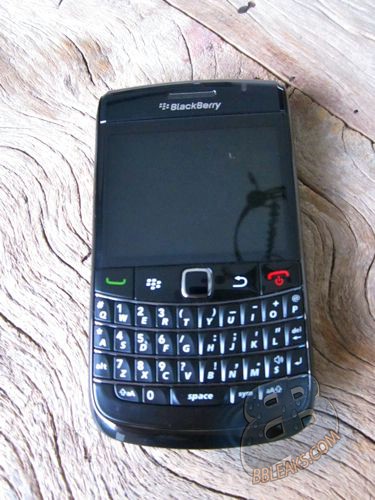
For BlackBerry 9780, maybe is no longer strange to you It is an upgraded version of the BlackBerry 9700. From July, the exposure of this mysterious type is increasing, which explains a problem that it is getting closer and closer to us. Recently, there is news that Canada’s second-largest telecommunications operator TELUS has already started preparing for the listing of the new machine. Maybe it will be launched on October 21.But we haven’t got any information about the listed price.
BlackBerry 9780 and 9700 is similar in appearance. The reason why RIM re-launch this classic model maybe is that they want to make some of its upgrade. The BlackBerry 9780 might will use the new BlackBerry OS 6.0 operating system, CPU frequency to 624MHz, a 2.4-inch screen, resolution 480 × 360 pixels remains, the back carrying a 5 million pixel camera, with LED flash, memory of 512MB (RAM), built-in Wi-Fi and GPS navigation chip. There is information before that the BlackBerry 9780 supports 32GB of micro SD card expansion.
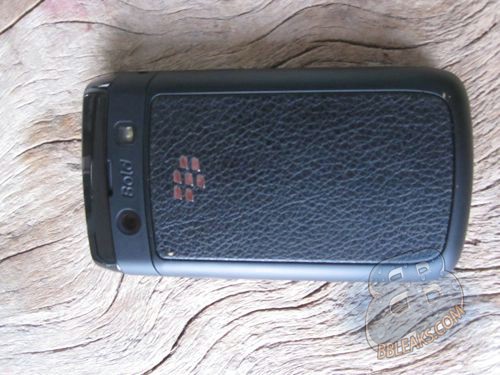
Here are the current specs we know:
624Mhz Processor
512MB Flash RAM
OS 6.0.0.125 (possible launch build)
480x360 Resolution Screen TFT, 65K colors
5.0 MP Camera with LED Flash
Trackpad
GSM / UMA / HSPA+?
Bluetooth 2.1 with A2DP
Wi-Fi b/g (possibly N?)
Gun Metal Bezel
In fact, 9700 has been within the scope of the list which lists the upgraded new version of BlackBerry BlackBerry OS 6.0 operating system, but RIM may be taken into account the carrying capacity of 9,700 hardware, so re-launch the Bold of this classic series. When there comes a comprehensive listing BlackBerry 9780, perhaps that is the date of the BlackBerry 9700 hero ended.
9780 jz being introduced by RIM
http://na.blackberry.com/eng/devices/black...33;where-to-buy
(thanks to T09 for sharing)
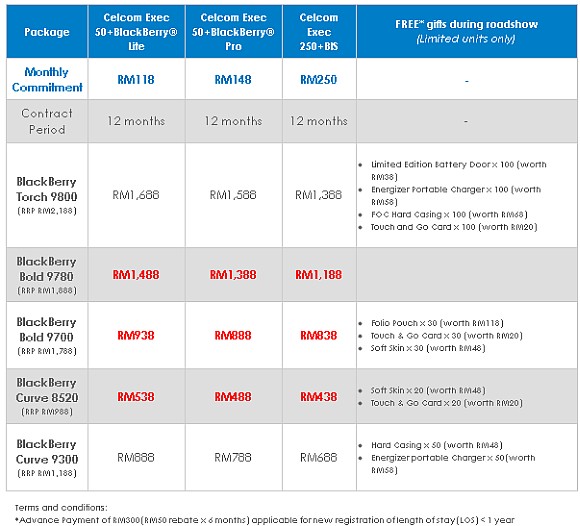
Thanks to "rattan" for this info
Maxis Bold 9780 Prepaid Package

Maxis Bold 9780 Postpaid Package

Upgrading Procedure for an Official OS release is as follows:
1. Download the OS and install it on your PC. (Make sure you have already removed any older OSes you have installed on your PC by going to Add / Remove Programs in Control Panel)
2. Delete the vendor.xml file (located in C:\Program Files\Common Files\Research In Motion\AppLoader)
3. Backup your 3rd party applications ( optional recommended step )
4. Connect your BlackBerry to your PC and right click on a file named Loader (located in the same place where you found the vendor.xml > C:\Program Files\Common Files\Research In Motion\AppLoader\Loader.exe) and select '' Run As Administrator ''
5. Follow the prompts and make sure you select the languages and applications you wish to be installed.
The Loader will backup and restore your data by default.
Still Having Issues !!?
I would recommend using BBSAK to Upgrade, so
- Uninstall the OS(s) you already have installed on your PC
- Delete the folder (research in motion) in ( c: \program files\common files\research in motion )
- Restart your PC
BBSAK Download Link: http://www.4shared.com/file/sS6F2NK2/BBSAKv18_Installer.html?
OS6.0.0.359 Download Link: https://www.blackberry.com/Downloads/entry....8F22A6C2A830A17
Official BlackBerry Bold 9780 Chat Group.. Scan the group barcode to join the chat group...

This post has been edited by dicksonbell: May 5 2011, 05:35 PM
 Quote
Quote


 0.0536sec
 0.77
0.77
 7 queries
 GZIP Disabled