Welcome Guest ( Log In | Register )

Bump Topic Topic Closed RSS Feed
129 Pages « < 19 20 21 22 23 > » Bottom

Outline · [ Standard ] · Linear+

 Samsung Galaxy 5 GT-I5503 (New Official Thread), The Budget Android Phone You Waiting

views
     
techsavvyguy
post Oct 8 2010, 12:10 AM

New Member
*
Newbie
1 posts

Joined: Oct 2010
Is the a-GPS with navigation software good enough to be useful? Example, the screen size is not too small to be illegible when driving, screen brightness is bright enough in the car, available voice/audio turn-by-turn direction, hands-free, battery life not drained in few hours. In other words, it doesn't need a passenger to read it and tell the driver. If it's good enough, I'll consider this phone and it'll save quite a bit of not needing to buy a dedicated GPS navigator.

By the way, what is the recommended navigation software for this phone? Thanks in advance.
Moon0126
post Oct 8 2010, 12:30 AM

New Member
*
Junior Member
17 posts

Joined: May 2010
From: Danao Kota


QUOTE(techsavvyguy @ Oct 8 2010, 12:10 AM)
Is the a-GPS with navigation software good enough to be useful?  Example, the screen size is not too small to be illegible when driving, screen brightness is bright enough in the car, available voice/audio turn-by-turn direction, hands-free, battery life not drained in few hours.  In other words, it doesn't need a passenger to read it and tell the driver.  If it's good enough, I'll consider this phone and it'll save quite a bit of not needing to buy a dedicated GPS navigator.

By the way, what is the recommended navigation software for this phone?  Thanks in advance.
*
papago x5 ^^ but i still cant manage to apply map to the app ^^ shame~
nxfx
post Oct 8 2010, 12:41 AM

Enthusiast
*****
Senior Member
979 posts

Joined: Jan 2003


QUOTE(StupidGuyPlayComp @ Oct 7 2010, 08:45 PM)
Disable wifi first
*
disabled but still grayed out


This post has been edited by nxfx: Oct 8 2010, 02:06 AM
Clerks
post Oct 8 2010, 08:23 AM

Getting Started
**
Junior Member
129 posts

Joined: Aug 2008
If the "Enable always on mobile" still greyed out, activate Airline Mode. Then deactivate it. I usually do that when it stay grey like forever.

For social networking, I use Seesmic (Twitter), FB 4 Android, YM for Android & Go!Chat (FB Chat).
SUSStupidGuyPlayComp
post Oct 8 2010, 09:00 AM

Kenny Is Here
********
All Stars
13,681 posts

Joined: Mar 2006


QUOTE(nxfx @ Oct 8 2010, 12:08 AM)
can anyone help me to test.
I can't login to my web game using android default web browser.
After login it just show the login page again. No error displayed.
help me to troubleshoot.
go to www.piratewarfare.com
register and try to login if you can.
*
I have no ideal the webgame you mentioned

but Android does not support flash, so most of the game unable support
(Actually thats PC game, not smartphone game, smartphone unable run)


Added on October 8, 2010, 9:05 am
QUOTE(techsavvyguy @ Oct 8 2010, 12:10 AM)
Is the a-GPS with navigation software good enough to be useful?  Example, the screen size is not too small to be illegible when driving, screen brightness is bright enough in the car, available voice/audio turn-by-turn direction, hands-free, battery life not drained in few hours.  In other words, it doesn't need a passenger to read it and tell the driver.  If it's good enough, I'll consider this phone and it'll save quite a bit of not needing to buy a dedicated GPS navigator.

By the way, what is the recommended navigation software for this phone?  Thanks in advance.
*
Screen size wont affect the navigation software, it still be able view clearly.

Papago come with voice(English,BM,mandarin,cantonese,hokien etc......). it will guide you turn-by-turn direction via phone's speaker

Yes, the battery life drain fast using gps, only be able stand for few hours, but for your info, the dedicated GPS also be able stand for few hours only, what your expect? anyway it can be solve if you bought a 3rd party car charger


Added on October 8, 2010, 9:07 am
QUOTE(Moon0126 @ Oct 8 2010, 12:30 AM)
papago x5 ^^ but i still cant manage to apply map to the app ^^ shame~
*
hmm.gif The Papago X5 i gave you is automatic match the map...........
just extract the Navisea folder into SD card root directory
then install the apk......done

This post has been edited by StupidGuyPlayComp: Oct 8 2010, 09:08 AM

bcmengs
post Oct 8 2010, 10:01 AM

Getting Started
**
Junior Member
123 posts

Joined: Dec 2008
From: Penang
QUOTE(Moon0126 @ Oct 8 2010, 12:30 AM)
papago x5 ^^ but i still cant manage to apply map to the app ^^ shame~
*
If you need the map, let me know.
SUSStupidGuyPlayComp
post Oct 8 2010, 10:05 AM

Kenny Is Here
********
All Stars
13,681 posts

Joined: Mar 2006


QUOTE(bcmengs @ Oct 8 2010, 10:01 AM)
If you need the map, let me know.
*
hmm.gif Do you have offline google maps?

I looking for it tongue.gif
maybe i will made one if i free
wInnIe PoOh
post Oct 8 2010, 10:21 AM

Getting Started
**
Junior Member
61 posts

Joined: Apr 2006


I'm also one of the user for this phone but somehow I'm quite upset with Andriod. I don't understand why I can't download the apps to my memory card? At the end my 8GB memory card seems to be useless already. Furthermore, I can't change the stupid calender which starting day is Monday, I want to change it to be Sunday so badly but I can't make adjustment via Settings. sad.gif
SUSStupidGuyPlayComp
post Oct 8 2010, 10:32 AM

Kenny Is Here
********
All Stars
13,681 posts

Joined: Mar 2006


QUOTE(wInnIe PoOh @ Oct 8 2010, 10:21 AM)
I'm also one of the user for this phone but somehow I'm quite upset with Andriod. I don't understand why I can't download the apps to my memory card? At the end my 8GB memory card seems to be useless already. Furthermore, I can't change the stupid calender which starting day is Monday, I want to change it to be Sunday so badly but I can't make adjustment via Settings.  sad.gif
*
The files can download into memory card, only cant install in memory card.......
about the calendar, maybe you can find 3rd party, for most of the user i believe monday/sunday for first day is not important
wInnIe PoOh
post Oct 8 2010, 10:37 AM

Getting Started
**
Junior Member
61 posts

Joined: Apr 2006


QUOTE(StupidGuyPlayComp @ Oct 8 2010, 10:32 AM)
The files can download into memory card, only cant install in memory card.......
about the calendar, maybe you can find 3rd party, for most of the user i believe monday/sunday for first day is not important
*
Mind enlighten me how to download into memory card? I downloaded things from the Market Apps yet it never asks me where to store it, straight away download. I can't install in the memory card, at the end if I'm going to change a phone which means I have to re-install all the apps again? Isn't that's troublesome?

It is very important to me for the starting day, at least give me a function that I can just change the starting day which even my Nokia Xpress music and all other phones also able to do so. If I have to download another 3rd party calendar, then what's the point of it?

How can I synchronize my contacts to Ms Outlook?
SUSStupidGuyPlayComp
post Oct 8 2010, 11:06 AM

Kenny Is Here
********
All Stars
13,681 posts

Joined: Mar 2006


QUOTE(wInnIe PoOh @ Oct 8 2010, 10:37 AM)
Mind enlighten me how to download into memory card? I downloaded things from the Market Apps yet it never asks me where to store it, straight away download. I can't install in the memory card, at the end if I'm going to change a phone which means I have to re-install all the apps again? Isn't that's troublesome?

It is very important to me for the starting day, at least give me a function that I can just change the starting day which even my Nokia Xpress music and all other phones also able to do so. If I have to download another 3rd party calendar, then what's the point of it?

How can  I synchronize my contacts to Ms Outlook?
*
You can use "Astro" (I forgot the full names, but its a hot apps) to retrieve and backup the installed apps.

I just checked the calendar, the starting day is Sunday, not Monday as you mentioned.

I believe you already familiar xpress S60 and new to android so you feel it not user friendly, after some time you will not feel it anymore after you expect it
wInnIe PoOh
post Oct 8 2010, 11:16 AM

Getting Started
**
Junior Member
61 posts

Joined: Apr 2006


QUOTE(StupidGuyPlayComp @ Oct 8 2010, 11:06 AM)
You can use "Astro" (I forgot the full names, but its a hot apps) to retrieve and backup the installed apps.

I just checked the calendar, the starting day is Sunday, not Monday as you mentioned.

I believe you already familiar xpress S60 and new to android so you feel it not user friendly, after some time you will not feel it anymore after you expect it
*
No, the starting day is MONDAY, which I've changed a few times via settings yet there isn't a way to adjust the starting day.

Isn't that is troublesome for me to get another apps to retrieve and backup the installed apps? I want something easy and convenient for myself, not extra additional work to do. I hated my XM5800 too but it doesn't give me this kind of headache, at least I can choose where to store my apps when I just download, as well I don't need additional extra apps to back up. Most important when I just mini opera, there's an exit button for me to close it off, compare to right now I have to click on the back button until it closes off. doh.gif

Yes, I'm asking for solution, opinion and mean while, ranting yada yada, because I'm seriously pissed off with this piece of crap.
SUSStupidGuyPlayComp
post Oct 8 2010, 11:54 AM

Kenny Is Here
********
All Stars
13,681 posts

Joined: Mar 2006


QUOTE(wInnIe PoOh @ Oct 8 2010, 11:16 AM)
No, the starting day is MONDAY, which I've changed a few times via settings yet there isn't a way to adjust the starting day.

Isn't that is troublesome for me to get another apps to retrieve and backup the installed apps? I want something easy and convenient for myself, not extra additional work to do. I hated my XM5800 too but it doesn't give me this kind of headache, at least I can choose where to store my apps when I just download, as well I don't need additional extra apps to back up. Most important when I just mini opera, there's an exit button for me to close it off, compare to right now I have to click on the back button until it closes off.  doh.gif

Yes, I'm asking for solution, opinion and mean while, ranting yada yada, because I'm seriously pissed off with this piece of crap.
*
smile.gif Yes, my phone show the first day is Sunday
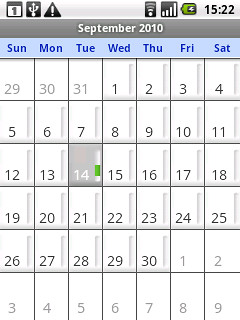
user posted image

About the backup, then the android is not your cup of tea.............no solution
wInnIe PoOh
post Oct 8 2010, 12:34 PM

Getting Started
**
Junior Member
61 posts

Joined: Apr 2006


QUOTE(StupidGuyPlayComp @ Oct 8 2010, 11:54 AM)
smile.gif Yes, my phone show the first day is Sunday
user posted image

About the backup, then the android is not your cup of tea.............no solution
*
WTF? How you do the settings? I'll post the picture of mine later because confirm it starts from MONDAY!!!!

I've been a fan of Sony Ericsson and tried also Nokia, Motorola and many more other phones. Lately tried Andriod and Windows though and surprisingly Windows seem to be much better and easier to be used compare to this Andriod sad.gif I already bought the phone, some people said Galaxy S will be much better but how to convince me to get it while this is making me so pissed off? sad.gif
SUSStupidGuyPlayComp
post Oct 8 2010, 12:46 PM

Kenny Is Here
********
All Stars
13,681 posts

Joined: Mar 2006


QUOTE(wInnIe PoOh @ Oct 8 2010, 12:34 PM)
WTF? How you do the settings? I'll post the picture of mine later because confirm it starts from MONDAY!!!!

I've been a fan of Sony Ericsson and tried also Nokia, Motorola and many more other phones. Lately tried Andriod and Windows though and surprisingly Windows seem to be much better and easier to be used compare to this Andriod sad.gif I already bought the phone, some people said Galaxy S will be much better but how to convince me to get it while this is making me so pissed off? sad.gif
*
hmm.gif I did not do any setting, the stock calendar is like this
wInnIe PoOh
post Oct 8 2010, 12:48 PM

Getting Started
**
Junior Member
61 posts

Joined: Apr 2006


QUOTE(StupidGuyPlayComp @ Oct 8 2010, 12:46 PM)
hmm.gif I did not do any setting, the stock calendar is like this
*
I see the link from picture is from GSMARENA? hmm.gif
SUSStupidGuyPlayComp
post Oct 8 2010, 01:02 PM

Kenny Is Here
********
All Stars
13,681 posts

Joined: Mar 2006


QUOTE(wInnIe PoOh @ Oct 8 2010, 12:48 PM)
I see the link from picture is from GSMARENA?  hmm.gif
*
smile.gif Yes, the pic is from gsmarena, but it exactly same with mine............
my phone not root yet, cant take screenshot


Added on October 8, 2010, 1:19 pm biggrin.gif We no need worry about whether froyo for Galaxy 5 ..........someone in china already success with Galaxy 5 using apps2sd

in future we might able to use custom froyo ROM for our phone

This post has been edited by StupidGuyPlayComp: Oct 8 2010, 01:19 PM
nxfx
post Oct 8 2010, 02:11 PM

Enthusiast
*****
Senior Member
979 posts

Joined: Jan 2003


QUOTE(Clerks @ Oct 8 2010, 08:23 AM)
If the "Enable always on mobile" still greyed out, activate Airline Mode. Then deactivate it. I usually do that when it stay grey like forever.

For social networking, I use Seesmic (Twitter), FB 4 Android, YM for Android & Go!Chat (FB Chat).
*
Still the same.
Are you guys using 3G?
could it be that my sim is prepaid and the function is only for postpaid with 3G?
SUSStupidGuyPlayComp
post Oct 8 2010, 02:25 PM

Kenny Is Here
********
All Stars
13,681 posts

Joined: Mar 2006


QUOTE(nxfx @ Oct 8 2010, 02:11 PM)
Still the same.
Are you guys using 3G?
could it be that my sim is prepaid and the function is only for postpaid with 3G?
*
hmm.gif I using prepaid too but i can deactivate.

May I ask you whether the icon of 3G/GPRS/HSPDA appear on the top of home screen?

what telco you using? its possible your telco need activate 3g function only can use this services (note:if you cant use 3g services right now, it will continue grey out)
nxfx
post Oct 8 2010, 02:46 PM

Enthusiast
*****
Senior Member
979 posts

Joined: Jan 2003


QUOTE(StupidGuyPlayComp @ Oct 8 2010, 02:25 PM)
hmm.gif I using prepaid too but i can deactivate.

May I ask you whether the icon of 3G/GPRS/HSPDA appear on the top of home screen?

what telco you using? its possible your telco need activate 3g function only can use this services (note:if you cant use 3g services right now, it will continue grey out)
*
It dont show any icon 3G/GPRS/HSPDA. only signal bar.
I'm using digi prepaid.
(note:if you cant use 3g services right now, it will continue grey out) << meaning if the phone can't detect 3G signal the function will be grey out?

129 Pages « < 19 20 21 22 23 > » Top
Topic ClosedOptions
 

Change to:
| Lo-Fi Version
0.0215sec    0.74    6 queries    GZIP Disabled
Time is now: 4th December 2025 - 10:27 PM
