Outline ·
[ Standard ] ·
Linear+
[BULK] Amazon and Kindle 3 Heavy Items Bulk!, New Bulk 15 Just Opened!Shipped in quick
|
TShavocx
|
 Dec 23 2010, 08:51 AM Dec 23 2010, 08:51 AM
|

|
QUOTE(Matlampir @ Dec 22 2010, 10:57 AM) Received my kindle from havocx. thank you bro 
QUOTE(fluene @ Dec 22 2010, 04:52 PM) Thank you very much for the COD this morning. You are the Santa Claus of the day but Christmas comes early this year (at least for me). He he!! Still trying to work out on how to use the Kindle. Got some questions here though (sorry if this is already mentioned in the thread). 1) How can we download /purchase e books from Amazon if we do not have US add or IP? Read somewhere that it can be done through VPN but I don't know how to do it. 2) Once we added the ebooks to our collection, they are still listed in the homepage. If we remove them, will it be removed from our collections as well? I see that there are lots to uncover from the Kindle. It will take time but it is also important to use it at its full potential. If not, it would be like having two horses pulling a ferrari. Thanks!!
Right let me help you out a little here. And youre right they have been answered in the thread so far. As a quick reference here goes
Not all books need US IP's, why are the US IP's needed ? Here's the reason, post 174.
How do you purchase ebooks from Amazon ? (PDF's, .mobi files and other formats that free can just be directly downloaded) - Find your answers here,post 188
Why do we still need US address if we already put our billing address as Malaysia ? - Here's your answer, Post 190
So to your questions if its not already answered above,
1. How to purchase ? Easy.
Step by Step ? Easy.
Register your Malaysian based Credit Card on Amazon.
Put your Malaysian based billing address. Must be the same as your official Credit Card Billing Address.
Make sure you also have a US address. How to get it ? Make google your friend. Just so you know although mine points to the White House  Im staying at Equine Park only Im staying at Equine Park only 
Purchase your books!
2. Im not clear on this question, which homepage ? The Kindle ? If its the Kindle then here is how it is.
Anything that goes through your Amazon Account will still be in your Amazon account until you physically delete it from your account.
So lets say for instance via your Amazon account youve downloaded 2000 books. You find that you have too many (ie 2000 books) in your Kindle and delete half of them via your Kindle,
youd still be able to recover all of them again on your next sync. They will just be in your archive. So you will now have 1000 books displayed and another 1000 in your archive ready to be
redownloaded and resync'ed again to your Kindle.
Oh also please check the first post for the Flowchart Cartoon
If its the free PDF files or Mobi files that youve downloaded, these are not synched with your Amazon account since they are not official books from Amazon.com.
For these, if you manually delete them from your Kindle unit directly, they will be physically deleted as well. You will need to add them in again via the USB cable.
Hope these helps!
QUOTE(jimmy_none @ Dec 22 2010, 08:22 PM) well..I kinda need help in this as well..I am still reading..the solution from the internet but so far...i haven't try yet ...not even register my kindle...
Its very simple, you first need an Amazon.com account.
Next just register your Kindle in Managing your account.
Next on Amazon just search for the free ebooks or paid ones.
You are good to go! Let me know if you have any further queries.
Oh also do read my first post, some queries already answered there as well with links to free ebooks and stuff.
QUOTE(mr.anutta @ Dec 22 2010, 08:31 PM) hi all, try visit this blog. Happy 'Kindling'!  thanks! |
|
|
|
|
|
TShavocx
|
Dec 23 2010, 11:18 AM
|
|
|
QUOTE(fluene @ Dec 23 2010, 08:49 AM) More questions : 1) Some says having ebooks (from other sites) delivered to kindle is free while others say there is a fee charged by Amazon. Which is true? 2) Is there a way to e-mail books from Calibre to Kindle when the Kindle is off or no wifi available? I keep getting error message saying sending fail because Kindle does not respond (no wifi mah)
1. Ebooks delivered to your Kindle from Amazon account is free. Ebooks from other sites should be copied manually into the Kindle. Some books may not display correctly hence you want Amazon to convert them for you, hence you then should use Amazon's service in which there is a fee for that. But there is no need to go through the trouble now is there, since you can use online converters for free just by googling it and then copying the files directly into your Kindle using your USB cable.
2. This is the second question involving Calibre. In truth i have never and may not use Calibre at all. Since you can already copy manually files into your Kindle.
But the answer to that is clear now isnt it ? Can your computer receive new email if its not connected to LAN, 3G or Wifi ? Can your phone receive SMS if there is no sim card ? 
|
|
|
|
|
|
TShavocx
|
Dec 23 2010, 11:28 AM
|
|
|
QUOTE(kengsim @ Dec 23 2010, 11:16 AM) Question to those of you who bought the Kindle and the cover (without the light). Have you guys had any issues such as the one highlighted here: http://www.tgdaily.com/consumer-electronic...device-to-crashThanks!
ive not come across such problems. If you also notice in my past bulks Ive also taken some extra orders for myself,
those are for office mates, darqfyre is one of them and out of the 6 thats with them only darqfyre's own Kindle unit had a reboot suddenly only once before,
that was about 3 weeks ago, never happened since and he didnt think much of it till the issue came to light.
Havent had any queries on that from the other past buyers though |
|
|
|
|
|
TShavocx
|
Dec 23 2010, 11:53 AM
|
|
|
QUOTE(kengsim @ Dec 23 2010, 11:40 AM) Ya, I'm just a bit concerned. The feedback on Amazon for that product is also mixed. Apparently, some people got it really bad. If it screws up the Kindle, I won't be able to return it. So better not waste the money on that cover. On eBay, you can get one for around RM30, so I suppose I'll go with that.
After that while waiting for my case I have a few other type of cases. Went with the original cover because it looked more 'kemas' than the rest and I wanted the book feeling.
Yeah some folks got it really bad, luckily no one else is in the same boat here.
Actually you will be able to return it. Since i have the original invoice purchase.
Amazon is good that way that they will accept the return of the case irrespective of the date you bought it. However you will have to ship it to US on your own.
For a refund that is.
For a replacement, the old one still needs to be shipped back, the new one will need to be paid to be shipped back to you.
A little more on spending unfortunately. |
|
|
|
|
|
TShavocx
|
Dec 23 2010, 07:21 PM
|
|
|
QUOTE(fluene @ Dec 23 2010, 07:12 PM) Not really. If we send e-mail, the sender needs to be connected to the internet but the recipient need not be online at the same time right? If we send sms, the sender need only press send but the recipient (taking that the phone is off) will receive the sms once they switch on the phone.
Its the same concept. The recipient, (Kindle, phone, email, sms) all needs to be connected to the internet.
In your example above, the recipient not being online, how will he get the email ?
The sms you sent, if there is no sim card on in the recipient's phone how will he get the sent sms?
The Kindle, since youre synching from the computer, if there is no wifi how will it get the information ?
This post if im writing it on notepad, not connected to the internet to post it on this forum, how will you see it ?
This post too, if i have written it and posted it on the forum, how will you read it if you have no connection to the internet, no wifi, no 3g and no data connection.
(Not counting of course looking over your friends machine)
I think im getting old, as Im not getting your argument. 
Your item will still be in your profile if you download it from the Amazon store to your Amazon profile.
It will sync with your Kindle only when and if you are connected with Wifi.
Calibre by default is not something that is specifically designed for Kindle as its an open source application designed to work with multiple eReaders.
I suggest using only Amazon to sync.
For Calibre support, then im guessing you best try the Calibre forum since im not sure how many folks are actually using Calibre.
How about trying it first, then if you come across problems only then post your query, its hard to work on concepts now is it This post has been edited by havocx: Dec 23 2010, 07:32 PM |
|
|
|
|
|
TShavocx
|
Dec 23 2010, 08:09 PM
|
|
|
QUOTE(MacJazz @ Dec 23 2010, 01:01 PM) Havocx - sorry for the delay on posting but thanks for being so efficient in delivering my items the same day you received it. To say the least your service is extremely good, wonderfully helpful, very prompt with responses and with a smile too! Every Malaysian should take a leave from you. Thanks for the service and you are one Vendor that I will happily deal with and recommend to anyone anytime. Cheers!
Merry Christmas buddy!
QUOTE(mr.anutta @ Dec 23 2010, 07:36 PM) hi all, for calibre user...you may get help here and here. Happy "Kindling"! p.s - ask google. most of the answers already there...  2nd. p.s - do we need a dedicated Kindle's thread @LYN ? 
QUOTE(khaliskhalid @ Dec 23 2010, 07:57 PM) Hey, how do I make a "collection" to put the books i'm currently reading into the folder? I tried to follow the instructions in http://e-bookvine.com/how-to-create-collec...ders-on-kindle/ but whenever I try to "create a collection" in the home menu screen, the option is greyed out and I cant select it. Please and thanks.
I have just tried on the 2 Kindle units I have here, in fact, creating the collection is the first time im hearing about it,
so i just went to your link, followed exactly the instructions and it worked just fine. |
|
|
|
|
|
TShavocx
|
Dec 23 2010, 08:19 PM
|
|
|
QUOTE(jimmy_none @ Dec 23 2010, 08:12 PM) actually there's a thread for kindle since last year...here's the link Kindle...i'm gonna create my Amazon account now...2 accounts...hope I don't need the VPN service when I buy...
Only one account is needed. Two addresses, one US address, one Malaysian address, same as credit card address.
No VPN. No dual account.
VPN is good is you have it, if you dont, Hotspot shield, other proxy websites will do just fine.
Dual account will only be needed if youre gonna be buying an Amazon Gift card sending from one account to another.
Even then, its only the US mailing address that is important. |
|
|
|
|
|
TShavocx
|
Dec 23 2010, 08:29 PM
|
|
|
Thought id just do a step by step for creating a collection » Click to show Spoiler - click again to hide... «
|
|
|
|
|
|
TShavocx
|
Dec 24 2010, 01:13 PM
|
|
|
QUOTE(Pooh_Bear @ Dec 23 2010, 08:48 PM) Sorry for the overdue post. Got my Kindle and lighted cover via COD two days ago. » Click to show Spoiler - click again to hide... « Please ignore the reflective screen and those air bubbles you see on the screen. That's due to the plastic on the screen that I am supposed to peel off. But I don't want to peel it off yet. I'm very happy with my Kindle and it's always the last thing I hold before I go to bed since I got it 2 days ago. lol. Thank you havocx for being such a nice person to deal with. Definitely highly recommended to other forumers! Hope you get well soon!
QUOTE(unpronounciable @ Dec 24 2010, 11:45 AM) hi i got a lot of questions, hehe 1. the RM630 is for kindle wifi or kindle 3g+wifi? how much is the other one? is the 3g version worth it? 2. to buy ebooks from amazon, just register an american address? even if the address is non-existent? or do i have to hide my ip or something? is there a clearcut guide? how about the amazon card? how does it work? 3. where can i download ebooks that i already own it in hardcopy? 4. where do you COD? just to know, because i do notice you prefer courier thanks!
1. The RM630 is only for Kindle Wifi. Kindle 3G+Wifi is RM850. Whether its worth it or not, it depends on your judgment. My personal feel is that the Wifi version is sufficient for use. The 3G
mode is awesome if youre going to be doing a lot of surfing and syncing of books while on the road. Having a Kindle however would mean that your main focus should be on reading and
surfing can take a back seat, besides, in that tiny Kindle youre gonna have about 33000 books you can carry with you, more than enough im sure. 3G is a nice feature if you wanna
do some extra checks on your blogs or twitter accounts while say...on the beach
2. The address needs to be a US based address with Postal code. Be creative. Mine's the White House, my wife's is a Pizza Parlour in New Orleans. You dont have to 'create' one there's already
thousands of address available. IP mask may sometimes be needed, a lot of programs and online IP masking sites can help you with that. In most occasions you dont need to. Yes there are
clearcut guides, a few posts just before yours have them, very very easy to use. The Amazon Card is a Prepaid card that you can use not only to buy Kindle books but also to buy other stuff
from Amazon, how it works is just that you buy it for a value (or have someone buy it for yo), you now have say USD50 worth of Amazon Dollars (which is equivalent to USD50), you then
buy anything from Amazon.
3. Hardcopy books and ebooks are 2 different things. Ownership of a Hardcopy does not automatically entitle you to a free ebook.
They are in different copyrights. For some ebooks versions of hardcopy they can be found for free
of the internet. Google is a GREAT friend. For some versions of the Hardcopy however you have to purchase the ebook. For instance I have 'The Girl with a Dragon Tattoo' hardcopy from Amazon,
yet I dont have it for Kindle, to get it ill need to purchase the ebook again.
4. I only COD at my office which is near KLCC or Equine Park, other nearby locations may be discussed. For me to make my way to Klang or Rawang or even PJ, its really out of my way and toll and fuel takes a hit on me,
unless of course I was heading that way in the first place. If you notice for the last bulk though, I COD'ed with everyone at their location,
but that's just me being Santa for this month
QUOTE(Moonflown @ Dec 24 2010, 12:16 PM) From what I know is that Amazon only charges conversion fee if you're using 3G to receive their converted files. Else it would be free from what I found =)
From my bulk i only know of ailinchia, mileseven and Mizi having Kindle 3G units. Maybe they can help ?This post has been edited by havocx: Dec 24 2010, 01:16 PM |
|
|
|
|
|
TShavocx
|
Dec 24 2010, 10:03 PM
|
|
|
QUOTE(khaliskhalid @ Dec 24 2010, 09:36 PM) Hey havocx, is it possible to create collections/sync your kindle with amazon w/o wifi? I dont have wifi in my area.
It will not however sync with the online account. Thus if you so happen to unregister your Amazon account on your Kindle and registers a friends account on it when you have wifi (to read your friends downloaded ebooks), when you return to your own account later, you will find that your ebooks are still messy like before.
If you sync your collection via wifi though and still do the above, when you return to your Kindle later with your own account, you'll find that your ebooks will just be like how they are the first time you put the collection together |
|
|
|
|
|
TShavocx
|
Dec 25 2010, 12:14 AM
|
|
|
QUOTE(khaliskhalid @ Dec 24 2010, 11:54 PM) Hmm, my kindle has been registered in amazon, the firmware isnt 3.01, its 3.0.3..  .. Ill try to apply a screensaver hack.. I assume you got this from mobileread? And um I'm going to my friend's house for a christmas party on sunday and she has wifi coverage so I'll try it then.. All I have to do when I have wifi is go to settings > registration, correct? *EDIT* Fixed, all I did was download Kindle Collection Manager, created some collections then made a full restart, works brilliantly now.. 

Hopefully works fine now. To everyone else,
In case you missed it...

MERRY CHRISTMAS!This post has been edited by havocx: Dec 25 2010, 12:14 AM |
|
|
|
|
|
TShavocx
|
Dec 25 2010, 07:53 AM
|
|
|
QUOTE(LanDi @ Dec 25 2010, 06:29 AM) Dear Havocx, Please quote me: 1) 1x Amazon Kindle wifi 2) CaseCrown Amazon Kindle 3 (Latest Generation) Faux Leather Premium Case with Screen Protector Included (Black) Thanks. Email me at zeugette@yahoo.com |
|
|
|
|
|
TShavocx
|
Dec 25 2010, 07:01 PM
|
|
|
QUOTE(goolias @ Dec 25 2010, 11:09 AM)
Added on December 25, 2010, 11:10 amquote me as well. |
|
|
|
|
|
TShavocx
|
Dec 26 2010, 07:44 PM
|
|
|
QUOTE(kengsim @ Dec 26 2010, 04:09 PM) Dude, when are we supposed to xfer the money to you? Lemme know, okay? Thanks!
No use me getting the payments but unable to transfer to him and for him not being at home to receive the shipments. Dont wanna hold on to cash that's not mine for too long.
Check your PM in a bit
QUOTE(kira-kun @ Dec 26 2010, 05:01 PM) In your inbox now buddy
QUOTE(JustAsking @ Dec 26 2010, 06:01 PM) hi, I'm drooling over the the Kindle 3 and am so darn tempted by the thought of having lots of books in my pocket before CNY! However, I am kinda worried about this issue - that the lettering comes off the keypad. See this link: http://www.amazon.com/tag/kindle%20accesso...=TxLIKN3FQA7CRL(it's under amazon's "Kindle Accessory Community" - discussion ; in case the link doesnt work) If the lettering rubs off, I am worried i have to return the unit to US and it seems the replacement units are refurbished units and not new ones. What do you think Havocx? or has Amazon resolved this issue already and what i'm reading is out of date? Thanks
Its probably a risk that you might have to consider, a small one when youre having the Kindle. Also, I dont think you'll need to be using too much of the keys anyway since to read the Kindle,
there are dedicated buttons around the issue. It seems too that its only hitting a few rogue units.
Im sure if it was a widespread problem the folks getting the first few batches would alert us on the Forum already.
Ball is in your park JustAsking, im neither an authorized reseller nor making a profit on these, just helping you to procure one
|
|
|
|
|
|
TShavocx
|
Dec 26 2010, 08:40 PM
|
|
|
QUOTE(JustAsking @ Dec 26 2010, 08:29 PM) Sent the quote via PM already buddy |
|
|
|
|
|
TShavocx
|
Dec 26 2010, 09:05 PM
|
|
|
QUOTE(JustAsking @ Dec 26 2010, 08:56 PM) can the free ebooks be downloaded into the Kindle3 without a US address? can i download free audiobooks eg from librevox into the kindle3?
Right so for free ebooks, depends on what version of free do you mean.
Free ebooks say off the net from Project Gutenberg and so forth, they can be directly uploaded into the Kindle via
the supplied microusb cable. There's some folks here who uses a Software called Calibre too. So that's fine.
Free ebooks on Amazon, only some of those will need a US address, most of the free ones there (and there's many of them)
are copyright free meaning that they are not limited to US only sale. Some free ebooks there though may still need you to have US
address simply because the book was not meant to be distributed outside US.
Audiobooks, as long as they are in mp3 format, Kindle reads them beautifully with its two speakers at the back.
Quite loud too if i do say so myself
Adding on to your question, yep I have loads of stuff from Project Gutenberg on my Kindle.
As long as its in .mobi file which most books are, they transfer just nicely into the Kindle via the supplied microusb cable.This post has been edited by havocx: Dec 26 2010, 09:06 PM |
|
|
|
|
|
TShavocx
|
Dec 26 2010, 09:17 PM
|
|
|
QUOTE(JustAsking @ Dec 26 2010, 09:09 PM) I already have quite a few ebooks and audiobooks downloaded in my notebook. If i get the Kindle3, is it an easy and simple procedure to transfer them into the K3? I am almost IT illiterate. If i need a US address for books, how do i go about it? I would either be using a giftcard or credit card for the ebooks.
Connecting the Kindle via the MicroUSB will bring you the Kindle as an external drive.
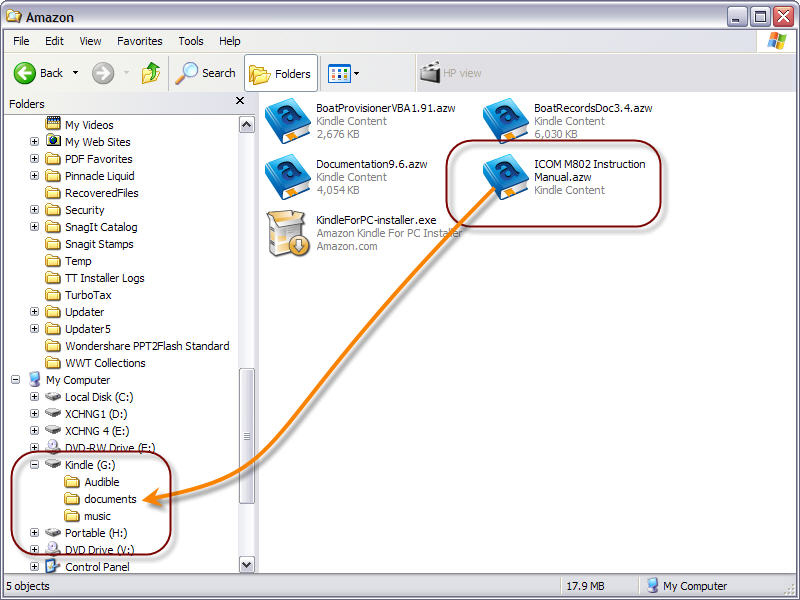
What you just need to do is to copy your already existing ebooks, pdf's into the document folder.
For MP3's ie audiobooks there is also a folder for that
For the US address, its been covered a few posts back actually.
Dont worry about the US address, mine is the white house.
Wife's one is a random US truck stop (last i remember).
Amazon needs a US address to verify youre in the US to sell you certain books. (for copyright)
Thats the only reason why there is a requirement for a US address.
So lets say you visit amazon.co.uk and you find you cant buy certain books, same reason,
copyrighted to only be sold in the UK. Hence you cant purchase the UK ebook unless you have a UK address.
For payments, you can register a Malaysian Credit card and it must point to your Malaysian billing address.
Thats of course for payment verification. |
|
|
|
|
|
TShavocx
|
Dec 26 2010, 09:38 PM
|
|
|
QUOTE(JustAsking @ Dec 26 2010, 09:22 PM) Most of my audiobooks are in OggVorbis format, not mp3! I wonder if it will work, i suppose i will just have to try if i get the Kindle3 thank you for all your time and efforts. Will let you know by the deadline.
A .OGG audio file is a file which contains audio samples compressed with the Vorbis audio encoding algorithm, which is a very good, open source audio codec.
An .ogg file can also be converted to .mp3
That said your audiobooks will work You dont have to get a Kindle 3 to try. You can convert one audiobook now and play it as mp3.
If its acceptable and to your liking then youre golden |
|
|
|
|



 Quote
Quote


 0.0396sec
 0.50
0.50
 7 queries
 GZIP Disabled