
Welcome Guest ( Log In | Register )

Bump Topic Topic Closed RSS Feed

Outline · [ Standard ] · Linear+

Unifi Official TM UniFi High Speed Broadbrand Thread V7, News: VIP20, free instalation till 31/12

views
     
joeaggas
post Sep 25 2010, 04:10 AM

Casual
***
Junior Member
363 posts

Joined: Aug 2009


hi klseet,

i am trying to configure my routerOS pppoE client to dial. but it kept disconnecting. any idea how to configure that on routerOS? thanks.

j

QUOTE(klseet @ Sep 16 2010, 03:59 PM)
What & how is your connection method when you "usually get ~400-500kb"? Is it using the standard connection from DIR-615 only?
I'm trying to figure out how do you connect the WGR614v9 prior to connect it with DIR-615 as bridging mode for you to make the comparison.

WGR614v9 is Broadcom base and I think v9 is not official confirmed by dd-wrt.
http://www.dd-wrt.com/wiki/index.php/Suppo...Devices#Netgear

You don't need to flash with dd-wrt, it should work find with your current method.
Thx Calvin for the update, also thx Riz again for making the RB250GS works to replace DIR-615 completely! notworthy.gif
Indeed, it would help many more UniFi users out there if Landasan willing to bring in .....  sweat.gif
Never too late right?! tongue.gif
Ok, guys, while we are waiting for the shipment, please go through Riz's guideline again to fully understand how to configure the RB250GS:
http://unifi.athena.my/index.php?option=co...id=55&Itemid=67

So with RB250GS, you guys can either:
1. use any of your current router, with or without dd-wrt or vlan taggin, just setup PPPoE profile will do!

2. if no extra router and don't want to spend extra again, then can consider to flash the DIR-615 with dd-wrt [see below Riz's guideline] and setup PPPoE will do!
http://unifi.athena.my/index.php?option=co...id=53&Itemid=65

3. if no extra router and still want to keep that DIR-615, then you are free to buy any router you like! tongue.gif
Cheers!  biggrin.gif
*
joeaggas
post Sep 25 2010, 11:46 AM

Casual
***
Junior Member
363 posts

Joined: Aug 2009


It's RB750G. I managed to configue the pppoE dialler but the rest of the interfaces cannot access the gateway. And the dhcp service on rb750g keeps disabling automatically, rendering my winbox connectivity timedout.

It's using Router Os lvl 4.1. Any networking specialist and shed a light on the configuration?
QUOTE(klseet @ Sep 25 2010, 08:55 AM)
Strange, if sometime ok sometime not, could it be the line problem?
Also, could it be the DIR-615 or STB start to give problem already ? blink.gif

I never have any problem on IPTV, except for the minor issue on STB LED display, which was replaced with a new unit on the 3rd day nod.gif
RouterOS, are you using RB750 series?
At this moment no idea on RB750 yet, but there's plan to test RB750 very soon, stay tune .....  icon_rolleyes.gif
Ooops, didn't know you are using RB250GS  biggrin.gif
You bought it directly from Soliton?

Glad to hear you solved the problem already!  smile.gif
*
joeaggas
post Sep 25 2010, 01:01 PM

Casual
***
Junior Member
363 posts

Joined: Aug 2009


Ok thanks, I give it a try then, read the wiki and do trial and error. PPPoE dialer is ok now but its the DHCP services that I keeps auto disables. AFter that I will not be able to log in to the router.


QUOTE(billytong @ Sep 25 2010, 11:59 AM)
you need to ask those guys in Mikrotik forum. Ask them how to configure pppoe vlan 500 & vlan 600 bridge mode.(I think IPTV is in bridge mode). No many can help u here except the Mikrotik forum guys.
*
joeaggas
post Sep 25 2010, 02:44 PM

Casual
***
Junior Member
363 posts

Joined: Aug 2009


Eh!Mambo...thanks. Yes it's working now. What about the IPTV? shud I set it up the VLAN 600 on ether2-local-master or one of the slaves?


QUOTE(oreomambo @ Sep 25 2010, 02:14 PM)
Joeaggas,

I am using Mikrotik RB750G with successful connection. You'll need to do this:

1) remove any bridge you have right now (so it won't interfere with what you are going to start with). Bridge will be needed later for IPTV setup, but get on with your PPPoE first.

2) Setup vlan with ID 500 (under interface->vlan) and attach it to Ethernet1 (assuming you are using Ethernet1 to connect to the BTU). So under winbox you'll see
    Ether1
        +-- vlan1.500

3) Create a PPPoE interface and have it attached to the vlan ID 500 that you've created above. Ensure that the Enable service tag is unchecked.
4) Immediately, you'll see it get connected.
5) ensure you create a NAT to masq the srcnat.

i am working out a longer set of instructions to get the pppoe + iptv setup for RB750G. Juggling between work and this...stay tuned.
*
joeaggas
post Sep 25 2010, 03:23 PM

Casual
***
Junior Member
363 posts

Joined: Aug 2009


Cantik la oreomambo rclxms.gif you the man /woman (just in case). Yes it works and can see the bandwidth usage of each IPTV channels. ANother question now is;
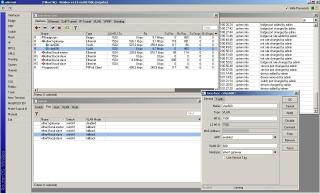
1) Would it be advisable to set the Switch(Window) VLAN mode? Just to ensure the 750G filter correct packets to destination?
2) If I use an old linksys WRT54 as a wifi accesspoint, I just need to plug that into any of the slave ports?

Here is my winbox screen cap
Attached Image


QUOTE(oreomambo @ Sep 25 2010, 02:55 PM)
For IPTV,

1) use ether5 (my choice)
2) setup ether5 to be neither master nor slave. That means bound to "none". So this will not enable the switching function under this physical port (cos we want to bridge it)
3) setup vlan ID 600 under ether1 (yes, that wan port to btu). You probably have a vlan ID 500 under this ehter1 as well for PPPoE.
4) Create a bridge, call it bridge.iptv.
5) Put the vlan ID 600 interface created above and ether5 under this bridge->port . That mean you are bridging vlan 600 (under ether1) + ether5 physical port itself. Traffic going out via port1 will have vlan ID 600 tagged.
6) still in the bridge window, you'll see a button "bridge setup" (i think), uncheck Bridge for firwall, vlan and pppoe (yes, all 3 unchecked)
7) hook up the STB to ether5 port and power up the box. Have fun.

* as for your DHCP bit, i don't think it is the dhcp server. Disconnection here could be other stuff, check if you have mis configure any other interface with bridge. Your management port (probably ether2) should only hold dhcp and an IP address. nothing else.
*
joeaggas
post Sep 25 2010, 04:40 PM

Casual
***
Junior Member
363 posts

Joined: Aug 2009


Thank you very much for all the tips. Yes it's very impressive the CPU is below 15%. Let's see how the performance for the next few weeks.


QUOTE(oreomambo @ Sep 25 2010, 03:35 PM)
Congrats for getting it running smile.gif
1. we are not using the switch function based on my instruction (we've disabled it by putting neither on master nor slave). So switch->vlan will not do anything here. The bridge is just between physical port 5 and vlan600 of port 1.
2. Just plug in to any slave port (3 or 4 in your case). Ensure you disable the dhcp server in the wifi AP, get the router to be the dhcp server so it can do the NAT for you.

I've used the bridge method rather than switch since i've yet to get switch config to work. This will be my eventual aim (provided if i have the time). Hardware switch chip built onto the router board is faster than the software bridge. But i am not going to complain since it barely sweat the CPU with bridge and everything works like a charm.

* you can address me as Mister ...heh.
*
joeaggas
post Sep 25 2010, 05:41 PM

Casual
***
Junior Member
363 posts

Joined: Aug 2009


I agree with you on the firewall rules. Perhaps we can share after a few tries and errors. I got my RB750G from here:

Archie Yeow
X-Concepts Asia Pacific
Singapore Office
#07-04 Burlington Square, 175A Bencoolen Street , Singapore , 189650

Price was SGD105 (incl GST 7%)

Yep now all setup incl wifi. TM DIR-615 is going to store room.


QUOTE(oreomambo @ Sep 25 2010, 05:32 PM)
RB750G is not for everyone. It is just a pure router without Wifi. It is only for folks who would like more flexible options that the RouterOS can offer. Stuff like QoS, fine grain control of firewall, integrated L2TP for VPN within the router, flexibility of setting up your options, monitoring of traffic, connecting to other routers and of course a solid hardware + router OS which is supported by many. For many, the RB250GS should be sufficient for resolving the Unifi issue in conjunction with out-of-the box router+wifi meant for mass users.

RB750G is RM $310, you can get it from Landasan. Not sure if they still have stock.
*
joeaggas
post Sep 28 2010, 07:09 PM

Casual
***
Junior Member
363 posts

Joined: Aug 2009


Organizing Your UNIFI equipments

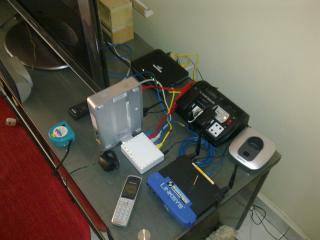
I think back a few version of this same topic, someone posted a picture of him organizing their Unifi equipment with Lego, which is very creative. I'm still trying to build a proper rack for my living room to shelf all these unifi appliances and hide the cables neatly. Perhaps if anyone have an idea, better with picture, can share their experience in getting this sorted out?


In case I have put this post in a wrong topic kindly re-reference for me, thanks.
Now here is my mess, going to spend a weekend to build a rack or housing for all these. Will keep update.
Attached Image

J

QUOTE(ldragon @ Sep 26 2010, 09:24 PM)
Have been using the Unifi for 1 month, Unifi team has swap 5 units of D-Link 615 !!  rclxub.gif

[attachmentid=1802219]

This is one of my new setup. BTU > Mikrotik RB250GS > Belkin Wireless N+

Thank you to klseet for the bulk purchase and rizvanrp for the user installation guide.
*
joeaggas
post Sep 28 2010, 08:05 PM

Casual
***
Junior Member
363 posts

Joined: Aug 2009


Lego expensive ler. Besides all cables still expose.


QUOTE(Calvin871989 @ Sep 28 2010, 07:29 PM)
this ? tongue.gif
*
joeaggas
post Sep 28 2010, 09:31 PM

Casual
***
Junior Member
363 posts

Joined: Aug 2009


seems like u are ventilating your appliances properly. Aiyah, all these things are in my living hall so a bit neater will be good lor.


QUOTE(auronthas @ Sep 28 2010, 09:25 PM)
My setup exactly like yours except I do not have the RB250GS, all Huawei BTU, TM DIR-615, TL-WR941ND are placed on top of notebook fan (black colour with blue LED light) like the photo shown smile.gif
*
joeaggas
post Sep 28 2010, 10:36 PM

Casual
***
Junior Member
363 posts

Joined: Aug 2009


Self crimping.


QUOTE(ruffstuff @ Sep 28 2010, 09:38 PM)
is there any shop selling short network cable like 30cm or something?  That would be neat to manage all those equipment.
*
joeaggas
post Sep 30 2010, 05:18 PM

Casual
***
Junior Member
363 posts

Joined: Aug 2009


Mr. Oreomambo,

Talking about beefing flex.gif up the router firewall rules; I used some of these;
http://wiki.mikrotik.com/wiki/Protecting_your_customers

After applying these rules, the downloading of torrent files from famous sites were a little harder, only magnet linking works fine. Anything u might want recommend to filter?


regards
J

QUOTE(oreomambo @ Sep 25 2010, 05:05 PM)
Don't forget to beef up the router with firewall rules, but don't implement all rules in one go. Test out your connections after the rules. You'll be surprised with the amount of crap we are getting from internet. Set firewall rules to "drop" them.
*
joeaggas
post Oct 1 2010, 11:02 AM

Casual
***
Junior Member
363 posts

Joined: Aug 2009


Seet,

In your vlan500 and 600, can u edit the l2 mtu size? strangely mine auto set to 1520 but yours 1522.

j


QUOTE(klseet @ Oct 1 2010, 01:09 AM)
Hi Oreomambo,

Follow your guides, I managed to setup the RB750 & RB750G with both internet & IPTV working, thank you bro !!  notworthy.gif

Luckily MikroTik has the WinBox GUI, lots of features & information, otherwise I don't think I'm capable to configure it at command lines ...  sweat.gif

The setup is rather straight forward, just few setup screen out of the box:

Interface – create vlan 500 & 600
[attachmentid=1810001]

Interface – set LAN5 neither master nor slave [to use for IPTV STB direct connection]
[attachmentid=1810003]

Bridge – create a bridge for IPTV
[attachmentid=1810006]

Bridge – Ports for IPTV bridge
[attachmentid=1810008]

PPP – Create PPPoE client for UniFi
[attachmentid=1810011]

Firewall – setup NAT
[attachmentid=1810015]

IP – DHCP server
[attachmentid=1810017]

That's all, internet & IPTV up & running!  rclxms.gif

Now have to figure out how to tighten the firewall ... sweat.gif
*

Added on October 1, 2010, 11:09 amaiyah maybe that's their profit lor.


QUOTE(billytong @ Oct 1 2010, 10:02 AM)
Even with expensive shipping and I buy alone from SG. It is still cheaper than Landasan.

750G is priced USD69.95 internationally = RM215+
If you buy in SG they charge you exactly 69.95, then u add 7% to SG GST tax.

I do not see any sort of reason why should Landasan sell RM95 more expensive @ Rm310. We do not have GST tax, Landasan should have sell @ RM215/69.95 USD. If anyone buy from Landasan right now = you are getting rip off.
*
This post has been edited by joeaggas: Oct 1 2010, 11:09 AM
joeaggas
post Oct 4 2010, 10:18 AM

Casual
***
Junior Member
363 posts

Joined: Aug 2009


dude

if u r renovating now better pull a fiber line to your phone junction box(if no addition service cost). In addition, if want lay some network cables from first to second floor will be good. Similar like your electrical wirings and water piping, now data cabling is almost a necessity. do it now spare headache later. No it;s not true for TM to appointed contractor to do internal wiring. External wiring yes, but not internal. When TM comes, they'll just help install the termination point. get the cable in first. good luck.

Go source for the fiber cable from electrician or friend or yellow pages. Vote of a location in ur new home where you'll likely gonna place all the tm equipments usually near your TV or Home entertaiment console. good luck.


J
p/s: better verify the TM fiber box is behind or in front of your house, may give you a better idea. Perhaps contact the local TM point guys, internal wiring normally done by tm themselves, if not mistaken.


QUOTE(shining_star @ Oct 3 2010, 10:54 PM)
Hi,

I'm currently renovating my double storey terrace house. The electrician is currently working on the electical wiring in the house. I'm planning to subscribe to Unifi VIP5 package.

Is it true that TM requires its appointed contractor to do the internal wiring? I would like to  to conceal the internal wiring in the house they install Unifi at my house. From what I've read so far, TM contractor does not provide conceal wiring during Unifi installation.

Anyone who is has done conceal wiring for Unifi before? How this can be done (and with TM) when the house is under renovation?

Thanks.
*
joeaggas
post Oct 5 2010, 12:11 AM

Casual
***
Junior Member
363 posts

Joined: Aug 2009


Guys,

Have anyone use this before?
vhttp://www.avermedia.com/avertv/Product/ProductDetail.aspx?Id=531
Does it work for our hyppoTV?

Cheers.
J

QUOTE(rizvanrp @ Oct 3 2010, 10:13 AM)
UGPM tongue.gif
*
joeaggas
post Oct 5 2010, 02:43 PM

Casual
***
Junior Member
363 posts

Joined: Aug 2009


bro r u using the avermedia capture card? U setup by connecting the hdmi from STB to your capture card?

QUOTE(BlueWind @ Oct 5 2010, 11:57 AM)
TM doesn't allow us to use TV tuner with the STB we have. But I've managed to get it working with pictures and the audio is disabled. Right now I'm thinking of looking for SPDIF cable and see what happens.
*
joeaggas
post Oct 6 2010, 11:15 PM

Casual
***
Junior Member
363 posts

Joined: Aug 2009


Called unifi, they say next week worr...so keep updating your STB.
QUOTE(tommyfai @ Oct 6 2010, 05:00 PM)
MUTV still don't have yet.. i check everyday..
*
joeaggas
post Oct 14 2010, 12:56 AM

Casual
***
Junior Member
363 posts

Joined: Aug 2009


guys anyone can confirm from Seksyen U5? My unifi down. No data, no iptv, no phone at all. Anyone?


QUOTE(hard2k @ Oct 14 2010, 12:17 AM)
Thx for the info hope nothing affected biggrin.gif
*

Added on October 14, 2010, 1:14 amKindly ignore .... downtime 26 minutes. Now it's back up. Sorry.
QUOTE(joeaggas @ Oct 14 2010, 12:56 AM)
guys anyone can confirm from Seksyen U5? My unifi down. No data, no iptv, no phone at all. Anyone?
*
This post has been edited by joeaggas: Oct 14 2010, 01:14 AM
joeaggas
post Oct 21 2010, 06:38 PM

Casual
***
Junior Member
363 posts

Joined: Aug 2009


Hi Hi,

My Hyyptv reception has a intermittent hissing spike sound, especially those premium channels. Has anyone experience this before? I suspect is me connecting two TV to the STB, one via HDMI and the other via Video Component cables.

Another thing I just found out, recently I noticed from my router logs, someone tried to telnet into my network. Notice several attempts perhaps he or she using brute force attempt. Therefore, I urge everyone to secure their routers. Below is the screenshot of the log.
Attached Image


QUOTE(rizvanrp @ Oct 19 2010, 04:51 PM)
No it's not, lol
*
joeaggas
post Oct 21 2010, 10:46 PM

Casual
***
Junior Member
363 posts

Joined: Aug 2009


Hey Riz,

I've configured the service list to only allow local IP. That should be good enuf I presume?


QUOTE(rizvanrp @ Oct 21 2010, 06:53 PM)
This is normal traffic for servers with SSH running on TCP port 22. It's usually just a couple of bruteforce attempts on 'root' or some standardized user:pass file which they use. This traffic originates from skiddies or botnet drones looking for easy targets to compromise. Anyway, if you have SSHd running and need it to be accessible from the WAN side for some reason.. be sure to switch its port number to something non standard (over port 1024 would be best).
*

2 Pages  1 2 >Top
Topic ClosedOptions
 

Change to:
| Lo-Fi Version
0.0818sec    0.47    8 queries    GZIP Disabled
Time is now: 4th December 2025 - 08:22 PM