Outline ·
[ Standard ] ·
Linear+
Asus A | U | N series combined thread V2, New model coming in.....
|
YH90
|
 Sep 19 2010, 10:57 PM Sep 19 2010, 10:57 PM
|

|
LOL, I know what's the problem. I was googling around and I found out it was the Power4Gear problem instead of the GC.It was on battery saving, i changed it to high performance and everything is good now.
Thx guys!
|
|
|
|
|
|
SUSgogo2
|
Sep 19 2010, 11:27 PM
|
|
|
QUOTE(YH90 @ Sep 19 2010, 10:57 PM) LOL, I know what's the problem. I was googling around and I found out it was the Power4Gear problem instead of the GC.It was on battery saving, i changed it to high performance and everything is good now. Thx guys! could this be the problem to all the user who have frame rate drop recently? lololol |
|
|
|
|
|
DoubleU
|
Sep 19 2010, 11:34 PM
|
|
|
dun think so, cause clockworked one is his gpu downclocking to cool off, although the temperature is low. Is your BIOS updated?
|
|
|
|
|
|
SUSgogo2
|
Sep 19 2010, 11:36 PM
|
|
|
QUOTE(DoubleU @ Sep 19 2010, 11:34 PM) dun think so, cause clockworked one is his gpu downclocking to cool off, although the temperature is low. Is your BIOS updated? better dun touch bios first. Also I think a42jv got no new bios yet. |
|
|
|
|
|
Ultima
|
Sep 19 2010, 11:36 PM
|
|
|
better check the power4gear setting..
for better performance, set it either to hi performance or entertainment..
quiet office and battery saving set the max proc state to around half of its performance..
|
|
|
|
|
|
lee_what2004
|
Sep 19 2010, 11:38 PM
|
*stare* ji--------

|
QUOTE(DoubleU @ Sep 19 2010, 11:34 PM) dun think so, cause clockworked one is his gpu downclocking to cool off, although the temperature is low. Is your BIOS updated? I thought the clock stay the same, just that the GPU load decrease? |
|
|
|
|
|
DoubleU
|
Sep 20 2010, 12:00 AM
|
|
|
oops, i read the graph wrongly.... my bad xD
hm... its during heavy load that it swtiches to the intel card? (or tries to use both cards together [is that possible?] but fails to use the gt335m?)
|
|
|
|
|
|
afify88
|
Sep 20 2010, 12:09 AM
|
|
|
|
|
|
|
|
|
DoubleU
|
Sep 20 2010, 12:11 AM
|
|
|
did you try restarting your router?
also make sure ur lights on the router are not blinking... but is a stable light.
This post has been edited by DoubleU: Sep 20 2010, 12:12 AM
|
|
|
|
|
|
lee_what2004
|
Sep 20 2010, 12:11 AM
|
*stare* ji--------
|
You should have internet on IPv4
IPv6, just ignore it...
|
|
|
|
|
|
DoubleU
|
Sep 20 2010, 12:13 AM
|
|
|
btw, shouldn't IPv6 usually say " no network access"?
|
|
|
|
|
|
afify88
|
Sep 20 2010, 12:14 AM
|
|
|
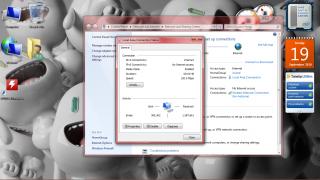
QUOTE(DoubleU @ Sep 20 2010, 12:11 AM) did you try restarting your router? also make sure ur lights on the router are not blinking... but is a stable light. doesn't using router lor got high speed university LAN connection.............hmmmmmmmm 
Added on September 20, 2010, 12:15 amQUOTE(lee_what2004 @ Sep 20 2010, 12:11 AM) You should have internet on IPv4 IPv6, just ignore it... so any ideas how to solve this probs??????????? even wireless cannot connect lor........hmmmm This post has been edited by afify88: Sep 20 2010, 12:15 AM |
|
|
|
|
|
verdangilte
|
Sep 20 2010, 12:18 AM
|
|
|
try use cable or another computer , log in into ur router and reboot the router from that ...
then restart ur com also , should be can already
|
|
|
|
|
|
lee_what2004
|
Sep 20 2010, 12:19 AM
|
*stare* ji--------
|
@afify88, does your place need specific IP address or register MAC address? QUOTE(DoubleU @ Sep 20 2010, 12:13 AM) btw, shouldn't IPv6 usually say " no network access"? Mine here say no internet access.. |
|
|
|
|
|
afify88
|
Sep 20 2010, 12:20 AM
|
|
|
QUOTE(verdangilte @ Sep 20 2010, 12:18 AM) try use cable or another computer , log in into ur router and reboot the router from that ... then restart ur com also , should be can already nope............everybody in my house use the same LAN connection but they can connect lor...hmmmmmmmm.... ...already try another cable...not work also |
|
|
|
|
|
DoubleU
|
Sep 20 2010, 12:21 AM
|
|
|
@afify88, you got any friends that can use the internet? so its only you cannot use?
|
|
|
|
|
|
afify88
|
Sep 20 2010, 12:23 AM
|
|
|
QUOTE(lee_what2004 @ Sep 20 2010, 12:19 AM) @afify88, does your place need specific IP address or register MAC address? Mine here say no internet access.. nope juz connect the cable and the internet can be used lor....i don't know why it say no internet access on IPv6
Added on September 20, 2010, 12:24 amQUOTE(DoubleU @ Sep 20 2010, 12:21 AM) @afify88, you got any friends that can use the internet? so its only you cannot use? yup.......only me....i thing maybe my a42jv setting lor....
Added on September 20, 2010, 12:24 amQUOTE(DoubleU @ Sep 20 2010, 12:21 AM) @afify88, you got any friends that can use the internet? so its only you cannot use? yup.......only me....i thing maybe my a42jv setting lor.... This post has been edited by afify88: Sep 20 2010, 12:24 AM |
|
|
|
|
|
lee_what2004
|
Sep 20 2010, 12:25 AM
|
*stare* ji--------
|
Go to device manager and delete the LAN, then scan for hardware changes
then try again the internet...
|
|
|
|
|
|
verdangilte
|
Sep 20 2010, 12:28 AM
|
|
|
i also try before , i restart thousand time also cant have internet access . so i log in to my router , then restart it , then wait for a while , connect again , then done ..
but my one is wireless la
|
|
|
|
|
|
afify88
|
Sep 20 2010, 12:28 AM
|
|
|
QUOTE(lee_what2004 @ Sep 20 2010, 12:25 AM) Go to device manager and delete the LAN, then scan for hardware changes then try again the internet... detail plzz?????  if i do that it won't effect my lappy??????????? |
|
|
|
|



 Quote
Quote




 0.0269sec
 0.60
0.60
 6 queries
 GZIP Disabled