Outline ·
[ Standard ] ·
Linear+
NirSoft CleanAfterMe [Free], Clean Registry entries and files
|
TScybpsych
|
 Aug 14 2010, 05:29 AM, updated 16y ago Aug 14 2010, 05:29 AM, updated 16y ago
|

|
http://www.nirsoft.net/utils/cleanafterme.exehttp://www.nirsoft.net/utils/cleanafterme.zipCleanAfterMe allows you to easily clean files and Registry entries that are automatically created by the Windows operating system during your regular computer work. With CleanAfterMe, you can clean the cookies/history/cache/passwords of Internet Explorer, the 'Recent' folder, the Registry entries that record the last opened files, the temporary folder of Windows, the event logs, the Recycle Bin, and more. CleanAfterMe is a portable application. This means that you can run it without any installation and without leaving any trace in the Registry. You can also run this program from a USB flash drive: In order to do that, simply copy the executable file of CleanAfterMe (CleanAfterMe.exe) into the USB flash drive, and run it from there. 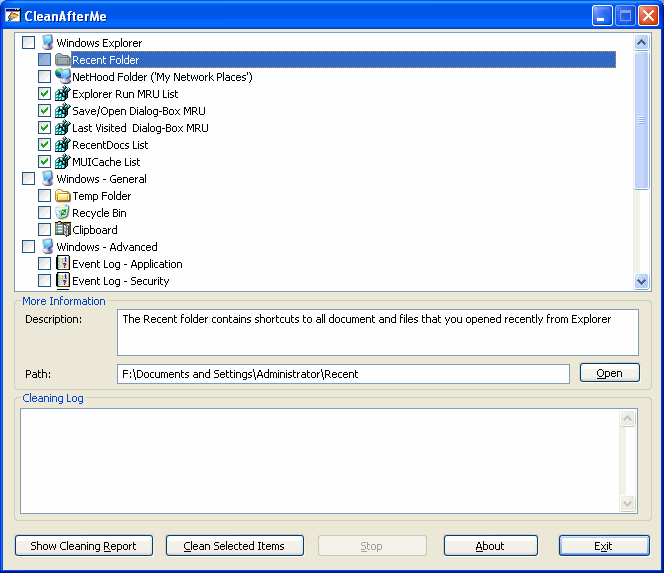
|
|
|
|
|
|
stasio
|
Nov 28 2010, 02:32 PM
|
|
|
NirSoft CleanAfterMe 1.37http://www.nirsoft.net/utils/cleanafterme.exehttp://www.nirsoft.net/utils/cleanafterme.zip» Click to show Spoiler - click again to hide... « # Version 1.37:
* Removed the option to delete .eml cache files of Windows Live Mail. This option was good for HotMail and IMAP accounts, but for POP3 accounts, it might delete real email messages.
# Version 1.36:
* Added support for Opera 10.
* Made another change in cleaning the 'installed USB devices', and Hopefully, this change will fix the problem of disconnecting the USB mouse/keyboard in some computers.
# Version 1.35:
* Added new cleaning items: DirectInput MRU, Direct3D MRU, and Windows Prefetch Files (*.pf).
* Added Unicode header (0xff, 0xfe) to the log files saved by CleanAfterMe.
|
|
|
|
|



 Quote
Quote

 0.0152sec
 0.64
0.64
 5 queries
 GZIP Disabled