


The Solid State Storage Thread
The Solid State Storage Thread
|
|
 Aug 6 2011, 01:00 AM Aug 6 2011, 01:00 AM
Return to original view | Post
#141
|
 
Senior Member
3,591 posts Joined: Feb 2008 
|
Another boring 120GB SSD. Will somebody please give us an interestingly affordable 300GB SSD?
|
|
|
|
|
|
Aug 9 2011, 10:44 AM
Return to original view | Post
#142
|
|
Senior Member
3,591 posts Joined: Feb 2008
|
QUOTE(nabielz @ Aug 9 2011, 03:07 AM) did u enable TRIM support & ACHI mode? phat_mcjack opened a topic to discuss his problem in detail: is my ssd normal and in good condition |
|
|
Aug 9 2011, 03:47 PM
Return to original view | Post
#143
|
|
Senior Member
3,591 posts Joined: Feb 2008
|
QUOTE(sniper69 @ Aug 9 2011, 03:21 PM) i think there's something wrong with my SSD, see, the speed isn't fast for SATA 2.0, isn't it? SSDs function internally like RAID. The more NAND chips they have, the faster their performance. 60GB SSDs will have less NAND chips than 120GB SSDs, so I expect their performance to be a little less.Did you checked with other Corsair 60GB benchmarks? This post has been edited by everling: Aug 9 2011, 03:47 PM |
|
|
Aug 10 2011, 02:27 PM
Return to original view | Post
#144
|
|
Senior Member
3,591 posts Joined: Feb 2008
|
Viewnet is selling Kingston V+ Series 96GB for RM549.
Or the Kingston V 100 64GB for RM369. This post has been edited by everling: Aug 10 2011, 02:28 PM |
|
|
Aug 11 2011, 04:50 PM
Return to original view | Post
#145
|
|
Senior Member
3,591 posts Joined: Feb 2008
|
It'll actually cost about RM5230 and RM6080, if we calculate by cost/GB.
|
|
|
Aug 11 2011, 11:06 PM
Return to original view | Post
#146
|
|
Senior Member
3,591 posts Joined: Feb 2008
|
QUOTE(akupening @ Aug 11 2011, 08:51 PM) whoa.. what happened??? tot ssd cant easily die.. becoz they claim no moving part. but 1 month old is They are indeed more hardier because they don't have moving parts that can fail. Unfortunately, electronics can still fail due to fatigue or manufacturing defects. Bad firmware is also another possibility, because SandForce-based SSDs are known for a higher failure rate. You could say, "Speed kills."   |
|
|
|
|
|
Aug 12 2011, 03:26 PM
Return to original view | Post
#147
|
|
Senior Member
3,591 posts Joined: Feb 2008
|
QUOTE(nabielz @ Aug 12 2011, 03:44 AM) suddenly i fed up using ssd. What's your motherboard? And you probably should have switched over to Intel or Kingston once you started facing the problem.always crash.sigh AnandTech's recent article might shed some light on your problem as it spent some time on the reliability issue: The SandForce Roundup: Corsair, Kingston, Patriot, OCZ, OWC & MemoRight SSDs Compared QUOTE(Alan @ Jul 24 2011, 2:57 PM) Intel has been investigating the ‘Bad Context 13x Error’ as seen on select Intel® SSD 320 Series drives. This was previously noted in the Intel community post as “SSD Power Loss”. To summarize the error: In certain circumstances, after an unexpected power loss, a small percentage of SSDs may experience this error on the next attempt to boot the system. In this situation, the system’s BIOS reports an SSD as an 8MB capacity drive. Intel has reproduced ‘Bad Context 13x Error’ utilizing strenuous testing methods. This ‘Bad Context 13x Error’ can be addressed via a firmware update and Intel is in the process of validating the firmware update. A future update will define the schedule to deliver the firmware fix. The Intel SSD 320 Series continues to be shipped and is available for purchase. If you experience this error with your Intel SSD, please contact your Intel representative or Intel customer support (via web: www.intel.com or phone: www.intel.com/p/en_US/support/contact/phone) . For those with Intel SSD 320 series SSDs who are concerned but currently unaffected, Intel advises the following actions:
Rgds, Alan Intel’s NVM Solutions Group Source: http://communities.intel.com/message/133499 Emphasis mine. Eeek! Afaik, the firmware hasn't been released yet. Might want to avoid the 320 series for desktop use until the firmware is out. |
|
|
Aug 13 2011, 12:44 AM
Return to original view | Post
#148
|
|
Senior Member
3,591 posts Joined: Feb 2008
|
QUOTE(H4XF4XTOR @ Aug 12 2011, 11:43 PM) for real? oh crap No. Not for real. You should read my following post. ..what the affordable one then ..what the affordable one thenQUOTE(everling @ Aug 11 2011, 04:50 PM) It'll actually cost about RM5230 and RM6080, if we calculate by cost/GB. What is affordable depends on your budget for SSDs. Now what are you willing to put in for SSDs?This post has been edited by everling: Aug 13 2011, 12:45 AM |
|
|
Aug 13 2011, 01:29 AM
Return to original view | Post
#149
|
|
Senior Member
3,591 posts Joined: Feb 2008
|
That's just another SATA 6.0Gbps SSD based on a SandForce controller. Nothing interesting.
QUOTE We stated it several times, the SATA II controller that we all love and got accustomed to so much is a bottleneck for the latest generation of SSDs as they were literally hitting the upper plafond in terms of performance. We've now physically and mechanically reached that threshold. Wait, what? SATA 3.0Gbps is no longer sufficient for HDDs? What are these guys taking?  QUOTE The one thing SSD and HDD manufacturers are quite horrible at, is to show you the real number of GB your drive has AFTER formatting. With 25nm NAND flash memory based products, it even gets worse as the SSD will need to reserve a chub of NAND memory for provisioning as well. Say that you purchase a 120 GB SSD drive, people expect to get 120GB and not 111 GB, you can dwell down into the "Windows uses Binary capacity measurements 1024MiB = 1GiB" discussion, but it remains somewhat shady advertising. With 25nm NAND flash memory, a bit more than usual NAND FLASH will be hogged up by the SSD for redundancy and compression and is over-provisioning a few additional GB. The end result for our 120 GB SSD is 111 GB after the NTSF format. We lost 8% = 9 GB right there without the drive even being used for storage. No, you didn't lost the 9GB after formatting. It was lost before you even touched the drive. The drives are marketed as 120GB, so they will have at least 120,000,000,000 bytes. Windows uses GiB, so 120,000,000,000 bytes divided by 1,073,741,824 bytes (1 GiB) = 111.759 GiB. Take note that this 9GB difference is only due to using different standards for measuring capacity! As a side note, the traitorous OSX changed to use GB a few years ago, so OSX will show that it has 120GB instead of 111GiB. Them GiB or GB units are crucial, people! Don't just discard them and cry foul. |
|
|
Aug 15 2011, 03:23 PM
Return to original view | Post
#150
|
|
Senior Member
3,591 posts Joined: Feb 2008
|
While the OCZ and Intel toolboxes allow you do to some maintenance work, you shouldn't need to defrag or do any other regular maintenance.
|
|
|
Aug 17 2011, 11:23 AM
Return to original view | Post
#151
|
|
Senior Member
3,591 posts Joined: Feb 2008
|
That's a pretty sweet improvement. Does your Agility 3 feel much faster than your Vertex 2 in regular use?
|
|
|
Aug 18 2011, 07:50 PM
Return to original view | Post
#152
|
|
Senior Member
3,591 posts Joined: Feb 2008
|
I would recommend larger capacity SSDs over high performance SSDs, because capacity is usually more useful. Even with the "slower" SSD, you will feel a difference if compared to HDDs. And the difference can be huge on certain tasks, like anti-virus scans.
Although the Intel 320 Series does have that terrible 8MB bug at the moment, Intel has reported that it has a fix for the problem and that it may be released before the end of August. You can get Intel's SSD 320 Series 160GB for RM940 at Cycom. If you used up the 160GB on this SSD and find yourself wishing for a larger capacity SSD, then you'll know that it was worth it.  |
|
|
Aug 19 2011, 12:25 AM
Return to original view | Post
#153
|
|
Senior Member
3,591 posts Joined: Feb 2008
|
QUOTE(WSL999 @ Aug 18 2011, 08:40 PM) Fair enough. Strictly speaking, high performance SSD are not required for the applications you have listed. Also, I wouldn't expect much of an additional performance improvement over regular SSDs. Take a look at the following benchmark:It also wholly depend on the end-user like myself. Basically I only have Microsoft Office, Google Chrome, MSN, Winamp, Winrar, Lime Wire, Steam & Team Fortress II installed in my PC. After all, a high performance SSD is what required. Here we have the super fast Vertex 3 losing to the Intel 320. 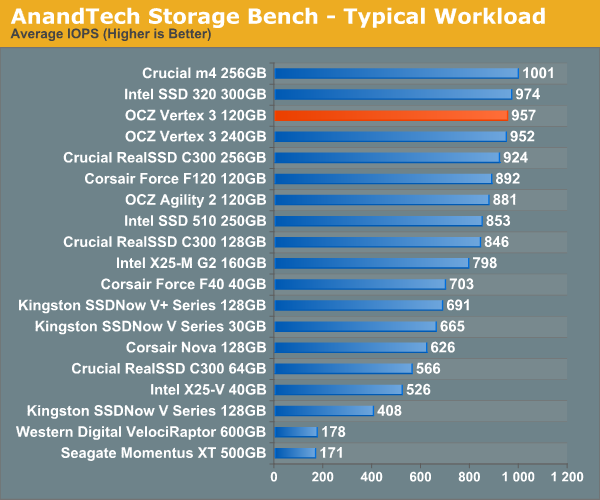 Here we have the budget-class Kingston SSD and the Intel 320 outperforming the super fast Vertex 3. 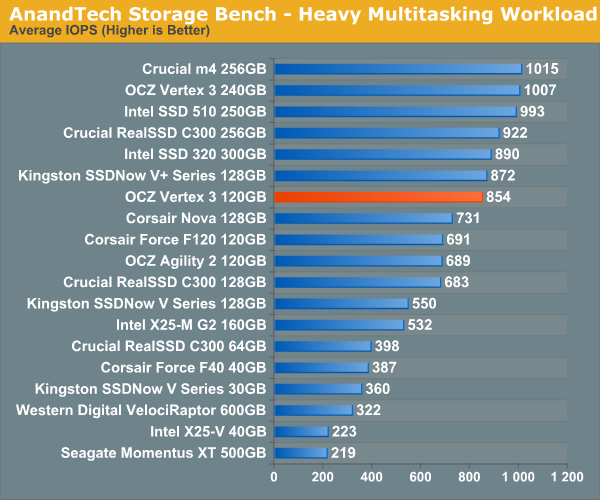 And here, we have the previous generation Intel G2 or the current generation Intel 320 being nearly on par with the super fast Vertex 3 in gaming. 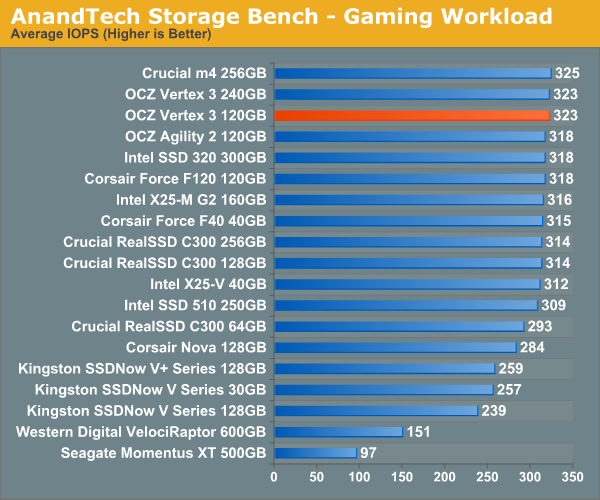 For an SSD that has at least twice the speed of the older or slower SSDs that I have mentioned, it doesn't really show that much of a difference in these benchmarks. And the author of the benchmarks, Anand, likes OCZ. Please feel free to buy the Vertex 3. After all, while it may have quite a bit of reliability issues that may lead to BSODs, unable to boot up or dying within the first six months,  To be fair, there are other graphs that show the Vertex 3's advantages. But in my opinion, performance isn't that big a factor for SSDs because they're already so much better than regular HDDs. Edit: Updated that the updated Intel firmware has been released. This post has been edited by everling: Aug 22 2011, 01:11 PM |
|
|
|
|
|
Aug 19 2011, 05:08 PM
Return to original view | Post
#154
|
|
Senior Member
3,591 posts Joined: Feb 2008
|
QUOTE(flexus90 @ Aug 18 2011, 05:48 PM) Intel Releases Firmware Update that Fixes SSD 320 Series 8 MB Bug Ack! How did I missed this? Thanks!Download here, http://downloadcenter.intel.com/Detail_Des...Y&DwnldID=18363 QUOTE(nick_vll @ Aug 19 2011, 04:16 PM) guys is it safe to use software like ccleaner or windows disk cleanup for cleaning up the temporary file on ssd? Yes, it is safe. You could even enable secure file erase if you want, but it is unlikely to work properly on SSDs because of the wear levelling algorithm so it would be better to not bother with file level secure erase to save on your writes. |
|
|
Aug 20 2011, 01:50 PM
Return to original view | Post
#155
|
|
Senior Member
3,591 posts Joined: Feb 2008
|
QUOTE(notroxcity @ Aug 19 2011, 09:46 PM) uh..help...i have 2 system reserved partitions....is it becoz i did not format my ssd after buying it? i immediately upgrade da firmware and isntall windows 7 on it.....shud i format it first (secure erase is it called?) This may help you: http://www.mydigitallife.info/how-to-avoid...7-installation/[attachmentid=2395282] Added on August 20, 2011, 1:57 pm QUOTE(WSL999 @ Aug 20 2011, 09:27 AM) I'll wait for the price drop next year or may be promotion during chinese new year. If I hadn't already owned a U2311H, I too would have bought the U2412M. Already have a wish-list, such as Intel SSD & Mechanical Keyboard. Bought my new U2412M just could not resist it:)  This post has been edited by everling: Aug 20 2011, 01:57 PM |
|
|
Aug 21 2011, 10:54 AM
Return to original view | Post
#156
|
|
Senior Member
3,591 posts Joined: Feb 2008
|
QUOTE(WSL999 @ Aug 20 2011, 04:37 PM) Haha you go to the LCD Monitor thread. A lot of poison there from U2412M user. I upload my picture already:) I saw. Nice clean setup.QUOTE(notroxcity @ Aug 20 2011, 06:39 PM) both hd tune and hwmonitor is reporting that my SSD's at 128 celcius. this shud b false rite? if is truly 128 celcius, i cudve make some hot coco drinks You found a 510? Yeah, 128° Celsius is too much. I'd go back to the shop for a replacement.QUOTE(WSL999 @ Aug 21 2011, 10:10 AM) Are you serious?! He is serious about the fact that RAID will not pass the TRIM commands. However, most SSDs by now are capable of internal garbage collection, although at a less effective rate because it does not have the assistance of the OS explicitly stating what blocks are no longer needed (TRIM). It is for this reason alone that OSX prior to Lion, which does not have TRIM support, were able to use SSDs without seriously killing performance over time.If there are any performance degradation because TRIM was unavailable, it will be mostly or fully restored once TRIM support is enabled. Please don't feel guilty if performance was not fully restored, because this is normal for some SSDs even if TRIM was enabled from day 0. |
|
|
Aug 24 2011, 01:09 PM
Return to original view | Post
#157
|
|
Senior Member
3,591 posts Joined: Feb 2008
|
QUOTE(iaknesnah @ Aug 23 2011, 09:41 PM) also on bro.. the thing is it is ok when day 1. suddenly dropped the next day. read on ocz forum u can retain the speed by secure erase but i already secure erase so many times now. until now the speed is still not rising. I hope you're aware of the ~3,000 writes limit. If you have secure erased your SSD a hundred times, you have reduced your SSD's write lifespan by ~3.33%. At that rate, your SSD would be dead in less than a year. |
|
|
Aug 24 2011, 09:36 PM
Return to original view | Post
#158
|
|
Senior Member
3,591 posts Joined: Feb 2008
|
QUOTE(wkkm007 @ Aug 24 2011, 06:23 PM) http://www.ocztechnology.com/ocz-revodrive...xpress-ssd.html I have no idea. Can boot but hard. Wonder my P6T SE can or not? But even if you could, I would suspect that for normal users it would have about the same feel as an ordinary SSD most of the time. You're going to be bottlenecked by your CPU. And even if not, SSDs too suffer from "diminishing returns" even as performance doubles or triples; because while 60 seconds (HDD) to 1 second (SSD) is very impressive, 1 second (SSD) to 0.3 second (PCI-E) is a lot less so. It would be cool to have one, but you may need to be an extraordinary user to actually feel and enjoy the difference. |
|
|
Aug 27 2011, 06:13 AM
Return to original view | Post
#159
|
|
Senior Member
3,591 posts Joined: Feb 2008
|
It would be noticeable only if you're looking for it. Otherwise a SATA 6.0Gbps SSD will probably feel like a SATA 3.0Gbps SSD most of the time.
I haven't seen a YouTube comparison between a SATA 3.0Gbps SSD and a SATA 6.0Gbps SSD. I wonder if that means something.  This post has been edited by everling: Aug 27 2011, 06:13 AM |
|
|
Aug 29 2011, 04:59 PM
Return to original view | Post
#160
|
|
Senior Member
3,591 posts Joined: Feb 2008
|
How about a Intel 320 Series 160GB SSD? RM940 from Cycom, which is in about the price bracket for SATA 6.0Gbps 120GB SSDs.
|
|
Topic ClosedOptions
|
| Change to: |  0.0440sec 0.0440sec
 0.37 0.37
 7 queries 7 queries
 GZIP Disabled GZIP Disabled
Time is now: 1st December 2025 - 06:50 PM |
 Quote
Quote