Welcome Guest ( Log In | Register )

Bump Topic Topic Closed RSS Feed

Outline · [ Standard ] · Linear+

 AMD® Socket AM2&AM3 Overclocking V23, It has come!Bulldozer heat is around us.

views
     
kimurastanley
post Jul 11 2010, 03:35 PM

Freak
******
Senior Member
1,580 posts

Joined: Feb 2006
From: Melaka, Singapore


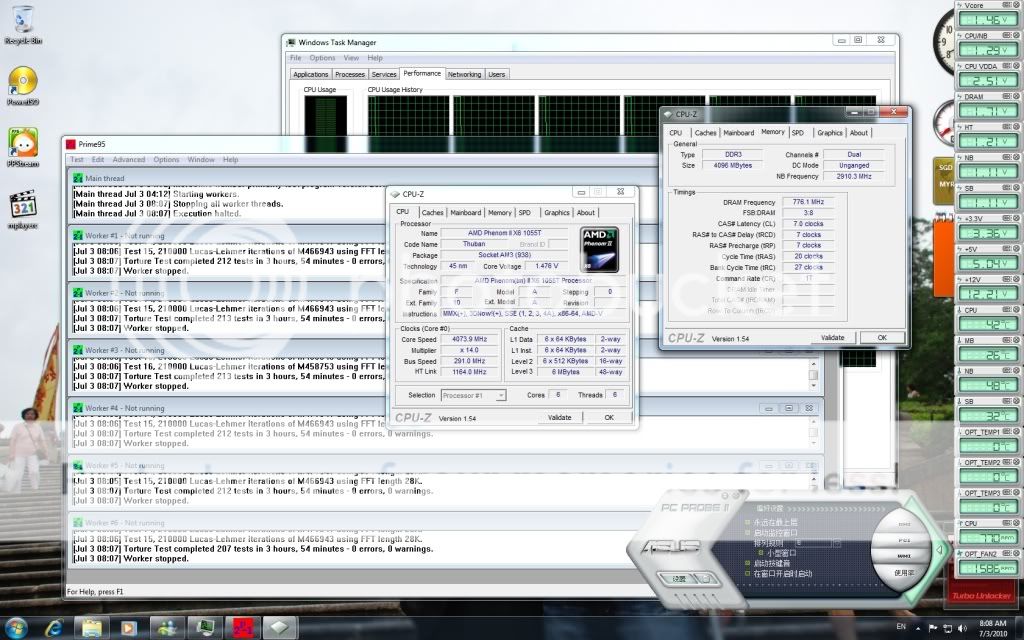
My 1055t only manage to push till 3472Mhz with FSB 248x14 multi.
Try 3.5GHz with FSB 250 but fail in Prime95
HT link 2232Mhz and NB 2232Mhz
MB: Gigabyte 880GM-UD2H
Ram Kingston valueram 1333MHz 2GB x2

My voltage all set to auto.
any help?
kimurastanley
post Jul 11 2010, 04:10 PM

Freak
******
Senior Member
1,580 posts

Joined: Feb 2006
From: Melaka, Singapore


QUOTE(antonio @ Jul 11 2010, 04:01 PM)
Probably your ram is running at very high speed...whats the divider for your ram? or do you left it at 1333/200HTT?


Added on July 11, 2010, 4:01 pm

Probably your ram is running at very high speed...whats the divider for your ram? or do you left it at 1333/200HTT?
*
My ram is running close to 1333Mhz, stock speed


Added on July 11, 2010, 4:17 pm
QUOTE(ah_khoo @ Jul 11 2010, 03:59 PM)
» Click to show Spoiler - click again to hide... «
user posted image

C1E, cool n quiet etc are all disabled

Temperature wise around 58-60 degree C

This post has been edited by kimurastanley: Jul 11 2010, 04:19 PM
kimurastanley
post Jul 11 2010, 04:20 PM

Freak
******
Senior Member
1,580 posts

Joined: Feb 2006
From: Melaka, Singapore


QUOTE(dafreak @ Jul 11 2010, 04:19 PM)
can show us bigger picture?...very small..
*
tongue.gif just noticed, change already


Added on July 11, 2010, 4:24 pm
QUOTE(dafreak @ Jul 11 2010, 04:19 PM)
looks like temperature issue

can show us the core temp as well?

ram stock timings are 9-9-9?
try bumping vdimm to 1.65v
*
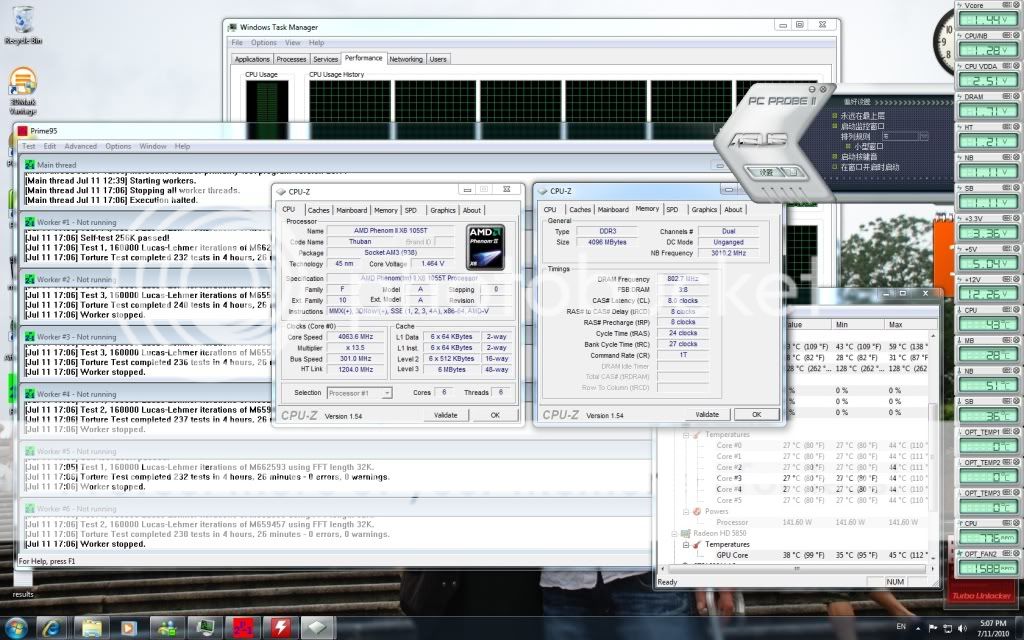
user posted image

This is the best i can get, once i increase to 250Mhz, then cant pass prime 95
Ya, stock timings are 9-9-9

This post has been edited by kimurastanley: Jul 11 2010, 04:25 PM
kimurastanley
post Jul 11 2010, 04:34 PM

Freak
******
Senior Member
1,580 posts

Joined: Feb 2006
From: Melaka, Singapore


QUOTE(dafreak @ Jul 11 2010, 04:31 PM)
stock cooler??
*
ya, stock cooler
kimurastanley
post Jul 11 2010, 04:38 PM

Freak
******
Senior Member
1,580 posts

Joined: Feb 2006
From: Melaka, Singapore


QUOTE(dafreak @ Jul 11 2010, 04:35 PM)
no wonder temps so high sweat.gif

i suggest you manually set vcore and change to a better cooler
*
Vcore is too high??
kimurastanley
post Jul 11 2010, 04:46 PM

Freak
******
Senior Member
1,580 posts

Joined: Feb 2006
From: Melaka, Singapore


My system crash jst nw..

Now i increase the Vdim to 1.65v abd Vcore set to 1.42V and will run stress test again.
kimurastanley
post Jul 11 2010, 06:17 PM

Freak
******
Senior Member
1,580 posts

Joined: Feb 2006
From: Melaka, Singapore


QUOTE(InfiniteX @ Jul 11 2010, 05:32 PM)
Here is another 1055T OC result at default voltage  biggrin.gif . Try to push into 4Ghz but not stable with 1.35v and it is very hot! like 65C++  hmm.gif
» Click to show Spoiler - click again to hide... «

*
try to increase the voltage rclxms.gif
kimurastanley
post Jul 11 2010, 07:05 PM

Freak
******
Senior Member
1,580 posts

Joined: Feb 2006
From: Melaka, Singapore


I check my Max FSB according to the guide on 1st page by increasing my FSB and decrease the multi
Guess what, my system crashes at 250MHz, FSB.

My 1055T got problem??

This post has been edited by kimurastanley: Jul 11 2010, 07:06 PM
kimurastanley
post Jul 11 2010, 07:21 PM

Freak
******
Senior Member
1,580 posts

Joined: Feb 2006
From: Melaka, Singapore


QUOTE(dafreak @ Jul 11 2010, 07:16 PM)
it's the temperature....
*
but i decrease the multi to make the clock speed as near as stock 2800Mhz. Temperature is around 50-53

This post has been edited by kimurastanley: Jul 11 2010, 07:21 PM
kimurastanley
post Jul 11 2010, 09:28 PM

Freak
******
Senior Member
1,580 posts

Joined: Feb 2006
From: Melaka, Singapore


QUOTE(saturn85 @ Jul 11 2010, 09:24 PM)
maybe the HT link speed cause it.  hmm.gif
what is your HT link speed?
*
HT link also around 2000MHz, i try to make HT link, NB, Ram clock as close to stock frequency, but it still crashes
kimurastanley
post Jul 11 2010, 09:36 PM

Freak
******
Senior Member
1,580 posts

Joined: Feb 2006
From: Melaka, Singapore


so my situation is
Setup:
CPU 250x11.5=2875MHz
HT, NB~2000Mhz
Ram ~1322MHz(Stock 1333)
CPU T full load Max= 55 C
Voltage all at default stock

But system still crashes

so that means the proc cant go more than 250MHz?
kimurastanley
post Jul 11 2010, 09:58 PM

Freak
******
Senior Member
1,580 posts

Joined: Feb 2006
From: Melaka, Singapore


QUOTE(saturn85 @ Jul 11 2010, 09:50 PM)
maybe the kingston DDR3 1333 value ram prevent the base clock go further than 250mhz.
i also have kingston DDR2 800 value ram that prevent my pc base clock go beyond 265mhz.  sad.gif
*
u change ur ram then??
kimurastanley
post Jul 11 2010, 10:09 PM

Freak
******
Senior Member
1,580 posts

Joined: Feb 2006
From: Melaka, Singapore


QUOTE(louislkw @ Jul 11 2010, 09:59 PM)
New member here.. good day everyone..

Back to AMD camp,  rclxm9.gif

Here is my result for x6 1055t,

user posted image

user posted image

This 2 sticks of ram CMI  vmad.gif , waiting for new ram arrive.  drool.gif
*
nice, what is ur hardware configuration??
kimurastanley
post Jul 11 2010, 10:17 PM

Freak
******
Senior Member
1,580 posts

Joined: Feb 2006
From: Melaka, Singapore


QUOTE(AMDAthlon @ Jul 11 2010, 10:14 PM)
It is indeed quite strange to see that your processor cannot pass 250..

Why i sense the motherboard is holding back?

Now lets see..Can tell me whether u are using IGP or Graphic card?

What PSU u are using?

And i suggest you set the vCore manually maybe at 1.35V..this volts enough to reach 3.7 at least..yours 1.45 too high already.
*
My MB is Gigabyte 880GM-UD2H

Using IGP now. Havent bought GC yet
PSU Silverstone ST50F
Thanks, I have set my Vcore to stock value edi


Added on July 11, 2010, 10:18 pm
QUOTE(louislkw @ Jul 11 2010, 10:14 PM)
Hardware configuration? Set up is it?
*
Yaya, setup tongue.gif

This post has been edited by kimurastanley: Jul 11 2010, 10:18 PM
kimurastanley
post Jul 11 2010, 10:27 PM

Freak
******
Senior Member
1,580 posts

Joined: Feb 2006
From: Melaka, Singapore


Why everest showed different temperature between CPU and CPU #1, #2 etc??
My target temperature is less than 55 C, which one should i refer to??
user posted image

kimurastanley
post Jul 11 2010, 11:18 PM

Freak
******
Senior Member
1,580 posts

Joined: Feb 2006
From: Melaka, Singapore


i tested again.. My system only stable at 248MHz FSB. More than that will crash.. using integrated display now, but i wonder this will affect the OC

Any sifu can help.. my MB gt problem, or my proc??
kimurastanley
post Jul 11 2010, 11:47 PM

Freak
******
Senior Member
1,580 posts

Joined: Feb 2006
From: Melaka, Singapore


QUOTE(AMDAthlon @ Jul 11 2010, 11:27 PM)
Yes..IGP really holding back the processor..i Suggest you LEND ur fren GC first and see if it really IGP culprit..but most of the time yes becos that processor is quite impossible to not reach 3.8Ghz..at least..

Or maybe you should buy aftermarket cooler smile.gif.
*
ok, i will try to install a GC and see how. Thx notworthy.gif
kimurastanley
post Jul 12 2010, 01:21 AM

Freak
******
Senior Member
1,580 posts

Joined: Feb 2006
From: Melaka, Singapore


ok, i try to install 7600GS and latest driver, result still the same..
crashes at FSB 250MHz.. decrease multi so that it run near 2800MHz, other settings are all changed near to stock value.

CPU temperature always around 55, i dun think is temperature issue..

I dunno what happen to my rig, disappointed

kimurastanley
post Jul 12 2010, 01:28 AM

Freak
******
Senior Member
1,580 posts

Joined: Feb 2006
From: Melaka, Singapore


QUOTE(cloudwan @ Jul 12 2010, 01:24 AM)
Learn to set the ur cpu volt and vdimm manually also, using auto is not a good thing to do coz they always put more volt than it really need doh.gif
Getting ur cpu up to 3.4ghz using stock HSF is already good for me, if u wanna push more please oh please invest on a better cooler sweat.gif

A few guys in here already tested ocing when using IGP and all of them find that u will face some bottlenecking issue compared to when on a discret GPU, that may also be the reason hmm.gif


Added on July 12, 2010, 1:26 am

Can u give a shot of ur casing internal? Maybe ur pwm's is screaming from lack of cooling from bad airflow laugh.gif
*
i will try a better cooler and see how, by the way, since the system crashes when the temperature is around 55 C, so u think better cooler will help??
kimurastanley
post Jul 12 2010, 01:34 AM

Freak
******
Senior Member
1,580 posts

Joined: Feb 2006
From: Melaka, Singapore


QUOTE(cloudwan @ Jul 12 2010, 01:24 AM)
Learn to set the ur cpu volt and vdimm manually also, using auto is not a good thing to do coz they always put more volt than it really need doh.gif
Getting ur cpu up to 3.4ghz using stock HSF is already good for me, if u wanna push more please oh please invest on a better cooler sweat.gif

A few guys in here already tested ocing when using IGP and all of them find that u will face some bottlenecking issue compared to when on a discret GPU, that may also be the reason hmm.gif


Added on July 12, 2010, 1:26 am

Can u give a shot of ur casing internal? Maybe ur pwm's is screaming from lack of cooling from bad airflow laugh.gif


Added on July 12, 2010, 1:27 am

Oooo nice setup there bro, really jealous  drool.gif  drool.gif
*
My casing internal view
The back fan not functioning bcs havent bought the adaptor to connect to power supply
user posted image


Added on July 12, 2010, 1:42 am
QUOTE(antonio @ Jul 12 2010, 01:29 AM)
Thanks...had a lot of cakes and fizzy drinks today.... rclxms.gif
Aahh, so probably the IGP is working the Core Logic chip extra hard on your case....

Manually set the voltages let you understand more on how varying voltages react during overclocking and the amount of heat raising through each and every hundreds of mhz you bring up to the CPU...

Try and get the stock values for each components such as CPU, CPU-NB, Ram, Chipset, HTT and PCIE and then set them manually and start raising from 200 with ram running slower i.e: 1066 or 800mhz... drop down the CPU-NB also... icon_rolleyes.gif
*
antonio, that's what i did to check the Max FSB
Increase the FSB and decrease the multiplier so that the frequency close to 2800MHz
CPU-NB, HTT and Ram all configured so that close to stock value
Voltage vice i let it at stock value as I think adjustment wont be needed as all the values are close to stock value
Ram wise I didnt start with lower value, i let it close to 1333Mhz

System is stable until the FSB reaches 250Mhz, then errors occured when tested with prime 95

This post has been edited by kimurastanley: Jul 12 2010, 01:42 AM

2 Pages  1 2 >Top
Topic ClosedOptions
 

Change to:
| Lo-Fi Version
0.0425sec    0.61    7 queries    GZIP Disabled
Time is now: 1st December 2025 - 11:45 AM