Welcome Guest ( Log In | Register )

Bump Topic Topic Closed RSS Feed
9 Pages  1 2 3 > » Bottom

Outline · [ Standard ] · Linear+

 July 2010 Desktops

views
     
TSfariz
post Jun 30 2010, 11:56 PM, updated 16y ago

Tan Sri F
Group Icon
VIP
16,825 posts

Joined: Jan 2003
From: Siberia
Posting Guidelines:
This is to prevent the dreaded side scrolling.
  • Please make sure the desktop screenshot you post is safe to browse for anyone, this is not a place for you to show how sexy the babe on your wallpaper or desktop.
  • If your image is larger than 640x480 please make a thumbnail or text linking to your image.
  • The thumbnail must not be larger than 640px wide, if your thumbnail is larger your post will be edited possibly deleted.
  • Please refrain from using a {spoiler} tag to post screenshots or embedded images
  • if you are going to quote a topic please remove the image from within the quote.
  • Moderators have the right to edit or remove any of the posts in this thread.
How do I post an image?:
  • Upload your image and thumbnail to your host
  • Use the following tag below and replace "yourURL" with the location and name of your image. This will link the thumbnail to your full size image. You can use text instead of a thumbnail by replacing the img tag with your text.
  • Also keep in mind that when using spaces in your url, replace the spaces with %20. Some images break when using spaces.
    Example:
    CODE
    [URL=http://yourURL/screenshot.jpg][IMG]http://yourURL/thumbnail.jpg[/IMG][/URL]
  • In the interests of keeping the thread on topic it is strongly urged that you format your posts in the following order:
    • Visual Style: Name/where you got it (with link would be nice).
    • Wallpaper: Name/where you got it (with link would be nice).
    • Icons: Name/where you got it (with link would be nice).
    • Programs: Name/where you got it (with link would be nice).
-------------------

This is for everyone that asks for the wallpaper.

Give this a try: TinEye Reverse Image Search

http://tineye.com/
QUOTE
You can right click on any posted desktop snap shot here, click on "Properties" to find the url of the photo and copy that to the clipboard, go to TinEye and paste the URL to be searched. Give it a shot!

HyeoshinX
post Jul 1 2010, 01:03 PM

Casual
***
Junior Member
491 posts

Joined: May 2007
From: [P]etaling [J]aya || [M]elbourne


Didn't change since last month.

[attachmentid=1654684]

Visual Style: SlanXP 2 for Windows 7 ported by ~mini~slash, original by =lassekongo83, can be downloaded from deviantart.
Wallpaper: Tachibana Kanade from Angel Beats. Don't remember where I got the wallpaper.
Icons: Sonetto Icons (Folders) and Blend Icon (Recycle Bin) can be downloaded from deviantart.
Programs: Rainmeter and Avedesk.
Kimie
post Jul 1 2010, 02:39 PM

Getting Started
**
Junior Member
187 posts

Joined: Jan 2008
Hyeoshinx,

An epic wallie bro, like it so much btw what OS that u use, is it Linux Distro or Win7?
noirXcross
post Jul 1 2010, 07:44 PM

New Member
*
Junior Member
19 posts

Joined: Dec 2008
Long time didn't post here tongue.gif

My current desktop cool.gif

Attached Image
Mudkippz
post Jul 1 2010, 11:21 PM

Getting Started
**
Junior Member
142 posts

Joined: Jul 2009
From: Ipoh-Kuala Lumpur


QUOTE(Kimie @ Jun 29 2010, 08:42 AM)
dude,

would love too if you don't mind... biggrin.gif
*
QUOTE(BlueWind @ Jun 29 2010, 12:55 PM)
That is something really interesting thumbs up for you  thumbup.gif
*
» Click to show Spoiler - click again to hide... «


user posted image

Uploaded with ImageShack.us

Here it is
gengstapo
post Jul 2 2010, 02:43 AM

Retired enthusiast
********
All Stars
10,688 posts

Joined: Jan 2005
Still the same with previous month, just change the wall~

user posted image

G-17
post Jul 2 2010, 03:57 AM

Securely Paranoid
******
Senior Member
1,748 posts

Joined: Mar 2010
Pretty much the same as my setup from past months, with small changes like animated scrolling text on wallpaper (scroll speed is dependent on cpu load), tweaked Pidgin layout (top left) with custom status icons, GTK tweaks and some other boring changes aimed at bringing consistency/usability to late night use.

user posted image
nkarul85
post Jul 2 2010, 08:02 AM

newbies
******
Senior Member
1,480 posts

Joined: Mar 2009
From: puchong, selangor


QUOTE(Mudkippz @ Jul 1 2010, 11:21 PM)
» Click to show Spoiler - click again to hide... «

user posted image

Uploaded with ImageShack.us

Here it is
*
eh?

what OS is that??

nice wallpaper btw,

thanks
empty
post Jul 3 2010, 05:27 AM

Casual
***
Junior Member
396 posts

Joined: Sep 2006
From: Le Bedroom desk ♍👽
QUOTE(G-17 @ Jul 2 2010, 03:57 AM)
Pretty much the same as my setup from past months, with small changes like animated scrolling text on wallpaper (scroll speed is dependent on cpu load), tweaked Pidgin layout (top left) with custom status icons, GTK tweaks and some other boring changes aimed at bringing consistency/usability to late night use.

user posted image
*
u should not be here, with desktop like that u should be in hollywood xD
plussin128
post Jul 3 2010, 08:50 AM

New Member
*
Junior Member
8 posts

Joined: Jan 2010


QUOTE(noirXcross @ Jul 1 2010, 07:44 PM)
Long time didn't post here tongue.gif

My current desktop  cool.gif

Attached Image
*
can share ur calendar , music player , ect ( all u hav ) biggrin.gif ....
c2p
post Jul 3 2010, 12:00 PM

Casual
***
Junior Member
368 posts

Joined: Jun 2006
From: Somewhere past this setting sun...
QUOTE(G-17 @ Jul 2 2010, 05:57 AM)
Pretty much the same as my setup from past months, with small changes like animated scrolling text on wallpaper (scroll speed is dependent on cpu load), tweaked Pidgin layout (top left) with custom status icons, GTK tweaks and some other boring changes aimed at bringing consistency/usability to late night use.

user posted image
*
Screencast?
V3nz
post Jul 3 2010, 12:38 PM

Chuck to teh rescue !!
*******
Senior Member
2,367 posts

Joined: Oct 2008
From: Penang / Selangor


QUOTE(G-17 @ Jul 2 2010, 03:57 AM)
Pretty much the same as my setup from past months, with small changes like animated scrolling text on wallpaper (scroll speed is dependent on cpu load), tweaked Pidgin layout (top left) with custom status icons, GTK tweaks and some other boring changes aimed at bringing consistency/usability to late night use.

» Click to show Spoiler - click again to hide... «

*
Thw wallie is sick! rclxm9.gif

share it pls tongue.gif

This post has been edited by V3nz: Jul 3 2010, 12:38 PM
Fuji-San88
post Jul 3 2010, 07:51 PM

Getting Started
**
Junior Member
119 posts

Joined: May 2008

Hye~..new here~~..
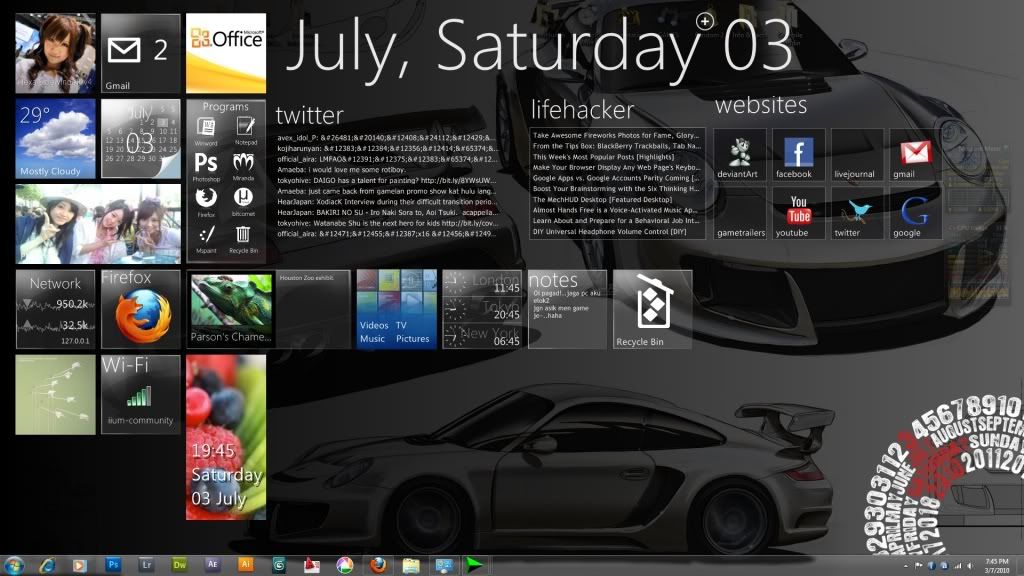
this is my desktop~

» Click to show Spoiler - click again to hide... «


I'm new in using rainmeter...
can someone tells me how to show the japanese fonts in the twitter feed?
G-17
post Jul 3 2010, 09:40 PM

Securely Paranoid
******
Senior Member
1,748 posts

Joined: Mar 2010
QUOTE(empty @ Jul 3 2010, 05:27 AM)
u should not be here, with desktop like that u should be in hollywood xD
*

But people in Hollywood all have their own face (highly photoshopped) as their wallpapers, so that they can stare at themselves all day.
I obviously don't qualify for Hollywood sad.gif tongue.gif


QUOTE(c2p @ Jul 3 2010, 12:00 PM)
Screencast?
*

Sorry mate, I'm pretty decent at photography and vector related stuff, but I'm totally crap at anything video related (I'm the type of idiot who only found out about ffmpeg 3 yrs ago) >__<
I tried making a screencast with an earlier setup, but it was terrible looking at full screen. The computer I'm using for all this customizing is basically my "experimentation" rig, which I mostly use for distro hopping, theming and Linux/BSD/Open Source software development, so I don't really have most relevant codecs for video editing and stuff like that.
Here's a small, extremely crappy screencast for now = http://omploader.org/vNHRvaA/11.ogg
It horrible framerate doesn't really do the thing justice (my actual desktop is very smooth on this quad core), and I'll try making a better one later if I can.
Sorry >_<


QUOTE(V3nz @ Jul 3 2010, 12:38 PM)
Thw wallie is sick! rclxm9.gif

share it pls tongue.gif
*

Uhm, my wallpaper in that shot is actually just plane blue. The live scrolling text is actually handled by a hidden script. I have no idea how people actually make all those animated type .gif wallies sad.gif
If you want, I can screencap my current backdrop for you, but that will only produce a static image and the text won't scroll down. Want? smile.gif

This post has been edited by G-17: Jul 3 2010, 09:41 PM
V3nz
post Jul 3 2010, 10:28 PM

Chuck to teh rescue !!
*******
Senior Member
2,367 posts

Joined: Oct 2008
From: Penang / Selangor


QUOTE(G-17 @ Jul 3 2010, 09:40 PM)
But people in Hollywood all have their own face (highly photoshopped) as their wallpapers, so that they can stare at themselves all day.
I obviously don't qualify for Hollywood  sad.gif  tongue.gif
Sorry mate, I'm pretty decent at photography and vector related stuff, but I'm totally crap at anything video related (I'm the type of idiot who only found out about ffmpeg 3 yrs ago) >__<
I tried making a screencast with an earlier setup, but it was terrible looking at full screen. The computer I'm using for all this customizing is basically my "experimentation" rig, which I mostly use for distro hopping, theming and Linux/BSD/Open Source software development, so I don't really have most relevant codecs for video editing and stuff like that.
Here's a small, extremely crappy screencast for now = http://omploader.org/vNHRvaA/11.ogg
It horrible framerate doesn't really do the thing justice (my actual desktop is very smooth on this quad core), and I'll try making a better one later if I can.
Sorry >_<
Uhm, my wallpaper in that shot is actually just plane blue. The live scrolling text is actually handled by a hidden script. I have no idea how people actually make all those animated type .gif wallies sad.gif
If you want, I can screencap my current backdrop for you, but that will only produce a static image and the text won't scroll down. Want? smile.gif
*
Want!Want!Want! rclxm9.gif rclxms.gif
G-17
post Jul 4 2010, 12:37 AM

Securely Paranoid
******
Senior Member
1,748 posts

Joined: Mar 2010
@V3nz
user posted image user posted image

Made 2 versions for you... different contrast and different font for each.
1600x900 only for now... if you want bigger, I'll have to go make em on my other desktop.
MsPopcorn
post Jul 4 2010, 01:31 AM

Popcorn..Yummy!
*****
Senior Member
808 posts

Joined: May 2010


My 1st post...on my new netbook

user posted image


Prog: Rainmeter (Pileus) idea from Skychilled bro..thx
Wallie: No idea..was digging few thousand times for 10.1" wallie...not much hope..didnt save the link.

Anyway, free to comment.. notworthy.gif
lazo
post Jul 4 2010, 10:06 AM

Civil Engineer
*****
Senior Member
797 posts

Joined: Mar 2006
From: Bukit Mertajam, Penang


just some flower. no fancy software


Attached thumbnail(s)
Attached Image
MOMOchacha
post Jul 4 2010, 11:49 AM

Regular
******
Senior Member
1,949 posts

Joined: Nov 2006
From: village land


QUOTE(Mudkippz @ Jul 1 2010, 11:21 PM)
» Click to show Spoiler - click again to hide... «

user posted image

Uploaded with ImageShack.us

Here it is
*
nice..can share it ya?
Crimson_SoulZ
post Jul 4 2010, 02:09 PM

Casual
***
Junior Member
332 posts

Joined: Jan 2010
From: malaysia
here is mine. a bit too simple though don't you think?

Attached Image

This post has been edited by Crimson_SoulZ: Jul 4 2010, 02:18 PM

9 Pages  1 2 3 > » Top
Topic ClosedOptions
 

Change to:
| Lo-Fi Version
0.9301sec    0.30    6 queries    GZIP Disabled
Time is now: 4th December 2025 - 08:05 AM