Welcome Guest ( Log In | Register )

Bump Topic Topic Closed RSS Feed

Outline · [ Standard ] · Linear+

 HTC Desire Official Thread V3, FAQs on First Page

views
     
benny888
post Jun 26 2010, 02:40 AM

Gadget Freak
Group Icon
Elite
27,801 posts

Joined: Jun 2007
From: Johor


As Maxis is now offering the Samsung Galaxy S, it is now a direct competitor to the htc Desire. I have done a comparison review at :

http://bennyleemn.blogspot.com/2010/06/max...-desire-vs.html
benny888
post Jul 4 2010, 12:01 PM

Gadget Freak
Group Icon
Elite
27,801 posts

Joined: Jun 2007
From: Johor


QUOTE(linuss @ Jul 3 2010, 06:15 PM)
Hi guys, is there any application can shows data transferred?
Because I'm looking to sign up maxis data plan, however, im afraid it exceed limited quota.
Pls recommend
*
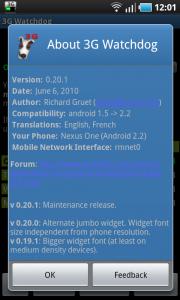
3G Watchdog - and is free
Attached Image Attached Image Attached Image


This post has been edited by benny888: Jul 4 2010, 12:15 PM
benny888
post Jul 6 2010, 12:39 PM

Gadget Freak
Group Icon
Elite
27,801 posts

Joined: Jun 2007
From: Johor


QUOTE(turion64 @ Jul 6 2010, 12:11 PM)
hi guys,

may i know how do i backup my phone contact and sms ?

thanks!
*
Use MyBackUp - download from market. Buy the PRO version is even better more features besides normal backup - worth every sen

This post has been edited by benny888: Jul 6 2010, 12:40 PM
benny888
post Jul 9 2010, 03:50 PM

Gadget Freak
Group Icon
Elite
27,801 posts

Joined: Jun 2007
From: Johor


My usage around 3GB a month but I am on unlimited data postpaid plan, so is not an issue for me. Bulk of my data download attributed to RSS news feeds, tweeter, few email account which I set my phone to download every hour. Browsing average an hour a day


Added on July 9, 2010, 3:56 pm
QUOTE(CKHong @ Jul 9 2010, 12:28 PM)
its not ur phone stupid.. its by design  sweat.gif
wait 2.2 (froyo)
*
You can root the Desire and even on ver 2.1 - you can install apps on the SD card. Even on Froyo 2.2 it does not mean that all apps will be installed on SD as this needs the developer to upgrade their apps to have this function. I am using Froyo 2.2 ( Paul Modaco release ) and also tested other 2.2 customized release , I do notice that for some apps if you "force install" on the SD, the apps will not appear on your homescreen if you select it. What you see is just a image of the app. But the app can still be executed and the original icon of the app remains if you select it from the menu. Such a issue does not appear in all the cooked roms ver 2.1 I have tested

This post has been edited by benny888: Jul 9 2010, 03:56 PM
benny888
post Jul 9 2010, 07:36 PM

Gadget Freak
Group Icon
Elite
27,801 posts

Joined: Jun 2007
From: Johor


QUOTE(silentser @ Jul 9 2010, 06:03 PM)
he? i tot you can unroot it back to the original firmware? seriously rooting cause warranty void?
*
Yes you can unroot. The problem is you cannot remove the locked bootloader.
On a unrooted original phone -when bootup you will see a lock closed ; in a rooted phone and a phone after unroot - you will see the lock with the clasp out showing unlock. Unroot a previously rooted phone will allow you to install back the original rom in case you need it. This is useful if you want to update your phone OTA directly from Google.
benny888
post Jul 9 2010, 07:53 PM

Gadget Freak
Group Icon
Elite
27,801 posts

Joined: Jun 2007
From: Johor


QUOTE(linuss @ Jul 9 2010, 06:13 PM)
online banking? application or using web browser?


Added on July 9, 2010, 6:17 pmanother thing, there any possibility that android can jail break like how iphone does? I want to get paid apps but unwilling to pay..LOL


Added on July 9, 2010, 6:50 pmwhy android games can't compete with iphone? Is just about time matter? Or hardwares do not support cool games like iphones'?
*
Rooting is equivalent to jailbreak. If you are unwilling to pay for apps your only choice is to go and google for those ahem versions. In this forum we don't discuss such things. Anyway pity those developers , support their efforts. Imagine you are a developer yourself , how you feel if people steal or pirate your apps - the apps are really dirt cheap ranging 99sen to US2-3 bucks only. It is so flithy cheap I buy several just to test which is best suited for me. I understand most of us want freebies but since the apps are so cheap give these developers a break. Their software is not like Microsoft or Apple which will cost you hundreds or even thousand dollars

Android in the mobile scene only 1 year +. the interest in Android actually surge when Google release the Nexus. Just in the last 3 months the apps store had grown from 10000 apps to 65000 apps as of now. Apple in the biz since 2007 - they are more established. I believe in time the apps for games will build up - actually ia chicken and egg situation. If they are no supporters of Android phones - you will see limited growth of the apps. If you are on games and is important feature, I'd say for the next 6-12 months stick to the iPhone

Having use both iPhone 3G, 3Gs and present Nexus - I have only one conclusion. Android will be a strong if not equal challenger to Apple probably in another year looking at their growth. The latest ver 2.2 is fantastic and unbelievable fast esp in browsing speed and streaming downloads. During the May Google I/O conference keynote, it was revealed that the ver 2.2 will surpass all mobile smartphones and quoted will be the " fastest in the world" . The demo shows is already 3-4X faster than the iphone 3Gs. That time I was sceptical . True as said, it is indeed fast and last week testing after official release shows is even 3-4X faster than iphone4 - you can read about this all over the web now about how ver 2.2 trounce iOS4 flat. I cannot vouch for these tests against iOS4 since I do not have the iPhone 4 but I can testify the 3Gs is a NO FIGHT case against Android ver 2.2 in browsing, video and streaming downloads. Games I cannot comment as I don't play any games - old man I am !


Added on July 9, 2010, 7:58 pm
QUOTE(maliqu3 @ Jul 9 2010, 03:05 AM)
Hey guys, I have made a tutorial for rooting our beloved Desire in simpler way(easy to understand and follow, best for noob). Check out my blog:
http://smarty-money.blogspot.com/
Check in 'Downloads' section. Say "Thanks" will be appreciated.
*
GOOD and simple writeup. Highly recommended

This post has been edited by benny888: Jul 9 2010, 07:58 PM
benny888
post Jul 9 2010, 08:32 PM

Gadget Freak
Group Icon
Elite
27,801 posts

Joined: Jun 2007
From: Johor


QUOTE(pluginbaby @ Jul 9 2010, 08:23 PM)
haha.. no comments on that, just go for the one u prefer better.. i still like my htc desire btw eventhough lacking of features comparing to the galaxy S..
btw.. anyone know bout battery life? which is better? the galaxy S or the desire for daily usage.. haha.. try describing in gaming + browsing mode and texting + mild surfing battery usage between these two?
*
The Galaxy S screen is superb and is bigger at 4" vs 3.7" if that is important to you. I have tested it but as usual dunno why Samsung just cannot improve on their interface - is a slouch and not so responsive vs the Desire.
If you like to tinker w roms and having quick updates available your choice is the Desire. BTW the Desire will get update to Froyo latest by Aug/Sep while the Galaxy S by probably year end only. Gaming - I saw a video on the net - the Samsung Galaxy is faster. So all boil down to what you want to have. It is a fact of life - you cannot have the best of both world unless you buy both of them !
Lastly the Desire resale value usually higher if that is an important consideration

battery life - if you buy such stuffs , no need to be too concerned. Cannot compare to normal phones. Most people with regular usage can last a working day. Anyway one can always buy a spare battery. I have use most of the smartphones and I'd say the general rule of a working day is a good guide unless you use it mostly to browse - then maybe 3-4 hours max. And no one can give any specific answer as everyone of us use it differently. The manufacturer specs are all ideal situation - eg call hours I find has no meaning provided you dun use the phone for other things which we won't be if we end up buying such stuff

This post has been edited by benny888: Jul 9 2010, 08:37 PM
benny888
post Jul 9 2010, 08:40 PM

Gadget Freak
Group Icon
Elite
27,801 posts

Joined: Jun 2007
From: Johor


QUOTE(sonyman @ Jul 9 2010, 08:37 PM)
hey guys i wanna ask, how do you install application of android from internet.
I downloaded swype for desire, unzip the file. file extension is .apk how do i install this into my desire? i copy into the sd card, but cannot access the file.. can anyone help?
*
Use a file manager eg Astro File Manager - is FREE. Copy the apk file into a folder eg APK in the SD card. Using Astro FM , browse to the APK folder and just open the file. It will prompt you to install
benny888
post Jul 10 2010, 06:51 PM

Gadget Freak
Group Icon
Elite
27,801 posts

Joined: Jun 2007
From: Johor


QUOTE(draco82 @ Jul 10 2010, 09:33 AM)
Google maps navigation do not support countries other than US and UK for this moment.....
It is not htc problems but android itself.
There is modified google maps create by one of the great developer out there, which able to navigate using google maps...
That application is brilliant and i love it ~~
google for brut map then you will know what i mean, (it is not in the market now)~~
*
Exact name is : Google Maps [brut] and latest version is 4.3.0-brut14
Just downloaded and upgraded mine 2 days ago. The navigation is builtin


Added on July 10, 2010, 7:00 pm
QUOTE(linuss @ Jul 10 2010, 06:31 PM)
anyone can share your swype apk to me?
PM me thanks.. i did installed swype previously but it said it was out of trial..@@~
*
I don't think you can use the apk file. I did try that before - it doesn't work as I suspect when you download it the date of download is builtin. When I upgraded to Froyo I try to run the apk file which I kept a copy. The message trial expire appear.
So I download it again at beta.swype.com - it was ok. Infact I noted since the last download , when I go to Marketplace I have receive a few notifications to update the software. Last update notice was only 2 days ago. But the beta download is now not available anymore since end Jun. Those who downloaded it will continue to receive updates until a new version is release


Added on July 10, 2010, 7:04 pm
QUOTE(ic3rock @ Jul 10 2010, 09:23 AM)
Anyone here who own htc handphone facing problem on the phone and send back to htc service center? I heard htc after sales service in singapore   
is quite worst, lousy and slow. Is same as Malaysia?
*
I have 2 occasions having excellent service experience at htc Service Centre (M Harbour Court ) in Singapore. Actually good or bad service depends a lot on that moment and which staff service you. The first time I send in my Dopod U1000 - got it repair and motherboard replace FOC within 6 days. The second time was sent in my Touch Pro2 to check on the GPS signals ( btw I bought the TP2 in Subang) - well entertain me and got unit back after 3 days and again is FOC

This post has been edited by benny888: Jul 10 2010, 07:04 PM
benny888
post Jul 13 2010, 09:24 AM

Gadget Freak
Group Icon
Elite
27,801 posts

Joined: Jun 2007
From: Johor


http://geekfor.me/faq/you-shouldnt-be-usin...r-with-android/

According to google it is not necessary to use task killer. Android works differently from windows phones which task killers are necessary.
benny888
post Jul 13 2010, 10:26 AM

Gadget Freak
Group Icon
Elite
27,801 posts

Joined: Jun 2007
From: Johor


QUOTE(cloudjc @ Jul 13 2010, 10:10 AM)
Is the anyway to change the way we unlock the screen of desire?

let's say I want to do unlock the screen like this:
1. tap any where on screen
2. slide the bar/press whatever button on screen to unlock it
*
Try lockbot free version which uses the track button. I am using the pro version which allows shaking the unit to unlock
benny888
post Jul 13 2010, 12:20 PM

Gadget Freak
Group Icon
Elite
27,801 posts

Joined: Jun 2007
From: Johor


QUOTE(microbe @ Jul 13 2010, 11:34 AM)
I tot like htc officially sellin car charger for their device.. if there's risk.. why they still selling a CAR charger anyway? We all knew that but with official car charger will be better for it? There's something like surge protector to avoid high voltage go tru the device on front of the plug there, not?
*
The price difference between a original car charger and those generic type is usually less than MR50. For this small sum, why risk buying a cheap charger to charge a 2k phone ? I don't usually use the original htc car charger but use a very good dual USB outlet cigarette lighter ( it is about RM 60 more expensive than the cheap type ) and and he original USB cable. The whole setup cost me RM 130 . The original HTC car charger I plug it in the other USB port of the cigaretter lighter plug to charge my other htc HD2 when I am on the road.


Added on July 13, 2010, 12:25 pm
QUOTE(Bleach84 @ Jul 13 2010, 11:33 AM)
Anyone know, got any software to customize the LED light for SMS, Miss call n other? Except the Handcent SMS, I had install, lazy to customize, too many function lol  tongue.gif
*
Try Trackball Alert - works perfectly on my Nexus. You can assign different colours to emails, sms, gmail, miss call, tweeter etc. It is a free download from marketplace. The PRO paid version can assign more stuffs. Don't know how well it works on the Desire. No harm trying and please feedback your testing


Added on July 13, 2010, 12:29 pm
QUOTE(pcboy @ Jul 13 2010, 10:52 AM)
After knowing the official Froyo for Desire will be launched on Christmas, I straight away rooted and flashed this Rom.. it's incredibly super cool. I'm not a guy who likes fancy Rom.. just a simple, plain Froyo HTC Sense for my Desire  smile.gif

It takes:
- 20minutes for you to understand the gold card/rooting/flashing rom concept
- 30minutes to download all files (root and Rom)
- 10minutes to root (there are many methods available on google but pls use xda's, thats easiest!)
- 10minutes to flash Rom

only 1 hour to have a speedy, cool Froyo HTC Sense  rclxms.gif
*
Yes you are right. My Nexus experience - The latest Froyo ver 2.2 is fantastic. I'd say it "blow away" and thrash the performance in browsing and download videos/you tubes, streaming compared to the earlier ver 2.1 and my other htc HD2 and iPhone 3GS. It is a highly recommended upgrade

This post has been edited by benny888: Jul 13 2010, 12:29 PM
benny888
post Jul 13 2010, 12:53 PM

Gadget Freak
Group Icon
Elite
27,801 posts

Joined: Jun 2007
From: Johor


QUOTE(i_bony @ Jul 13 2010, 12:46 PM)
is there any way to un-root it back? i mean if u do a hard reset, it will still run the ROM we installed rite? or we have to wait for the new official ROM to release then only can un-root? sorry for nooB question.
*
You can unroot it. With this you can install back the stock rom and recieve OTA updates on new rom updates. All these tricks you can refer at forum modaco http://android.modaco.com/category/430/htc...ire-modaco-com/

Unlike Windows mobile phones, you cannot remove the lock bootloader. On Windows mobiles, one can restore everything back to original and SIS will be unable to detect phone's rom has been tampered with.

With Android, when you bootup you will still see a lock logo with the clasp taken off for rooted phones and similarly for phones unrooted after rooting . So far no way to hide this
benny888
post Jul 13 2010, 04:04 PM

Gadget Freak
Group Icon
Elite
27,801 posts

Joined: Jun 2007
From: Johor


QUOTE(cleave @ Jul 13 2010, 02:16 PM)
Actually the warranty is voided when you unlock your bootloader, not the rooting process. If you can root without unlocking the bootloader (like the N1), the warranty wont be void when you unroot. wink.gif

The good news is that HTC is rather cool with unlocked phones. There have been reports that HTC still honors the warranty even when the customers send in unlocked sets.
*
You are right. Few years back, I flash my Dopod U1000 and the whole unit was frozen as I forgot to take out the sim card. The unit cannot be switch off displaying just a white screen. I took it to htc Service center in harbour court singapore. When I show them the white screen, the counter staff smile at me and said I must have upgraded the rom illegally. Anyway the motherboard need to change and surprise they did it free of charge as still under warranty and I got the unit back about 7 days later
benny888
post Jul 13 2010, 09:52 PM

Gadget Freak
Group Icon
Elite
27,801 posts

Joined: Jun 2007
From: Johor


QUOTE(triplexpresso @ Jul 13 2010, 05:55 PM)
just got me thinking. If i root now... wouldn't it be another PITA (pain in the ass) to go through another round of re-installation and data/settings recovery if i decide to flash it back to the official froyo with htc sense? (when it comes out la... must think ahead wink.gif)
*
Use Titanium Backup and you can restore across different roms easily - takes about 5-15 minutes depending on how much data you have.
benny888
post Jul 14 2010, 02:26 PM

Gadget Freak
Group Icon
Elite
27,801 posts

Joined: Jun 2007
From: Johor


The galaxy will be a better choice for gamers due to it's more powerful graphic chip. I will also choose desire as customization limited and the UI is really laggy for galaxy
benny888
post Jul 15 2010, 09:20 PM

Gadget Freak
Group Icon
Elite
27,801 posts

Joined: Jun 2007
From: Johor


To those who wish to root :

1. Juz follow the instructions given - it will not brick your phone unlike windows mobile where the risk is higher
2. Once root - no more warranty as during bootup you will see the lock is unclasp showing the bootloader is unlock. Even if you unroot it, the bootloader remains unlock
3. I always say if you don't root your phone you will lose the chance of enhancing its features, improve performance

Immediately you can access to the paid apps ( you can use either marketaccess or marketenabler ) to trick the phone it is using a foreign telco. With rooting, you can play with custom roms which provide more features. You can also change the kernel to optimize it according to your needs - overclock, underclock, battery life control etc. It is really amazing what you can do with a rooted phone
benny888
post Jul 16 2010, 09:58 AM

Gadget Freak
Group Icon
Elite
27,801 posts

Joined: Jun 2007
From: Johor


Once rooted, the phone remain rooted. This is a one time action until you decide to unroot. After root, you can install and try as many rooms, kernels as much as you like. Some roms are still buggy and would cause looping during reboot. Usually such issues due to user did not wipe their phone clean. As there are now very good and reliable backup / restore software across different roms, I'd advise not to take shortcut. Always wipe data, cache, dalvik cache n sd ext ( if u have partition it) before flashing a new rom.

This post has been edited by benny888: Jul 16 2010, 09:59 AM
benny888
post Jul 17 2010, 09:47 PM

Gadget Freak
Group Icon
Elite
27,801 posts

Joined: Jun 2007
From: Johor


QUOTE(akachester @ Jul 17 2010, 06:12 PM)
Guys,

I installed Swype but i cant see it at my SMS Keyboard. Any idea how can i enable it?
*
At the entry box hold down , a popup will ask you select input method. Tap on it and you can select which keyboard you want. Before this you must enable Skype and change any of it's settings if you need to at Settings/language and keyboard
benny888
post Jul 17 2010, 10:58 PM

Gadget Freak
Group Icon
Elite
27,801 posts

Joined: Jun 2007
From: Johor


QUOTE(pcboy @ Jul 17 2010, 09:58 PM)
hi, may I know what does it mean by native A2SD? I s there any other kind of A2SD?
*
Let me try to explain this with my limited knowledge. I know nothing about Linux/SD ext etc until I bought my Nexus 3 months ago. By default all apps will be install in main memory. However Google had said the latest ver 2.2 will allow apps to be install onto SD card - this is native apps2sd. To be able to have apps install to card , the developer of the apps must built in this option for you to choose during installation. As of now many of the apps still do not have this option and the apps will be install in memory even if you are on ver 2.2 Android/Froyo.

Before ver 2.2 was released, many of the rom cooks customize the rom of previous ver 2.1 and even present ver 2.2 to allow you to "force install" onto the SD card - if you were to read into the details of the roms, usually 2 types - install directly to sd card ( ie on the FAT32 portion ) or install onto extended partitions , commonly called sd ext. Before you can use sd ext partiotion, you must partition your sd card first - there are several methods , the easiest is to use custom recovery. Using custom recovery you firs select the swap size, then the size of the extended partition, default is ext 2 - normally most people will use 512 MB upwards ; I use 1024 M. Once you have create this ext 2 , you can immediate upgrade it to ext 3 ( with journalling features). I notice most rom cooks will ask you to setup ext 3 , only a minority will be ext 4. These extended partitions you cannot view it in your computer as is hidden ; similarly in the phone using the file explorer , you cannot see it. Installing apps into the sd ext is the most popular method so far used by the various rom cooks.

for those rom that are customized to allow you to install directly on the SD card - you can view all the files/apps. In my various trials of the different roms, I find that apps install to sd ext is most reliable, can say is 100 % reliable. For roms where you force install on the sd card directly ( so called native apps2sd), depending on rom , sometimes some apps are not display when you put it out on the homescreen - what you see is just a blank image , but the link to the app still work. I believe this issue is only temporary until the apps are modified to allow installation directly to the card

I hope with this simplified explanation, you have a better idea

Any Linux experts, please correct me if I am wrong or best of all explain it further


Added on July 17, 2010, 11:03 pm
QUOTE(KayK @ Jul 17 2010, 10:54 PM)
got this from another forum:
Source
*
I do not own the desire but my Nexus is on the htc desire rom. Actually the settings to cahnge both wallpaer and lockscreen is in SETTINGS/PERSONALIZE. However on the Desire you see option for home wallpaper only. The lockscreen option is taken off - but HTC never update their manual which was based on previous earlier models, I think Hero

This post has been edited by benny888: Jul 17 2010, 11:03 PM

2 Pages  1 2 >Top
Topic ClosedOptions
 

Change to:
| Lo-Fi Version
0.0456sec    1.26    7 queries    GZIP Disabled
Time is now: 12th December 2025 - 03:36 PM