

 Anyone facing the same problem??
DELL Studio XPS™ 13 & 16 Notebooks [V4], powered by Intel C2D, Core i5 n Core i7
DELL Studio XPS™ 13 & 16 Notebooks [V4], powered by Intel C2D, Core i5 n Core i7
|
|
 Jun 12 2011, 01:57 PM Jun 12 2011, 01:57 PM
Return to original view | Post
#61
|
 
All Stars
12,573 posts Joined: Nov 2008 
|
After 1 year and 4 months plus of use, my SXPS 16's hinge on the right side is getting loose
Anyone facing the same problem?? |
|
|
|
|
|
Jun 25 2011, 04:50 PM
Return to original view | Post
#62
|
|
All Stars
12,573 posts Joined: Nov 2008
|
Anyone colour calibrated the monitor's display before?
 |
|
|
Jun 26 2011, 04:13 AM
Return to original view | Post
#63
|
|
All Stars
12,573 posts Joined: Nov 2008
|
QUOTE(Kiki-Lala @ Jun 26 2011, 02:32 AM) Yeap i did. From cold to warm. I mean using those calibration tools like Spyder 3 Express  http://shashinki.com/shop/datacolor-colorv...tem-p-3742.html |
|
|
Jun 26 2011, 08:29 PM
Return to original view | Post
#64
|
|
All Stars
12,573 posts Joined: Nov 2008
|
QUOTE(Kiki-Lala @ Jun 26 2011, 10:27 AM) Yes, i'm using that. How's it? Is there a vast difference before and after calibration?As you see, I need accurate colours since I do editing, and there's less hassle when making prints  |
|
|
Jun 29 2011, 07:23 AM
Return to original view | Post
#65
|
|
All Stars
12,573 posts Joined: Nov 2008
|
QUOTE(Kiki-Lala @ Jun 26 2011, 10:40 PM) I was shocked after i calibrated my screen. From a cold tone to warm. Can't get use to it at first but slowly cope with it. How's it now bro |
|
|
Jul 30 2011, 06:41 PM
Return to original view | Post
#66
|
|
All Stars
12,573 posts Joined: Nov 2008
|
Nooooooooooo
 I dearly hope that Dell ain't gonna charge me a bomb for this  |
|
|
|
|
|
Jul 31 2011, 01:18 AM
Return to original view | Post
#67
|
|
All Stars
12,573 posts Joined: Nov 2008
|
QUOTE(lee_what2004 @ Jul 30 2011, 08:19 PM) Try push it ? Pushing it won't do anything. I think it's spoilt already That one need whole screen replacement   No more warranty de  |
|
|
Jul 31 2011, 11:24 PM
Return to original view | Post
#68
|
|
All Stars
12,573 posts Joined: Nov 2008
|
QUOTE(hidz7 @ Jul 31 2011, 04:32 PM) kytz, what is your problem actually? Hinge at the right corner is loose? I can't really get it from the picture. The whole thing seems to be broken |
|
|
Aug 6 2011, 02:36 PM
Return to original view | Post
#69
|
|
All Stars
12,573 posts Joined: Nov 2008
|
Have to change whole LCD lolz
*pray pray* |
|
|
Aug 10 2011, 06:16 PM
Return to original view | Post
#70
|
|
All Stars
12,573 posts Joined: Nov 2008
|
Thanks weingseen, finally got it done!
One word: WARRRRRRRRRRRRRM |
|
|
Aug 14 2011, 11:03 AM
Return to original view | Post
#71
|
|
All Stars
12,573 posts Joined: Nov 2008
|
QUOTE(lee_what2004 @ Aug 14 2011, 10:25 AM) You mean BSOD ? liddat oso got. TQ~ Try run Bluescreenview from my sig and see which .exe cause the error..  |
|
|
Aug 27 2011, 03:47 AM
Return to original view | Post
#72
|
|
All Stars
12,573 posts Joined: Nov 2008
|
ehh. our HD4670 driver is Catalyst Pro Control Centre ? o.O
hw come i checked driver details in device manager, it states the lastet update is 8.63. The date is 2009 lol |
|
|
Sep 10 2011, 02:45 AM
Return to original view | Post
#73
|
|
All Stars
12,573 posts Joined: Nov 2008
|
Anybody wanna download a calibrated colour profile for SXPS 16 WLED backlight? This is the accurate one ONLY for WLED backlight
Here it is http://forum.notebookreview.com/dell-xps-s...d-monitors.html Those who aren't members can dl here  (for LG panel only) (for LG panel only) LGD0214_8_27_2010_1___Copy.zip ( 4.09k )
Number of downloads: 0
LGD0214_8_27_2010_1___Copy.zip ( 4.09k )
Number of downloads: 0p/s: Credits to weingseen |
|
|
|
|
|
Sep 10 2011, 02:51 AM
Return to original view | Post
#74
|
|
All Stars
12,573 posts Joined: Nov 2008
|
QUOTE(lee_what2004 @ Sep 10 2011, 02:48 AM) Been using that haha nice. so far ok for you?My only complaint is that the brightness has been reduced quite a bit But it scored pretty well in the black levels test http://www.lagom.nl/lcd-test/black.phpI can differentiate all the black levels from pic 1 to the last (but i set my brightness max lah  ) ) |
|
|
Sep 10 2011, 03:03 AM
Return to original view | Post
#75
|
|
All Stars
12,573 posts Joined: Nov 2008
|
QUOTE(lee_what2004 @ Sep 10 2011, 02:55 AM) hmm, mine can't differentiate 1 until 3. hmmmm I think same case with weingseen.If I use 8-22-2010 profile, can't differentiate 1 and 2. anyway, im getting a U2312HM soon |
|
|
Sep 10 2011, 03:15 AM
Return to original view | Post
#76
|
|
All Stars
12,573 posts Joined: Nov 2008
|
QUOTE(lee_what2004 @ Sep 10 2011, 03:07 AM) Plan to use the display port ? yup. i saw some bought a DP port to "full" DP port.. means our port is the mini one?And yeap, planning to get spyder to calibrate the monitor as well. |
|
|
Sep 10 2011, 03:25 AM
Return to original view | Post
#77
|
|
All Stars
12,573 posts Joined: Nov 2008
|
QUOTE(lee_what2004 @ Sep 10 2011, 03:20 AM) Nope, the regular one. Ohhh i see.Btw, i saw ur siggy. What's that ATI GPU scaling fix for? |
|
|
Sep 15 2011, 07:00 PM
Return to original view | Post
#78
|
|
All Stars
12,573 posts Joined: Nov 2008
|
sigh.. just got my U2311H but problem now is that my laptop can't use its own colour profile anymore..
It's a bit long but hope you guys might understand Problem: Had problems with the colours of my ext monitor(it being too warm). Luckily, managed to fix it but there's another problem: My laptop screen is displaying the default colour profile instead of the calibrated colour profile I downloaded off the net, even though it's set as default already What happened: (My monitor is currently using calibrated colour profile) Brought back monitor, plugged into laptop and all. Started it and was surprised to learn that the colours are way too warm. Look up some black and white pictures and find them brownish.. the whites aren't even whites! Checked the colours on my laptop, it's cooler and more accurate! The whites look more like whites than my ext monitor. (my laptop is still using the default calibrated colour profile) Feeling a bit fustrated already, so I tried to calibrate my own monitor using the RGB mode where you input your own Red Green and Blue levels. Tried and tried and tried, still couldn't get the whites to look white. Was totally way off. So I tried opening the ATI Catalyst Control Pro Centre, looked up at 'dekstop colour' and saw the icon ' Reactivate Colour Control' !!! It was unticked so I tick it loh. To my surprise!! All the colours in my ext monitor came back!! No more warm colours now.. all accurate. Black and white looks like really black and white picture. White is white and black is black. BUT big problem is that, my laptop colour profile reverted back the default colour profile  So yes, this is the problem now. So yes, this is the problem now.tl:dr So in short before reactivating colour in ATI control centre, laptop accurate, monitor inaccurate(warm) After reactivating colour control: Laptop accurate-----> inaccurate (from using calibrated profile to default), Ext monitor inaccurate------> accurate So what did this ATI colour thingy do ah? I want both to be accurate! Sos: Before reactivating setting 
Colour control setting 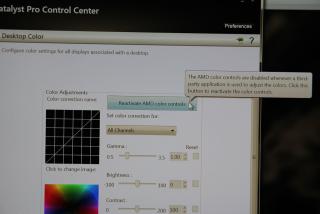
After reactivating setting 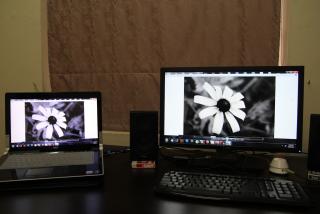
|
|
|
Oct 12 2011, 07:53 PM
Return to original view | Post
#79
|
|
All Stars
12,573 posts Joined: Nov 2008
|
QUOTE(LightningFist @ Oct 12 2011, 07:38 PM) I just realised the sound output on my laptop is absolutely shit. It's like that when you're using built in sound card. I don't think getting different softwares to tweak the settings might help much, so I'd recommend getting an external sound card perhaps? How do I tune the settings for better output? Any comments would be appreciated. Also, how come if I plug headphones in, and I tick "Optimise for headphones" the sound becomes really bad? This is just a curiosity question, not looking for a solution. Thanks. Btw guys, what's the latest Intel WifiLink 5100 driver? Just reformatted my laptop and don't know which to download: http://downloadcenter.intel.com/SearchResu...k+5100+products |
|
|
Oct 24 2011, 09:34 PM
Return to original view | Post
#80
|
|
All Stars
12,573 posts Joined: Nov 2008
|
Ehhh. IE9 has a lot smoother vertical page scrolling than FF and Chrome?
Anyone can confirm this?? |
|
Topic ClosedOptions
|
| Change to: |  0.0487sec 0.0487sec
 0.44 0.44
 7 queries 7 queries
 GZIP Disabled GZIP Disabled
Time is now: 16th December 2025 - 03:51 PM |
 Quote
Quote