

 Jun 20 2010, 01:31 PM


UBUNTU INSTALLATION GUIDE
» Click to show Spoiler - click again to hide... «
What you need:
1)S41 users : congrats u don't need any extra package or configuration other than having the install disc for Ubuntu 9.10 desktop version
2)S42 users: xp-bios from the benq website ( to avoid tricky configuration for the hybrid card)
and of course the installation disc.
How to install?
s41 users :
1.Put the disc into your disk drive on start up, i recommend live disc rather than alternate disc for beginners or those who has very little knowledge about text mode installation.
2.Prior to that, for those who plan to do dual boot with windows, i recommend installing windows prior to ubuntu, just leave out 10GB from ur hard disk for Ubuntu is more than enough. Don't worry abt ntfs support, ubuntu can handle them very well, read and write will never be a problem. NOTICE! Never use ExFAT file system, Ubuntu gives no support for it.
3.Next, on the Ubuntu Logo screen after u boot into the disk, You should be able to see the option to boot into live session. Select it and press enter.
4.Once boot into the live session, ur keyboard and trackpad should be functioning properly. If there is any support problem with ur keyboard and touchpad, please refer to the guide for s42 users below.
5.Double click the [install] icon on the desktop, and folloe the steps through the installation wizard.
6.At the partition editor part, just select the option to use all the empty space available ( the 10GB u left earlier)
7.the wizard should show u that 9.5GB of them is use as the mount point [/] and 512MB as swap memory. This may of course vary from what i write.
8.For those who r only using ubuntu as the single OS in ur s41, feel free to choose the manual option. From the empty space, setup new partition of 10GB for the mount point [/] and make sure u use EXT3 Journaling file system, I still dun recommend EXT4, because it is still in unstable state. Then use theb rest of ur hard disk to format them into another partition using EXT3 journaling file system as well. Set the mount point to [/HOME]. Then use another 1GB of it to setup a partiton as SWAP.
9.The rest of it is just go and get urself a Teh tarik and wait for the installation to complete.
10.Restart the system once finish, and u should be able to use Ubuntu without any problem, hardware driver for Nvidia 8600M GS should be detected and downloaded.
S42 users:
This is one of the more tricky install in Ubuntu i have ever came across, I myself has tried for more than 5 times, and at last found the best solution for it.
First, all s42 users shoud know that Ubuntu still have some issue with the hybrid card of S42, this will later be solved with the xp -bios from the benq website.
Next is the problem with the keyboard and touchpad, they will not be recognised automatically as in S41. We need to do some changes to the boot option to make it works.
1.First, in order to be able to flash the xp-bios, we need to first install windows xp, for those who r going to use windows xp, please refer to the downgrade form vista guide on the benq official website.
2.Once done, boot into the live disc. Now on the logo page, press [F6].
3.You will see a line pop up at the bottom of the screen, move the cursor to the end of the line, and press [space] once.
4.Now, type: i8042.nomux=1 i8042.noloop=1
5.press [enter] and boot into the live session, u will notice the boot time is very long, don't wory, it is becuase of the script. But, once u got the Ubuntu install, the boot time wil be come normal again.
6.The rest of the steps are similar to the s41 until u finish the installation.
7.On the first booting into Ubuntu, press [esc] once u see the grub loader screen on the start up.
8.Now, u will enter a screen with the kernel selection option, and as well the memtest.
9.Navigate to the first option and press [e]
10.nest navigate to the line starting with „kernel...“ and press [e] again,
11.at the end of the line press [space] once and type: i8042.nomux=1 i8042.noloop=1
12.press [enter] and then [b ] (ctrl+x for 9.10)
13.U will be able to boot into Ubuntu again and of course with the keyboard and touchpad working.
14.Now, press [alt+F2] and type: gnome-ternimal
15.A window will open up, then type: sudo gedit /boot/grub/grub.cfg
16.the terminal will ask for ur password, type them as usual, but u won't be able to see what type, press [enter] when finish typing.
17.Now another window will pop up, scroll to the end of the document, and search for line starting with „kernel...“ at the end of it press [space] once and type: i8042.nomux=1 i8042.noloop=1
18.make sure u put this extra line into both the kernel selections. Remeber to reedit this document again every time u update to newer kernel.
19.Save the document and restart the computer.
20.NOW. Comgratulation from me, u have just successfully install Ubuntu on ur s42 where there still many s42 users worldwide, who do not know how to get it works...lol
Guide for Useful application list on Ubuntu
http://www.ubuntupocketguide.com/
download the pocket guide from the website. And u will be an expert in no time....haha, just joking. But at least you will be able to understand how to use ur Ubuntu.
And for those who accidently mess up their grub loader, refer here:
http://ubuntuforums.org/showthread.php?t=224351
For those who have problem with multimedia play back, go to [application > add and remove application], install every package starting with „gstreamer...“ there.
Then install the w32codec here : http://debian-multimedia.org/pool/main/w/w32codecs/
For more information look here https://help.ubuntu.com/8.04/musicvideophotos/C/index.html
In order to keep ur system at optimum condition, i do not recommend skipping the disk check which runs automatically on every 27 times of ur start up. Run the update manager often to check for update as well.
I guess that's all for this tutorial, You can always refer to ubuntuforum.org for more help.
Weiyap a.k.a Mr Poison..26/4/09
1)S41 users : congrats u don't need any extra package or configuration other than having the install disc for Ubuntu 9.10 desktop version
2)S42 users: xp-bios from the benq website ( to avoid tricky configuration for the hybrid card)
and of course the installation disc.
How to install?
s41 users :
1.Put the disc into your disk drive on start up, i recommend live disc rather than alternate disc for beginners or those who has very little knowledge about text mode installation.
2.Prior to that, for those who plan to do dual boot with windows, i recommend installing windows prior to ubuntu, just leave out 10GB from ur hard disk for Ubuntu is more than enough. Don't worry abt ntfs support, ubuntu can handle them very well, read and write will never be a problem. NOTICE! Never use ExFAT file system, Ubuntu gives no support for it.
3.Next, on the Ubuntu Logo screen after u boot into the disk, You should be able to see the option to boot into live session. Select it and press enter.
4.Once boot into the live session, ur keyboard and trackpad should be functioning properly. If there is any support problem with ur keyboard and touchpad, please refer to the guide for s42 users below.
5.Double click the [install] icon on the desktop, and folloe the steps through the installation wizard.
6.At the partition editor part, just select the option to use all the empty space available ( the 10GB u left earlier)
7.the wizard should show u that 9.5GB of them is use as the mount point [/] and 512MB as swap memory. This may of course vary from what i write.
8.For those who r only using ubuntu as the single OS in ur s41, feel free to choose the manual option. From the empty space, setup new partition of 10GB for the mount point [/] and make sure u use EXT3 Journaling file system, I still dun recommend EXT4, because it is still in unstable state. Then use theb rest of ur hard disk to format them into another partition using EXT3 journaling file system as well. Set the mount point to [/HOME]. Then use another 1GB of it to setup a partiton as SWAP.
9.The rest of it is just go and get urself a Teh tarik and wait for the installation to complete.
10.Restart the system once finish, and u should be able to use Ubuntu without any problem, hardware driver for Nvidia 8600M GS should be detected and downloaded.
S42 users:
This is one of the more tricky install in Ubuntu i have ever came across, I myself has tried for more than 5 times, and at last found the best solution for it.
First, all s42 users shoud know that Ubuntu still have some issue with the hybrid card of S42, this will later be solved with the xp -bios from the benq website.
Next is the problem with the keyboard and touchpad, they will not be recognised automatically as in S41. We need to do some changes to the boot option to make it works.
1.First, in order to be able to flash the xp-bios, we need to first install windows xp, for those who r going to use windows xp, please refer to the downgrade form vista guide on the benq official website.
2.Once done, boot into the live disc. Now on the logo page, press [F6].
3.You will see a line pop up at the bottom of the screen, move the cursor to the end of the line, and press [space] once.
4.Now, type: i8042.nomux=1 i8042.noloop=1
5.press [enter] and boot into the live session, u will notice the boot time is very long, don't wory, it is becuase of the script. But, once u got the Ubuntu install, the boot time wil be come normal again.
6.The rest of the steps are similar to the s41 until u finish the installation.
7.On the first booting into Ubuntu, press [esc] once u see the grub loader screen on the start up.
8.Now, u will enter a screen with the kernel selection option, and as well the memtest.
9.Navigate to the first option and press [e]
10.nest navigate to the line starting with „kernel...“ and press [e] again,
11.at the end of the line press [space] once and type: i8042.nomux=1 i8042.noloop=1
12.press [enter] and then [b ] (ctrl+x for 9.10)
13.U will be able to boot into Ubuntu again and of course with the keyboard and touchpad working.
14.Now, press [alt+F2] and type: gnome-ternimal
15.A window will open up, then type: sudo gedit /boot/grub/grub.cfg
16.the terminal will ask for ur password, type them as usual, but u won't be able to see what type, press [enter] when finish typing.
17.Now another window will pop up, scroll to the end of the document, and search for line starting with „kernel...“ at the end of it press [space] once and type: i8042.nomux=1 i8042.noloop=1
18.make sure u put this extra line into both the kernel selections. Remeber to reedit this document again every time u update to newer kernel.
19.Save the document and restart the computer.
20.NOW. Comgratulation from me, u have just successfully install Ubuntu on ur s42 where there still many s42 users worldwide, who do not know how to get it works...lol
Guide for Useful application list on Ubuntu
http://www.ubuntupocketguide.com/
download the pocket guide from the website. And u will be an expert in no time....haha, just joking. But at least you will be able to understand how to use ur Ubuntu.
And for those who accidently mess up their grub loader, refer here:
http://ubuntuforums.org/showthread.php?t=224351
For those who have problem with multimedia play back, go to [application > add and remove application], install every package starting with „gstreamer...“ there.
Then install the w32codec here : http://debian-multimedia.org/pool/main/w/w32codecs/
For more information look here https://help.ubuntu.com/8.04/musicvideophotos/C/index.html
In order to keep ur system at optimum condition, i do not recommend skipping the disk check which runs automatically on every 27 times of ur start up. Run the update manager often to check for update as well.
I guess that's all for this tutorial, You can always refer to ubuntuforum.org for more help.
Weiyap a.k.a Mr Poison..26/4/09
LINK FOR GAMES BENCHMARK
INSTALLING DOX MODDED DRIVER FOR S42~BBXiong Style
For users that use BenQ S42 that have problem installing hybrid graphic (Dox modded 185.85)..refer to the steps below, as it already been tested by BBX for a 60%??? successful rate of installation...works for x86
» Click to show Spoiler - click again to hide... «
extract the driver(as in run thru the dox's setup file, select W7, Hybrid grpahic) when u see the [install] button, just cancel, u will notice ur desktop there got a folder being extracted
now, go to device manager, select ur GMA card first, and update it's driver to latest
then, to the 'Standard VGA Adapter", right click, install driver, choose select from a list, and choose "have disk", browse to that folder, select the INF file, and u will see 9600M GT in the list, select, and press next
the driver will now install(half way thru, it will ask u if u wanna install unsigned driver, just clock on 'continue install anyway')
after that, REMEMBER, change ur power profile to power saver mode to ensure it boots with the GMA card, restart PC, DoX's driver should work..
this is the finding that i had after trying a number of different approach to install yesterday..u can try out and see
now, go to device manager, select ur GMA card first, and update it's driver to latest
then, to the 'Standard VGA Adapter", right click, install driver, choose select from a list, and choose "have disk", browse to that folder, select the INF file, and u will see 9600M GT in the list, select, and press next
the driver will now install(half way thru, it will ask u if u wanna install unsigned driver, just clock on 'continue install anyway')
after that, REMEMBER, change ur power profile to power saver mode to ensure it boots with the GMA card, restart PC, DoX's driver should work..
this is the finding that i had after trying a number of different approach to install yesterday..u can try out and see
Installing Dox Modded 195.62, Double_U style (tested by double_U and he said that within 10 minutes and you are clear)
» Click to show Spoiler - click again to hide... «
Power option to balance > Uninstalled the driver for the the 9600m GT only (at this point ur screen should go to a low reso) > Switch to power saver and restart. > Keep pressing f8 to go to the boot menu. > Select Safe mode > once windows is loaded run driver sweeper. Clean the nvidia driver.
Still in safe mode.
Run the DOX installer, and unzip the missing x86 folder. > Copy the content of the missing x86 folder into the folder unpacked by the installer "Win7x86"
DO NOT CLOSE THE INSTALLER
On the installer, select hybrid graphic and click install. (This installer should just close and do nothing). Open up device manager and look under display adapters. > on "standart VGA ..." that one, not the Intel one, right click and select Update Driver Software >Browse my computer for driver software > Let me pick from a list of device drivers on my computer > Have Disk > Browse > Desktop > Win7x86 > the inf file.
Then install.
After that i rebooted once into safe mode, then into normal mode. And the driver is installed successfully.
I tried this with closing the installer after the i unpacked the Win7x86, but once i did the installation of the inf file, the installation failed. I'm guessing by selecting the hybrid graphic option and finishing the installation, the inf file is modified for hybrid graphics. Of course this is just theory, i not that pro to know why. Also i rebooted into safe mode just in case maybe, might not be required.
One additional tip is remove your password, so rebooting is fast-er. I did all this is 10 minutes, and it was quite painless. (not like the last time i did it, which was the one where i closed the installer) Anyways, good luck.
Still in safe mode.
Run the DOX installer, and unzip the missing x86 folder. > Copy the content of the missing x86 folder into the folder unpacked by the installer "Win7x86"
DO NOT CLOSE THE INSTALLER
On the installer, select hybrid graphic and click install. (This installer should just close and do nothing). Open up device manager and look under display adapters. > on "standart VGA ..." that one, not the Intel one, right click and select Update Driver Software >Browse my computer for driver software > Let me pick from a list of device drivers on my computer > Have Disk > Browse > Desktop > Win7x86 > the inf file.
Then install.
After that i rebooted once into safe mode, then into normal mode. And the driver is installed successfully.
I tried this with closing the installer after the i unpacked the Win7x86, but once i did the installation of the inf file, the installation failed. I'm guessing by selecting the hybrid graphic option and finishing the installation, the inf file is modified for hybrid graphics. Of course this is just theory, i not that pro to know why. Also i rebooted into safe mode just in case maybe, might not be required.
One additional tip is remove your password, so rebooting is fast-er. I did all this is 10 minutes, and it was quite painless. (not like the last time i did it, which was the one where i closed the installer) Anyways, good luck.
AS REQUESTED ----> Dox Modded 195.62 (32/64 bit)
ANOTHER HYBRID DRIVER -----> Nautis 191.90 (32-bit) & 191.97 (64-bit)
Official Hybrid GC Driver BenQ ------> 187.45 (Official 32-bit BenQ Hybrid)
~~~~~> Click For How To Dissect BENQ S42
This post has been edited by miahahaha: Jun 28 2010, 08:49 AM
 Quote
Quote ..dun want to mess things in 2nd post, so this post i dedicated for :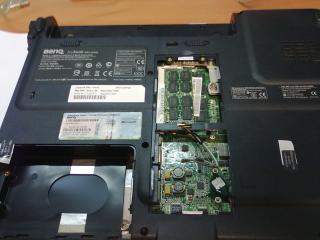


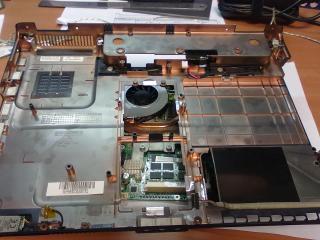


 ...
...
 ..
.. ..that one is Acer Aspire One
  ..see, which mobo HP Mini use
  ..that Dell coupon is useful info
 ..
..
 ..
..
 ...lee not going to Pasar Malam


 0.0394sec
 0.61
0.61
 7 queries
 GZIP Disabled