Welcome Guest ( Log In | Register )

Outline · [ Standard ] · Linear+

 CONNECTIVITY: HDTV, B-YOND, BD HOME THEATRE & PS3

views
     
TSkaynofx
post Jun 16 2010, 02:20 AM, updated 16y ago

Getting Started
**
Junior Member
68 posts

Joined: Feb 2009
Hi all.....I recently purchased some new equipments and upgraded to B-yond drool.gif ......but stuck up on the connections rclxub.gif . Need sifus help (as I'm a kind of newbie in this area) regarding connection for these equipments:

(i) HDTV - Sony KLV-55EX500 - Link
(ii) BD Home Theatre System - Sony BDV-E370 - Link
(iii) PS3 - 250GB
(iv) Astro B-Yond

For info, I have these connections:

BD HT-------HDMI-------->HDTV

PS3----------HDMI-------->HDTV

B-YOND-----HDMI-------->HDTV

I have no problem hearing sound from my BD HT during BD playback. But........

Problems: sweat.gif
1. Cannot hear sound from BD HT when using B-Yond
2. Cannot hear sound from BD HT when using PS3


Pls. advise me regarding the additional cable to use.......

Thanks in advance sifus....


maskedchan
post Jun 16 2010, 02:28 AM

Look at all my stars!!
*******
Senior Member
6,022 posts

Joined: Oct 2004


u need to connect ur B-Yond and PS3 to the HT BD instead direct to TV...


sbd18
post Jun 16 2010, 02:30 AM

Casual
***
Junior Member
300 posts

Joined: Jan 2003
From: Petaling Jaya


i don't think u can connect direct to BD HT as most of them do not have HDMI repeaters...

you might want to check if your TV supports return audio to your BD HT...if it does just make sure both TV and HT has that feature turned on...then whatever audio that streams to TV will come out via HT...
TSkaynofx
post Jun 16 2010, 02:31 AM

Getting Started
**
Junior Member
68 posts

Joined: Feb 2009
QUOTE(maskedchan @ Jun 16 2010, 02:28 AM)
u need to connect ur B-Yond and PS3 to the HT BD instead direct to TV...
*
Thanks for replying maskedchan....

But....my BD HT only has 1 HDMI port

Do I need other type of cables??

evolutionize
post Jun 16 2010, 02:33 AM

Getting Started
**
Junior Member
159 posts

Joined: Apr 2007
From: Kuala Lumpur


check and see ur HT got optical or coaxial input or not..
maskedchan
post Jun 16 2010, 02:34 AM

Look at all my stars!!
*******
Senior Member
6,022 posts

Joined: Oct 2004


QUOTE(kaynofx @ Jun 16 2010, 02:31 AM)
Thanks for replying maskedchan....

But....my BD HT only has 1 HDMI port

Do I need other type of cables??
*
then too bad..
wat else connection u have there?
coaxial input?if got then coaxial to ur HT BD
then on ur B-Yond or PS3 set output audio via coaxial.


Added on June 16, 2010, 2:35 ami recheck the spec..
got coaxial, just plug into coaxial..should be able to connect either ur ps3 or B-Yond

This post has been edited by maskedchan: Jun 16 2010, 02:35 AM
TSkaynofx
post Jun 16 2010, 02:37 AM

Getting Started
**
Junior Member
68 posts

Joined: Feb 2009
QUOTE(sbd18 @ Jun 16 2010, 02:30 AM)
i don't think u can connect direct to BD HT as most of them do not have HDMI repeaters...

you might want to check if your TV supports return audio to your BD HT...if it does just make sure both TV and HT has that feature turned on...then whatever audio that streams to TV will come out via HT...
*
I'm not quite sure bout that...however, I'd checked in the manual...nothing mentions about audio return....


Added on June 16, 2010, 2:40 am
QUOTE(maskedchan @ Jun 16 2010, 02:34 AM)
then too bad..
wat else connection u have there?
coaxial input?if got then coaxial to ur HT BD
then on ur B-Yond or PS3 set output audio via coaxial.


Added on June 16, 2010, 2:35 ami recheck the spec..
got coaxial, just plug into coaxial..should be able to connect either ur ps3 or B-Yond
*
maskedchan.....can u picture it a bit / diagram...coz i'm kinda confused......I'm really new to this..

This post has been edited by kaynofx: Jun 16 2010, 02:40 AM
maskedchan
post Jun 16 2010, 02:43 AM

Look at all my stars!!
*******
Senior Member
6,022 posts

Joined: Oct 2004


PS3 HDMI ----> TV
PS3 coaxial(optical) ----->HT BD

HDMI will output video to TV
PS3 coaxial will ouput the audio to HT BD

make sure ur ps3 set the audio output via optical

TSkaynofx
post Jun 16 2010, 02:44 AM

Getting Started
**
Junior Member
68 posts

Joined: Feb 2009
oppss....

Brazil is playing now....need to break for a while....huhuhu

Another reason for buying the big TV is to watch FIFA WC cool2.gif .....huhuhuhu


Added on June 16, 2010, 2:46 ammaskedchan...

u don't watch the game??


This post has been edited by kaynofx: Jun 16 2010, 02:46 AM
maskedchan
post Jun 16 2010, 11:17 AM

Look at all my stars!!
*******
Senior Member
6,022 posts

Joined: Oct 2004


QUOTE(kaynofx @ Jun 16 2010, 02:44 AM)
oppss....

Brazil is playing now....need to break for a while....huhuhu

Another reason for buying the big TV is to watch FIFA WC cool2.gif .....huhuhuhu


Added on June 16, 2010, 2:46 ammaskedchan...

u don't watch the game??
*
no, not going to watch a single match on worldcup
azxel
post Jun 16 2010, 11:23 AM

moological mooster
Group Icon
VIP
3,421 posts

Joined: Jan 2003
From: 2 30 N, 112 30 E
Here's what you should do for your current HTS

BD HT-------HDMI-------->HDTV (Video)

PS3----------HDMI-------->HDTV (Video)
PS3----------Optical-------->BD HT (Audio - Set PS3 audio settings to Bitstream)

B-YOND-----HDMI-------->HDTV (Video)
B-YOND----------Coaxial-------->BD HT (Audio)
TSkaynofx
post Jun 16 2010, 04:34 PM

Getting Started
**
Junior Member
68 posts

Joined: Feb 2009
azxel.....coaxial cable is like the astro cable right?

what about optical?.....sorry I only know HDMI cable icon_question.gif ......can u explain further?

Thanks in advance....


Added on June 16, 2010, 4:35 pmmaskedchan....u dont like football ka?

This post has been edited by kaynofx: Jun 16 2010, 04:35 PM
prasys
post Jun 16 2010, 05:33 PM

Heros Never Die
Group Icon
VIP
12,925 posts

Joined: Mar 2005
From: Kuala Lumpur
I am just talking about the audio part here , for video part , you'll have to use HDMI anyway !

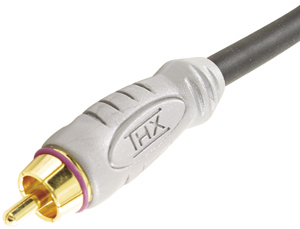
ASTRO to your HT , basically you'll have to get Coax Cable http://cdn1.ioffer.com/img/item/112/615/162/AA7I.jpg for your audio !

PS3 to your HT , basically you'll have to get this http://www.tufts.edu/programs/mma/mrap/ana...ory/TOSLINK.jpg , a Toslink cable , link em up and you can have it working

If you got a nice amp you can basically connect all of these devices to your amp and just use one single HDMI output to your TV. But your HT does not take HDMI Inputs , it only takes audio input tongue.gif

This post has been edited by prasys: Jun 16 2010, 05:33 PM
azxel
post Jun 16 2010, 05:33 PM

moological mooster
Group Icon
VIP
3,421 posts

Joined: Jan 2003
From: 2 30 N, 112 30 E
Behind your PS3, you should be able to see the port (labeled Digital Out / Optical)
user posted image

This is how an Optical cable looks like
user posted image

if you look closely, you should be able to observe that only an Optical Cable can fit into the Digital Out because of its shape.

Coaxial port behind your Astro... the Orange one..
user posted image

and the Coaxial cable
user posted image
faidzal1982
post Jun 16 2010, 06:45 PM

Getting Started
**
Junior Member
272 posts

Joined: Nov 2006
From: Bangi, Puchong


to save u some money on cable... u can use any rca cable to connect astro byond to HT via digital coaxial audio...
u can use the yellow rca cable provided with astro byond... smile.gif
TSkaynofx
post Jun 16 2010, 10:02 PM

Getting Started
**
Junior Member
68 posts

Joined: Feb 2009
Thanks all....

For now, I need to buy these cables 1st...

Will inform you all bout the outcome...

Long live LYN sifus.... thumbup.gif


Added on June 16, 2010, 10:14 pmOh ya...guys

Where's the best place to buy these cables?

I'm looking for reliable / high quality ones....what's the price like?

Thanks in advance..

This post has been edited by kaynofx: Jun 16 2010, 10:14 PM
salam03
post Jun 16 2010, 10:58 PM

Getting Started
**
Junior Member
75 posts

Joined: Feb 2006
QUOTE(kaynofx @ Jun 16 2010, 10:02 PM)
Thanks all....

For now, I need to buy these cables 1st...

Will inform you all bout the outcome...

Long live LYN sifus.... thumbup.gif


Added on June 16, 2010, 10:14 pmOh ya...guys

Where's the best place to buy these cables?

I'm looking for reliable / high quality ones....what's the price like?

Thanks in advance..
*
Is it true for HTS with HDMI repeater such as the new Sony HT CT150/HT SF470,or like Yamaha Soundbar YHT S400..you only need to connect HDMI cable from your Astro Byond to HTS [Sony HT CT150/HT SF470/Yamaha YHT S400],then from HTS to your HDTV...?

or do we still need to connect thru Coaxial Digital In from Astro Byond to HTS...?
TSkaynofx
post Jun 16 2010, 11:27 PM

Getting Started
**
Junior Member
68 posts

Joined: Feb 2009
QUOTE(azxel @ Jun 16 2010, 11:23 AM)
Here's what you should do for your current HTS

BD HT-------HDMI-------->HDTV (Video)

PS3----------HDMI-------->HDTV (Video)
PS3----------Optical-------->BD HT (Audio - Set PS3 audio settings to Bitstream)

B-YOND-----HDMI-------->HDTV (Video)
B-YOND----------Coaxial-------->BD HT (Audio)
*
Basically, I'd understand the settings.....

I even had tested from B-YOND--------Coaxial------->BD HT using the yellow rca cable provided by astro(like faidzal1982 suggested).... IT WORKED!!! rclxm9.gif

However, there's one more problem b4 I make the purchase:

(i)PS3-------Optical------->BD HT
When I refer to the manual of BD HT and the unit's rear panel, ther's only 1 digital in optical which read as follows:
TV (DIGITAL IN OPTICAL)[COLOR=blue]. Does it mean that the connection is only for TV??

P/S: Do expensive cables (both coaxial & optical) differs in terms of output quality?


Added on June 16, 2010, 11:28 pm
QUOTE(salam03 @ Jun 16 2010, 10:58 PM)
Is it true for HTS with HDMI repeater such as the new Sony HT CT150/HT SF470,or like Yamaha Soundbar YHT S400..you only need to connect HDMI cable from your Astro Byond to HTS [Sony HT CT150/HT SF470/Yamaha YHT S400],then from HTS to your HDTV...?

or do we still need to connect thru Coaxial Digital In from Astro Byond to HTS...?
*
u need to ask the sifus.....i'm a newbie

This post has been edited by kaynofx: Jun 16 2010, 11:28 PM

maskedchan
post Jun 16 2010, 11:43 PM

Look at all my stars!!
*******
Senior Member
6,022 posts

Joined: Oct 2004


QUOTE(kaynofx @ Jun 16 2010, 11:27 PM)
Basically, I'd understand the settings.....

I even had tested from B-YOND--------Coaxial------->BD HT using the yellow rca cable provided by astro(like faidzal1982 suggested).... IT WORKED!!! rclxm9.gif

However, there's one more problem b4 I make the purchase:

(i)PS3-------Optical------->BD HT
  When I refer to the manual of BD HT and the unit's rear panel, ther's only 1 digital in optical which read as follows:
  [b]TV (DIGITAL IN OPTICAL)[COLOR=blue]. Does it mean that the connection is only for TV??[/B]

P/S: Do expensive cables (both coaxial & optical) differs in terms of output quality?


Added on June 16, 2010, 11:28 pm

u need to ask the sifus.....i'm a newbie
*
can be use for other devices also...

yeah, i dont like football, i only like girls smile.gif
TSkaynofx
post Jun 17 2010, 12:07 AM

Getting Started
**
Junior Member
68 posts

Joined: Feb 2009
So no problem to connect to my PS3? The sound will come out from HT right?


Added on June 17, 2010, 12:08 amSo u like girls ya....hahahah...interesting...

This post has been edited by kaynofx: Jun 17 2010, 12:08 AM

2 Pages  1 2 >Top
 

Change to:
| Lo-Fi Version
0.1195sec    1.63    5 queries    GZIP Disabled
Time is now: 20th December 2025 - 09:21 PM