Outline ·
[ Standard ] ·
Linear+
Simulation The Sims Discussion V2, Supernatural September and Seasons Nov!!
|
Azfar90
|
 Jun 14 2010, 10:28 PM Jun 14 2010, 10:28 PM
|
New Member


|
|
|
|
|
|
|
SUSCharkoteow
|
Jun 15 2010, 01:20 AM
|
Getting Started
|
lurking here makes me want to buy this game.
now here's a question, is there a pack which contains The Sims 3 vanilla + other exp packs in one pack that I can buy? or do I have to buy it separately?
|
|
|
|
|
|
M@Y
|
Jun 15 2010, 03:46 AM
|
Getting Started
|
QUOTE(Charkoteow @ Jun 15 2010, 01:20 AM) lurking here makes me want to buy this game. now here's a question, is there a pack which contains The Sims 3 vanilla + other exp packs in one pack that I can buy? or do I have to buy it separately? The Sims 3 Vanilla?  As in base game? Try to PM Ryuna Rei. He/She bought the whole set.  |
|
|
|
|
|
SUSCharkoteow
|
Jun 15 2010, 04:31 PM
|
Getting Started
|
QUOTE(M@Y @ Jun 15 2010, 03:46 AM) The Sims 3 Vanilla? As in base game? Try to PM Ryuna Rei. He/She bought the whole set. thx. PM'ed  |
|
|
|
|
|
the100308
|
Jun 17 2010, 01:14 PM
|
|
|
I was just curios how much space Sims 3 took me? I have sims 3 and High-End-Loft Stuff, and if i was not wrong, the Installation DVD for HEF is 4G +, but when I right click teh properties in Programs Files, its only 300MB? Why? Did I lost a lot of things or wat?
|
|
|
|
|
|
Hornet
|
Jun 17 2010, 01:23 PM
|
|
|
I think in Windows XP, it only shows the size of the file in that folder level, not including the files in other sub folder
|
|
|
|
|
|
the100308
|
Jun 17 2010, 01:48 PM
|
|
|
I am using Windows 7.. But the SIms folder show up like 5.8G.. Thats normal..
|
|
|
|
|
|
OrangeCubes
|
Jun 18 2010, 05:41 PM
|
Getting Started
|
currently tried investigator , firefighter and architect designer. i like architect designer job the most among these 3 jobs, firefighter the least..it's kinda boring for me » Click to show Spoiler - click again to hide... « This post has been edited by OrangeCubes: Jun 18 2010, 05:44 PM |
|
|
|
|
|
toothgnasher
|
Jun 19 2010, 08:50 PM
|
Getting Started
|
I just bought my sims3 ambition. can't seem to get into the 10th anniversary page to redeem the digital items. anyone face the same problem?
|
|
|
|
|
|
xXAaronXx
|
Jun 20 2010, 12:02 AM
|
|
|
|
|
|
|
|
|
stalkie
|
Jun 20 2010, 09:27 AM
|
|
|
Hey guys, not sure if this discussion is allowed. But is there a way to play Sims 3 without the disc? Don't get me wrong, I do owned the original Collector's Edition, World Adventures and Ambition (if you need proof I can snap a picture of my collection  ) I just find it troublesome to put in the disc every time I want to play and my drive got hard time reading the disc... I have try MagicISO to create virtual disc but still failed (manage to load the game but to load my saved game)... Anyone? |
|
|
|
|
|
TSemino
|
Jun 20 2010, 09:42 AM
|
|
|
QUOTE(stalkie @ Jun 20 2010, 09:27 AM) Hey guys, not sure if this discussion is allowed. But is there a way to play Sims 3 without the disc? Don't get me wrong, I do owned the original Collector's Edition, World Adventures and Ambition (if you need proof I can snap a picture of my collection ) I just find it troublesome to put in the disc every time I want to play and my drive got hard time reading the disc... I have try MagicISO to create virtual disc but still failed (manage to load the game but to load my saved game)... Anyone? There are several ways actually. One of them is simply by putting a mod inside the mod folder. But, discussing them here is in fact illegal, and will get you banned, whether you own the ori copy or not. |
|
|
|
|
|
toothgnasher
|
Jun 20 2010, 10:41 AM
|
Getting Started
|
QUOTE(xXAaronXx @ Jun 20 2010, 12:02 AM) can't. tried it several times, page not found. |
|
|
|
|
|
ftotti
|
Jun 20 2010, 04:50 PM
|
New Member
|
QUOTE(stalkie @ Jun 20 2010, 09:27 AM) Hey guys, not sure if this discussion is allowed. But is there a way to play Sims 3 without the disc? Don't get me wrong, I do owned the original Collector's Edition, World Adventures and Ambition (if you need proof I can snap a picture of my collection ) I just find it troublesome to put in the disc every time I want to play and my drive got hard time reading the disc... I have try MagicISO to create virtual disc but still failed (manage to load the game but to load my saved game)... Anyone? Simple. Open up EA download manager. Login. Key in your game's key and download the latest expansion (i.e. Ambitions). Install digital copy of the game using the download manager. Then you don have to load the game using CD anymore  This post has been edited by ftotti: Jun 20 2010, 04:52 PM This post has been edited by ftotti: Jun 20 2010, 04:52 PM |
|
|
|
|
|
erald06
|
Jun 20 2010, 05:12 PM
|
Getting Started
|
hmmm,is it possible for someone else to have a same SN no. as me? i mean, i try to key in my World Adventures in EA download manager and it says the SN no. has been used already whereas this is my first time doing so.
|
|
|
|
|
|
stalkie
|
Jun 20 2010, 06:07 PM
|
|
|
QUOTE(ftotti @ Jun 20 2010, 04:50 PM) Simple. Open up EA download manager. Login. Key in your game's key and download the latest expansion (i.e. Ambitions). Install digital copy of the game using the download manager. Then you don have to load the game using CD anymore thanks so much  , seems working (downloading 3.5gb ) will keep you guys update |
|
|
|
|
|
Ryuna Rei
|
Jun 21 2010, 05:17 PM
|
New Member
|
QUOTE(Charkoteow @ Jun 15 2010, 04:31 PM) thx. PM'ed Sorry for the late reply, new semester just started, keep me away from my pc  I bought seperately but in the same order which means there is no pack that include the base and the expansions in one price tho I wish they do have a promotion like that. This post has been edited by Ryuna Rei: Jun 21 2010, 05:20 PM |
|
|
|
|
|
stalkie
|
Jun 21 2010, 09:03 PM
|
|
|
QUOTE(ftotti @ Jun 20 2010, 04:50 PM) Simple. Open up EA download manager. Login. Key in your game's key and download the latest expansion (i.e. Ambitions). Install digital copy of the game using the download manager. Then you don have to load the game using CD anymore Confirmed it's working! Thanks so much  |
|
|
|
|
|
Skyena
|
Jun 22 2010, 06:53 AM
|
New Member
|
Hi guys , i installed The Sims 3, an error message shows below :- 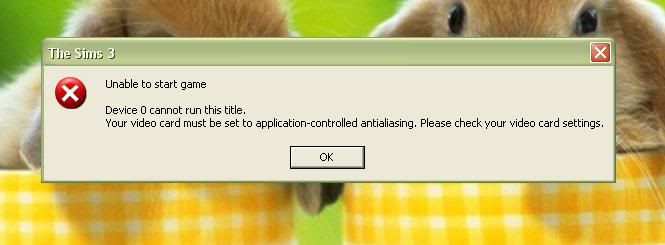 OS: Window XP SP3 can you help me ? how should i solve this ?  Many thanks... ... finally get my sims game but kenot play ...=.=" |
|
|
|
|
|
TSemino
|
Jun 22 2010, 07:09 AM
|
|
|
From the error it seems from your graphic card setting. Set it to application control, not system control.
|
|
|
|
|



 Quote
Quote


 0.0324sec
 0.23
0.23
 6 queries
 GZIP Disabled