Welcome Guest ( Log In | Register )

Bump Topic Topic Closed RSS Feed
19 Pages « < 7 8 9 10 11 > » Bottom

Outline · [ Standard ] · Linear+

Unifi WARNING TO ALL UNIFI USERS, Threat warning, read inside

views
     
MX510
post Jun 2 2010, 08:21 PM

Love Me Sin Hate Me Sinner
*******
Senior Member
4,038 posts

Joined: Aug 2005
From: Earth


QUOTE(rizvanrp @ Jun 2 2010, 08:10 PM)
MX there's a difference between their Riger DSL modem which is pretty crappy and only has a web UI compared to a custom made DLINK DIR-615 with full SSH access.. full SSH access you can SSH tunnel.. you can view the conntrack table.. you can modify the iptables and DNS servers to redirect users to phishing sites..
*
I don't see much exploit can be install inside the router itself. Only as u said it they can view connections and ip tables and dns servers :-) . Anyway it's good that u point up the issues as i already notice it that they did it as practice common among their users since years ago and apply it for Unify.

As i also in my case did change the username n password default for my router in my office that use GITN line hehe they give a call and ask me why did i change it tongue.gif because they want to monitor tongue.gif.

CODE
TM would like to assure all concerned parties that the only reason the UniFi router setting for remote access is enabled is for remote access troubleshooting purposes for the express use of our technical support personnel. In the event there is a technical support issue with any of our UniFi subscribers; at the first level of troubleshooting, TM’s network operation centre (NOC) can immediately remotely diagnose the problem before sending a support team on-site.


Anyway u just give UniFi teams more work to do and setup their own database for unique password for each customers. As the issues already when public into www.thestar.com.my

CODE
TM also acknowledges that there is a need to balance the public’s level of comfort with regards to security and privacy and TM’s own commitment to faster support turnaround time. As such, TM would like to maintain the higher level of service enabled by remote access management on customer routers, and in recognition of that TM will immediately  change  every UniFi customers’ router management password into a high security, unique one (which will be only known to the customer and TM). TM will notify all our Unifi customers of this change accordingly.


Hehehe just for those who set username n password for ppoe into ur ADSL modem also pls change the default password because ppl can scan ip and get into ur ADSL modem and get ur username n password.


nitewish
post Jun 2 2010, 08:23 PM

Viva La Resistance
*****
Senior Member
810 posts

Joined: Feb 2008
From: 127.0.0.1


reminds me of the usual streamyx's default password tmnet123 =x

edit: by the way, what's TR-069, can we disable that feature as well?

This post has been edited by nitewish: Jun 2 2010, 08:26 PM
Mido575
post Jun 2 2010, 08:39 PM

Getting Started
**
Junior Member
123 posts

Joined: May 2010


may i know how to change the default password to my desired pw in a belkin modem setting?
ayamkambing
post Jun 2 2010, 08:47 PM

Getting Started
**
Junior Member
66 posts

Joined: Aug 2009
From: Kenpachi Fried Chicken!


Not to mention how TMNut's tech came and set the default WEP wifi security as aabbccddeeff for the end users who got their streamyx package including a wifi modem

How LAX! Shit work. Exposing unknown issues to their clients.
ycs
post Jun 2 2010, 08:53 PM

MEMBER
*******
Senior Member
4,229 posts

Joined: Jan 2003
From: Selangor


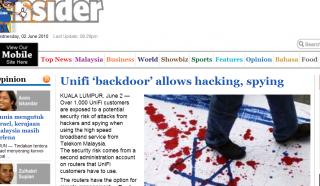
headline story in M Insider:

Attached Image

This post has been edited by ycs: Jun 2 2010, 08:55 PM
ayamkambing
post Jun 2 2010, 09:00 PM

Getting Started
**
Junior Member
66 posts

Joined: Aug 2009
From: Kenpachi Fried Chicken!


QUOTE(ycs @ Jun 2 2010, 08:53 PM)
headline story in M Insider:

Attached Image
*
wow, spilling blood!!! must go until spill blood? TMnet may be bad, no need spill blood! icon_question.gif
almaty
post Jun 2 2010, 09:05 PM

Enthusiast
*****
Senior Member
944 posts

Joined: Jan 2003
From: does not exist
that pic has something to do with israel?
funny to see the word hack and the pic...are you trying to insinuate something biggrin.gif

prasys
post Jun 2 2010, 09:18 PM

Heros Never Die
Group Icon
VIP
12,925 posts

Joined: Mar 2005
From: Kuala Lumpur
QUOTE(ycs @ Jun 2 2010, 08:53 PM)
headline story in M Insider:

Attached Image
*
You could post a link rather then posting a screenshot

Anyway its

http://www.themalaysianinsider.com/malaysi...hacking-spying/


mylinear
post Jun 2 2010, 09:50 PM

Enthusiast
*****
Senior Member
974 posts

Joined: Jan 2009
IMO, TM has shown:

QUOTE(soundsyst64 @ Jun 2 2010, 07:53 PM)
TM would like to assure all concerned parties that the only reason the UniFi router setting for remote access is enabled is for remote access troubleshooting purposes for the express use of our technical support personnel. In the event there is a technical support issue with any of our UniFi subscribers; at the first level of troubleshooting, TM’s network operation centre (NOC) can immediately remotely diagnose the problem before sending a support team on-site.
*
1. Failure to make users fully aware of such remote access in the first place.

2. Failure to realise that they cannot guarantee that the remote access would only be used by their support personnel and not a third party, especially with a weak password being used.

3. Failure to take into consideration the security aspects of the users, rather than focusing on easier support

QUOTE(soundsyst64 @ Jun 2 2010, 07:53 PM)
TM takes note of the security concerns that have been raised, and we have taken these issues to heart.
*
4. Failure to "get away" by trying to use "security by obscurity" method.

QUOTE(soundsyst64 @ Jun 2 2010, 07:53 PM)
TM also acknowledges that there is a need to balance the public’s level of comfort with regards to security and privacy and TM’s own commitment to faster support turnaround time. As such, TM would like to maintain the higher level of service enabled by remote access management on customer routers, and in recognition of that TM will immediately change  every UniFi customers’ router management password into a high security, unique one (which will be only known to the customer and TM). TM will notify all our Unifi customers of this change accordingly.
*
5. Failure to be pro-active, rather than re-active. The proposed unique password method could have been done right from the start.

6. Failure to follow some basic rules of creating passwords:
- do not use simple passwords
- do not use dictionary words or simple words as passwords
- do not use the same password on multiple accounts / services

druppert
post Jun 2 2010, 10:26 PM

New Member
*
Newbie
0 posts

Joined: Jun 2010
Sorry if i ask so directly BUT what is the higher-level admin login ? I do have the firmware 7.05.
What do you mean by "If you're a Unifi user on firmware 7.05, if you read everything in the management page you can find the username for this account. The pass is the same, ..."

Please help - I do need to change it!

Thanks!!
silverhawk
post Jun 2 2010, 10:47 PM

Eyes on Target
Group Icon
Elite
4,956 posts

Joined: Jan 2003


I wub twitter <3

I bet the tmnet guys have rizvanrp's username and avatar pinned up on the wall and throwing knives at it laugh.gif Making their job a lot harder tongue.gif


schmeichel7
post Jun 3 2010, 12:05 AM

The JERSEYMAN
Group Icon
Elite
2,475 posts

Joined: Jan 2003
From: Shah Alam


When I got my unifi installed last month.. I tweaked around the router (to change the DHCP addressing etc etc) and I notice the remote management feature is enabled by default.. Luckily I've turned it off ever since.. because I know, there is no need to remotely configure it since I can do so directly... Phewww...

Thanks rizvanrp for the info.
klseet
post Jun 3 2010, 12:16 AM

Getting Started
**
Junior Member
130 posts

Joined: Mar 2008
After much of pressure, now TM have to change:

http://www.themalaysianinsider.com/malaysi...ccess-settings/

ciohbu
post Jun 3 2010, 12:19 AM

Group: Senior Member
*******
Senior Member
2,104 posts

Joined: Oct 2006
TM..TM... stil think malaysian is stupid..

and credit to those ZTE's network engineer hired by TM + TM CCIEs .. tongue.gif

This post has been edited by ciohbu: Jun 3 2010, 12:38 AM
SlayerXT
post Jun 3 2010, 01:25 AM

PRIDE!
*******
Senior Member
2,042 posts

Joined: Jan 2003
From: KL


QUOTE(ciohbu @ Jun 3 2010, 12:19 AM)
TM..TM... stil think malaysian is stupid..

and credit to those ZTE's network engineer hired by TM + TM CCIEs .. tongue.gif
*
Hey are u working for those TM ZTE companies? Dont simply spill the beans here okay tongue.gif
schmeichel7
post Jun 3 2010, 01:37 AM

The JERSEYMAN
Group Icon
Elite
2,475 posts

Joined: Jan 2003
From: Shah Alam


Actually for every user... don't be lazy.. one thing they should do is always change the default admin password for the router and also the default settings for other features (such as the WIFI hotspot WPA key).

Lucky for me because I decided to disable the 'Remote Management' feature earlier after they've installed the unifi equipment at my home after I noticed this:

user posted image

When it says "or set 0.0.0.0 to allow access to any computer on the Internet'... That made me worry and straight away I decided to disable it. Lucky me because I decided to play around with the router and change the WPA Wifi password and the admin password as well.. Funnily though, there is another message in the picture above that reminds us "For security reasons, it is recommended that you change the login password for the admin accounts"

The intentions are noble. TM created an account that can be used to remotely access by the TM staff for troubleshooting purposes. But two big mistakes were made by TM which were:

1. Customer was not told about this up front (existence of another secondary account)
2. Customer was not given the option to change the password for this secondary account (how would they even know it exists since it can't be seen by the default admin userID)

You feel a bit cheated after finding out all this..

VengenZ
post Jun 3 2010, 01:54 AM

La la la~
****
Senior Member
608 posts

Joined: Nov 2009
From: 127.0.0.1


I am proud of u rivan:
http://www.tm.com.my/about-tm/media-centre...IFIROUTERS.aspx


STATEMENT


Telekom Malaysia Berhad ™ wishes to clarify the concerns raised by various parties with regards to the remote accessibility of UniFi routers which are part of the customer premises equipment (CPE) for all UniFi subscribers.

TM would like to assure all concerned parties that the only reason the UniFi router setting for remote access is enabled is for remote access troubleshooting purposes for the express use of our technical support personnel. In the event there is a technical support issue with any of our UniFi subscribers; at the first level of troubleshooting, TM’s network operation centre (NOC) can immediately remotely diagnose the problem before sending a support team on-site.

TM takes note of the security concerns that have been raised, and we have taken these issues to heart.

TM also acknowledges that there is a need to balance the public’s level of comfort with regards to security and privacy and TM’s own commitment to faster support turnaround time. As such, TM would like to maintain the higher level of service enabled by remote access management on customer routers, and in recognition of that TM will immediately change every UniFi customers’ router management password into a high security, unique one (which will be only known to the customer and TM). TM will notify all our Unifi customers of this change accordingly.


schmeichel7
post Jun 3 2010, 01:59 AM

The JERSEYMAN
Group Icon
Elite
2,475 posts

Joined: Jan 2003
From: Shah Alam


It is a shame on how this was not planned properly....

And I'm not surprised that TM quickly released that statement to safeguard their business and potential future customers.. Who wants to subscribe to unifi if they feel insecure and worried due to the risks..

If only they planned things properly in the first place.. Remote support can be done in a proper way..

This post has been edited by schmeichel7: Jun 3 2010, 02:00 AM
Moogle Stiltzkin
post Jun 3 2010, 03:57 AM

Look at all my stars!!
*******
Senior Member
4,458 posts

Joined: Jan 2003
QUOTE(VengenZ @ Jun 3 2010, 01:54 AM)
I am proud of u rivan:
http://www.tm.com.my/about-tm/media-centre...IFIROUTERS.aspx
STATEMENT


Telekom Malaysia Berhad ™ wishes to clarify the concerns raised by various parties with regards to the remote accessibility of UniFi routers which are part of the customer premises equipment (CPE) for all UniFi subscribers.

TM would like to assure all concerned parties that the only reason the UniFi router setting for remote access is enabled is for remote access troubleshooting purposes for the express use of our technical support personnel. In the event there is a technical support issue with any of our UniFi subscribers; at the first level of troubleshooting, TM’s network operation centre (NOC) can immediately remotely diagnose the problem before sending a support team on-site.

TM takes note of the security concerns that have been raised, and we have taken these issues to heart.

TM also acknowledges that there is a need to balance the public’s level of comfort with regards to security and privacy and TM’s own commitment to faster support turnaround time. As such, TM would like to maintain the higher level of service enabled by remote access management on customer routers, and in recognition of that TM will immediately change  every UniFi customers’ router management password into a high security, unique one (which will be only known to the customer and TM). TM will notify all our Unifi customers of this change accordingly.
*
This if frakkin bullshit. All they said is

1. they are keeping remote access despite our complaints for the CHOICE of not having it (we don't want them poking around inside our stuff. And we don't want a backdoor for l33t hackers.)

2. Their only solution is to change the operator password so we cannot access....... so if we can't access, how do we bypass their shitty router and use our own using Riv's method of making the Dir-615 a vlan bridge (i refuse to use their 32 concurrent connections capable hardware for routing my p2p downloads), and connect it to our own router instead. Why is tmnut ignoring the other issue at hand??? They did not even mention any solution for letting us use our own routers. That is bullshit vmad.gif

This post has been edited by Moogle Stiltzkin: Jun 3 2010, 03:59 AM
TSrizvanrp
post Jun 3 2010, 04:10 AM

Getting Started
Group Icon
Elite
195 posts

Joined: Sep 2006


Updated the Router Security guide on http://unifi.athena.my to disable TR-069

19 Pages « < 7 8 9 10 11 > » Top
Topic ClosedOptions
 

Change to:
| Lo-Fi Version
0.0242sec    0.50    6 queries    GZIP Disabled
Time is now: 6th December 2025 - 05:26 AM