Welcome Guest ( Log In | Register )

Bump Topic Topic Closed RSS Feed

Outline · [ Standard ] · Linear+

 CLOSED

views
     
sleedlx
post Jun 16 2010, 08:05 PM

New Member
*
Junior Member
6 posts

Joined: Jun 2010
This is my first post here in this forum but I just received my Dell U2311H this afternoon (ordered last Saturday). After reading many LCD reviews and was going to get the U2209WA originally but the new 2011 models just came out at the time I was going to order. However, I've noticed that the right side of the monitor is brighter and clearly whiter than the left side (which is a bit bluish). When I turn off the lights, I can also see more backlight bleed on the top right side as well (relative to the other corners). I've tried using both the DVI & VGA cables and there is no noticeable difference between the two. I don't have a spare video card to test if it is at fault but I did test my netbook VGA output on it and the same whiter right side is still there. shocking.gif

Is this normal for a brand new LCD and can I get Dell to replace the monitor even though it isn't a stuck / dead pixel issue? Thanks for any help / suggestions.

I did manage to get RM50 off the price (total RM699) by ordering via the small business site instead, the discount codes are often only valid at one site for the same item (found out by trial and error, keep add to cart at every site). They still delivered it to my home so not a problem with the order via the biz site. thumbup.gif
sleedlx
post Jun 16 2010, 09:54 PM

New Member
*
Junior Member
6 posts

Joined: Jun 2010
I was just checking to see if I had a bad cable or video card but it seems to be the monitor at fault.

I'm currently using the calibrated settings from the web review below:

http://www.flatpanelshd.com/review.php?sub...l&id=1275291737

Brightness: 30
Contrast: 75
Input Color Format: RGB
Mode Selection: Graphics
Sharpness: 50
Dynamic Contrast: Off
Response time: Overdrive
RGB: Custom
• R: 99
• G: 95
• B: 98

The setting isn't too bright, which probably makes the color / tone shift more prominent... if I increase the brightness to >70, the difference between the 2 sides is less (right side probably maxes out but left side is still getting brighter) but then the screen is too bright for normal use. There seems to be user review on the dell website for this model which seems to state the similar problem I'm seeing. shakehead.gif

-------text copied from dell website-----------
Cons
Despite being an IPS panel, screen has a gradient. Doesn't comes with pre loaded calibration like its 24inch Ultrasharp.
There is a gradient of cool(left) to warm(right) from left to right. Its obvious when you select 50% gray as display picture. Despite calling up Dell after 1 day of usage they offer to change a brand new set on the following day, result is the same. Gradient remain there. Basically can't be use it to work on photoshop as the left and right side of the screen display 2 tone of color temperature.
----------------------------------------------------

Sounds like other people may have the same issue with this model, not sure whether to ask for a replacement or swap back to my original 2209WA model that I wanted to get. I'm not too bothered about the bleed on the corners as I don't intend to watch movies in the dark with this monitor but I purposely got an IPS LCD for their superior colors so it's a bit of a letdown that this U2311H model has quite a noticeable tone shift from 1 side to the other. shocking.gif

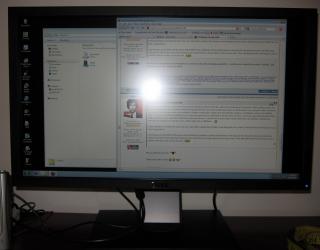
A bit difficult to take a picture of a LCD when it is on as it is emitting quite a bit of light, attached is one of the better shots I could manage to take. wink.gif

Attached Image
sleedlx
post Jun 16 2010, 10:29 PM

New Member
*
Junior Member
6 posts

Joined: Jun 2010
I've got a Canon S90 that allows me to control the exposure time for the shot, what would be a good exposure period? 0.25s? 2s? Also, how does one get a full 100% dark screen? I don't think turning off the PC but leave the monitor on would work as the screen would go into some sort of sleep mode if it doesn't detect a signal?
sleedlx
post Jun 16 2010, 10:52 PM

New Member
*
Junior Member
6 posts

Joined: Jun 2010
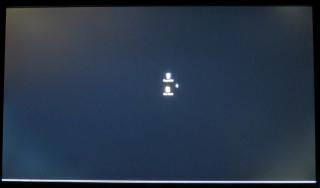
Had a quick few shots of the screen with the lights off... I set my desktop background to solid black, moved my shortcuts into the middle and turn-on the taskbar auto-hide.

0.2 sec exposure

Attached Image


0.5 sec exposure

Attached Image

Seems like the upper left bleed is the most prominent. doh.gif

Given the lottery of screens one could get, any replacement screen may not be any better (or worse have a stuck pixel) rclxub.gif
sleedlx
post Jun 18 2010, 01:15 AM

New Member
*
Junior Member
6 posts

Joined: Jun 2010
QUOTE(V3nz @ Jun 17 2010, 12:31 AM)
This indeed a real disappointment.... doh.gif  doh.gif

Will it affect when i watching movie or playing games? hmm.gif


Added on June 17, 2010, 12:35 am
LOL,my thread laugh.gif
*
I've run a few movie clips through the same screen, decided to keep it for now as likely replacement won't be much different. As long as you don't watch your movies in pitch darkness (absolutely no lighting except for the LCD) then you will not see the corner bleeds at all as the movie clip will be much brighter than the letterbox top & bottom. If you're watching a 16:9 movie (not the 2.35 aspect from the cinema / blu-ray) then the movie will fill the whole screen and for sure there will be no problems even in a totally dark room. rclxms.gif

I don't really do any gaming so can't comment on the slower 8ms screen, it's fast enough for movies + the contrast / color accuracy is much better than a TN... especially laptop ones (those really suck, even moving a few inches off center or up / down and it's all washed out). If your gaming doesn't involve lots of dark dungeons / tunnels / space ships, then the corner bleed issue isn't a problem. It just looks quite bad when there is no bright object at all on the screen, it looks obvious... if there is anything on the screen, then your eyes will likely focus on that (adjust to the brighter object) and you won't notice the corners are a little less black. blink.gif

I was looking specifically for an IPS screen with a pivot function... looks great in portrait mode if you have lots of CBR files to view, the JPGs will fill the whole screen vertically and it's almost the same size as reading a newspaper (screen is 20" tall in portrait mode). thumbup.gif Certainly larger than an actual comic page.
sleedlx
post Jun 19 2010, 11:17 AM

New Member
*
Junior Member
6 posts

Joined: Jun 2010
QUOTE(V3nz @ Jun 19 2010, 03:20 AM)
what is the budget?

i would recommend Dell U2311H,its IPS panel drool.gif

no,not most of the lcd comes with led technology

only some,google has the more accurate answer tongue.gif
*
As V3nz as said, most LCDs still come with CCFL backlighting... those with LED backlighting will usually have something in their name / model to indicate it has it as it's a relatively new feature to desktop LCDs. Being new, LED models tend to be also more expensive.

Why LED? It allows the monitor to be thinner, use less power, have higher brightness (for the same power as CCFL) which in turns allows the makers to claim higher contrast ratio (as white peak brightness is higher), and a higher /wider color gamut range. The first two reasons are why it's very common in laptop LCDs and the last two reasons (+ maybe the thin factor) are why it's in the top end LCD TVs. There's also a difference between edge-lit LED and direct-lit LED and also white LED vs RGB LED. There are very few direct-lit RGB LED monitors as those are very expensive professional models that costs more than most PCs builds (just like similar TVs models are often in the 10+k range).

Even so, having LED does not automatically mean it's a better monitor... all depends on your needs / main usage & budget. As most people (in these kind of forums anyhow) tend to put gaming & watching TV / movies as a priority, TN LCDs are cheaper, have less ghosting (lower GtG times) & are 98% of the available models anyhow. IPS have better viewing angles, more accurate colors & often better contrast ratio.

Topic ClosedOptions
 

Change to:
| Lo-Fi Version
0.0181sec    0.37    7 queries    GZIP Disabled
Time is now: 5th December 2025 - 04:44 PM