

Hi guys. I plan to get a VAIO. But indecisive on E series or CW series. My budget is below RM4000. ANy advantages between the two? Heard Sony updated its line-up too, should I be waiting a bit ? Thanks!
VAIO Club V2.5, make.believe
VAIO Club V2.5, make.believe
|
|
 Oct 6 2010, 03:54 PM Oct 6 2010, 03:54 PM
Return to original view | Post
#1
|
 
Junior Member
77 posts Joined: Jun 2007  
|
Hi guys. I plan to get a VAIO. But indecisive on E series or CW series. My budget is below RM4000. ANy advantages between the two? Heard Sony updated its line-up too, should I be waiting a bit ? Thanks!
|
|
|
|
|
|
Mar 28 2011, 04:28 PM
Return to original view | Post
#2
|
|
Junior Member
77 posts Joined: Jun 2007
|
Well, i got the SB16FG black.. Swell machine.. Sign me up as an owner
Razor thin, can fight Macbook for performance and looks anytime.. I think the LCD panel can slice a person's neck leh.. trying to get Crysis 2 to try its performance.. Running PS is smooth.. Specs say it got one 4gb RAM, so will be getting another 4 Gb RAM (hopefully similar model and brand) so it can run as pair. Heard it will be better as a pair too. Only grip is the HDD is only 320 Gb 5400rpm. Why not give 7200rpm model, hai... And the ports all on the right side only, even with the power inset, kensington lock.. so crammed.. Anyone know how to change the HDD? The manual does not show where the HDD is or whether we can change it DIY.. |
|
|
Mar 29 2011, 10:03 AM
Return to original view | Post
#3
|
|
Junior Member
77 posts Joined: Jun 2007
|
QUOTE(lee_what2004 @ Mar 28 2011, 10:48 PM) You need to open the lower half cover.. This one is a S series SB16FG? ok.. looks easy enough, but how do you transfer the hidden partitions that contain the VAIO Recovery files? Thanks ya! QUOTE(hakim_radzuan @ Mar 29 2011, 01:02 AM) Wah congrats on ur newly purchased vaio. Can you give deep review of it bro? i'm thinking to get it too. Hows the fan issue? is it really loud? QUOTE(Miyabi @ Mar 29 2011, 01:36 AM) lonewolfchua: welcome to the club. do feedback us, especially the fan loud level. Fan arr.. Ok loh, cos i used to own an Acer Travelmate 4000 (with 64mb 9700Radeon - can play Half Life 2 and Fear!!)Compared to that it is ok lor. Fan sounds like a jet engine, and I like jets, so ok for me. And I play games with Seinhesser earphones so cannot hear outside sounds lah, but not try it yet. It kinda build up slowly if you are doing HDD strenuous activities like streaming video while copying files and installing PS CS5   then becomes like zzzznng zzzng zzzng like a jet, not too distracting to me. then becomes like zzzznng zzzng zzzng like a jet, not too distracting to me.Oh, while at it, the vents are all on the right of user, so the aluminium of keyboard and trackpad feels little bit warm on right and veli cool on left. Nvr had heat issues yet cos still trying to get Crysis 2 to try. I hope I can run it and not waste my money. Actually that touchpad not as nice as the one on my gf's CW series (hers more exp than mine!!). But my gf says maybe after it sucks more of my "oil" from my fingers it glide better. I bought this model cos got offer for My Sony members on that SonyStyle online shop (free SOny bluetooth mouse and that expensive Sony bag)= that's about RM600 worth of goods, and u know Sony never give any free stuff when u buy from its Shops!! The promo ending soon and u guys better hurry if wan.. I cannot give full review cos I still uninstalling those trials software and installing mine, setting up my image editing tools, transferring my data from my acer. BTW, I am still writing this on my Acer, leaving the sweet baby at home..  will give my views again later lah, got work.. will give my views again later lah, got work.. |
|
|
Mar 29 2011, 03:14 PM
Return to original view | Post
#4
|
|
Junior Member
77 posts Joined: Jun 2007
|
QUOTE(lee_what2004 @ Mar 29 2011, 11:04 AM) Not sure about transferring the Recovery partition, you could try use imaging software to image the recovery and restore it to the new HDD. But not sure if that would work.. Thanks. Better I wait then, maybe later SSD price drop further then I change.  |
|
|
Mar 29 2011, 05:14 PM
Return to original view | Post
#5
|
|
Junior Member
77 posts Joined: Jun 2007
|
QUOTE(hakim_radzuan @ Mar 29 2011, 03:49 PM) Make sure you burn ur recovery data DVD bro. Then change the hard disk and insert that recovery DVD then it will guide u to install OS and application like factory option bro. You can select any size of partition that u want. Quite easy afterall. I've did in on my old SZ when replace the hard disk. Like that kah? Good to know. I did already burn the recovery disk.QUOTE(xSean @ Mar 29 2011, 03:55 PM) bro, can you please record and post in youtube for fan noise? I'll get get some videos as soon as I finish setting it up the way I like. |
|
|
Apr 4 2011, 09:26 AM
Return to original view | Post
#6
|
|
Junior Member
77 posts Joined: Jun 2007
|
Wow, many same kaki on SB series.. But much more powerful ya.. haha..
I just tried Crysis 2 (with a fan-made detail graphic settings mod). Everything almost lowest settings (which is "high" in Crysis 2 terminology), ran pretty smooth and gorgeous. But cannot compare to extreme settings on better PCs lah.. Still better looking than Fallout3. I played till 4th chapter, only thing choppy is the in-between mini movie cut-scenes, not the in game cut-scenes.. Firefight is smooth once u get a better gun with better scope, initial is crap, hard to aim.. I played with earphones, but when i take them off, Wow! the fan is quite loud, but in a nice way. Like I said previously, sounds like a jet engine.. The back and right upper end of keyboard is quite warm->hot.. But it cools super quick when I exit the game, the fan almost start to wind down immediately after u stop those CPU+RAM+Graphic+HDD intensive things. So my overall perspective is, fan is not a problem. U have to listen to an Acer's fan then u can appreciate Sony's fan is better.. And my Windows Exp Index: was better than zze121, dunno y.. Attached thumbnail(s) 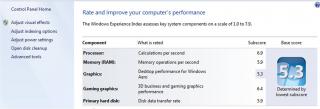
|
|
|
|
|
|
Apr 4 2011, 10:12 AM
Return to original view | Post
#7
|
|
Junior Member
77 posts Joined: Jun 2007
|
QUOTE(zze121 @ Apr 4 2011, 09:58 AM) lonewolfchua, i run the test using Intel Graphics. maybe u test using the 6470M. That explains it! And BTW, first time i played Crysis 2 i forgot to change back to ATI from Intel graphics, damn the game was slightly choppy.bcos the significant differences are in graphics test result. btw, i wonder does our laptop affected by Cougar point bugs? bcos it is still utilizing the mobo with B2 revision. correct me if i am wrong. i think it should be ok, bcos when checked in device manager, HDD is using port 0, ODD port 1. and sorry i hav no idea what's a Cougar, except as a mountain lion in US and an older woman who wants younger men. Nothing weird with my comp, I tried HDMI to TV, burning DVDs, games, PS CS5, Lightroom, MS Office 2007, streaming videos, watching videos on VLC, no prob yet.. Is it you mean hardware conflicts? I thought those are a past problem with Windows 98? Cheers, and enjoy ur VAIO! Update: Oh, I googled the cougars.. Hai.. that problem detected in Macbooks about sandy bridge? It affects multiple SATA users. Laptop mana boleh guna multiple SATA device? at most is dual SATA SSD raid 0 and a DVD drive. I heard it affects only when paired up to 4 or 5 SATA drives only got problem under heavy load.. This post has been edited by lonewolfchua: Apr 4 2011, 10:31 AM |
|
|
Apr 5 2011, 09:05 AM
Return to original view | Post
#8
|
|
Junior Member
77 posts Joined: Jun 2007
|
best to go bak to Sony service.. u get bak good quality screens. Still under warranty?
|
|
|
Apr 10 2011, 03:04 PM
Return to original view | Post
#9
|
|
Junior Member
77 posts Joined: Jun 2007
|
Sony VAIO BIOS update for SB16xx SB18XX and SB19xx of the newest S series. Do check your VAIO Update programme. Supposedly help solve the loud fan issue.
I oledi patched the Bios, no problem.. |
|
|
Apr 19 2011, 09:22 AM
Return to original view | Post
#10
|
|
Junior Member
77 posts Joined: Jun 2007
|
QUOTE(Miyabi @ Apr 18 2011, 08:53 PM) It will stop charging. The most concern here is the heat generate by the notebook which would affect the battery lifespan (depend on where you place the notebook). The battery best to keep it cool and if possible avoid of any massive heat. Well I can safely say battery is away from the heat epicentre for the SB series. It is nearest to the user, immediately below the palm rest and touchpad. The heat from HDD, RAM, CPU and GPU is drawn towards the back, under the LCD. So the heat not affect the battery much I think. Cos I played Crysis 2 and the aluminium only got warm, and most heat is at the back, and VAIO is doing good job cooling. But I do use a CoolerMaster, so maybe it helps too.Since the batt are screw into the notebook, maybe you can try run some program that utilize the cpu and gpu process. Observe the heat spread. If its until the battery, better to plug it out if only you working with program that require fully cpu and gpu process all the time. Just my 2cents. On another matter, anyone else thinks that the touchpad "sucks" a bit compared to CW series? My friend's CW touchpad is a very nice to use. |
|
|
Jun 27 2011, 08:08 AM
Return to original view | Post
#11
|
|
Junior Member
77 posts Joined: Jun 2007
|
QUOTE(fizzy @ Jun 26 2011, 02:35 AM) where to buy discounted vpcsb16fg/b/p/s/w? U have to look out for promo at SonyStyle online shop. There's where I bought my SB16 with free Ori Sony Bag, Sony Bluetooth mouse and a silly mystery gift. But those two Sony products worth RM500-600 liao... RIght now I think is middle of cycle of refresh, cos in US already announced replacement models for the SB. I think is SA or something. But anyway, buy the SB, it is a really nice machine, not perfect but very nice.. |
|
|
Jul 25 2011, 02:46 PM
Return to original view | Post
#12
|
|
Junior Member
77 posts Joined: Jun 2007
|
Vaio S series is worth it. Just don't compare with Acer/Dell/HP/Asus/Lenovo lah based on price.. Except of course Alienware..
And please don't compare to a Mac, if you're thinking Mac, you're posting in the wrong thread. The keyboard is nice, the construction is very nice. Backlight keyboards so useful in the dark. If you peel off all those stupid stickers (showing AMD, Intel, Win7) then your lappy becomes super classy. I own the SB16, can play Crysis2, Fallout3. So performance wise no prob lah. But fan noise is loud under stress. Does it bother you? It not bother me cos I use headphones for games. And your right palm will get warm cos HDD and processors and RAM are below it. if you play FPS then lagi no prob cos your left hand only touching the keyboard as your right is for fragging and headshots! But the lappie cools very effectively to the back under the LCD. |
|
|
Aug 11 2011, 08:11 AM
Return to original view | Post
#13
|
|
Junior Member
77 posts Joined: Jun 2007
|
|
|
|
Oct 4 2011, 08:45 AM
Return to original view | Post
#14
|
|
Junior Member
77 posts Joined: Jun 2007
|
Noise? what noise? I hear no damn thing.. Oops! I'm on earphones.
Normal if doing CPU intensive things on the SB. But hey, at least you know it is venting out heat very effectively to the back, not on the sides which will heat up your palm (like some Acer models). Be happy with your SB, I know I am.. |
|
|
Oct 23 2011, 02:20 PM
Return to original view | Post
#15
|
|
Junior Member
77 posts Joined: Jun 2007
|
No warranty, just try DIY or can send to Sony Service (they charge a lot though).
On a different note guys and gals. There are various updates on the Vaio Update for the SB series, but it seems there is a BIOS update to improve "Thermal management". Maybe less annoying fan issue? Check and update your SB guys and gals! |
| Change to: |  0.0383sec 0.0383sec
 0.21 0.21
 7 queries 7 queries
 GZIP Disabled GZIP Disabled
Time is now: 6th December 2025 - 06:48 PM |
 Quote
Quote