Outline ·
[ Standard ] ·
Linear+
Hook HDMI from lappy to my old TV
|
TSshangyi
|
 Apr 23 2010, 01:21 PM, updated 16y ago Apr 23 2010, 01:21 PM, updated 16y ago
|
New Member


|
Hi, i wanted to play videos from my lappy to my tv, and my tv doesn't have HDMI port. However, the specification of my TV are as follows: SONY KV-DA29M6 WEGA ENGINE Multi HD Ready WEGA Theatre Mode 3D Intelligent Picture Intelligent Signal Booster Cinema Drive Mode Tru-Surround / WOW Program Sorting Teletext S Video In HD / DVD In Center Speaker In Multi System Set Dimension (W/H/D) 765X584X544 So naturally when i saw HD i thought it was HDMI, but i was wrong. I went and check the ports behind the tv and i found 2 ports;1 black 1 white.. Is there any way to connect it to my tv? i was thinking of HD component cables, and duno where to find them lol. thanks for the help in advance =P Additional info regarding my tv: http://www.mindlogic.com/MSTV_SONY_kv-da29m61_DTL.shtmlHere's a pic of the ports behind the tv. Notice the most right 2 ports grouped together. the white one is HD the black one is VD 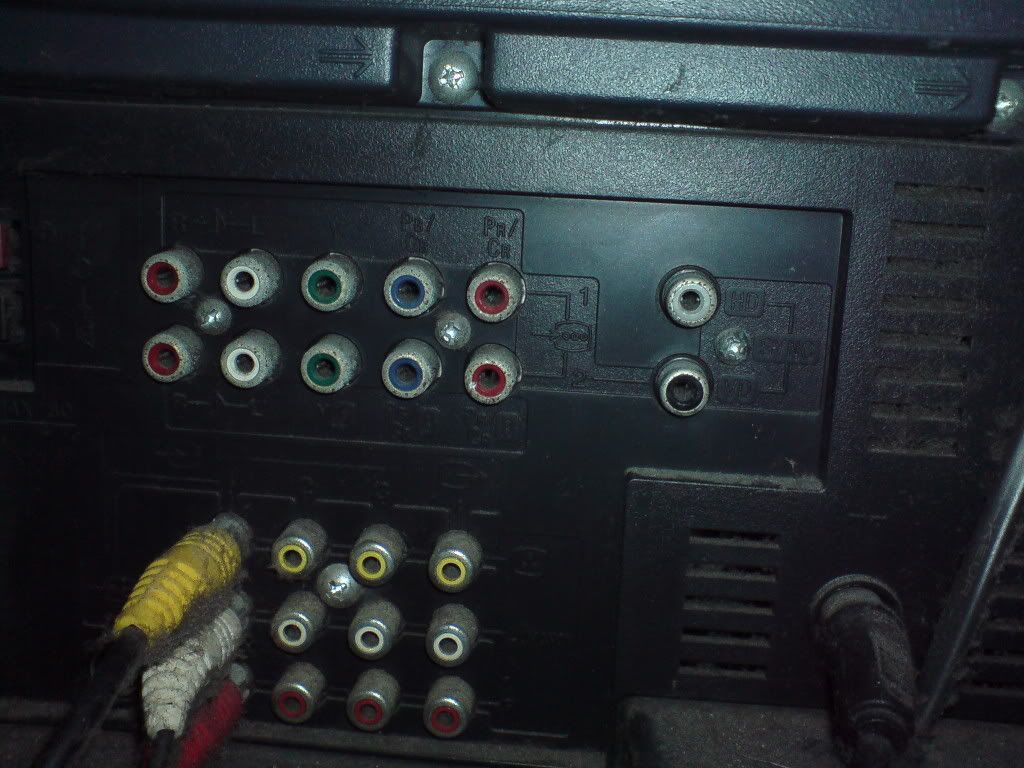 This post has been edited by shangyi: Apr 23 2010, 03:27 PM This post has been edited by shangyi: Apr 23 2010, 03:27 PM |
|
|
|
|
|
neb
|
Apr 23 2010, 02:32 PM
|
|
|
you can use s-video if you laptop got it
|
|
|
|
|
|
eMKs
|
Apr 23 2010, 03:23 PM
|
|
|
Buy new HDTV  |
|
|
|
|
|
neb
|
Apr 23 2010, 03:44 PM
|
|
|
QUOTE(shangyi @ Apr 23 2010, 01:21 PM)
Here's a pic of the ports behind the tv. Notice the most right 2 ports grouped together. the white one is HD the black one is VD
looks like component video synchronization signal for both vertical and horizontal just use s-video or composite video to use HDMI or component, you need to spend more money to buy converter |
|
|
|
|
|
eMKs
|
Apr 23 2010, 06:03 PM
|
|
|
The connections (as a whole) are known as RGBHV. You have your regular component connections (Red, Green and Blue) and two sync connections (Black and White/Grey) that correspond to the Horizontal Sync and Vertical Sync signals. It is meant to be higher quality connection than component, as it keeps the sync information separate. You can't use it with your laptop anyway. Like neb said, you can use s-video if your laptop have s-video out. Btw, i don't like to use s-video from pc to crt tv, pc resolution won't match with crt tv Better buy new HDTV to connect with your laptop  |
|
|
|
|
|
neb
|
Apr 23 2010, 07:44 PM
|
|
|
|
|
|
|
|
|
TSshangyi
|
Apr 24 2010, 12:49 AM
|
New Member
|
haha.. that got it clear for me thanks =P . About the converter i saw one at lowyat sri computers or something like that. they got sell converter and it costs around rm 12 for the hdmi to dvi cable.. i saw ps3 hd component cable that can complete the circuit lol 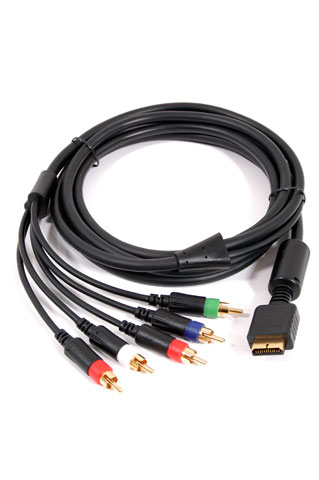 This post has been edited by shangyi: Apr 24 2010, 12:59 AM This post has been edited by shangyi: Apr 24 2010, 12:59 AM |
|
|
|
|
|
anchovies93
|
Apr 24 2010, 01:31 AM
|
|
|
yea hook it to the component input i think
|
|
|
|
|
|
neb
|
Apr 24 2010, 01:37 AM
|
|
|
ps3 cable is not HDMI but a proprietary socket unique to PS2/3, it should hook into ps2/3 's "AV multi out"  hdmi is digital, component video is analog, digital hdmi need to go through some sort of electronic circuit to convert from digital into analog signal about hdmi to avi cable, it is only good for old LCD monitor, new monitor now equipped with HDMI input This post has been edited by neb: Apr 24 2010, 01:43 AM |
|
|
|
|
|
TSshangyi
|
Apr 24 2010, 02:08 PM
|
New Member
|
QUOTE(neb @ Apr 24 2010, 01:37 AM) ps3 cable is not HDMI but a proprietary socket unique to PS2/3, it should hook into ps2/3 's "AV multi out" hdmi is digital, component video is analog, digital hdmi need to go through some sort of electronic circuit to convert from digital into analog signal about hdmi to avi cable, it is only good for old LCD monitor, new monitor now equipped with HDMI input oic.. it looks almost the same haha.. thanks neb i see u are an expert in this. XD. Btw, i saw in Sri Computers in lowyat i think, that got sell hdmi to dvi and dvi to component.. do u think i can just hook them up or are they fakes? |
|
|
|
|
|
neb
|
Apr 24 2010, 03:06 PM
|
|
|
dvi to component like this  my guess is that it is for DVI-I (integrated, digital & analog) no good for HDMI which as I said before, is digital, there is no electronic circuit to do conversion what you really need is to buy something like HDfury2 for converting from digital HDMI to analog component-video, or replace your crt TV with HDTV or LCD monitor with HDMI input port, search the net I think there are cheaper alternative, but HDfury2 is the best in fact, I just bought a samsung b2230H, 22" LCD monitor for RM550 at the pc fair, this monitor has 3 video input(hdmi+dvi+vga) with audio out This post has been edited by neb: Apr 24 2010, 03:19 PM |
|
|
|
|



 Quote
Quote


 0.0160sec
 0.77
0.77
 5 queries
 GZIP Disabled