Welcome Guest ( Log In | Register )

Bump Topic Topic Closed RSS Feed
156 Pages « < 16 17 18 19 20 > » Bottom

Outline · [ Standard ] · Linear+

 Intel LGA1155 P67/Z68/Z77, Sandy/Ivy Bridge Architecture

views
     
MystiqueLife
post Jan 1 2011, 08:25 PM

127.0.0.1
***
Junior Member
475 posts

Joined: Feb 2010
QUOTE(VinluV @ Jan 1 2011, 07:24 PM)
thanks man.
think i will make a visit to either digital mall or lowyat soon..
their prices seem better than our garage sales here
*

yup, true enough.

QUOTE(mohdazuan @ Jan 1 2011, 07:54 PM)
my suggestion: get "K" version rather than normal -2600
just a few hundred ringgit. but soooooo tempting!

and P67 chipset make BCLK overclocking become more complicated.
so, go get "K".

i am "idling" user so i always set C1E & speedstep on. but changing the turbo ratio inside the bios give me appropriate power when needed! and the bios GUI is quite nice; called "EFI".

regards:
ASUS P8P67+i7-2600K user since 27th december 2010 biggrin.gif
*

at 4.5GHz, how much is your GFlops? show some benchies! brows.gif brows.gif


QUOTE(owikh84 @ Jan 1 2011, 08:23 PM)
*

thx!

centaurious25
post Jan 1 2011, 08:57 PM

New Member
*
Junior Member
21 posts

Joined: Oct 2008
QUOTE(willaw @ Jan 1 2011, 06:42 PM)
Hey guys, first time posting here.

I got myself i5-2500 and Gigabyte P67A-UD4. Now I'm not too sure if my version is the unlocked version. The box doesn't have the code K.

But CPU-Z reports "Intel Core i5 2500K".

Anyway, using Gigabyte's EasyTune 6, I overclocked this CPU to use multiplier 38x, so the speed can reach 3.8GHz (from 3.3GHz).

I'm using Coolermaster Hyper 212+. Ran Prime95 stable for more than 8 hours.

Idle temp at about 40 C, and load at 63 C. Not sure about ambient temp, but my room (work/store room) is sure warm. (no aircond, not even fan, poor me!)

I also have 2 x Sapphire 6850 Toxic running in CrossfireX mode. Guess this contributes to the heat.
*
mine telling me how much u pay for the i5 2500?
Aiphos
post Jan 1 2011, 09:11 PM

Getting Started
**
Junior Member
106 posts

Joined: Feb 2009
QUOTE
VinluV  Posted Today, 06:54 PM
  @Aiphos @willaw

mind telling where you got your rigs?
looking for the best deal atm.


Yeap, same like willaw, at C-zone.
willaw
post Jan 1 2011, 09:13 PM

Enthusiast
*****
Senior Member
920 posts

Joined: Oct 2006
QUOTE(centaurious25 @ Jan 1 2011, 08:57 PM)
mine telling me how much u pay for the i5 2500?
*
RM710. Deducted from RM720 I think, because I pay cash.
MystiqueLife
post Jan 1 2011, 09:19 PM

127.0.0.1
***
Junior Member
475 posts

Joined: Feb 2010
so yours is K series?
Can reach 4.5GHz?
centaurious25
post Jan 1 2011, 09:20 PM

New Member
*
Junior Member
21 posts

Joined: Oct 2008
QUOTE(willaw @ Jan 1 2011, 09:13 PM)
RM710. Deducted from RM720 I think, because I pay cash.
*
710?wow
refer to the pc depot price show by owikh84, 2500k's price is 725...15 bucks difference oni?
anyways,thx for sharing the price...n thx aiphos
gonna go lowyat and get myself one sandy bridge soon
willaw
post Jan 1 2011, 09:44 PM

Enthusiast
*****
Senior Member
920 posts

Joined: Oct 2006
QUOTE(MystiqueLife @ Jan 1 2011, 09:19 PM)
so yours is K series?
Can reach 4.5GHz?
*
Oh, i5-2500K can overclock to 4.5GHz? I haven't try. Will try and post the results here.


Added on January 1, 2011, 9:46 pm
QUOTE(centaurious25 @ Jan 1 2011, 09:20 PM)
710?wow
refer to the pc depot price show by owikh84, 2500k's price is 725...15 bucks difference oni?
anyways,thx for sharing the price...n thx aiphos
gonna go lowyat and get myself one sandy bridge soon
*
I'm not sure if mine is 2500K.

Anyone got the normal 2500 and post your CPU-Z info?

This post has been edited by willaw: Jan 1 2011, 09:46 PM
MystiqueLife
post Jan 1 2011, 09:49 PM

127.0.0.1
***
Junior Member
475 posts

Joined: Feb 2010
I know it can OC to 4.0 ~ 4.2 without much problem, only thing is if it can run on 4.5 with air cooling stable. Do check your temperature when you OC, cause it might get too hot.

What's the multiplier max limit?
mohdazuan
post Jan 1 2011, 09:54 PM

Getting Started
**
Junior Member
140 posts

Joined: Sep 2009
From: seremban, negeri sembilan


user posted image
not bad for mainstream compare to extreme.

btw, some people can reach until 4.9GHz (almost 5GHz) based on google result and youtube result.
i just to 4.5 using single core turbo mode using prime95, by adjusting turbo core ratio.

conclusion? go get K model. K means KEPUASAN! thumbup.gif
owikh84
post Jan 1 2011, 11:01 PM

i7 Clan
Group Icon
Elite
8,711 posts

Joined: Nov 2007
From: Butterworth, PG / Machang, Kelantan


LOL

Air = 5Ghz
Water = 7Ghz
L2N = 10Ghz

thumbup.gif thumbup.gif thumbup.gif
owikh84
post Jan 1 2011, 11:51 PM

i7 Clan
Group Icon
Elite
8,711 posts

Joined: Nov 2007
From: Butterworth, PG / Machang, Kelantan


MSI intros Big Bang Marshal board with eight PCIe x16 slots

With Intel's Sandy Bridge processors set to debut at CES 2011, MSI has taken the opportunity to unveil its new flagship P67 motherboard offering, the "Big Bang Marshal." Demonstrating the very definition of overkill, MSI's upcoming board utilizes the XL-ATX format and sports eight PCI Express x16 slots, eight USB 3.0 ports, and three BIOS chips.

The PCIe slots can pump x16 speeds on up to four slots or x8 when occupying all eight. That bandwidth is courtesy of a new Lucid Hydra chip, which may not support the ability to mix and match different graphics cards (and that's probably for the best). The four true x16 slots can be disabled manually via onboard DIP switches dubbed "PCI-E CeaseFire".

user posted image

The Big Bang Marshal also features a 24 phase DrMOS PWM design, two 8-pin CPU power connectors and one 6-pin for the PCIe slots, four DDR3 DIMM slots with support for up to 32GB of RAM, an LED POST display, power, reset and OC Genie buttons as well as a multimeter measurement point. There's also talk of "ClickBIOS," which is MSI's name for UEFI.

Connectivity includes four SATA 3Gb/s ports, four SATA 6Gb/s ports, and headers for six USB 2.0 and four USB 3.0 ports. The rear I/O plate is populated with two USB 2.0 ports, eight USB 3.0 ports (via a single host controller and two hubs), a PS/2 port, FireWire, dual-Gigabit Ethernet, and 7.1-channel audio with optical and coaxial S/PDIF output.

SOS
willaw
post Jan 2 2011, 08:41 AM

Enthusiast
*****
Senior Member
920 posts

Joined: Oct 2006
QUOTE(MystiqueLife @ Jan 1 2011, 09:49 PM)
I know it can OC to 4.0 ~ 4.2 without much problem, only thing is if it can run on 4.5 with air cooling stable. Do check your temperature when you OC, cause it might get too hot.

What's the multiplier max limit?
*
I just confirmed that mine is NOT the K version.

The only way I can change the multiplier is through Gigabyte ET6's Quick Boost (Level 3 - highest level).

Once set, restarting the PC will show CPU settings with multiplier 38.

The multiplier however, cannot be changed from within the BIOS, nor can it be changed within ET6. So I can't change anything higher than 38. sad.gif
owikh84
post Jan 2 2011, 09:15 AM

i7 Clan
Group Icon
Elite
8,711 posts

Joined: Nov 2007
From: Butterworth, PG / Machang, Kelantan


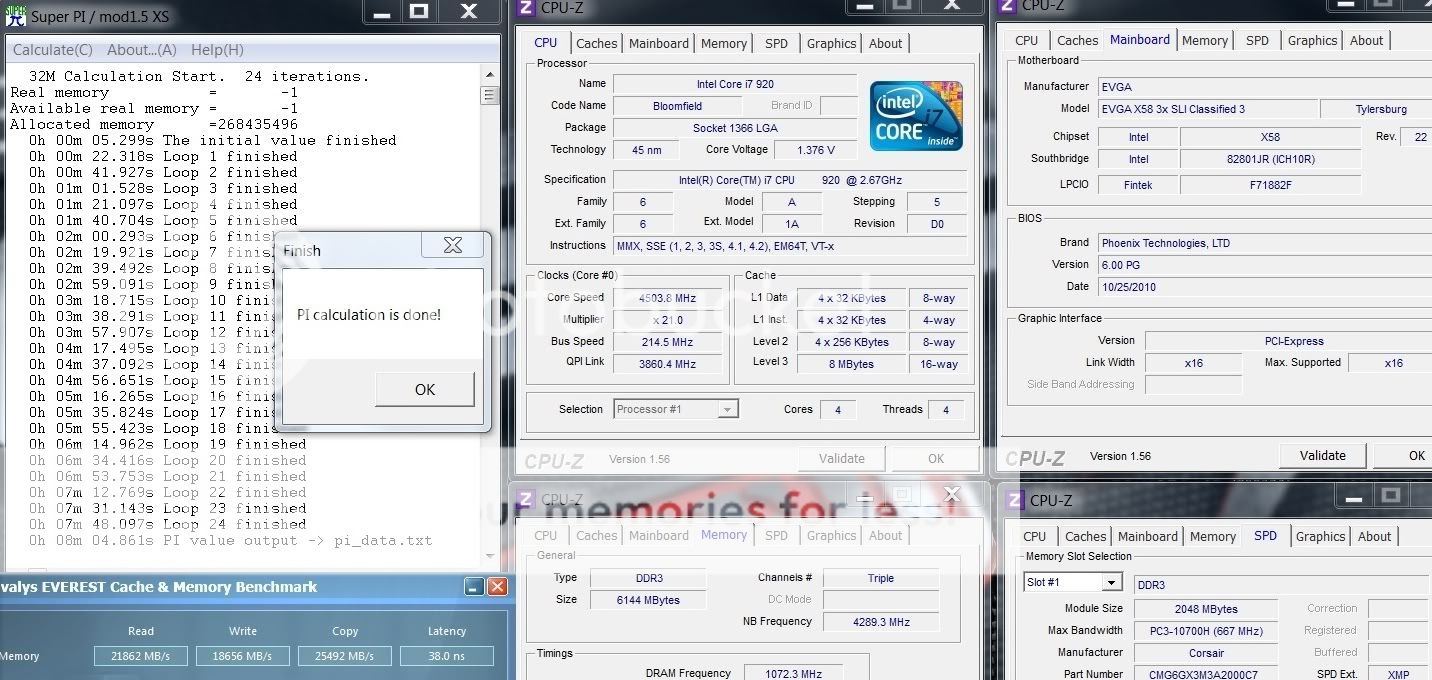
4.5Ghz 4C/4T

my Bloomfield
» Click to show Spoiler - click again to hide... «

vs
Sandy Bridge
» Click to show Spoiler - click again to hide... «

thumbup.gif thumbup.gif
MystiqueLife
post Jan 2 2011, 10:00 AM

127.0.0.1
***
Junior Member
475 posts

Joined: Feb 2010
QUOTE(owikh84 @ Jan 1 2011, 11:51 PM)
» Click to show Spoiler - click again to hide... «

I wonder how much it cost?

QUOTE(willaw @ Jan 2 2011, 08:41 AM)
I just confirmed that mine is NOT the K version.

The only way I can change the multiplier is through Gigabyte ET6's Quick Boost (Level 3 - highest level).

Once set, restarting the PC will show CPU settings with multiplier 38.

The multiplier however, cannot be changed from within the BIOS, nor can it be changed within ET6. So I can't change anything higher than 38. sad.gif
*

What about the BCLK adjustment?

QUOTE(owikh84 @ Jan 2 2011, 09:15 AM)
4.5Ghz 4C/4T
my Bloomfield
» Click to show Spoiler - click again to hide... «

vs
Sandy Bridge
» Click to show Spoiler - click again to hide... «

thumbup.gif  thumbup.gif
*

Nice benchmarks!!
Not quite worth the upgrade though from current Lynn/Bloomfield series

BTW, how do you make it stable @ 4.5GHz? I can barely pass the bootscreen at that frequency. =(
And both on air cooling? You should have included the temperature for Sandy Bridge vs Bloomfield brows.gif brows.gif

This post has been edited by MystiqueLife: Jan 2 2011, 10:38 AM
willaw
post Jan 2 2011, 10:33 AM

Enthusiast
*****
Senior Member
920 posts

Joined: Oct 2006
BCLK can be overclocked, but I didn't try to overclock it due to information I find like this one:

http://en.ocworkbench.com/tech/intel-sandy...rictive-to-2-3/
MystiqueLife
post Jan 2 2011, 10:36 AM

127.0.0.1
***
Junior Member
475 posts

Joined: Feb 2010
Thanks for the information. Looks like the best way is to get the K series or unless some motherboards manufacturer comes with a way to "increase locked multiplier".

I wonder, what's your load temperature with LinX @ 3.8GHz?
willaw
post Jan 2 2011, 11:03 AM

Enthusiast
*****
Senior Member
920 posts

Joined: Oct 2006
QUOTE(MystiqueLife @ Jan 2 2011, 10:36 AM)
Thanks for the information. Looks like the best way is to get the K series or unless some motherboards manufacturer comes with a way to "increase locked multiplier".

I wonder, what's your load temperature with LinX @ 3.8GHz?
*
Agreed. Just get the K series.

Load temperature:

Core 1: 59 C
Core 2: 59 C
Core 3: 62 C
Core 4: 60 C
mohdazuan
post Jan 2 2011, 12:01 PM

Getting Started
**
Junior Member
140 posts

Joined: Sep 2009
From: seremban, negeri sembilan


willaw: your cooler is not tight enough?

load @ 4.5GHz stressed
using prime95:
Core 1: 47 C, Core 2: 48 C, Core 3: 46 C, Core 4: 48 C

when idling, drop to 1.6GHz:
Core 1: 31 C, Core 2: 31 C, Core 3: 39 C, Core 4: 31 C

using hyper 212+ single fan biggrin.gif
willaw
post Jan 2 2011, 12:18 PM

Enthusiast
*****
Senior Member
920 posts

Joined: Oct 2006
QUOTE(mohdazuan @ Jan 2 2011, 12:01 PM)
willaw: your cooler is not tight enough?

load @ 4.5GHz stressed                               
using prime95:
Core 1: 47 C, Core 2: 48 C, Core 3: 46 C, Core 4: 48 C

when idling, drop to 1.6GHz:
Core 1: 31 C, Core 2: 31 C, Core 3: 39 C, Core 4: 31 C

using hyper 212+ single fan biggrin.gif
*
I'm also using Hyper 212+ single fan. But my PC is in a room with no fan and air conditioning.

In the casing, I also have 2 ATI 6850 (overclocked) running. 4 hard drive (WD: 1 black, 3 blue).

It's pretty warm in there. sad.gif

Mainboard temp: 41 C

mohdazuan
post Jan 2 2011, 01:16 PM

Getting Started
**
Junior Member
140 posts

Joined: Sep 2009
From: seremban, negeri sembilan


QUOTE(willaw @ Jan 2 2011, 10:33 AM)
BCLK can be overclocked, but I didn't try to overclock it due to information I find like this one:
*
they are going back to single clock generator, caused me to remember at the pentium III era biggrin.gif


QUOTE(willaw @ Jan 2 2011, 12:18 PM)
Mainboard temp: 41 C
*
i think your hardware inside your casing don't have enough air & space to breath. full of accessories? my room temperature is same like my body's temperature biggrin.gif but i have front & back casing fan to help air flow inside casing.

156 Pages « < 16 17 18 19 20 > » Top
Topic ClosedOptions
 

Change to:
| Lo-Fi Version
0.0266sec    0.54    6 queries    GZIP Disabled
Time is now: 11th December 2025 - 05:57 AM