Welcome Guest ( Log In | Register )

Outline · [ Standard ] · Linear+

 Q6600 overclocked 3.60ghz, Finally :)

views
     
TSjaya7
post Apr 6 2010, 05:01 PM, updated 16y ago

Getting Started
**
Junior Member
59 posts

Joined: Oct 2005


Hi Guys,

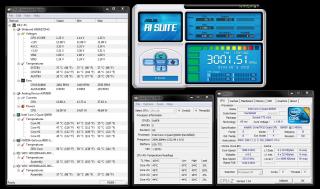
Finally my q6600 is running at 3.6GhZ. Thanx to every1 who shared their tips and thoughts thumbup.gif esp , bro tech3910 , OC4/3 , n hong1380 notworthy.gif

Attached Image

Next project -> lapping my q6600 rclxms.gif

again. thanx every1

http://valid.canardpc.com/show_oc.php?id=1134696

user posted image

This post has been edited by jaya7: Apr 15 2010, 09:24 AM
saturn85
post Apr 6 2010, 05:27 PM

Folding@home
*******
Senior Member
8,686 posts

Joined: Mar 2009


did you run stress test on it?

55c at idle is consider high temperature..
your casing have good air flow?

This post has been edited by saturn85: Apr 6 2010, 05:34 PM
mADmAN
post Apr 6 2010, 05:35 PM

10k Club
********
All Stars
10,530 posts

Joined: Nov 2004
From: Petaling Jaya & Mid Valley


Q6600 @ 3.0 is pretty easy to get... u can actually reduce ur Vcore...

try going 2-3 steps down on ur vcore from stock and run stress test for a few hours to ensure stability

try getting the lowest vcore thats stable with ur clocks and thatll help reduce the temps
tech3910
post Apr 6 2010, 05:37 PM

Anonymous
*******
Senior Member
5,644 posts

Joined: Feb 2008
From: Heaven to HELL


QUOTE(mADmAN @ Apr 6 2010, 05:35 PM)
Q6600 @ 3.0 is pretty easy to get... u can actually reduce ur Vcore...

try going 2-3 steps down on ur vcore from stock and run stress test for a few hours to ensure stability

try getting the lowest vcore thats stable with ur clocks and thatll help reduce the temps
*
even 1.24v also shouldn't b dat high temperature.

@ts
try:

1)open ur case pannel
2) apply fresh thermal paste
3) clean ur heatsink
4) disable auto fan
OC4/3
post Apr 6 2010, 06:29 PM

.
Group Icon
Elite
4,746 posts

Joined: Dec 2007
From: Speed rule


Try to take a reading using core temp??
deep_hunter
post Apr 6 2010, 08:01 PM

Getting Started
**
Junior Member
282 posts

Joined: Jan 2009
1.24v seems does not produce that kind of heat...but try;
check ur hsf whether it fixed properly,
reapply termal paste if hsf edi fixed properly,
check ur casing air ventiation


some suggest get a decent 3rd party cooler if u wanna to oc higher...
SUSaltimi
post Apr 6 2010, 08:22 PM

Look at all my stars!!
*******
Senior Member
2,173 posts

Joined: Jan 2006

Asus AI Suite is not accurate. Try CPUID HWMonitor....
TSjaya7
post Apr 6 2010, 10:39 PM

Getting Started
**
Junior Member
59 posts

Joined: Oct 2005


I've opened the case now.. so the airflow is better. here's the reading from CPUID HWMonitor. Should i reduce the VCore? Thanx everyone notworthy.gif

I havent reduced the Vcore but i can see it fluctuates. between 1.144 and 1.248 (max). is the only way to reduce Vcore is by using BIOS??

This post has been edited by jaya7: Apr 6 2010, 10:49 PM


Attached thumbnail(s)
Attached Image
tech3910
post Apr 6 2010, 10:46 PM

Anonymous
*******
Senior Member
5,644 posts

Joined: Feb 2008
From: Heaven to HELL


izzit go o B3 stepping?
try checking the temperature using care temp. mek sure the tj. max value is 100c

hav u off auto fan?
TSjaya7
post Apr 6 2010, 10:52 PM

Getting Started
**
Junior Member
59 posts

Joined: Oct 2005


QUOTE(tech3910 @ Apr 6 2010, 10:46 PM)
izzit go o B3 stepping?
try checking the temperature using care temp. mek sure the tj. max value is 100c

hav u off auto fan?
*
Stepping = B
Revision = G0

I've turned off auto fan.

here's the result with core temp test.


This post has been edited by jaya7: Apr 6 2010, 11:09 PM


Attached thumbnail(s)
Attached Image
tech3910
post Apr 6 2010, 11:00 PM

Anonymous
*******
Senior Member
5,644 posts

Joined: Feb 2008
From: Heaven to HELL


QUOTE(jaya7 @ Apr 6 2010, 10:52 PM)
Stepping = B
Revision = G0

I've turned off auto fan.

how do i check  temperature using care temp? please bear with me. 1st time overclocking  blush.gif
*
google & dl a s/w called "core temp"...
den just run it.
post a screenshot here....

btw.....u sure ur hsf is clean?
how long izzit since u change thermal paste?
stock thermal paste?
TSjaya7
post Apr 6 2010, 11:14 PM

Getting Started
**
Junior Member
59 posts

Joined: Oct 2005


QUOTE(tech3910 @ Apr 6 2010, 11:00 PM)
google & dl a s/w called "core temp"...
den just run it.
post a screenshot here....

btw.....u sure ur hsf is clean?
how long izzit since u change thermal paste?
stock thermal paste?
*
screenshots r up. I changed P5Q-PRO board on sunday. So the heatsink is clean, thermal paste is new. Using Thermalfusion 400 (Cooler Master). Im running FIFA10 now, and the temp is at 48c. I know change of better HSF will improve the temp, but to what level. If new 3rd party HSF can drop the temp to 40c i could live with that smile.gif
sharkeer
post Apr 6 2010, 11:22 PM

Casual
***
Junior Member
312 posts

Joined: May 2008
From: Nowhere
40c + idle is normal on stock hsf. i assume 55c that u mention is on load?
tech3910
post Apr 6 2010, 11:27 PM

Anonymous
*******
Senior Member
5,644 posts

Joined: Feb 2008
From: Heaven to HELL


last time ie OC mine to 3.0 wit stock fan, only ~40c idle (no air-con)...
u sure u put the hsf nicely?
i mean sure no broken legs o dint pin in properly?

how bout load temperature?
try stress testing wit Intel Burn Test (latest version is 2.4)
run 5 loops. for stability.
on core temp while running.....monitor the temperature.....
i suggest i stop the test if temperature reach 90c

later post another screenshot.
TSjaya7
post Apr 6 2010, 11:29 PM

Getting Started
**
Junior Member
59 posts

Joined: Oct 2005


yeap, thats on load. i play FIFA10 like all the time, with nothing else but windows services running at the back. So is that all right ? with load temp reaching 55C ?


Added on April 6, 2010, 11:32 pm
QUOTE(tech3910 @ Apr 6 2010, 11:27 PM)
last time ie OC mine to 3.0 wit stock fan, only ~40c idle (no air-con)...
u sure u put the hsf nicely?
i mean sure no broken legs o dint pin in properly?

how bout load temperature?
try stress testing wit Intel Burn Test (latest version is 2.4)
run 5 loops. for stability.
on core temp while running.....monitor the temperature.....
i suggest i stop the test if temperature reach 90c

later post another screenshot.
*
Ill double check that again wink.gif current load is standing at 49c.

This post has been edited by jaya7: Apr 6 2010, 11:32 PM
tech3910
post Apr 6 2010, 11:36 PM

Anonymous
*******
Senior Member
5,644 posts

Joined: Feb 2008
From: Heaven to HELL


dat is very normal for load temperature.....
i guess it is fine.....

now, i suggest either u try lower the vcore as low as possible if u edi satisfied wit the clock speed,
or, oc more, see the max current vcore can bring u.
TSjaya7
post Apr 7 2010, 12:23 AM

Getting Started
**
Junior Member
59 posts

Joined: Oct 2005


QUOTE(tech3910 @ Apr 6 2010, 11:36 PM)
dat is very normal for load temperature.....
i guess it is fine.....

now, i suggest either u try lower the vcore as low as possible if u edi satisfied wit the clock speed,
or, oc more, see the max current vcore can bring u.
*
I went into BIOS, turned Fan control to Turbo mode, Disabled CPU spectru, but did not touch the Vcores. Left them on Auto. Now i'm getting 40~42C when Idle. (actually when im using IE biggrin.gif)

What Voltage core u suggest would be suitable ?
tech3910
post Apr 7 2010, 12:29 AM

Anonymous
*******
Senior Member
5,644 posts

Joined: Feb 2008
From: Heaven to HELL


QUOTE(jaya7 @ Apr 7 2010, 12:23 AM)
I went into BIOS, turned Fan control to Turbo mode, Disabled CPU spectru, but did not touch the Vcores. Left them on Auto. Now i'm getting 40~42C when Idle. (actually when im using IE biggrin.gif)

What Voltage core u suggest would be suitable ?
*
every CPU has different stable voltage.....u hav to find out for urself.
try lowered it bit by bit.....
do IBT test each time u lowered it...

y dun find the max oc for dat vcore?
hahaha.... biggrin.gif

This post has been edited by tech3910: Apr 7 2010, 12:50 AM
TSjaya7
post Apr 7 2010, 12:37 AM

Getting Started
**
Junior Member
59 posts

Joined: Oct 2005


QUOTE(tech3910 @ Apr 7 2010, 12:29 AM)
every CPU has different stable voltage.....u hav to find out for urself.
try lowered it bit by bit.....
do IBT test each time u lowered it...

y dun find the max of for dat vcore?
hahaha.... biggrin.gif
*
I think max was 1.55v. didnt catch it properly. U suggest i should try lowering it?
tech3910
post Apr 7 2010, 12:41 AM

Anonymous
*******
Senior Member
5,644 posts

Joined: Feb 2008
From: Heaven to HELL


QUOTE(jaya7 @ Apr 7 2010, 12:37 AM)
I think max was 1.55v. didnt catch it properly. U suggest i should try lowering it?
*
no...
i'm saying wit dat 1.24vcore, oc it summore.....find max oc......
TSjaya7
post Apr 7 2010, 01:02 AM

Getting Started
**
Junior Member
59 posts

Joined: Oct 2005


QUOTE(tech3910 @ Apr 7 2010, 12:41 AM)
no...
i'm saying wit dat 1.24vcore, oc it summore.....find max oc......
*
i lowered Vcore to 1.2875v (using from Vid). Its running at 45C on idle. hmmm...

i pushed it 3.10Ghz now. still at 45C idle.. next im going for 3.20Ghz.. is that wise, or i shud change my HSF 1st.

This post has been edited by jaya7: Apr 7 2010, 01:08 AM
tech3910
post Apr 7 2010, 01:33 AM

Anonymous
*******
Senior Member
5,644 posts

Joined: Feb 2008
From: Heaven to HELL


QUOTE(jaya7 @ Apr 7 2010, 01:02 AM)
i lowered Vcore to 1.2875v (using from Vid). Its running at 45C on idle. hmmm...

i pushed it 3.10Ghz now. still at 45C idle.. next im going for 3.20Ghz.. is that wise, or i shud change my HSF 1st.
*
depends on ur load temperature on Intel Burn Test.....
u shud keep it bellow 90c on load.

This post has been edited by tech3910: Apr 7 2010, 02:42 AM
TSjaya7
post Apr 7 2010, 04:38 PM

Getting Started
**
Junior Member
59 posts

Joined: Oct 2005


QUOTE(tech3910 @ Apr 7 2010, 01:33 AM)
depends on ur load temperature on Intel Burn Test.....
u shud keep it bellow 90c on load.
*
Pushed it 3.20Ghz now. temp at idle is around 43c. Load was 49c.
ran Intel Burn Test at vcore 1.287. It crashed almost immediately. system went to Memory Dump and rebooted. Changed vcore to 1.30 and re-rum the test (on Standard). This time it was successful. Should i leave it at 3.20Ghz? Speed is good but im just worried about the CPU core temps.
reading are as follows :


Hardware monitor Intel Core 2 Quad Q6600
Temperature 0 50°C (121°F) [0x32] (Core #0)
Temperature 1 48°C (118°F) [0x34] (Core #1)
Temperature 2 47°C (116°F) [0x35] (Core #2)
Temperature 3 48°C (118°F) [0x34] (Core #3)

again. thanx for your guidance bro. really appreciate it.


Attached thumbnail(s)

Attached Image
hong1380
post Apr 7 2010, 04:43 PM

Casual
***
Junior Member
345 posts

Joined: Aug 2007
thats idle temp or load temp?


Added on April 7, 2010, 4:44 pmif its load temp...it should be no problem

my Q6600 running on 400X8 mhz at 1.35v vcore...load temp around 60C

This post has been edited by hong1380: Apr 7 2010, 04:44 PM
TSjaya7
post Apr 7 2010, 05:01 PM

Getting Started
**
Junior Member
59 posts

Joined: Oct 2005


QUOTE(hong1380 @ Apr 7 2010, 04:43 PM)
thats idle temp or load temp?


Added on April 7, 2010, 4:44 pmif its load temp...it should be no problem

my Q6600 running on 400X8 mhz at 1.35v vcore...load temp around 60C
*
thats load temp bro smile.gif ASUS Ai seems to be giving average of the temps for 4 cores. So i guess its not very accurate.
hong1380
post Apr 7 2010, 05:03 PM

Casual
***
Junior Member
345 posts

Joined: Aug 2007
i think it should be no problem ba...lower than mine smile.gif
tech3910
post Apr 7 2010, 05:07 PM

Anonymous
*******
Senior Member
5,644 posts

Joined: Feb 2008
From: Heaven to HELL


push it summore..... biggrin.gif

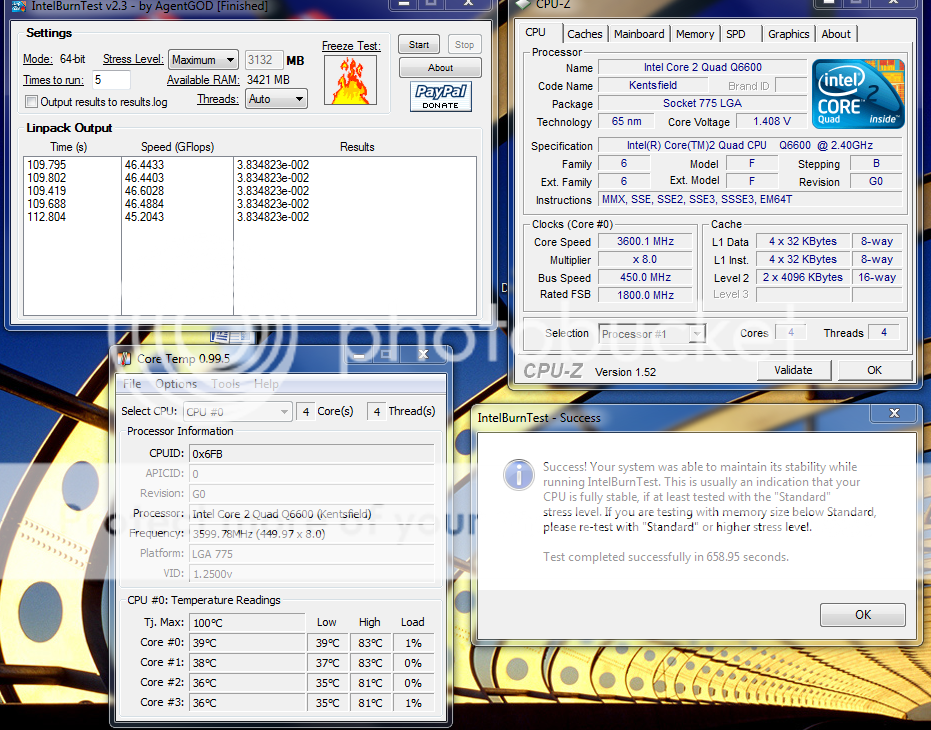
btw....on stress level...put maximum......& run minimum of 5 loops......

show screenshot like dis.....

» Click to show Spoiler - click again to hide... «


This post has been edited by tech3910: Apr 7 2010, 05:11 PM
hong1380
post Apr 7 2010, 05:13 PM

Casual
***
Junior Member
345 posts

Joined: Aug 2007
running on that settings...its like killing the processor for me..lol
tech3910
post Apr 7 2010, 05:38 PM

Anonymous
*******
Senior Member
5,644 posts

Joined: Feb 2008
From: Heaven to HELL


QUOTE(hong1380 @ Apr 7 2010, 05:13 PM)
running on that settings...its like killing the processor for me..lol
*
wit sufficient cooling, i dun see any problem running on dat setting 24/7.....

actually i don't run dat setting 24/7, just wanna see my q6600 can reach 3.6 o not....
coz every q6600 users hopes his/her processor can hit 3.6...... blush.gif

usually, for intense gaming, the setting is on my siggy....
but during non gaming season like now, just doing dl, i set tit to 410*6 + under volt it to 1.024vcore..... thumbup.gif
OC4/3
post Apr 7 2010, 07:07 PM

.
Group Icon
Elite
4,746 posts

Joined: Dec 2007
From: Speed rule


No issue,temp is normal
Nothing to worry about

TSjaya7
post Apr 7 2010, 09:26 PM

Getting Started
**
Junior Member
59 posts

Joined: Oct 2005


QUOTE(tech3910 @ Apr 7 2010, 05:07 PM)
push it summore..... biggrin.gif

btw....on stress level...put maximum......& run minimum of 5 loops......

show screenshot like dis.....

» Click to show Spoiler - click again to hide... «

*
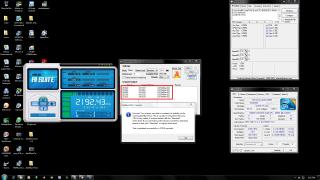
Great wink.gif but on 32 bit OS you could only run on Standard.. hmmm... sad.gif i'm gonna get Mega shadow soon wink.gif
Current Vcore set at 1.270v. any lower than that system wont POST. at the moment Core temp is like below at idle

Installed speedfan to see if temp reading are more accurate. all i get is juz confused. Which is reliable ?


This post has been edited by jaya7: Apr 7 2010, 11:09 PM


Attached thumbnail(s)
Attached Image Attached Image
TSjaya7
post Apr 8 2010, 06:42 PM

Getting Started
**
Junior Member
59 posts

Joined: Oct 2005


Latest :

cpu : 3.3ghz
vcore : 1.462v
Idle temp : 40-41C
Load Temp : 65C (Max) -> Intel Burn Test

Cooler : Prolimatech MegaShadow DLX Edition

This post has been edited by jaya7: Apr 8 2010, 06:56 PM


Attached thumbnail(s)
Attached Image Attached Image
hong1380
post Apr 8 2010, 06:55 PM

Casual
***
Junior Member
345 posts

Joined: Aug 2007
i think ur vcore is too high for that= =...
TSjaya7
post Apr 8 2010, 06:57 PM

Getting Started
**
Junior Member
59 posts

Joined: Oct 2005


QUOTE(hong1380 @ Apr 8 2010, 06:55 PM)
i think ur vcore is too high for that= =...
*
Im gonna lower it more wink.gif
hong1380
post Apr 8 2010, 07:00 PM

Casual
***
Junior Member
345 posts

Joined: Aug 2007
thats my CPUID for my Q6600 at 3.2ghz at idle temp

load temp will be around 60C
Attached Image


Added on April 8, 2010, 7:00 pmi think u better tweak the settings on bios manually smile.gif

This post has been edited by hong1380: Apr 8 2010, 07:00 PM
TSjaya7
post Apr 8 2010, 07:04 PM

Getting Started
**
Junior Member
59 posts

Joined: Oct 2005


i lowered it to 1.392 and temp dropped to 39c at idle. i'm gonna push the FSB to reach 3.4ghz. hope to reach 3.6g and idle temp 39-40c like bro tech3910's OC settings wink.gif im getting greedy .. lol
tech3910
post Apr 8 2010, 08:00 PM

Anonymous
*******
Senior Member
5,644 posts

Joined: Feb 2008
From: Heaven to HELL


the temperature different between 2 s/w boz dey uses different tj. max value....
stick wit core temp, more accurate.

oc from bios la.
disable eist & c1e for improve overclocking.
TSjaya7
post Apr 8 2010, 10:03 PM

Getting Started
**
Junior Member
59 posts

Joined: Oct 2005


QUOTE(tech3910 @ Apr 8 2010, 08:00 PM)
the temperature different between 2 s/w boz dey uses different tj. max value....
stick wit core temp, more accurate.

oc from bios la.
disable eist & c1e for improve overclocking.
*
tweaking from BIOS. raised to 377*9 now. able to POST at vcore 1.33125v smile.gif Intel Burn Test was successful. Idle temp is ard 38C. Load was at 44C when running burn test.


tech3910
post Apr 8 2010, 10:30 PM

Anonymous
*******
Senior Member
5,644 posts

Joined: Feb 2008
From: Heaven to HELL


QUOTE(jaya7 @ Apr 8 2010, 10:03 PM)
tweaking from BIOS. raised to 377*9 now. able to POST at vcore 1.33125v smile.gif Intel Burn Test was successful. Idle temp is ard 38C. Load was at 44C when running burn test.
*
tip:

say 378*9 ~ 3.4GHz
& 425*8 = 3.4GHz

the 425*8 setting will b faster coz fsb is faster.....
TSjaya7
post Apr 8 2010, 11:12 PM

Getting Started
**
Junior Member
59 posts

Joined: Oct 2005


QUOTE(tech3910 @ Apr 8 2010, 10:30 PM)
tip:

say 378*9 ~ 3.4GHz
& 425*8 = 3.4GHz

the 425*8 setting will b faster coz fsb is faster.....
*
i hit 3.60 with 400*9 vcore at 1.41. idle temp seems to be at 40C. but when i look at core temp its average 44-45c. i compared to your screenshot, i can see yuor core temp showing average 39c.. is something wrong with my settings??


Attached thumbnail(s)
Attached Image
tech3910
post Apr 8 2010, 11:40 PM

Anonymous
*******
Senior Member
5,644 posts

Joined: Feb 2008
From: Heaven to HELL


QUOTE(jaya7 @ Apr 8 2010, 11:12 PM)
i hit 3.60 with 400*9 vcore at 1.41. idle temp seems to be at 40C. but when i look at core temp its average 44-45c. i compared to your screenshot, i can see yuor core temp showing average 39c.. is something wrong with my settings??
*
i'm using 3rd party cooler...
plus wen i do dat oc dat time, i just wanna benchmark, hence blast my air-con
also, thermal paste also meks few Celsius different......

i'm using tuniq tx-3..... biggrin.gif

i wan push it further, but i wont do dat till i hav better cooling.....
the load temperature edi 80+......
if no a/c, 90+

This post has been edited by tech3910: Apr 8 2010, 11:44 PM
TSjaya7
post Apr 8 2010, 11:58 PM

Getting Started
**
Junior Member
59 posts

Joined: Oct 2005


QUOTE(tech3910 @ Apr 8 2010, 11:40 PM)
i'm using 3rd party cooler...
plus wen i do dat oc dat time, i just wanna benchmark, hence blast my air-con
also, thermal paste also meks few Celsius different......

i'm using tuniq tx-3..... biggrin.gif

i wan push it further, but i wont do dat till i hav better cooling.....
the load temperature edi 80+......
if no a/c, 90+
*
Ic, i expected MegaShadow shoul be able to cool it more. Mayb it juz coz my room temp. its really stuff at the moment. smile.gif had BSOD while playing fifa at vcore 1.41. Raised it 1.43.. gotta test it out.. sad.gif
ALeUNe
post Apr 9 2010, 12:02 AM

I'm the purebred with aristocratic pedigree
Group Icon
VIP
9,692 posts

Joined: Jan 2003
From: Mongrel Isle
QUOTE(jaya7 @ Apr 8 2010, 11:58 PM)
Ic, i expected MegaShadow shoul be able to cool it more. Mayb it juz coz my room temp. its really stuff at the moment. smile.gif had BSOD while playing fifa at vcore 1.41. Raised it 1.43.. gotta test it out..  sad.gif
*
Use OCCT 3.1.0 to test your system. It's free and user friendly.
You system should be stable if it can run OCCT for 1-2 hours.
tech3910
post Apr 9 2010, 12:17 AM

Anonymous
*******
Senior Member
5,644 posts

Joined: Feb 2008
From: Heaven to HELL


idle temperature dun matter much, load temperature more important....
i see ur load temperature is fantastic......

btw.....unstable oc maybe cause from other thing such as ram timing too tight/frequency too high, o nb voltage.

This post has been edited by tech3910: Apr 9 2010, 12:20 AM
TSjaya7
post Apr 9 2010, 01:01 AM

Getting Started
**
Junior Member
59 posts

Joined: Oct 2005


QUOTE(tech3910 @ Apr 9 2010, 12:17 AM)
idle temperature dun matter much, load temperature more important....
i see ur load temperature is fantastic......

btw.....unstable oc maybe cause from other thing such as ram timing too tight/frequency too high, o nb voltage.
*
yeap..thats what i'm trying to figure it our..coz i left ram timing, mem voltage and NB voltage on "auto" settings? should i set it manually? but then i'm not sure what value to choose.. blush.gif
tech3910
post Apr 9 2010, 01:14 AM

Anonymous
*******
Senior Member
5,644 posts

Joined: Feb 2008
From: Heaven to HELL


i think for nb voltage, leave it auto is good enough.....

wat ram u using & wat speed & timing it is currently running at?
TSjaya7
post Apr 9 2010, 01:36 AM

Getting Started
**
Junior Member
59 posts

Joined: Oct 2005


QUOTE(tech3910 @ Apr 9 2010, 01:14 AM)
i think for nb voltage, leave it auto is good enough.....

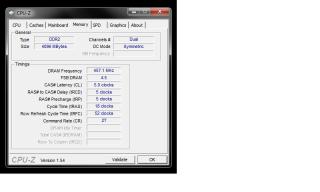
wat ram u using & wat speed & timing it is currently running at?
*
im using corsair XMS2 2x2gb Kit (800mhz)


Attached thumbnail(s)
Attached Image
tech3910
post Apr 9 2010, 01:39 AM

Anonymous
*******
Senior Member
5,644 posts

Joined: Feb 2008
From: Heaven to HELL


i think ur ram shouldn't problem given enough dram voltage is pump in...

btw, for q6600 safe operating limit, keep it bellow 1.5vcore.
TSjaya7
post Apr 9 2010, 02:39 PM

Getting Started
**
Junior Member
59 posts

Joined: Oct 2005


QUOTE(ALeUNe @ Apr 9 2010, 12:02 AM)
Use OCCT 3.1.0 to test your system. It's free and user friendly.
You system should be stable if it can run OCCT for 1-2 hours.
*
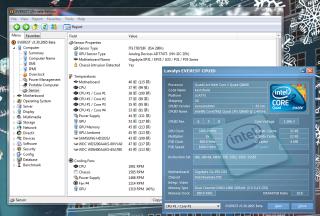
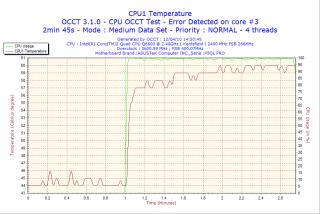
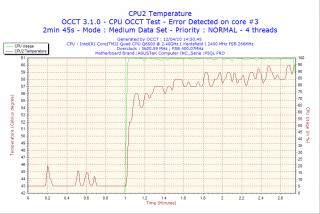
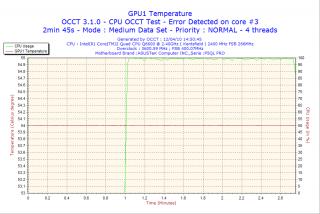
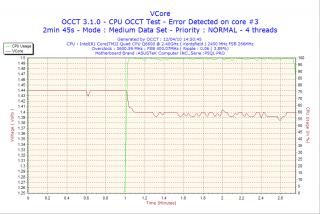
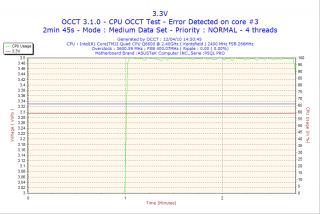
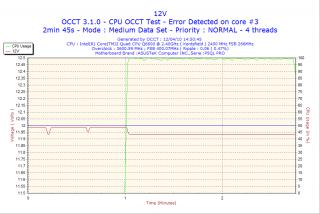
thanx. ran it for juz 6 mins. Core #2 failed. i'll have to tweak Vcore more untill it becomes stable.

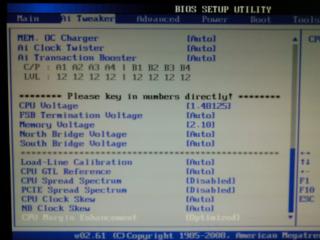
I ran OCCT test for 1hr and it failed. I've increased vcore to 1.48 but still cant get it stable. I've attached screenshots of BIOS settings and OCCT tables.


Attached thumbnail(s)
Attached Image Attached Image Attached Image Attached Image Attached Image Attached Image Attached Image Attached Image Attached Image Attached Image Attached Image
TSjaya7
post Apr 12 2010, 03:32 PM

Getting Started
**
Junior Member
59 posts

Joined: Oct 2005


BIOS settings

This post has been edited by jaya7: Apr 12 2010, 04:27 PM


Attached thumbnail(s)
Attached Image
Hiruka
post Apr 12 2010, 03:33 PM

Game's Life
******
Senior Member
1,342 posts

Joined: Mar 2008
From: Heaven


Woot..that's pretty dark..is it me or u guys too.. whistling.gif cool2.gif
TSjaya7
post Apr 12 2010, 04:22 PM

Getting Started
**
Junior Member
59 posts

Joined: Oct 2005


QUOTE(Hiruka @ Apr 12 2010, 03:33 PM)
Woot..that's pretty dark..is it me or u guys too.. whistling.gif cool2.gif
*
i dont get it, every time i upload a pic from my omnia 2, it turns up dark vmad.gif

pics r up...had to resize ... vmad.gif

This post has been edited by jaya7: Apr 12 2010, 04:33 PM


Change to:
| Lo-Fi Version
0.0334sec    0.73    6 queries    GZIP Disabled
Time is now: 11th December 2025 - 06:46 AM