Welcome Guest ( Log In | Register )

Bump Topic Topic Closed RSS Feed

Outline · [ Standard ] · Linear+

 iPhone 4 and iOS 4, Discussion Thread

views
     
fumjusta
post Jun 8 2010, 10:26 PM

Getting Started
**
Junior Member
62 posts

Joined: Sep 2008


Just finished reading 30+ pages of this thread. Lots of repeated questions, which is unnecessary in the first place if people care enough to read or perform a simple Google search.

As suggested by some of you, this topic needs its own FAQs section.

As for iPhone 4, I don't think I will upgrade. But if I do decide to upgrade, it will be in October simply because I got my 3GS last October. This way, I would have used the 3GS for 1 year.

Plus, in terms of user experience, the new iOS 4 will transform the current 3GS into a new iPhone (albeit not on par with iPhone 4). Similar to the time when we upgraded from iOS 2.2 to 3.0 smile.gif

That said, I need to be wary of the poisoners here tongue.gif

QUOTE(stringfellow @ Jun 8 2010, 12:14 PM)
Moving past the petty squabbles we're seeing here, I've read July 18th as the possible date for AUS launch. But looking at the calendar, it's a Sunday, and historically, no iPhone launch has ever been on a Sunday.

I've requested and blocked my roster for next month on the last three Friday-Sunday days, namely 15-17th/22-24th/29-31st for the estimated AUS launch. If I can, I'll even line up.

I'll post another post after this, just got an MMS from my bro in Maxis, screenshot of the FAQ for frontliners in Maxis for their iPhone 4 plans.

EDIt: Meh. Not much of infos on the screenshot FAQ, only tangible info is that Maxis will be launching in "Quarter 3, 2010", which is codename for September.

Fumjusta, where are you bro? Care to shed some light into this? Your senior just sent me the FAQ screenies. tongue.gif
*
Your source is as good as mine wink.gif whistling.gif
fumjusta
post Jun 9 2010, 11:27 AM

Getting Started
**
Junior Member
62 posts

Joined: Sep 2008


QUOTE(mafeya @ Jun 9 2010, 10:16 AM)
does anyone know where to find the full keynote speech regarding the iphone?
*
You can watch the video-on-demand at Apple website, or download it from iTunes podcast.

Here's the link to the podcast: Apple Keynotes
fumjusta
post Jun 9 2010, 08:25 PM

Getting Started
**
Junior Member
62 posts

Joined: Sep 2008


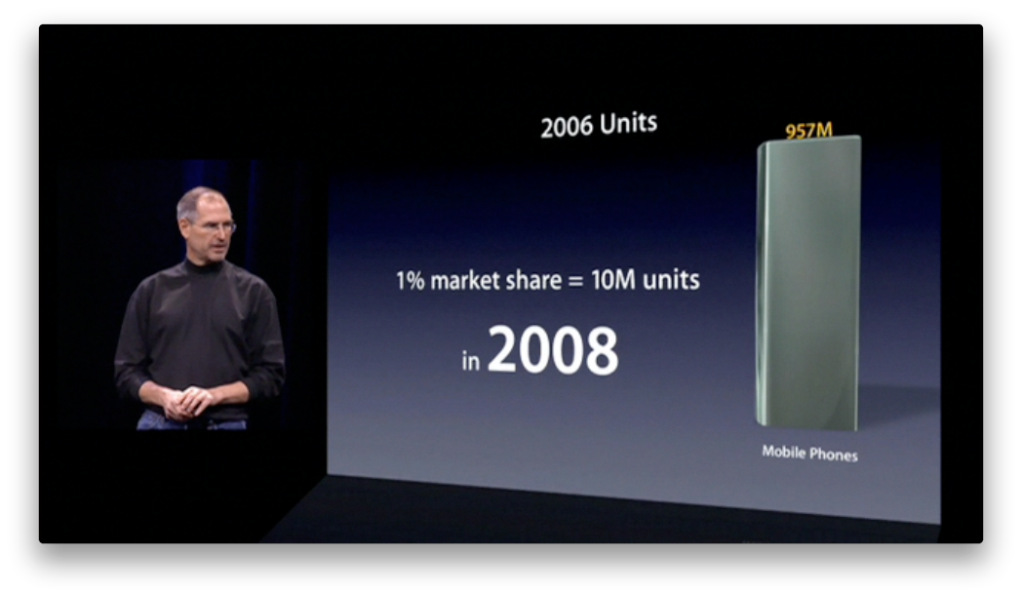
When Steve Jobs unveiled the iPhone during Macworld 2007, he made it clear that their target was to sell 10 million iPhone in 2008 (the first full year for iPhone).

» Click to show Spoiler - click again to hide... «


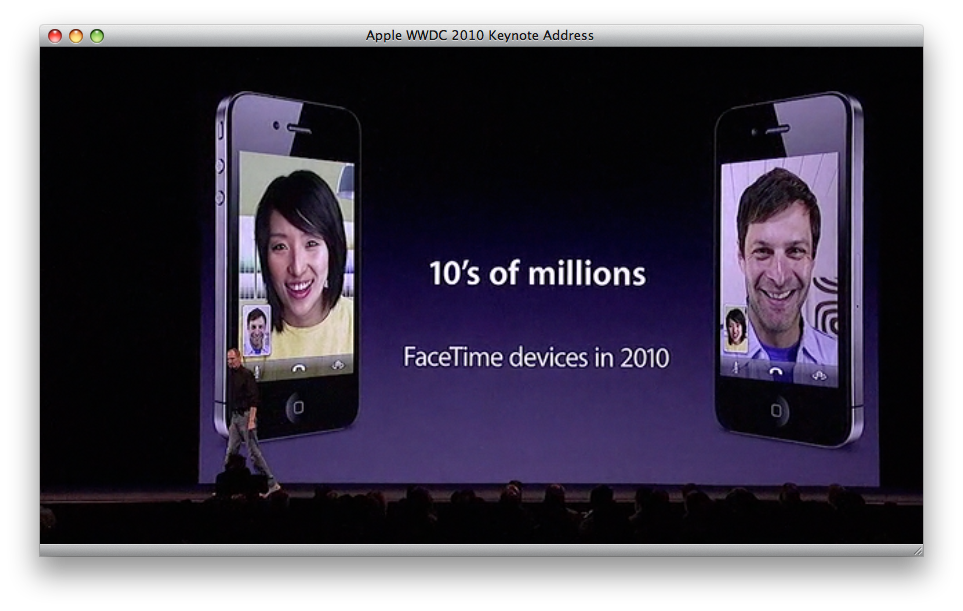
Interestingly, during the recent WWDC, he mentioned that "Apple will ship 10's of millions of FaceTime devices this year."

» Click to show Spoiler - click again to hide... «


For a company that pays a lot of attention to details, I do wish that FaceTime will make its way into iPod Touch, iPad, and Mac.

Now, this is merely my observation, prediction, and hope. We can dream, right? whistling.gif

fumjusta
post Jun 22 2010, 02:30 AM

Getting Started
**
Junior Member
62 posts

Joined: Sep 2008


QUOTE(Alviano @ Jun 22 2010, 02:04 AM)
After downloading from the external link, then how to update my phone. omg =P
*
If you are using Mac, press & hold the Option key then click update. Then choose the update file.

IIANM, If you are using Windows, press & hold the Shift key then click update.

smile.gif

fumjusta
post Jun 22 2010, 04:25 AM

Getting Started
**
Junior Member
62 posts

Joined: Sep 2008


QUOTE(voldemort @ Jun 22 2010, 03:57 AM)
it's weird that they put that setting there.. it was like irrelevant with the iPod navigation..  rclxub.gif
*
QUOTE(voldemort @ Jun 22 2010, 04:02 AM)
actually i'm ok with the iPod in landscape mode, just that while i was trying to text on bed then it'll be quite annoying..
so for me this setting is more useful in text message..
putting this setting in setting > general would be more appropriate..
because that was the first place i was searching for it just now..  tongue.gif
*
You don't have to launch iPod first. You can just simply double-tap the home button from anywhere, and flick to the left to access the orientation control.

It's much more convenient to have the orientation lock there because it provides faster access, as compared to putting it in Settings.


This post has been edited by fumjusta: Jun 22 2010, 04:30 AM
fumjusta
post Jun 22 2010, 06:49 PM

Getting Started
**
Junior Member
62 posts

Joined: Sep 2008


If you are using multiple keyboard layout, press & hold the globe, and a pop-up menu will appear.

To make things faster, you can quickly activate the pop-up menu by pressing the globe and immediately slide your finger upward.

This is especially handy when you are using more than 2 keyboard layouts.

user posted image

This post has been edited by fumjusta: Jun 22 2010, 06:55 PM

Topic ClosedOptions
 

Change to:
| Lo-Fi Version
0.0189sec    0.52    7 queries    GZIP Disabled
Time is now: 9th December 2025 - 04:06 AM