

..
This post has been edited by phat_ox: Sep 6 2012, 11:14 PM
.., ..
.., ..
|
|
 Apr 4 2010, 07:59 PM, updated 14y ago Apr 4 2010, 07:59 PM, updated 14y ago
Show posts by this member only | Post
#1
|
 
Junior Member
42 posts Joined: Jul 2008  
|
..
This post has been edited by phat_ox: Sep 6 2012, 11:14 PM |
|
|
Apr 4 2010, 10:33 PM
Show posts by this member only | Post
#2
|
|
Junior Member
107 posts Joined: Feb 2006
|
if your lcd monitor has audio out, then use that loh.
otherwise, you'll need to do this... http://www.chadledford.com/?p=50 to make the av cable fit with your hdmi cable. then get a rca to 3.5mm adapter like this to connect to your headphones 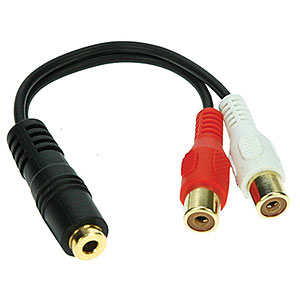 from All IT or Sri Computers in lowyat. from All IT or Sri Computers in lowyat.have fun  |
|
|
Apr 5 2010, 10:32 AM
Show posts by this member only | Post
#3
|
|
Junior Member
42 posts Joined: Jul 2008
|
I got the vga cable as well as a hdmi cable. Currently using the hdmi. So if I want to connect to headphones I need to switch to the vga cable and connect it with the rca to 3.5mm adapter to a headphone?
Before this I tried to use the vga cable to connect my xbox to monitor but what happened is the screen keep popping up this message :auto config please wait, and then the screen becomes dark and back to normal repeatedly. Any idea why this happen? Btw Im using acer h233h |
|
Topic ClosedOptions
|
| Change to: |  0.0135sec 0.0135sec
 0.82 0.82
 5 queries 5 queries
 GZIP Disabled GZIP Disabled
Time is now: 21st December 2025 - 03:01 PM |
 Quote
Quote