Welcome Guest ( Log In | Register )

Outline · [ Standard ] · Linear+

 Will you buy non-branded HDMI cable?, if it is RM20 for 3m and RM50 for 4.5m

views
     
DigitalTech
post Apr 1 2010, 04:55 PM

Enthusiast
*****
Senior Member
974 posts

Joined: Aug 2005
From: Petaling Jaya


QUOTE(chewkl @ Apr 1 2010, 04:47 PM)
Now Tesco 1.3b 3m cable going for RM10. thumbup.gif
*
If Tesco can sell this cable for RM10, I think the cost of producing this cable will be about RM3 or less.

After taking away sales agent commission, middle man, manufacturer & tesco profit, logistics, packaging & etc it should be about that price.

So, you can judge what kind of quality can a RM3.00 (USD0.90) HDMI with 3m length can do to your Home theater experience.

If it does not damage your HDMI connector on your devices, you should be very happy already.

This post has been edited by DigitalTech: Apr 1 2010, 05:08 PM
DigitalTech
post Apr 3 2010, 08:20 AM

Enthusiast
*****
Senior Member
974 posts

Joined: Aug 2005
From: Petaling Jaya


QUOTE(dopp @ Apr 3 2010, 01:31 AM)
If Monstard Cable can sell a hdmi cable same model n length but price varies from $100-1000, I think the cost of producing this cable will be about $2 or less.

After taking away sales agent commision, cheap labour in china, tons of advertisement, middle man, high commision forum/ebay seller that spam forum for sale, etc it should be about that.

So, you can judge what kind of money you want to spend if $10 cable from tesco work as well as Monstard Cable for your pocket experience.

If it does not make you poorer, it will make you looks stupid if you cant differentiate your cable when your fren challenge you for a blind fold test. You should feel regret already.
*
I wonder why most of my customers after purchasing the cables and left testimonial on my thread, saying that it's an awesome cable and it makes a difference and appreciate me that I brought in these cables at an affordable price?

Hmm...I wonder why? I'm talking about hundreds of customers here, not 1 or 2.

If you think a RM10 cable works fo you, then good for you.

Maybe you've never own a good quality cable before. I can't blame you for making that judgement.

Based on your judgement, you are also insulting serious audiophiles who invest in thousands RM in cables. Are they blind too?

Obviously you are not serious in quality and performance. Let's leave this at it is.
DigitalTech
post Apr 3 2010, 10:40 PM

Enthusiast
*****
Senior Member
974 posts

Joined: Aug 2005
From: Petaling Jaya


QUOTE(low98944 @ Apr 3 2010, 08:40 AM)
Are your customers still think that their previous comments still true and valid as at now after their learned the facts or do at comparison themselve and/or become well informed?  laugh.gif

Think physiologically, what normal people will react, if their found out that their paid lot of extra and get a same performance cable? Think, you will know the answer.  tongue.gif
*
FYI, those who purchase the cable from me came back and buy more and even refer to their friends.

They know a good deal, when they see one. I'm not cooking this up. Look at my thread and you can read it yourself.

Why they came back and buy more if they are not satisfied? They have too much of $$$ or they appreciate quality & performance?

I have many senior audiophiles from lowyat and hifi4sales who bought from me also left good remarks.

This people knows what they are paying for......quality.

If you still want to believe cheap cable works the same, then I'm not going to challenge that.

Don't resist the fact that there are many happy & satisfied people who use and own the quality branded cables.

The testimonials from my customers speak for themselves.

DigitalTech
post Apr 12 2010, 11:17 AM

Enthusiast
*****
Senior Member
974 posts

Joined: Aug 2005
From: Petaling Jaya


Refer to this thread:
Why you shouldn't buy cheap HDMI cable (http://forum.lowyat.net/topic/738072)


(Source) http://www.audioholics.com/education/cable...ble-bench-tests

Digital Is Digital, Right?

Unlike the mumbo-jumbo surrounding TOSlink and coax optical cables, HDMI is a little more complex. When the specification is a constantly-moving target, as HDMI has proven to be - and this has been fueled by a willing consumer electronics industry - things get a little hairy. It's important to understand just why, with HDMI, you can't just say "digital is digital, it either works or it doesn't." As we referenced in detail in our article 'HDMI - It's All in the Bitrate,' HDMI has progressed (evolved) from a simple 720p/1080i 8-bit per channel signal to the current 1080p 12-bit (or more) per channel signal it is today. Just what kind of bandwidth is being sent over the cable depends on the source electronics and the capability of the display, but the potential has vastly increased since the debut of HDMI in 2003. As these signals got higher in resolution and bit depth, the amount of bits per second traveling through the HDMI cable increased. When that happened (and most recently culminating in the release of HDMI 1.3) the tolerance requirements for HDMI cables changed as well.

By way of example, with a digital audio coax cable you are dealing with a required maximum bitrate of just over 3 Mbit/s. For a S/PDIF connection, be it TOSlink or digital coax, this is chump change. The specification for that digital connection hasn't changed since ~1997 and the demands made on the cable are far less than the cable's potential capabilities. Now let's look at HDMI. A massive bundle of 15 cables (not including drain wires) - some insulated, all fairly important. In order for HDMI to remain practical, and avoid unnecessary interference, the cable has to be made, at least partially, out of stranded wire, lest 15 solid cables render the cable more of an unbendable, unwieldy stick than a cable. Additionally, the amount of information necessary to transmit the incredibly high resolution video and 8-channels of uncompressed digital audio far exceeds that of the typical DTS or Dolby Digital compressed traffic which meanders through a S/PDIF audio-only connection.


So How Do Cables Differ?

Aside from cost, HDMI cables differ in many ways. Some real obvious differences include the gauge of cable used in construction, stranded versus solid cable pairs (which greatly affects flexibility), and flat versus round. These physical differences are significant, but not nearly as important as whether or not the cables are rated to carry a particular signal a stated distance. Many cables are certified by one or more companies who provide specifications and/or speed ratings to cables. Simplay, for example is a wholly-owned division of HDMI Licensing, LLC that charges large sums of money to test cables and consumer electronics for compatibility and interoperability. Another company coming online is DPL Labs which rates cables on a 1-5 rating. It's a bit redundant since it should be pretty obvious that the Category 1 and 2 specs should be easy enough to certify and uphold. We're more concerned with manufacturer being honest than whether or not some third party certifies them or gives them a sticker. After all, nobody expects every AV receiver to be certified by a third party for exact power ratings (the FCC notwithstanding, but they hardly do more than ensure the product doesn't emit radiation).

Specific problems arise in a couple of areas. First, the equipment required to test HDMI cables is very expensive. We're talking over $200,000 for a basic setup including source generator, scope and calibrated HDMI "probes". This is obviously cost prohibitive for smaller companies to do much more than rebrand someone else's manufactured cables that have already been certified. If they choose the right manufacturer this isn't a problem, but some don't.

You can predict cable integrity and performance fairly accurately by doing the math on the cable geometry and modeling the results. This isn't easy, however (at least not for mere mortals) and we opted to use the measurement methodology instead. For a great (though very technical) article on HDMI cable modeling, please see Eugene Mayevskiy's writeup, which comes from an engineer who worked with Tektronix to deal with these very issues.

This post has been edited by DigitalTech: Apr 12 2010, 11:23 AM
DigitalTech
post Apr 13 2010, 02:39 PM

Enthusiast
*****
Senior Member
974 posts

Joined: Aug 2005
From: Petaling Jaya


QUOTE(sKyWiR3pT3lTd @ Apr 13 2010, 11:13 AM)
Something like this

user posted image
*
You are promoting fake Monster cable by inserting this picture with that URL.

You can buy fake M1000HD/M2000HD for $10-$20 from that website.

So buying fake Monster cable is the same quality as RM10 tesco brand, but with good looks.
DigitalTech
post Apr 13 2010, 03:43 PM

Enthusiast
*****
Senior Member
974 posts

Joined: Aug 2005
From: Petaling Jaya


QUOTE(sKyWiR3pT3lTd @ Apr 13 2010, 02:59 PM)
Excuse me bro, im not promoting fake cable. Im just showing the picture only.
If you got any problem, post your own pic here..
*
bro, putting that picture is not the problem. It's the URL showing in that picture.

People may think that's the place to buy Monster cable.

Not your fault, because you may not know what's with the URL.


DigitalTech
post Apr 13 2010, 04:30 PM

Enthusiast
*****
Senior Member
974 posts

Joined: Aug 2005
From: Petaling Jaya


QUOTE(faidzal1982 @ Apr 13 2010, 02:46 PM)
bro... how do we differentiate fake monster cable with the ori one?
*
Go to this thread for more info on the discussion on counterfeit Monster cables:

Beware of Counterfeits Monster Cables, High risk - M2000HD/M1000HD HDMI Cable
http://forum.lowyat.net/topic/1360072
DigitalTech
post Apr 13 2010, 04:50 PM

Enthusiast
*****
Senior Member
974 posts

Joined: Aug 2005
From: Petaling Jaya


QUOTE(wuanzi @ Apr 13 2010, 03:58 PM)
ok noted.

but... so what is the problem with the URL - I know now, coz you said the URL is pointing to a seller who is alleged by you of selling fake goods... but the problem is that - how do we, as commoners, know if a URL (seller) is a problem or when it is not a problem... sorry, not trying to be funny - just that a lot of times, as a forum member, using a picture to illustrate a content is a hard habit to break and I don't really think it is hardly a fault... but if you are not agreeable so be it lah - but seriously, if you think that the seller is selling fake goods and infringe copyright, you should report to authority and only once the seller is convicted, I think we can openly say the seller is doing a criminal act lah
*
I think the best way is to avoid inserting pictures with URL on it.
DigitalTech
post Apr 13 2010, 04:55 PM

Enthusiast
*****
Senior Member
974 posts

Joined: Aug 2005
From: Petaling Jaya


brows.gif
QUOTE(neb @ Apr 13 2010, 04:42 PM)
someone is selling tesco cable for RM30, RM20 profit right there shakehead.gif
http://cgi.ebay.com.my/TECHNIKA-HDMI-CABLE...=item35a87b1946
*
Some places don't have tesco mah. So must pay a premium for it lor. brows.gif

This post has been edited by DigitalTech: Apr 13 2010, 04:57 PM
DigitalTech
post Apr 13 2010, 06:46 PM

Enthusiast
*****
Senior Member
974 posts

Joined: Aug 2005
From: Petaling Jaya


QUOTE(mpyw @ Apr 13 2010, 05:16 PM)
For authorised Monster Cable for Singapore & Malaysia, please get it from Hwee Seng (Electronics) Pte Ltd as listed in Monster main page :-

http://www.monstercable.com/international/...nal_dealers.asp

DigitalTech, did you get your cables from Hwee Seng Malaysia?
*
No. The cables I'm selling I imported directly from US.

If I get it from Hwee Seng, the price will be similar to Harvey Norman or SenQ (overpriced).

However, if you buy from Hwee Seng authorised dealers, you will get warranty from them.


Added on April 13, 2010, 6:54 pm
QUOTE(sKyWiR3pT3lTd @ Apr 13 2010, 05:30 PM)
Bro, im sorry, if that has spoiled your genuine sale.

This is my actual cable that im using ..

user posted image

Someone bought it for me for a whopping price sometime ago. Im not sure if the cable in the pic is fake.

But if you check in Mudah or elsewhere , there's people sellling it. Even in LYN.

How do we know identify fake and genuine Monster cable. Where do you get your items from? I mean , im just asking , not questioning your sale.

If it does, im sorry if it was straight to point..whistling.gif:
*
In US, there's are some factory closeout and liquidation stocks.

The wholesaler buys those stock in huge bulks in massive discounted price.

Most of it are older models, but some are still selling in the market.

So, I happen to know this US wholesalers and import them in bulk.

If you know where to buy, you can get a good deal. rclxms.gif


Seriously, please avoid buying Monster 1000HD, M1000HD and M2000HD HDMI cables selling below RM200.00.

If you want to buy, you can get it for $10-$20 from China websites. These are high grade copies cable.


This post has been edited by DigitalTech: Apr 13 2010, 06:54 PM
DigitalTech
post Apr 16 2010, 04:04 PM

Enthusiast
*****
Senior Member
974 posts

Joined: Aug 2005
From: Petaling Jaya


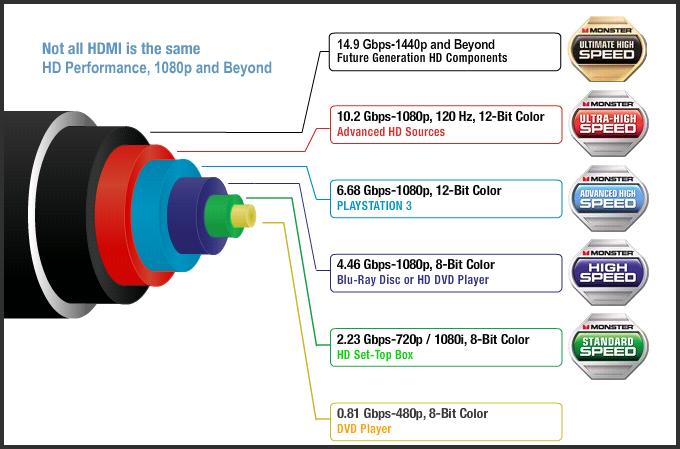
HDMI: Need for Speed

Believe it or not, HDMI cables are not all created equal. Some can handle video from DVD players just fine, but if you connect a Playstation 3 to them and try to play a game, you might be in for a shock – the video might not display at the maximum resolution of your television, for example, or might not work at all. So read on, and learn all about how our cables to meet – and exceed – industry specifications so that you can enjoy your home theater to its potential.

This diagram illustrates the progression of complexity that occurs when you’re going from a simple DVD signal to that of devices such as the Playstation 3 – and beyond. Rich video (such as that created by 120HZ displays running at a resolution of 1080p) and complex audio (such as Dolby DTS 5.1 surround sound) require much more bandwidth than a basic DVD signal with stereo sound and require a much more sophisticated cable. If the cable you’re using isn’t up to the task of pushing enough data, your player may downgrade your signal to a lower resolution, or visual artifacts such as colored spots may appear on your video.


user posted image

http://www.monstercable.com/hdmi/hdmi_spee...cable_speed.asp

This post has been edited by DigitalTech: Apr 16 2010, 04:05 PM
DigitalTech
post Apr 16 2010, 11:22 PM

Enthusiast
*****
Senior Member
974 posts

Joined: Aug 2005
From: Petaling Jaya


Can anyone try using the RM10 tesco HDMI cable on your PS3 and try playing on a high action, high speed game.

Please share the results.

You don't see much difference if you are using a cheap hdmi cable on a DVD player, as the chart show, that it's below standard speed level.

Testing it on a PS3 will be the best to gauge the performance of your cable. PS3 is categorised under Advanced High Speed level.


Added on April 17, 2010, 9:33 amExplaining 3D Formats
Due to the high speed of the 1920 x 1080 signal at 120Hz, extra care must be taken in cable bandwidth, connections, crimps and bending to introduce bit errors.

By George Walter
March 18, 2010
http://www.cepro.com/article/explaining_3d_formats/D1/


Extraordinary 3D is all about creating the best environment and equipping it with powerful 3D displays capable of delivering a truly immersive experience.

In the world of 3D entertainment, the believability of the experience is everything.
Let's take a look at the more advanced levels of 3D display technology available for home use.


Low Tech: 3D via Anaglyph 3D

Due to the limited number of true 3D TVs currently in homes, the delivery of television-based 3D content has had to rely on the anaglyph 3D process.

Viewed in 2D mode, the images look like "double vision" with one image having a cyan tint and the other image having a red tint. Anaglyph content is viewed using matching glasses, which have a cyan filter as the lens for the left eye, and a red filter as the lens for the right eye.

Through the anaglyph viewing process, the cyan content is only seen by the viewer's left eye and the red content is only seen by the viewer's right eye. This is the simplest and least expensive 3D delivery method and provides the least dynamic 3D experience.

The cyan and red filters tend to distort the color accuracy of the 3D content. Thus, while anaglyph 3D technology does allow 3D content to be delivered to any television in any home, it is generally considered to provide a 3D experience that is far from state of the art.


Mid Tech: 3D DLP for TVs

The first 3D DLP consumer displays were introduced in 2007 as rear-screen single-chip TVs. Using the inherent speed of the DLP's micro mirrors technology, the displays transmit left and right eye imagery separately for stereoscopic imaging with high-quality 3D glasses.

Consumer-level 3D DLP TVs enlist a specific technology referred to as checkerboard imaging. For example, the red squares of the checkerboard represent the right eye, and the black square represents the left eye. In this fashion, full 1080p images can be displayed without the need for expanded bandwidth.

The images are displayed 60Hz right eye and 60Hz left eye (equivalent to 120Hz). Since every other pixel is dedicated to either the left or the right eye, the resolution of each single eye image is only half the native resolution of the 3D television. While this does sacrifice image quality, no additional system bandwidth is required to support signal distribution.

The high-speed LCD shutter glasses allow the appropriate left eye information to transmit to the left eye and right eye information to transmit to the right eye. Thus, total left and right eye signal can equal full 1920 x 1080, if that is the native resolution of the 3D TV.


High Tech: Active 3D Projectors

The latest 3-chip 3D projectors use a more advanced technology capable of supporting full Active 3D whereby a 120Hz signal is fed to the projector (full 1920 x 1080 60Hz, left; full 1920 x 1080 60Hz, right), and the right eye and left eye are displayed sequentially. Once again, high-speed LCD shutter glasses are used and synchronized with the projector via an IR emitter, blocking the right eye when left eye content is displayed, and vice versa.

The signal requirement is that you either need a high-speed dual link DVI cable to transmit 120Hz full HD signals to the projector from the source or two standard DVI/HDMI cables - one for the right eye content, one for the left eye content.

HDMI 1.4 looks to reduce this to a single cable. Due to the high speed of the 1920 x 1080 signal at 120Hz, extra care must be taken in cable bandwidth, connections, crimps and bending so as not to introduce bit errors.

There are several DLP two-piece consumer projection systems and flat-panel displays that advertise 3D capability, but they do so only at reduced resolutions. By reducing the resolution, the electronics and response times are greatly simplified. Most gaming flat panels are maximum 1680 x 1050, and many of the single-chip 3D projectors present a maximum of 1024 x 768 resolution.

There are a number of ways to create 3D with DLP systems. There are also numerous ways of generating 3D material, so the possible outcomes are limitless!

This post has been edited by DigitalTech: Apr 17 2010, 09:39 AM

 

Change to:
| Lo-Fi Version
0.0244sec    0.20    7 queries    GZIP Disabled
Time is now: 4th December 2025 - 06:47 PM