Welcome Guest ( Log In | Register )

Outline · [ Standard ] · Linear+

 HTPC V2, Home Theater PC Setup, HOWTO and Guides

views
     
Bart-man
post Mar 27 2010, 11:16 PM

Getting Started
**
Junior Member
73 posts

Joined: Feb 2010
QUOTE(CSin @ Mar 27 2010, 11:09 PM)
My fren HTPC paired with TOSHIBA regza 32'' LCD shows colour over saturated.

The black text with red, blue, or green at the side..

any solution?
*
Change resolution to native resolution (should be 1366x768 assuming the 32" is only hd ready and not fullhd)

Then set the picture mode to "PC" instead of movie, game etc.
Bart-man
post Mar 28 2010, 12:06 AM

Getting Started
**
Junior Member
73 posts

Joined: Feb 2010
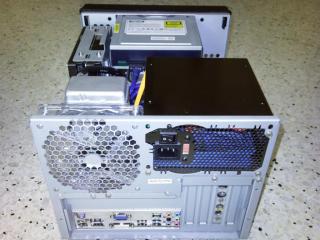
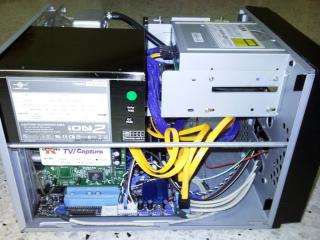
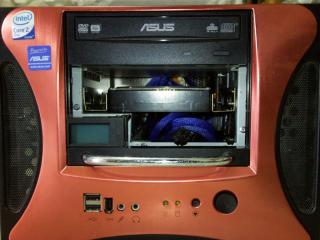
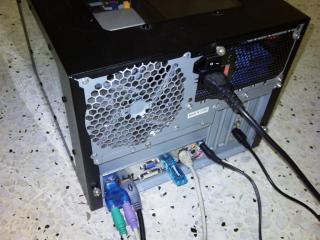
Just wanna share some photos of the HTPC I built for my hometown at KL, connecting to my dad's 42LG53FR and our old-but-faithful Sony Mini Hi-fi blush.gif

Our hall have no space for 5.1/7.1 setup so it's stereo all the way for us sweat.gif

Specs:
Intel Core 2 Duo E8400
Asus P5G43T-M PRO HDMI
2x2GB ADATA XPG DDR3-1333 CL8
3x500GB Samsung HD501LJ HDD
Asus DRW-201451T DVD Writer
K-World TV878 PCI TV Tuner
Vantec ION2+ 450W ATX PSU
Cooler Master Aquagate Mini R80 (self-contained water cooling kit)
XQbox X-Cube HTPC Case

Water cooling + silent fan + silent PSU = silent HTPC cool.gif

Attached Image
Attached Image
Attached Image
Attached Image
Attached Image
Attached Image
Attached Image
Attached Image
Attached Image
Attached Image
Attached Image
Attached Image
Attached Image
Attached Image
Attached Image
Attached Image

AV connection is on-board G43 => HDMI => LG TV => RCA audio => Sony Hi-fi

Other connections:
Astro decoder (RCA video) => LG TV
Astro decoder (S-video) => TV Tuner
Astro decoder (RCA audio) => splitter => LG TV + on-board sound line-in
Wii => YPbPr component video + RCA audio => LG TV


Added on March 28, 2010, 12:20 am
QUOTE(hilk @ Mar 27 2010, 11:29 PM)
look like no one wanna to help!!.. thanks
*
Not no one wanna help, more like nobody know how to help!! (maybe you also posted in the wrong section) tongue.gif

As far as I know only genuine AMP-brand Cat5e cable can run gigabit reliably, or go for other brand Cat6 brows.gif

I dunno how to answer your question about the idea of putting network cable and power line together, perhaps it's okay? Dun blame me if it doesn't work blush.gif

Since this is network related question, try asking it in the appropriate section of the forum wink.gif


Added on March 28, 2010, 12:22 am
QUOTE(CSin @ Mar 27 2010, 11:31 PM)
All done. stil cant fix it

my fren even brought to toshiba service center, tested with all the LCD, all with the same problem..

but the HTPC is working fine with sony and samsung
*
What connection are you using? VGA? DVI? HDMI? icon_question.gif

This post has been edited by Bart-man: Mar 28 2010, 12:22 AM

Bart-man
post Mar 28 2010, 04:54 PM

Getting Started
**
Junior Member
73 posts

Joined: Feb 2010
QUOTE(stan001 @ Mar 28 2010, 01:31 AM)

Added on March 28, 2010, 1:38 am

Nice pics and HTPC setup!!!

I tried both Astro RCA Video and S-video to TV and TV Tuner card..

I find the picture quality is much better for S-video goes to the TV and RCA Video to the PCI card TV Tuner ..

Picture quality, especially the text on the TV is much sharper using S-Video cable to the TV.
*
Thanks! smile.gif

Yes, S-video is better quality than RCA video. That is why I connect it to TV Tuner coz I prefer to record in higher quality laugh.gif
Bart-man
post Apr 29 2010, 05:13 PM

Getting Started
**
Junior Member
73 posts

Joined: Feb 2010
QUOTE(kopking10 @ Apr 29 2010, 03:13 PM)
1. Havent really look into the models yet. What inputs should i look for?

2. In order to run BDMV and BD iso, what are the minimum CPU spec that u recommend?

3. I cant agree more.

4. For sound, im glad to maintain 5.1 at the moment.

5. Ill stay with the integrated graphic with the mobo then.

With much said, i really appreciate your answers, Netherlord. However, I am still open for more suggestions. THANK YOU!
*
Have you bought the processor and mobo yet? If not, why not consider using Intel platform? It is lower power and lower cost and better performance than the AMD equivalent brows.gif

Compare this 3 combos (all 3 mobos have HDMI port):
1) Pentium DC E6500 2.93GHz + Asus P5G43T-M = ~RM460
2) Athlon II X2 250 3.0Ghz + Gigabyte A785GMT = ~RM540
3) Core i3 530 2.93GHz + Gigabyte H55M-S2H = ~RM720

If you do some research, combo 1 actually give you better performance and lower power than combo 2 despite being cheaper. The only catch here is that the processor socket (LGA775) slowly being replaced by the Core i3/i5/i7 socket (LGA1156), which is why some people recommend spending a little more for combo 3 nowadays. Core i3 is even lower power than the rest due to the 32nm fabrication process and performance is a lot higher too (i3 is similar to Core 2 Quad performance) drool.gif

To see the performance comparison check out http://www.anandtech.com/Bench/

Oh, as long as you look for a HT model with HDMI input and output, you can passthrough both audio+video through HDMI from your HTPC to the HDMI input of the HT. The HT will output the audio through its speakers and pass the video to the TV via its HDMI output laugh.gif


Added on April 29, 2010, 5:41 pmDo check out the spec and some photos of the HTPC I built for my hometown laugh.gif

http://forum.lowyat.net/topic/1354755?author=Bart-man

This post has been edited by Bart-man: Apr 29 2010, 05:41 PM


Change to:
| Lo-Fi Version
0.0488sec    0.23    7 queries    GZIP Disabled
Time is now: 2nd December 2025 - 07:49 AM