Welcome Guest ( Log In | Register )

4 Pages < 1 2 3 4 >Bottom

Outline · [ Standard ] · Linear+

 HTPC V2, Home Theater PC Setup, HOWTO and Guides

views
     
peter32
post Sep 15 2010, 11:09 PM

心旷神怡
******
Senior Member
1,162 posts

Joined: Sep 2008
From: PJ


QUOTE(echoesian @ Sep 15 2010, 10:18 PM)
Just curious what is the specs inside?
*
I found the spec this afternoon but lost it again. But underline is this, it can play most of the files just like others, even the BD-iso, but without the menu option. MKV as well as flacs. But it does not play APE files.

I only interested in just a few of the above only, the rest I can't remember.

But I find this interesting because:
1. If you don't want to get the whole box unit ,u can download boxee software which is available in all platform, inc. linux, apple etc.

2. Its based on XBMC.

3. Most important for me, it comes with various installed options which I believe is still expanding online. Eg. u can choose CNN tv channels, BBC (radios only when I tried it), even options to adopt Shoutcast and Radiotimes, which is plentiful of internet radio channels!

Of course it boosts the USA netflix, hulu etc.. too, if you want to use a paid or free VPN option.

This afternoon I test installed the Boxee at my office computer (** cough **), tested with VPN, managed to view some online internet TV channels, CNN, radios !! Its awesome.

I am now at home, will try various stuff of this Boxee again. So far its very impressive.
peter32
post Sep 16 2010, 06:47 PM

心旷神怡
******
Senior Member
1,162 posts

Joined: Sep 2008
From: PJ


QUOTE(echoesian @ Sep 16 2010, 03:50 PM)
If you don't intend to bitstream HD audio, the budget is sufficient enough


Added on September 16, 2010, 3:51 pmJust wondering what is the BDROM drive brand that can play bluray seamlessly without stuttering , protected issue, etc... ?

Does anyone know where to buy Antec Fusion Remote Black ?
*
I think RM700 cannot build a HTPC.

Both Motherboard and chip will be about RM280+RM250=RM530 already.
You need 2GB Ram and hardisk, plus casing too. So its going to be hard.

RM1000 maybe.

*****************

Any BD player can read Bluray disc without problem. But to play Original bluray you will need a software that help to bypass protection code, software such as AnyDVD HD. You will have to pay for it though.

Unless you get yourself original Bluray playing softwares eg. WinDVD HD version 10 or more, or powerDVD.

If you buy some soundcards, eg. Auzentech 7.1 HD , it comes with software that play original bluray disc too.

There is no other way at least right now.
peter32
post Sep 23 2010, 03:25 PM

心旷神怡
******
Senior Member
1,162 posts

Joined: Sep 2008
From: PJ


QUOTE(echoesian @ Sep 21 2010, 11:52 AM)
Launching TMT3 using the default MCE Media Library is ok but when using Media Browser, it will not launch the TMT3 and it will give 'Unsupported file format'...
*
Have you tried config the media browser (newer version is available now it seems) to use external player for bluray format?
peter32
post Oct 22 2010, 10:41 PM

心旷神怡
******
Senior Member
1,162 posts

Joined: Sep 2008
From: PJ


I have the following ideas, some I have tried but some not, just to share the opinion:

1. Having HTPC to play music, the aim will be to minimise the no. of cpu accessories. So the lesser the fan, the better. I kind of like the idea of having fanless PSU, its my first time hearing this. I think it should be considered.

2. Do consider fanless cpu design overall. Less fan, less electronic interference, so better sound hopefully. I know there are HTPC design with total fanless design, just google it.

3. Liquid cooling of the chip can be considered. Its much more quieter than high speed fan cooling it seems.

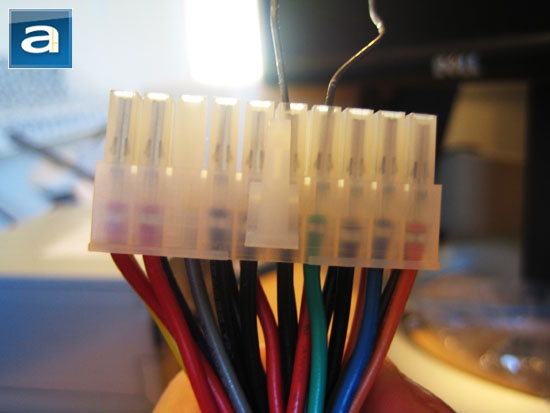
4. If you still want to have lesser cpu accessories to reduce electronic interference but still want to have fan in it, get a used cap ayam psu, short the blue and black cable from the power line, plug it with the power socket, and the psu is turned 'on'. You can use this independent psu to power up any no. of fan as u want and place the fan anywhere in your cabinet as you pleased. I have tried this and it works. I actually use this sort of shortcut to power up my fans (total of 4 fans) in my diy project.

This post has been edited by peter32: Oct 22 2010, 10:42 PM
peter32
post Oct 23 2010, 12:04 AM

心旷神怡
******
Senior Member
1,162 posts

Joined: Sep 2008
From: PJ


Neither can I hear the difference actually.

But having fanless system cost less than we thought. Eg get a slower chip instead of the highest spec, slapped it with decent Mobo, if possible, underclock the chip too. All that maybe able to cool down the whole system. That of course does not include the fanless PSU I just heard about earlier.

By the way, the separate PSU option can also be used to power fans installed in enclosed cabinet too. Making it is very easy. I got one PSU free from one of the computer shop while chatting with the shop attendants. Those generic PSU is just a throw away items for them.

I made a mistake, to power the PSU on, just cut out the 'green' cable and any one of the 'black' cable, connect them and tape it with insulator tape.
user posted image

The photo above is one guy who short the connection with a pin, its dangerous so don't do it that way.

This post has been edited by peter32: Oct 23 2010, 12:04 AM
peter32
post Oct 25 2010, 01:55 PM

心旷神怡
******
Senior Member
1,162 posts

Joined: Sep 2008
From: PJ


Has anyone tried this Mobo for HTPC so far?

P5N7A-VM

Sounds like the most versatile Mobo thus far. Couldn't find the price also frm the local web store. anyone has any idea the price here? Thanks.
peter32
post Oct 26 2010, 10:07 AM

心旷神怡
******
Senior Member
1,162 posts

Joined: Sep 2008
From: PJ


Maybe. I either will need a media player or a simple HTPC (2nd one). Still contemplating.
peter32
post Oct 26 2010, 06:43 PM

心旷神怡
******
Senior Member
1,162 posts

Joined: Sep 2008
From: PJ


Stan, whoa.. your idea of automation is definitely a major turn-on for me. Will look into it. And don't forget to share if you have started your project.

The reason for 2nd HTPC is long term software compatibility. Its easier to upgrade computer software than firmware for media player.

Have you ever thought of diy solar power panel ?
peter32
post Dec 20 2010, 12:53 PM

心旷神怡
******
Senior Member
1,162 posts

Joined: Sep 2008
From: PJ


Today is the release day for the latest stable version of XBMC.

Just to inform the HTPC kakis.
peter32
post Dec 21 2010, 10:23 AM

心旷神怡
******
Senior Member
1,162 posts

Joined: Sep 2008
From: PJ


QUOTE(xsi @ Dec 20 2010, 11:56 PM)
is it really stable..? i downloaded last 2 weeks....really buggy...
trying to setup the files...i.e. searching all the data in imdb....get the data...but not displaying properly in the library mode...very sakit hati one..
either i'm that dumb or that xmbc is really buggy..
nevertheless...will be trying the new version...thanks for the info.
*
Installed last night, tried their audio and video plugins, haven't done much other then letting them scrapping through my video files. But it gave me a solid blue screen crash on my win7 64bit when I did something...

This latest is the stable version after about a year in production. They are able to play all my mkv files so far, but still I need time to play with it. No doubt there will be bugs, but they will come out with nightly built soon as well.

Audio and video addon can be added very easily in this version.

ps: the shoutcast audio plugin was broken at the last minute the day before they release the stable version.. due to the shoutcast provider changing their mind about releasing the support it seems.
peter32
post Dec 28 2010, 10:29 AM

心旷神怡
******
Senior Member
1,162 posts

Joined: Sep 2008
From: PJ


I am using win7 64 bits, under certain situation the system crashed too. Obviously it still has bugs needed to sort out.
peter32
post Dec 28 2010, 11:14 AM

心旷神怡
******
Senior Member
1,162 posts

Joined: Sep 2008
From: PJ


Thanks for sharing. It must be the software, as my HTPC is a barebone unit. Only the soundcard is the add-on.
peter32
post Feb 24 2011, 12:09 AM

心旷神怡
******
Senior Member
1,162 posts

Joined: Sep 2008
From: PJ


Just noticed today that my HTPC most likely got fried during a thunder storm !

It was a MA785 MOBO with additional Prodigy soundcard. Seriously I don't know if its just the Mobo or PSU that was at fault.

If I were to remake another HTPC, may I ask what is the latest best budget Mobo that can at least capable of decoding True HD ?


peter32
post Feb 25 2011, 05:52 PM

心旷神怡
******
Senior Member
1,162 posts

Joined: Sep 2008
From: PJ


Thanks.

Actually I just bought myself an AMD Fusion netbook, acer Aspire One 522 that comes with a HDMI line out for 10' screen. Pretty impressive for the price.

But does this Fusion set able to deliver FullHD Sound thru the HDMI ?


peter32
post Mar 7 2011, 01:31 PM

心旷神怡
******
Senior Member
1,162 posts

Joined: Sep 2008
From: PJ


QUOTE(peter32 @ Feb 24 2011, 12:09 AM)
Just noticed today that my HTPC most likely got fried during a thunder storm !

It was a MA785 MOBO with additional Prodigy soundcard.  Seriously I don't know if its just the Mobo or PSU that was at fault.

If I were to remake another HTPC, may I ask what is the latest best budget Mobo that can at least capable of decoding True HD ?
*
Update:

Dismantled the PSU, found a burnt fuse ( I didn't know there is a fuse in PSU !) and some charred Board inside .

Bought myself a Be Quiet PSU rated 350W for replacement. The HTPC ran smoothly again, but the board date has been re-set. So it was a lightning strike that actually probably affect the Mobo, but did not actually destroy the Mobo.

Feedback on the New PSU:

Be Quiet Power 4 rated at 350W with good efficiency (>80%), cost RM120+ I think, its very quiet. Can be considered for HTPC builder.
peter32
post Mar 13 2011, 11:48 PM

心旷神怡
******
Senior Member
1,162 posts

Joined: Sep 2008
From: PJ


QUOTE(stan001 @ Mar 13 2011, 10:53 PM)
Yr place must have bad earthing or something... usually thunderstorm/lightning blow the cordless or modem connected to telephone lines..

Very seldom heard it blows the PSU... any other electrical appliance in the house got blown too ?
For PSU, I usually recommend ppl to go for high quality and 500W or above cos the PSU will outlast everything else...  mobo/cpu/gpu/ram, so a good quality ones will last more than 5 years or so..
*
Nothing else blown. Strange enough. As you said, I think our house may need better earthing. Will wait for the electrician to come and provide his opinion.
peter32
post Apr 9 2011, 11:55 AM

心旷神怡
******
Senior Member
1,162 posts

Joined: Sep 2008
From: PJ


QUOTE(potachan @ Apr 8 2011, 08:55 PM)
hi guys,i want to build a htpc,need some opinion
A
intel core i3 540
asus p7H55

B
amd asus E35m1 fusion

which 1 is better? notworthy.gif the price diffrence not really a big gap between these 2.Except choice A use onboard graphic.My main use is to play 1080p movie with hd sound.
please advise  notworthy.gif
thank you
*
If you don't use it for games, the E35m1 fusion fanless design and lower power output with more than enough graphic processing power for HD should be a better option.

Less fan, lesser electrical interference for audio, should you opt to use the onboard digital audio output, or adding audiophile soundcard in future.

Lower power consumption means u can leave the unit on all the time with minimal $ energy spent.

And... lower power consumption means less heat, and able to use a low power output PSU. A good quality PSU such as Be Quiet brand 450W output is more than enough for your HTPC. Less heat generated meaning less fan noisy HTPC.

So overall using the E35m1 enable you to have a quieter HTPC, with less electrical interference and cheaper long term power usage.

Unless you want to play games of course.
peter32
post Apr 10 2011, 01:11 PM

心旷神怡
******
Senior Member
1,162 posts

Joined: Sep 2008
From: PJ


QUOTE(silbii @ Apr 10 2011, 09:36 AM)
just got myself a bdrom...nowe playing with Power DVD 10 not bad... but still can't play one blu ray movie title that i have sad.gif

so wondering if there's any better players out there that could play commercial blu ray movies easily ... smthing free like VLC perhaps? tried using VLC (not latest vesrion) but cant play

any links would be appreciated

thx guys!
*
You can't find any free player to play commercial BD as yet.

You will also need software to decode security code before being played with the Power DVD. Example of such software is AnyDVD HD. You will need to purchase it.
peter32
post May 4 2011, 07:09 PM

心旷神怡
******
Senior Member
1,162 posts

Joined: Sep 2008
From: PJ


QUOTE(bumperX @ May 4 2011, 04:29 PM)
PHENOM II X2 555
ASUS M4A88T-M/USB3 with ATI HD4250
4GB DDR3 1333mhz RAM

Is the above spec capable of playing 1080HD smoothly?
*
More than enough.
peter32
post May 6 2011, 04:19 PM

心旷神怡
******
Senior Member
1,162 posts

Joined: Sep 2008
From: PJ


QUOTE(xcen @ May 6 2011, 03:02 PM)
Sounds like the HTPC setup would be a little bit tricky. So maybe i should go for the hdpro v8 1283+? It supports 5.1 analogy out. What do you think of its quality?

The link is here:  https://forum.lowyat.net/topic/986399
*
I agree that HTPC is more meant to be for those geeky individual. If your gf/wife or parents are going to use the device, its better to get a media player.

4 Pages < 1 2 3 4 >Top
 

Change to:
| Lo-Fi Version
0.0498sec    0.25    7 queries    GZIP Disabled
Time is now: 7th December 2025 - 07:15 AM