Welcome Guest ( Log In | Register )

Outline · [ Standard ] · Linear+

 The Official HDPro Media Player Owner's Thread, All about the HDPro Media Player

views
     
xtended
post Dec 20 2010, 10:16 PM

Getting Started
**
Junior Member
68 posts

Joined: Feb 2010
From: KK


Hi,
I just bought the hdpromini+ on 10.12.2010 n receive it on the next day.
Fast and recommended seller. Thanks Yangxi.
well, I encountered this problem:
1.FIrst, I play the mp3 or wma files, then I go to my folder that contains pictures ;
whenever i press the enter or the play button to view the picture, the musics stops, and the slideshow starts,
it really annoys me, and i cant find way how to view the slideshow with music unless i put the song in the picture folders.
Anyone can help me ? rclxub.gif
» Click to show Spoiler - click again to hide... «

2.Another problem, whenever i copy a file from ext. hardrive then i paste it on the same hardrive, the copying process stuck and the screen just show the copy process until i power off the player then power on it back.
3.Sometimes the mp3 file playback is jerky at earlier 15-30secs then after that it cont to play smoothly.
*the Acryan forum only state there it "It will only work If your music is stored on the internal Harddrive "
~i dunt use internal hardrive for now, please advise icon_question.gif
xtended
post Dec 21 2010, 06:09 AM

Getting Started
**
Junior Member
68 posts

Joined: Feb 2010
From: KK


thnks jhleo1,
I think playing slideshow with music only work with me if i put music file in the picture folder. sad.gif
QUOTE
Regarding ur copying process, how big ur files? I tried few RMVB files around 300MB each without any problem just take time to copy.
I tried copy my mp3 file to picture folder, then my player stuck forever till I re-power on it. If i copy big file, much worse i think.
QUOTE
I FOUND OUT THAT TRANSITION EFFECT seems like got BUG. Whenever I select all EFFECT suffle, only cross fade effect working during slidesho

I found that mine have same problem too.

xtended
post Dec 21 2010, 10:18 AM

Getting Started
**
Junior Member
68 posts

Joined: Feb 2010
From: KK


QUOTE
3.) copy problem? from usb1 to usb2 or internal hdd?

from usb1 to usb1, my external 2 partition, for eg; i copy from example.mp3 from G:/mp3/ to G:/pictures/.

Now i currently trying checkdisk on my ext. hard disk. hope it will do it any good.

Edited *After checkdisk, the copy file process still not successful and whenever i play mp3 file, i still have jerky playback but wma files plays smoothly.
I dun have camera to record video to show u, sorry.

This post has been edited by xtended: Dec 21 2010, 12:50 PM
xtended
post Jan 13 2011, 02:49 AM

Getting Started
**
Junior Member
68 posts

Joined: Feb 2010
From: KK


QUOTE(yangxi @ Jan 12 2011, 10:58 PM)

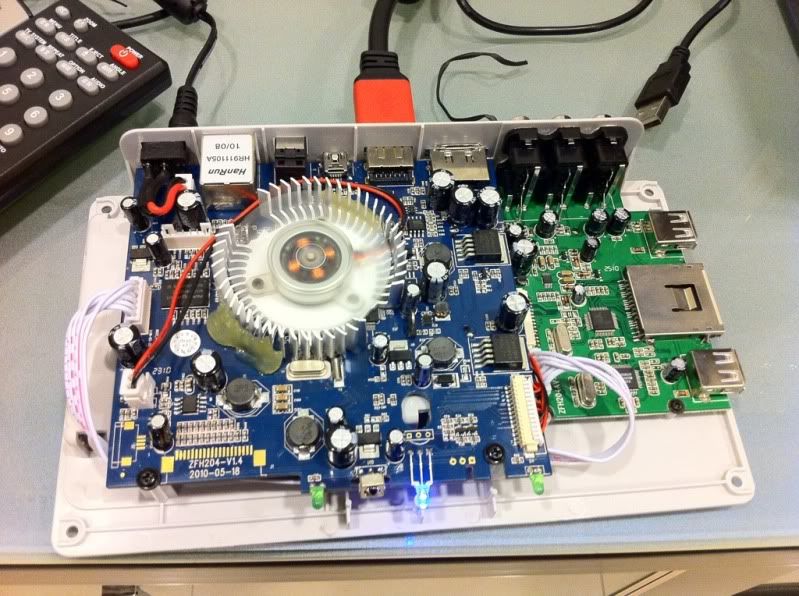
Hdpro mini+ (rev B) arrive

user posted image user posted image user posted image user posted image
*
what is the difference than the Hdpro mini+ revision A ? cry.gif


xtended
post Jan 13 2011, 03:23 PM

Getting Started
**
Junior Member
68 posts

Joined: Feb 2010
From: KK


QUOTE(yangxi @ Jan 13 2011, 09:32 AM)
same .  change to big fan.
*
Wah, so sad mine din't have big fan like this.cry.gif
How about the price?
Is it same or a bit change?


xtended
post Jan 14 2011, 11:41 AM

Getting Started
**
Junior Member
68 posts

Joined: Feb 2010
From: KK


QUOTE(yangxi @ Jan 14 2011, 10:31 AM)
download link
http://www.zshare.net/download/8519569581b58536/

(advance user only ^^)
*
Thanks bro Yangxi, downloaded it just now, i hope that more english online content included in the next firmware.
Can bro Yangxi request extra option of slideshows setting, that we can browse and set any folder to be played, it is messy to put 2 or 4 mp3 file in same picture folder. I got too many folder of pictures, watching slideshow without music is boring especially with whole family. sad.gif
xtended
post Jan 16 2011, 06:43 PM

Getting Started
**
Junior Member
68 posts

Joined: Feb 2010
From: KK


QUOTE(tornedo @ Jan 16 2011, 04:38 PM)
Good points indeed smile.gif

Added on January 16, 2011, 4:46 pmTalking about support, i hope yangxi can re-visit the request of small slideshow fuction bug which has been raised by a few here. 
*
thanks a lot tornedo, been waiting for my post to be answered whistling.gif
xtended
post May 31 2011, 10:44 AM

Getting Started
**
Junior Member
68 posts

Joined: Feb 2010
From: KK


its been a hot thread since ckboon is here, i have a lot of problem too but i just e-mail yangxi for explanation biggrin.gif

anyway, I also got problem with .rmvb files.
My firmware : Jan 2011
So, any new firmware that can fix this problem? or just have to revert to old June 2010 firmware ?

This post has been edited by xtended: May 31 2011, 12:20 PM
xtended
post May 31 2011, 11:14 AM

Getting Started
**
Junior Member
68 posts

Joined: Feb 2010
From: KK


Yes, "readable RMVB file become corrupted" it is the same problem, after stuck playing it on hdpro, it become corrupted when I check it on my laptop. So, I have no choice, have to delete my rmvb corrupted file sad.gif

Another issues that I still waiting for the proper fix is ;
1. Cannot play sound while viewing Pictures [slideshow mode]
So boring watch slideshow with no sound, with all my family >.<
I dont know it is fixed already or not.
2. Slideshow effect bug.
xtended
post May 31 2011, 12:19 PM

Getting Started
**
Junior Member
68 posts

Joined: Feb 2010
From: KK


QUOTE(ckboon @ May 31 2011, 11:40 AM)
after stuck? mine is not stuck..  i copied the fully readable file and play the whole file till end. then 2 weeks later i tried to replay the file and found that it's corrupted, some with the original file size and some become 0kb. It's like WTF ... i've just make a quick check on rmvb file, dunno this happen to my mkv files or not as there's some 10G ++ file there that i haven't watch and i don't have any backup on my PC, since my PC is out space so i transferred all big big 1080p mkv file to the player, and now this happen, hopefully not to those big file (finger crossed)!
*
I mean after it stucks for a moment with blank screen then the player auto boot, my mkv files works fine. sweat.gif
xtended
post May 31 2011, 01:31 PM

Getting Started
**
Junior Member
68 posts

Joined: Feb 2010
From: KK


QUOTE(yangxi @ May 31 2011, 12:45 PM)
hdpro or mini ?
current firmware version ?

1.) you can put song, picture same folder.

2.) effect already fix on Dec version.
Hdpro mini +
current: just updated to may 2011 firmware
*Datage logo/words on right top of the screen in these firmware

1.) work already
2.) owh, tq..

I noticed new issues, filecopy corrupted, copied .mp3 file to new destination in same hardisk,
new copied file .mp3 corrupted sized only 64 kb..


Change to:
| Lo-Fi Version
0.0367sec    0.21    7 queries    GZIP Disabled
Time is now: 6th December 2025 - 05:18 AM