Welcome Guest ( Log In | Register )

Outline · [ Standard ] · Linear+

 The Official HDPro Media Player Owner's Thread, All about the HDPro Media Player

views
     
klseet
post May 5 2010, 09:43 AM

Getting Started
**
Junior Member
130 posts

Joined: Mar 2008
Hi,

I just bought the HDPro unit from Yangxi, it can play almost all kind of multimedia filles I currently have, very impressed with the output quality & menu features at this price rclxms.gif
I'm new to this type of HD player and has asked lots of questions, Yangxi is very patient and fast to response thumbup.gif

With regards to the photo viewing, does anyone know how to play photos at the same time can play the music ?

Thanks in advance!

This post has been edited by klseet: May 5 2010, 09:54 AM
klseet
post May 5 2010, 04:39 PM

Getting Started
**
Junior Member
130 posts

Joined: Mar 2008
QUOTE(tracktion3 @ May 5 2010, 11:10 AM)
You can set the backgroup music while viewing photo in setup miscellaneous. But, the setting that play the playlist doesnt work even with the latest firmware. You can choose play folder setting where when you view photo in a specific folder, it will play music files from the same folder. I prefer it play from playlist, unfortunately it didnt work.

S, do it manually, go to playlist, play and then go to the photo and view the photos while music playing on playlist. smile.gif hate the extra effort, but better than nothing.
*
Thanks for the guidance!
Yes, it sound a bit complicated, especially on how to create the playlist, how nice if can select music when view photos .....
Anywhere, I'll try it out later tonight.

Ok, this is what I did:

1. Go to Music folders, Select & Confirm those songs to create the playlist
2. Got to Misc setup and set music background to Playlist

After which, each time when I Play the photos, the songs on the playlist will start automatically.

This post has been edited by klseet: May 6 2010, 03:19 AM
klseet
post May 7 2010, 02:26 PM

Getting Started
**
Junior Member
130 posts

Joined: Mar 2008
QUOTE(Sphenix @ May 7 2010, 01:46 PM)
guys, do i need to format the HDD before install the BT samba?
*
When I use the menu to Format the internal HDD, I saw the Samba automatically installed right after the format complete.
But sorry I do not know how to use the Samba blush.gif
klseet
post May 25 2010, 12:46 PM

Getting Started
**
Junior Member
130 posts

Joined: Mar 2008
QUOTE(yangxi @ May 24 2010, 11:36 PM)
some part cannot..

*those live tv still beta stage..  no free meal. sad.gif
*
I already upgraded the latest firmware, most live TV still not function yet..... any idea when will become available?

Your instruction mentioned to detach the HDD before firmware upgrade. So everything when I update new firmware, I have to unscrew the box and detach the HDD, later screw back again after the update is done. It is rather troublesome la, is there any easier way to do it without unscrew+screw again? hmm.gif
klseet
post May 27 2010, 11:58 AM

Getting Started
**
Junior Member
130 posts

Joined: Mar 2008
QUOTE(helob @ May 26 2010, 10:55 PM)
I just formatted and install BT/Samba on a new HDD on my HDPro .
How do I add/create new folder and subfolder under the main directory?
Didn't see any add folder feature under copy file menu.
TQ
*
Normally I use my computer to connect the HDPro (either through LAN or direct USB) and organise folders & files.
But if you intend to copy lots of files, I suggest you use direct USB.

I tried few times to copy a DVD ISO (about 4.5GB) over LAN but ended up failed, and the HDPro disconnected automatically, don't know why ..... blink.gif


Added on May 27, 2010, 12:00 pm
QUOTE(yangxi @ May 27 2010, 09:22 AM)
what brand router?
what type Encryption set?  if disable or WEP.  can connect?
*
Hi yangxi,

May I know how to setup the HDPro to connect from outside so can use it to share multimedia files ?

This post has been edited by klseet: May 27 2010, 12:00 PM
klseet
post May 28 2010, 02:04 AM

Getting Started
**
Junior Member
130 posts

Joined: Mar 2008
Instead of buying a USB wifi, I bought another wifi router, connect my HDPro to it, setup bridging-mode use WPA2 to connect with host router.


Added on May 28, 2010, 2:15 am
QUOTE(jasonlky @ May 28 2010, 01:15 AM)
Can I ask if your HDD in the HDPro is formated with FAT32 or NTFS?

Jason biggrin.gif
*
If use the "Format HDD" function, it will format into NTFS and install BT+Samba automatically.

I noticed if fix the IP on HDPro, then map it to a drive on your PC, then it is easier and faster to organise folders/files.

This post has been edited by klseet: May 28 2010, 02:15 AM
klseet
post May 28 2010, 09:28 AM

Getting Started
**
Junior Member
130 posts

Joined: Mar 2008
Hi yangxi,

I've updated the latest firmware and saw so many online TV channels, but it seem like all of them always show "cannot play this" message, may I know how to make it work? Or we have to wait for next firmware upgrade?

Appreciate your further information sharing, thanks in advance! smile.gif

klseet
post May 28 2010, 10:20 AM

Getting Started
**
Junior Member
130 posts

Joined: Mar 2008
Any idea what is the charges? And who is charging us?
If the fees is reasonable, I don't mind seem there are loads of channels which I'm very interested in !

Please give more detail, thx!
klseet
post Jul 3 2010, 09:58 PM

Getting Started
**
Junior Member
130 posts

Joined: Mar 2008
QUOTE(cybersim2 @ Jul 2 2010, 04:16 PM)
wat do u mean by after flash, please restore default ?
why must we restore default ? tongue.gif
*
I screw up my HDPro Samba/BT big time, only manage to make it run again through latest firmware, read my post at:
http://forum.lowyat.net/topic/986399/+2340
post#2347

Somehow restore back to factory default make my Samba/BT run again, strange but it's true! smile.gif
klseet
post Jul 20 2010, 01:48 AM

Getting Started
**
Junior Member
130 posts

Joined: Mar 2008
QUOTE(yangxi @ Jul 18 2010, 08:15 PM)
oem version is for export model.  more english channel.
*
Just upgraded to OEM, Samba/BT working no problem, LOADS of TV/Movies/OnlineMusic rclxms.gif thumbup.gif
klseet
post Jul 22 2010, 03:08 PM

Getting Started
**
Junior Member
130 posts

Joined: Mar 2008
I try my best to answer....

QUOTE(peter32 @ Jul 22 2010, 02:20 PM)
How's the online radio channel fair from this device?  Or even the internet TV channel, is there such a thing?
I expect to use quite a bit on internet radio channel other than just streaming the multimedia files, thats why I ask.
The June10 OEM firmware has lots of online TVs & online radio.
For online TVs & shows, I'd tried some, most of it works, but the problem is the SlowMax (Streamyx) which caused problem on some higher resolution shows, I haven't tried on UniFi, hope it's better. For normal low resolution TV shows, YouTube, PodCast, no problem streaming.

For internet radio, also a lot, I like the Akado radio channels http://radio.akado.ru/
I particularly like the Smooth Jazz, The 80's, Love Pride, etc thumbup.gif
So far I have been playing every night for hours without major problem, once in a while will drop, but I suspect it's due to my network bridging and SlowMax problem.

QUOTE(peter32 @ Jul 22 2010, 02:20 PM)
Besides, can the HD Pro function well WITHOUT a hardisk inside?  I already have a network NAS in place.
You don't need to put any internal or external HDD, the HDPro box itself already can go internet TVs & radios thumbup.gif

For me, definitely the HDPro entertain me a lot more and the price is very reasonable, my only wish list now is to have UniFi quickly launch at my area icon_rolleyes.gif

This post has been edited by klseet: Jul 22 2010, 03:09 PM

klseet
post Jul 24 2010, 01:06 AM

Getting Started
**
Junior Member
130 posts

Joined: Mar 2008
QUOTE(peter32 @ Jul 23 2010, 08:44 AM)
May I know what channels are available? From which countries? Thanks..
*
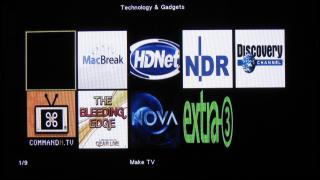
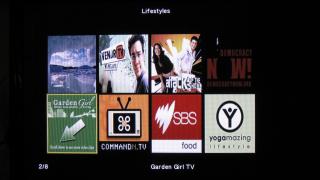
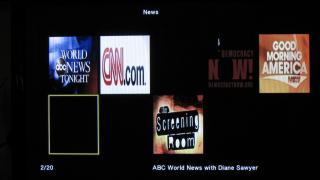
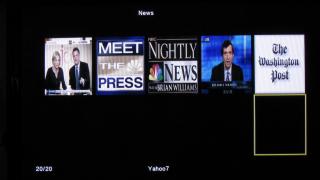
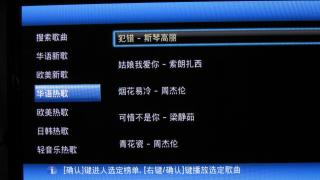
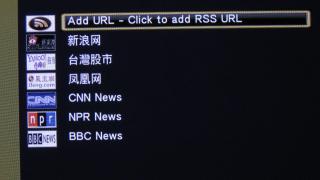
Took some pictures from the HDPro internet menu selection [with Jun2010 OEM firmware] for your reference:

Internet menu selection (total 20):
Attached Image
Attached Image
Attached Image

Some TV/Radio channels listing:
Attached Image
Attached Image
Attached Image
Attached Image
Attached Image
Attached Image
Attached Image
Attached Image
Attached Image
Attached Image
Attached Image

I still have no time to go through all yet ..... sweat.gif

QUOTE(ExcelBoy @ Jul 23 2010, 07:00 PM)
I just got a unit HDpro, after test run, PQ is better than my samsung plasma USB build in media player, got more feature to use, can play all my big file size mkv & m2ts file with sub title, can skip chapter somemore, I no need to use my ps3 watch Bluray now... Thanks to yangxi good seller...
*
I also never use my Samsung Plasma build-in USB media player, now I throw every multimedia files onto the HDPro thumbup.gif

This post has been edited by klseet: Jul 24 2010, 01:07 AM
klseet
post Jul 24 2010, 12:16 PM

Getting Started
**
Junior Member
130 posts

Joined: Mar 2008
QUOTE(peter32 @ Jul 24 2010, 01:23 AM)
klseet, thanks for your effort.  Truly appreciate it.

Looks like high speed broadband is a must to make full use of this device.
*
Indeed, especially for those HDTV, my current 1M SlowMax (Streamyx) really driving me nuts .... still waiting the UniFi service ..... damn fed-up with TMNUT doh.gif
Luckily most other non-HDTV & radio channels still ok biggrin.gif

klseet
post Jul 24 2010, 05:01 PM

Getting Started
**
Junior Member
130 posts

Joined: Mar 2008
QUOTE(johnkor @ Jul 24 2010, 04:26 PM)
Just got my piece of HD Pro Mini wonder am i allowed to be in here?
*
I think you are most welcome here, also same HDPro & firmware, just size different mah tongue.gif
klseet
post Jul 26 2010, 04:14 PM

Getting Started
**
Junior Member
130 posts

Joined: Mar 2008
QUOTE(andyz @ Jul 26 2010, 02:25 PM)
WOAH, very in-depth & good review, you are really PRO mate!! thumbup.gif

QUOTE(nanzotaro @ Jul 26 2010, 03:47 PM)
Just a standard question....

Regardless of HD player type I have,if I want to play full HD 1080p movie on my HD Ready LCD TV(up to 1080i),the file still cant play on the TV right?Though The HD player support 1080p?Am I right?Or there is solution for that?Thank you.
*
I think it will still play.....
Under Setting, I setup the Video as HDMI Auto, it can play any video formats without any problem on both my Samsung 42" Plasma & Toshiba 37" LCD, both TV HD Ready only. icon_rolleyes.gif
klseet
post Jul 29 2010, 10:47 PM

Getting Started
**
Junior Member
130 posts

Joined: Mar 2008
QUOTE(dottcomm @ Jul 29 2010, 08:37 PM)
...Also bought Wifi dongle, setting up is easy. Streaming large MKV files do face some lagging. Streaming normal 300 - 400mb RMVB files works fine.
*
Aiyoh, wireless cannot stream those big Gs MKV files smoothly la sweat.gif
try to use LAN line whenever possible, it's more stable & reliable smile.gif
klseet
post Aug 27 2010, 09:53 AM

Getting Started
**
Junior Member
130 posts

Joined: Mar 2008
have not been here for quite a while....

wah, bro Yangxi now got pattern logo liao, cool man, support ! thumbup.gif biggrin.gif

so any latest products ? any news on china iPed? smile.gif

This post has been edited by klseet: Aug 27 2010, 09:53 AM
klseet
post Aug 27 2010, 10:57 AM

Getting Started
**
Junior Member
130 posts

Joined: Mar 2008
Try to answer ...

1. you sure the network cable is ok? try to use the same cable to connect your notebook and check what's the connection & transfer speed.

2. try to use external hdd with only 1 partition

3. how big is your file? 'm using the latest Aug10 built and i do not have problem streaming 12G Avatar through cable


Change to:
| Lo-Fi Version
0.0408sec    0.64    7 queries    GZIP Disabled
Time is now: 5th December 2025 - 01:31 AM