

QUOTE(neuvas @ Mar 30 2010, 11:32 AM)
i found my hdpro!
[attachmentid=1508843]

ohh..man...I feel sorry for you [attachmentid=1508843]

The Official HDPro Media Player Owner's Thread, All about the HDPro Media Player
|
|
 Mar 31 2010, 02:01 PM Mar 31 2010, 02:01 PM
Return to original view | Post
#1
|
 
Senior Member
4,403 posts Joined: Jan 2007 From: Johor Bahru  
|
QUOTE(neuvas @ Mar 30 2010, 11:32 AM) i found my hdpro! ohh..man...I feel sorry for you [attachmentid=1508843] |
|
|
|
|
|
Jul 5 2010, 12:23 PM
Return to original view | Post
#2
|
|
Senior Member
4,403 posts Joined: Jan 2007 From: Johor Bahru
|
QUOTE(helob @ Jul 5 2010, 12:08 PM) Are there any significant difference on the sound quality on using ordinary RCA cable vs 75 ohm coaxial vs expensive (>RM100) coaxial audio cable. RCA cables:If so, what are the diferences? TQ  Coaxial cables  As you can see, the difference is shielding...signals from Digital Audio is prone to interference...thats why they use Coaxial or toslinks. It can also handle more energy than those pasar malam RCA cables for optimum digital transfer. Difference between normal coaxial RG6U Vs a Monster coaxial RM100 one is the material they used, branding and how many shielding it has. I once DIY a triple shielding Coaxial, but later found out, a single shield was good enough. For DIY: http://forum.lowyat.net/topic/1209686 I swear by Coaxial cables over RCA cause I have experience of major interference cause i need to bundle up my cable due to space constrain. This post has been edited by azbro: Jul 5 2010, 12:43 PM |
|
|
Jul 5 2010, 05:43 PM
Return to original view | Post
#3
|
|
Senior Member
4,403 posts Joined: Jan 2007 From: Johor Bahru
|
QUOTE(neb @ Jul 5 2010, 02:12 PM) all RCA cables I have encountered are all in coaxial format, but for audio RCA its impedance may be in 50Ω Well, thats one method (haha..some ppl swear by twisted or braided).I have never seen audio RCA cable using cable in twisted pair fashion  , it really not suitable , it really not suitableIn the pictures above case, there is a third wire so called 'Drain Wire' . But normally, RM5 RCA what you'll get is this:  Very seldom you'll see RCA with copper/silver braided like Coaxials. Here is an example of RCA Cables with shielding like those Coaxial cables have...but they are not cheapo stuff 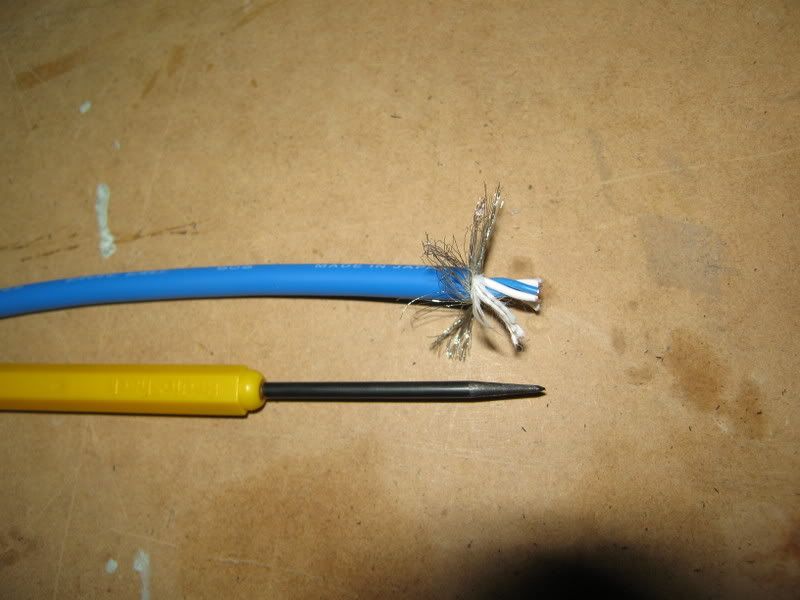 In this case the braided wasn't even used as a shielding. Again you can see clearly the difference of the inner wires that sets RCA and Coaxial cables apart. Sorry...going off topic oledi..haha This post has been edited by azbro: Jul 5 2010, 05:46 PM |
|
|
Jul 6 2010, 03:11 PM
Return to original view | Post
#4
|
|
Senior Member
4,403 posts Joined: Jan 2007 From: Johor Bahru
|
QUOTE(helob @ Jul 6 2010, 02:43 PM) azbro, Most of the time...ppl will use RG59 for Astro instead of RG6 to keep the cost down...usually RG6 has a larger diameter core for better digital signal transfer...but you can try with what you have first.Tks a million for the useful info. I will try the normal coaxial RG6U(leftover from Astro). What RCA connector do you recommend? Is gold plated connector necessary? TQ Abt the connectors, No need to get RM30~40 connectors...just those RM6~8 should be OK.....most important is the cable diameter can go through the cables....no point buying fat cables that dun fit into the connector hole at the back. Most important is you need a soldering iron. Before you solder, make sure the Iron is at its optimum temperature. Also, use a sharp object to scratch the connector soldering area so it will stick better. To make both wire and connector to stick with the solder...both need to be hot. If you only heat the wires, than it become dry solder. And to be on the safe side, have some allowance on the cable length. Check the thread I gave to DIY a coaxial cable. |
|
|
Sep 29 2010, 04:54 PM
Return to original view | Post
#5
|
|
Senior Member
4,403 posts Joined: Jan 2007 From: Johor Bahru
|
helob...try to remux it and assembly it back...use this software...very easy..takes less than 10min for 720p.
There are many Remux software, but try this first http://haali.su/mkv/ Sometimes remuxing is like a miracle |
|
|
Sep 29 2010, 05:58 PM
Return to original view | Post
#6
|
|
Senior Member
4,403 posts Joined: Jan 2007 From: Johor Bahru
|
QUOTE(rstusa @ Sep 29 2010, 05:49 PM) Remuxing is mixing .mkv file together? Actual word is Remultiplexing it (separate it), take out or add in what you want that relevent, then Demultiplexing it back...meaning combine it back....but its easier to say "Remux".For some difficult to play files, just "Remux" it...most Remux software not only do the Remux/Demux function...some smoothen the bitrates to make the movie more playable. Also take out the unwanted audio and subs that you don't need during the Remux process..just uncheck them... This post has been edited by azbro: Sep 29 2010, 05:59 PM |
|
|
|
|
|
Sep 29 2010, 06:18 PM
Return to original view | Post
#7
|
|
Senior Member
4,403 posts Joined: Jan 2007 From: Johor Bahru
|
QUOTE(auronthas @ Sep 29 2010, 06:08 PM) For a big mkv file size (>4GB), is it better to have it Remux? No...never remux an OK file....just think Remux as medicine...sometimes, remuxing OK file makes errors too.Any Remux in Mac OS version? |
|
|
Sep 30 2010, 05:26 PM
Return to original view | Post
#8
|
|
Senior Member
4,403 posts Joined: Jan 2007 From: Johor Bahru
|
QUOTE(helob @ Sep 30 2010, 05:21 PM) remuxing did the trick using haali. Yeah...sure bro... I understand that this has to do with mkv header compression. Apparently, HDPro does not support mkv compressed header. So have to uncompress the header to solver the "no pic" problem. Tks azbro for your advise.  Thats just 1 trick...got many more  |
|
|
Sep 30 2010, 05:35 PM
Return to original view | Post
#9
|
|
Senior Member
4,403 posts Joined: Jan 2007 From: Johor Bahru
|
QUOTE(helob @ Sep 30 2010, 05:26 PM) azbro, High reframe rates not easy to cure...especially like Transformer 1.What about mkv pixeling problem due to high reframe rate >8? What is the best program to edit/lower reframe rate on existing high reframe mkv file? TQ You can try to remux with Haali or....the ever popular MKVmergegui http://www.videohelp.com/tools/MKVtoolnix Actually, Remux is the main features....the software itself sometimes have features to smoothen the movie. This post has been edited by azbro: Sep 30 2010, 05:37 PM |
|
|
Oct 1 2010, 09:32 AM
Return to original view | Post
#10
|
|
Senior Member
4,403 posts Joined: Jan 2007 From: Johor Bahru
|
QUOTE(helob @ Oct 1 2010, 08:40 AM) Tks for the tips. I think its just a user friendly window that still uses Haali for MKV and MKVmergeGUI to convert audio.What about RipBot264? Have you used this prog before to fix/reduce reframe rate? TQ But advantage is its user friendly and remux .mov to. For MKV files only, better you stick to Haali and MKVmergeGUI. But next time do check the reframe rates before downloading...anything more than 5 your media player is going to have hardtime playing it without pixellation. I dunno why some encoder are crazy enough to encode more than 5 reframe rate. Probably they think the quality will be good, but playability will suffer. |
|
|
Oct 1 2010, 09:46 AM
Return to original view | Post
#11
|
|
Senior Member
4,403 posts Joined: Jan 2007 From: Johor Bahru
|
QUOTE(cybersim2 @ Oct 1 2010, 09:41 AM) HDPRO canot support italic font subtitle. Grab the SRT file and edit it using a Subtitle editor...got lotsa free one in the net.It will show <i> Subtitle..... </i> Most are user friendly doing auto corrections for you based on the option you 'checked' |
|
|
Oct 1 2010, 06:19 PM
Return to original view | Post
#12
|
|
Senior Member
4,403 posts Joined: Jan 2007 From: Johor Bahru
|
QUOTE(helob @ Oct 1 2010, 04:15 PM) Tried both Haali & MKVmergeGUI with default settings but NO joy. Still encountered pixellation. How to config Haali or MKVmergeGUI to change/reduce the reFrame number? TQ http://forum.doom9.org/showthread.php?t=127611 Go through it. QUOTE(yangxi @ Oct 1 2010, 05:21 PM) Compression Header feature important? sometime convert software cause this problem. Of course its important for playability. We dunno what software they use to convert...just download..so sometimes cannot play |
|
|
Oct 1 2010, 10:36 PM
Return to original view | Post
#13
|
|
Senior Member
4,403 posts Joined: Jan 2007 From: Johor Bahru
|
QUOTE(cybersim2 @ Oct 1 2010, 10:00 PM) how bout built in subtitle inside MKV files ? That one is simple...Example: Using Subtitle Edit Program->Import Sub from MKV file (takes abt 10min to extract it)->Edit it->Save as .srt (file name must be the same as movie file and same folder) To correct the Italic Sub during editing, check the "Fix Invalid Italic Tags" There are also many other options to correct the Sub...check the related box If your player can select either one, the its OK to select the external SRT. If cannot, remux the movie, take out the Subtitle inside it, then use the newly created one just now. You can either use the newly created srt as it is, or remux back to the movie. You guys need to do some experiment  |
|
|
|
|
|
Oct 2 2010, 03:05 PM
Return to original view | Post
#14
|
|
Senior Member
4,403 posts Joined: Jan 2007 From: Johor Bahru
|
QUOTE(helob @ Oct 2 2010, 01:58 PM) azbro, So far I've tried a few Sub programs...whats best is subjective..."Using Subtitle Edit Program->Import Sub from MKV file" Which program do you recommend? TQ I'm using Subtitle Edit ...freeware http://www.nikse.dk/se/ |
|
|
Oct 29 2010, 03:18 PM
Return to original view | Post
#15
|
|
Senior Member
4,403 posts Joined: Jan 2007 From: Johor Bahru
|
QUOTE(waisiong.chan @ Oct 29 2010, 11:49 AM) No display when play the MKV file. anyone know why? Funny, should be able to play easily.General Complete name : The.Thin.Red.Line.1998.720p.BluRay.x264-CiNEFiLE\The.Thin.Red.Line.1998.720p.BluRay.x264-CiNEFiLE.mkv Format : Matroska File size : 7.94 GiB Duration : 2h 50mn Overall bit rate : 6 655 Kbps Encoded date : UTC 2010-09-22 07:51:02 Writing application : mkvmerge v4.2.0 ('No Talking') built on Jul 28 2010 18:38:23 Writing library : libebml v1.0.0 + libmatroska v1.0.0 Anyway, try to remux it: http://haali.su/mkv/ |
|
|
Nov 9 2010, 08:00 PM
Return to original view | Post
#16
|
|
Senior Member
4,403 posts Joined: Jan 2007 From: Johor Bahru
|
QUOTE(ameeyn @ Nov 9 2010, 07:11 PM) can u suggest me the best hard drive for hdpro? get the sammy 1.5tb eco drives....price almost same as the 1tbi'm looking for a 1tb drive.. how much should the rpm be,16mb or 32mb,sata or sata II? Got 2 version HD154UI and HD153WI. Both are similar. Nowadays I see some forummers selling WD Green 1.5 at a very good price also. Never buy fast drives like WD Blue/Black, Sammy F3..it will toast your media player. |
|
|
Nov 21 2010, 01:04 PM
Return to original view | Post
#17
|
|
Senior Member
4,403 posts Joined: Jan 2007 From: Johor Bahru
|
QUOTE(jinxiang @ Nov 21 2010, 12:15 PM) Sure I put all subtitles in same folder. But most of the time I can only select the one with the same filename as the movie. movie: spiderman1.eng.mkve.g.: movie: spiderman1.eng.mkv eng sub: spiderman1.eng.srt chs sub: spidermain1.chs.srt <---- this one doesn't seem to show up in the subtitle menu. Also, why some movie's subtitle is on by default and other are off? nks eng sub: spiderman1.eng.srt chs sub: spidermain1.chs.srt you will need to change the movie title to spidermain1.chs.mkv for the title to be 'on'. Some movies are on by default because the .srt file oledi remux (built-in) inside the movie...meaning someone merge the Subs into the movie. I guess. |
|
|
Nov 25 2010, 06:45 AM
Return to original view | Post
#18
|
|
Senior Member
4,403 posts Joined: Jan 2007 From: Johor Bahru
|
QUOTE(zäryc @ Nov 24 2010, 04:15 PM) I think the way it should be is: I'm not sure if multiple subtitle will work with external .SRT files.movie: spiderman1.mkv eng sub: spiderman1.eng.srt chs sub: spidermain1.chs.srt Then when you select the subtitle, it will show either eng or chs. But those that has been remux into the movie itself can be selected. |
|
|
Nov 25 2010, 09:02 AM
Return to original view | Post
#19
|
|
Senior Member
4,403 posts Joined: Jan 2007 From: Johor Bahru
|
QUOTE(jeehouhee @ Nov 25 2010, 07:54 AM) How much is this Player now? http://forum.lowyat.net/topic/986399 |
| Change to: |  0.0512sec 0.0512sec
 0.46 0.46
 7 queries 7 queries
 GZIP Disabled GZIP Disabled
Time is now: 10th December 2025 - 10:38 PM |
 Quote
Quote