


I surveying some case like silicon , capdase n want to buy it, but thinkin again, can it fit at dock as well or might to take it out before placing at dock

Nexus One LYN Official Review & Testing, Our very own testing playground on N1 :)
|
|
 Mar 3 2010, 09:32 AM Mar 3 2010, 09:32 AM
Return to original view | Post
#41
|
 
Junior Member
182 posts Joined: Dec 2006 
|
Hi all, Morning
I surveying some case like silicon , capdase n want to buy it, but thinkin again, can it fit at dock as well or might to take it out before placing at dock |
|
|
|
|
|
Mar 3 2010, 12:05 PM
Return to original view | Post
#42
|
|
Junior Member
182 posts Joined: Dec 2006
|
QUOTE(xavier7 @ Mar 3 2010, 10:07 AM) http://www.seidioonline.com/product-p/csr3hnx1-bk.htm Thanks bro, not bad acctually, but im prefer with the thin one, also can use with original dock alternative choice for N1 casing, tho pricey. i believe they have modified docks to fit their casing.   .. very hard to find now ,coz our nexus one still not many ppl own it, .. very hard to find now ,coz our nexus one still not many ppl own it,This post has been edited by musz78: Mar 3 2010, 12:05 PM |
|
|
Mar 3 2010, 04:00 PM
Return to original view | Post
#43
|
|
Junior Member
182 posts Joined: Dec 2006
|
QUOTE(tcmean @ Mar 3 2010, 01:56 PM) I'm not sure about the exact usage of supl apn type. I read somewhere in xda about this. Can't remember where though. If i'm not wrong, it's for AGPS to work properly. maybe will help coz all this setting i use at my nexus oneI have DiGi GPRS also. Maybe need this also. Name: DiGi GPRS APN: digiwap Proxy: 203.92.128.188 Port: 80 Username: digi Password: digi MCC: 502 MNC: 16 APN type:default - change to httpproxy This post has been edited by musz78: Mar 3 2010, 04:00 PM |
|
|
Mar 3 2010, 04:25 PM
Return to original view | Post
#44
|
|
Junior Member
182 posts Joined: Dec 2006
|
QUOTE(xavier7 @ Mar 3 2010, 04:05 PM) Hi musz78, Bro, try using this methods ; thanks for the info, but after i add that, i still need to choose between diginet and digiwap right? i mean is there any way to make it like mms to be in passive mode (without button in the selection screen) DIGI INTERNET Name : DiGi Internet APN : diginet Proxy : - Port : - Username : - Password : - Server : - MMSC : - MMS proxy : - MMS port : - MCC : 502 MNC : 16 APN type : default DIGI GPRS Name : DiGI GPRS APN : digiwap proxy : 203.92.128.188 Port : 80 Username : digi Password : digi Server : - MMSC : - MMS Proxy : - MCC : 502 MNC : 16 APN type : httpproxy DIGI MMS Name : DiGI MMS APN : digimms proxy : - Port : Username : mms Password : mms Server : - MMSC : http://mms.digi.com.my/servlets/mms MMS Proxy : 203.92.128.160 MCC : 502 MNC : 16 APN type : mms I using this setting on my hero , milestone n nexus, so far ok...  after that choose diginet after that choose diginetThis post has been edited by musz78: Mar 3 2010, 06:55 PM |
|
|
Mar 3 2010, 06:52 PM
Return to original view | Post
#45
|
|
Junior Member
182 posts Joined: Dec 2006
|
QUOTE(xavier7 @ Mar 3 2010, 06:02 PM) hmmm... why not like this, i send you one mms, if you willing, pm me your number, then you forward the same mms back to me. see if it works. Yeah bro, sorry. thanksit sounds funny, but it might work to "kick start" your mms.. i dunno man lolz. Added on March 3, 2010, 6:04 pm » Click to show Spoiler - click again to hide... « hi musz78, yes i'm following this there's a typo in your post - http://mms.digi.com.my/servlets/mms |
|
|
Mar 4 2010, 01:10 AM
Return to original view | Post
#46
|
|
Junior Member
182 posts Joined: Dec 2006
|
QUOTE(adrive @ Mar 3 2010, 07:42 PM) hey guys..do you know of any good free dvd to mp4 for nexus one?? i found a few..but they just don't really support 800x480 conversion! Pm me bro, will give u converter that im using now to conver any video format to suit with our nexus, and anyone PM me if u all want also Added on March 3, 2010, 8:15 pmalso, im pretty confused about the way nexus one's contacts work..having not used androids before : why is it that whenever i created a new contact from my phone, it kept saving to 'my contacts' in my gmail account even though i've told it not to?? i checked on 'phone' group only. i expect it to save to 'phone' group. at the very least, save it to both 'my contacts ' and 'phone' but it just kept ssaving to 'my contacts' !!!!   |
|
|
|
|
|
Mar 4 2010, 01:10 PM
Return to original view | Post
#47
|
|
Junior Member
182 posts Joined: Dec 2006
|
Hi all, morning,
Again the vid converter name is zune converter, is anyone one i will send to u all pls provide me with ur email add, thanks |
|
|
Mar 6 2010, 11:06 PM
Return to original view | Post
#48
|
|
Junior Member
182 posts Joined: Dec 2006
|
hi everyone,
anyone who pm me regarding vid converter, will send to them asap, sorry kinda really bz will project,again really sorry all |
|
|
Mar 9 2010, 03:12 PM
Return to original view | Post
#49
|
|
Junior Member
182 posts Joined: Dec 2006
|
QUOTE(xavier7 @ Mar 9 2010, 02:27 PM) good for you, i dont have any phone tech friend Bro try finding one forumer that sell seidion case n SP for nexus one, he also sell nexus one .. already buy from him.. great case n SP   |
|
|
Mar 25 2010, 05:58 PM
Return to original view | Post
#50
|
|
Junior Member
182 posts Joined: Dec 2006
|
Yeah agree with shumaky, im also using seidio.. very nice case..
|
|
|
Mar 25 2010, 11:32 PM
Return to original view | Post
#51
|
|
Junior Member
182 posts Joined: Dec 2006
|
QUOTE(Andrewtst @ Mar 25 2010, 09:38 PM) Successful overclocking my Nexus One to 1.113Ghz Bro how u set to adb?? coz i cant detect devices  Go below for instruction http://forum.legendroid.com/roms-firmwares...ne-to-1-113ghz/ |
|
|
Mar 26 2010, 04:10 PM
Return to original view | Post
#52
|
|
Junior Member
182 posts Joined: Dec 2006
|
QUOTE(h11g @ Mar 26 2010, 11:51 AM) Do you have the correct working USB drivers for ADB? If not you might have to download it and update the driver. Thanks .. solve already... shumaky got extra seidio case to sell.. try pm him For the link click HERE. Where did you guys get the seido case? Might be interested. Looks really solid indeed. It's quite hard to find accesories for N1 because i think the phone is still new. Hopefully more ppl adopt N1 and manufacturers will start making accesories for us.  |
|
|
Mar 28 2010, 01:13 AM
Return to original view | Post
#53
|
|
Junior Member
182 posts Joined: Dec 2006
|
QUOTE(R a D ! c 4 L @ Mar 27 2010, 10:41 PM) well u see my job is actually a very tiring one and i sweat alot during work ours so during outdoors session i usually keep my phone in the truck's dashboard but this time someone went through it and took it away. so lesson learned here is pretty obvious, keep ur valuables with u no matter what. =/ Waaaa.. really sorry to hear that bro.....  |
|
|
Apr 7 2010, 12:20 PM
Return to original view | Post
#54
|
|
Junior Member
182 posts Joined: Dec 2006
|
QUOTE(shenmui @ Apr 7 2010, 11:25 AM) I will inform u after complete my testing............. Bro, for ur information, the one u download only can be use at taiwan, out site still on progress, bear in mind we still on develop to suit for our maps Added on April 7, 2010, 12:04 pmI'm successfully install MFM map on papago M6 but now the problem is I can't change the language from Chinese to Eng.... 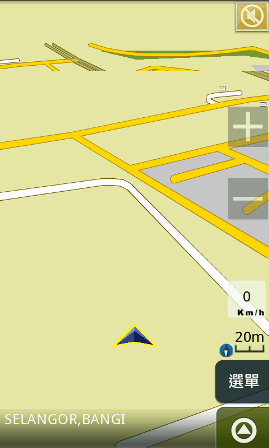 |
|
|
Apr 7 2010, 12:38 PM
Return to original view | Post
#55
|
|
Junior Member
182 posts Joined: Dec 2006
|
QUOTE(shenmui @ Apr 7 2010, 12:33 PM) I think can use in Malaysia after change to MFM map only the problem is language setting can't be change........... Yeah, sorry for typo... i mean for android to suit for malaysian or outside of taiwan, we still on progress..  |
|
Topic ClosedOptions
|
| Change to: |  0.0471sec 0.0471sec
 0.35 0.35
 7 queries 7 queries
 GZIP Disabled GZIP Disabled
Time is now: 6th December 2025 - 10:01 PM |
 Quote
Quote