Welcome Guest ( Log In | Register )

3 Pages  1 2 3 >Bottom

Outline · [ Standard ] · Linear+

Guide Beginners Guide to Desktop Modding

views
     
TSfariz
post Feb 3 2005, 09:09 AM, updated 15y ago

Tan Sri F
Group Icon
VIP
16,825 posts

Joined: Jan 2003
From: Siberia
Beginners Guide to Desktop Modding

Disclaimer:
1. I'm not responsible if you mess up your registry and your computer decides to no longer work. just so you know, do all of these things at your own hazard.
2. Guides are taken from other guide scattered in the forum and other forums.

Introduction:

So you went to customize.org and you saw the most badass desktop ever and you want to know how it's done right? now that you realize that posting a comment saying "great screenshot, how did you do this?" doesn't get you anywhere, this tutorial will attempt to reveal to you the basic steps of desktop customization in windows and point you in the right direction as to where to achieve more advanced effects.

Enabling WinXP to use 3rd party themes:

Universal UXTheme Patcher:
The UXTheme Patcher allows you to use any 3rd party msstyle theme on Windows XP/SP1/SP2 by patching the uxtheme.dll (dynamic link library).

Download UXTheme Multi-Patcher

Download visual style from any of these site:
- Neowin.net: Completed Visual Styles
- deviantART: Visual Styles
- Customize.org: XP VisualStyles

After you have downloaded the visual styles; usually in zip format; extract it to c:\windows\resources\themes\

Right click desktop > properties > appearance tab, select the visual style you just installed.

Another method is to use WindowBlinds; download here; also 30 days trial.
You can get themes for WindowBlinds from WinCustomize

Wallpaper:

As you may have guessed, your desktop background or "wallpaper" is integral to the overall look of your desktop theme.

A good rule of thumb for wallpapers is to always use one that has a solidly colored area so you can place your icons and other desktop elements without interfering with the wallpaper's focal point. This becomes a problem sometimes when you're using a wallpaper that has a lot of three dimensional work and doesn't really leave room for a blank area. This might require you to edit the wallpaper a bit to your liking and may be more trouble than it's worth.

some good resources for wallpapers are:

- customize.org
- deviantart.com
- Pixelgirl
- Mac OS X wallpapers
- MobiusCo
- Mandolux
- MagnetStudio
- Vladstudio
- WallpaperStock

This post has been edited by fariz: May 22 2011, 10:02 PM
TSfariz
post Feb 3 2005, 09:14 AM

Tan Sri F
Group Icon
VIP
16,825 posts

Joined: Jan 2003
From: Siberia
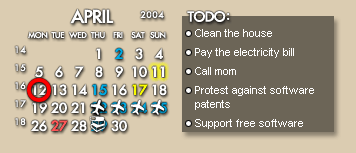
Rainmeter & Rainlendar:
- simple clock and calender on your desktop

user posted image

Download link:
Rainlendar
Rainmeter
(read the manual before asking question)

Skins:
Rainmeter: http://customize.org/rainmeter
Rainlendar: http://customize.org/rainlendar


Samurize:
- shows your cpu usage, memory and etc
Download link: http://www.samurize.com
Install samurize; then make sure you run the client.exe in order to have the program display on ur desktop. Run config.exe to mod the appearance and add stuffs.
To show the temps; download motherboard monitor at http://mbm.livewiredev.com; make sure you configure all the meters so that it follows your mobo's sensors.
Create shortcut for samurize client and then put it in your startup folder so that it will auto start the next time you restart/turn on your computer.

Samurize tutorial: Samurize Tutorials
To make some adjustment in the settings of the config -> right click samurize icon on your systray, then select edit config.

This post has been edited by fariz: Jan 6 2009, 11:16 AM
TSfariz
post Feb 3 2005, 09:19 AM

Tan Sri F
Group Icon
VIP
16,825 posts

Joined: Jan 2003
From: Siberia
Dock

user posted image

Object Dock: http://www.objectdock.com/
RK Launcher: http://home.cogeco.ca/~rklauncher/
Rocketdock: http://www.rocketdock.com/
Xwindows Dock: http://www.aqua-soft.org/board/showthread.php?t=50179

Download PNGs/icons for docks from these sites:
- Gfxed.com
- InterfaceLIFT
- Wincustomize Objectdock Library

Dock Shortcuts: how-to

All you need to do is drag your applications or folders to the dock! To remove, drag the shortcut out from the dock and Poff!!

This post has been edited by fariz: Dec 8 2008, 03:04 PM
TSfariz
post Feb 3 2005, 09:24 AM

Tan Sri F
Group Icon
VIP
16,825 posts

Joined: Jan 2003
From: Siberia
Changing Icons:

The easiest/safest is to use Iconpackager: http://www.stardock.com/products/iconpackager/ (trial)
Download icon packages from: http://www.wincustomize.com/skins.asp?library=2

Sample:
1. G.A.N.T 2: http://www.wincustomize.com/skins.asp?library=2&SkinID=1041
2. iCandy Junior Yellow: http://www.wincustomize.com/skins.asp?library=2&SkinID=1099
3. Gloss: http://www.wincustomize.com/skins.asp?library=2&SkinID=1066
4. Comic Icon 02: http://www.wincustomize.com/skins.asp?library=2&SkinID=1040

Freeware:
Icon Phile

Hiding desk icons
right click on desktop > arrange icons by > uncheck show desktop icons.

Making Desktop Text Transparent
Use D-Color XP: download link
- change the view of your icons on your desktop, allowing you to select from the default large icons view, the small icons view, and the new tile view.

Changing Windows Explorer / Internet Explorer Toolbar Icons

- download Y'z Toolbar: Y'z Toolbar 1.3
- download themes from these sites:Put it in your "startup" folder in Start Menu --> Programs --> Startup to initialized it on startup.
TSfariz
post Feb 3 2005, 09:31 AM

Tan Sri F
Group Icon
VIP
16,825 posts

Joined: Jan 2003
From: Siberia
Hiding the Recycle Bin

Easy way:
Download, install and run TweakUI for Windows XP. Navigate to Desktop and remove Recycle Bin.


Add Recycle Bin to Folder Options:

Copy and save the following code into notepad and save as Binopt.reg and then double-click it. After importing Binopt.reg into the registry, a new option is listed in the Folder Options dialog box that lets you configure the Recycle Bin icon.
CODE
REGEDIT4

[HKEY_LOCAL_MACHINE\SOFTWARE\Microsoft\Windows\CurrentVersion\Explorer\Advanced\Folder\RecycleBinOnDesktop]
"RegPath"="Software\\Microsoft\\Windows\\CurrentVersion\\Explorer\\HideDesktopIcons\\NewStartPanel"
"Text"="Show Recycle Bin icon on the desktop"
"Type"="checkbox"
"ValueName"="{645FF040-5081-101B-9F08-00AA002F954E}"
"CheckedValue"=dword:00000000
"UncheckedValue"=dword:00000001
"DefaultValue"=dword:00000001
"HKeyRoot"=dword:80000001


user posted image


Making a Transparents Background for Desktop Icons.

By default, Windows XP, can have a transparent background for desktop icons.

System Properties (Win+Pause) > Advanced > Performance > Settings > Visual Effects > enable Use drop shadows for icon labels on desktop

But, if you disable this you can change the text color and background. For this you need D-Color XP. Install it, click on a monitor icon in system tray and you'll get this:

user posted image

This post has been edited by fariz: Sep 22 2006, 10:12 AM
TSfariz
post May 16 2005, 03:46 PM

Tan Sri F
Group Icon
VIP
16,825 posts

Joined: Jan 2003
From: Siberia
I opened this thread so people can ask question directly..
TSfariz
post May 31 2005, 09:00 AM

Tan Sri F
Group Icon
VIP
16,825 posts

Joined: Jan 2003
From: Siberia
LClock: http://www.neowin.net/forum/index.php?showtopic=157465
TSfariz
post Oct 28 2005, 05:44 PM

Tan Sri F
Group Icon
VIP
16,825 posts

Joined: Jan 2003
From: Siberia
@icon sushi: http://www.towofu.net/soft/e-aicon.php
TSfariz
post Dec 30 2005, 06:14 AM

Tan Sri F
Group Icon
VIP
16,825 posts

Joined: Jan 2003
From: Siberia
just reinstall samurize and only select extra > media plugin
TSfariz
post Feb 6 2006, 06:14 AM

Tan Sri F
Group Icon
VIP
16,825 posts

Joined: Jan 2003
From: Siberia
Tweak UI

Common Dialog -> Places Bar
TSfariz
post Feb 8 2006, 01:48 PM

Tan Sri F
Group Icon
VIP
16,825 posts

Joined: Jan 2003
From: Siberia
QUOTE(hkeat @ Feb 8 2006, 01:42 PM)
where can i dl the latest full version of styler toolbar... i only found the evaluation version at the official site. thanks in advance for the link
*
You have to buy the license. The license will released the restriction place on the evaluation version.

This post has been edited by fariz: Feb 8 2006, 01:52 PM
TSfariz
post Apr 23 2006, 04:05 PM

Tan Sri F
Group Icon
VIP
16,825 posts

Joined: Jan 2003
From: Siberia
rk launcher is NOT y'z dock but both use the same recycle bin docklet

to customize the icon right click the docklet and select "Property of Docklet"

This post has been edited by fariz: Apr 23 2006, 04:09 PM
TSfariz
post May 5 2006, 04:30 PM

Tan Sri F
Group Icon
VIP
16,825 posts

Joined: Jan 2003
From: Siberia
Control Panel > Regional and Language Options > Regional Options > Customize > Time

use H:mm:ss as time format

This post has been edited by fariz: May 5 2006, 04:31 PM
TSfariz
post May 15 2006, 12:44 PM

Tan Sri F
Group Icon
VIP
16,825 posts

Joined: Jan 2003
From: Siberia
for beginner, use Yahoo! Widget
TSfariz
post May 18 2006, 03:04 PM

Tan Sri F
Group Icon
VIP
16,825 posts

Joined: Jan 2003
From: Siberia
QUOTE(piku @ May 18 2006, 02:34 PM)
1.i am using weather under avescripter in ave desk
i know how to use it, just dont know how to change to malaysia
cause it is currently showing us states weather
*
http://forum.lowyat.net/index.php?showtopi...dpost&p=5610131
TSfariz
post May 23 2006, 01:45 PM

Tan Sri F
Group Icon
VIP
16,825 posts

Joined: Jan 2003
From: Siberia
QUOTE(nightzstar @ May 23 2006, 01:40 PM)
I got this problem. When i want to delete this shortcut on my desktop, it will reappear again when i restart my window. Any sifus here can help? icon_question.gif
*
http://forum.lowyat.net/index.php?showtopic=291812
TSfariz
post Jun 5 2006, 11:02 PM

Tan Sri F
Group Icon
VIP
16,825 posts

Joined: Jan 2003
From: Siberia
QUOTE(supernothing @ Jun 5 2006, 10:15 PM)
hi guys, first time post somemore

i'm looking for this visual style

http://img467.imageshack.us/my.php?image=ts5kr.jpg

anybody know the name of this one? i know the icons are tango
*
Royale Vista

the screenshot is different, it is one of the substyles.

QUOTE(gengstapo @ Jun 5 2006, 10:52 PM)
could any1 here tell me how to add the separator line in RK Launcher after i remove it??
currently i dont have any separator for my launcher  sweat.gif  sweat.gif
*
right click dock > add separator
TSfariz
post Jun 6 2006, 12:12 AM

Tan Sri F
Group Icon
VIP
16,825 posts

Joined: Jan 2003
From: Siberia
Use the latest beta and the option will appear.

http://www.aqua-soft.org/board/showthread.php?t=24982
TSfariz
post Jun 6 2006, 08:15 AM

Tan Sri F
Group Icon
VIP
16,825 posts

Joined: Jan 2003
From: Siberia
with the latest RK Launcher, when you don't have separator, just right click any of the dock icons and select RK Launcher Setting

or

Add it manually.

Go to RK Launcher folder

find the file itemlist.conf and open with notepad or a text editor.

Add the following code to the end of the file

[RKDockItem]
type = separator
show = normal
TSfariz
post Jun 16 2006, 07:18 PM

Tan Sri F
Group Icon
VIP
16,825 posts

Joined: Jan 2003
From: Siberia
QUOTE(Dominant Star @ Jun 16 2006, 07:01 PM)
Thanks... you have already explain much on the problem I'm having. I thought at first... those icons from there is for IconPackager. No wonder I can't use it at all. Those icon... are they for some particular programs?? Or we just take it and change the icons of applications we want to use in the properties of the icon's shortcut?
*
you can use them with iconpackager, but you have to make you own theme


3 Pages  1 2 3 >Top
 

Change to:
| Lo-Fi Version
0.0214sec    0.81    7 queries    GZIP Disabled
Time is now: 18th December 2025 - 07:09 AM