


» Click to show Spoiler - click again to hide... «
Recommended GPS App For iPhone , Q&A Discussion Thread
|
|
 Oct 22 2010, 06:56 PM Oct 22 2010, 06:56 PM
Return to original view | Post
#1
|
 
Senior Member
6,462 posts Joined: Nov 2004 From: [Latitude-N3°9'25"] [Longitude-E101°42'45"]  
|
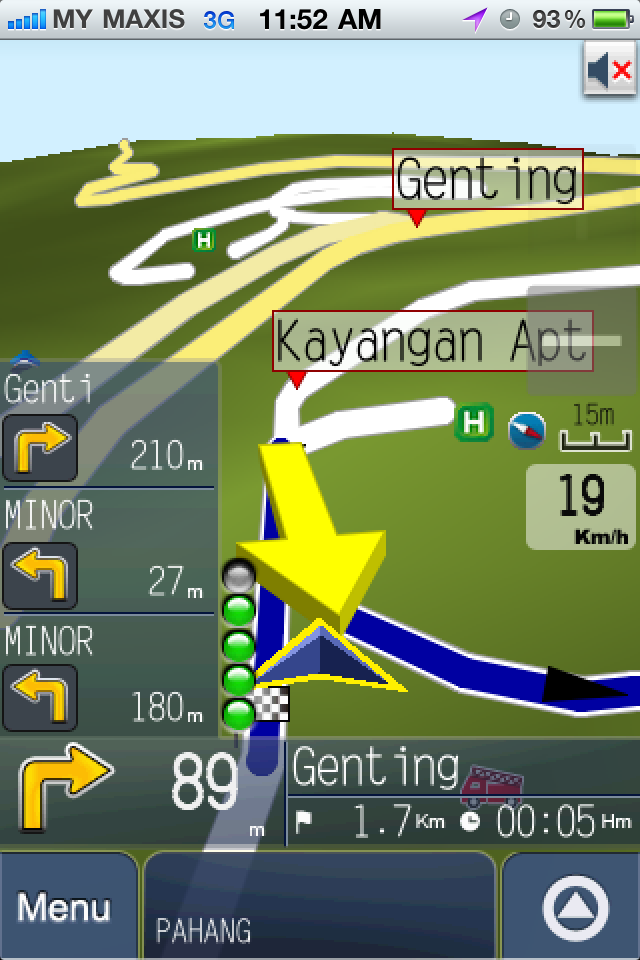
Something to ask about Papago from a newbie. In the navigation screen, what is the 5 circles/bubbles that turn grey & green ? GPS satellite signal strength ?
» Click to show Spoiler - click again to hide... « |
|
|
|
|
|
Oct 25 2010, 12:21 PM
Return to original view | Post
#2
|
|
Senior Member
6,462 posts Joined: Nov 2004 From: [Latitude-N3°9'25"] [Longitude-E101°42'45"]
|
QUOTE(angelflames @ Oct 22 2010, 08:52 PM) green bubble indicate how near you are to the junction. 1 green bubble = around 400m, 5 green bubbles = right infront of you Is it ?   I read through Papago user guide PDF, and can't find any info on this. Perhaps you can share where to get info or learn more on this ? I read through Papago user guide PDF, and can't find any info on this. Perhaps you can share where to get info or learn more on this ?Thanks  |
|
|
Oct 26 2010, 10:25 AM
Return to original view | Post
#3
|
|
Senior Member
6,462 posts Joined: Nov 2004 From: [Latitude-N3°9'25"] [Longitude-E101°42'45"]
|
Try delete the file, and re-download again ? Maybe the file corrupted during download.
|
|
|
Oct 26 2010, 01:47 PM
Return to original view | Post
#4
|
|
Senior Member
6,462 posts Joined: Nov 2004 From: [Latitude-N3°9'25"] [Longitude-E101°42'45"]
|
I assume you are using Papago for MY & SG, which only comes with MY & SG map. If you are in other country, e.g. Hong Kong, then you will need the HK map, i.e. Papago for HK.
Check the appstore. |
|
|
Oct 26 2010, 03:58 PM
Return to original view | Post
#5
|
|
Senior Member
6,462 posts Joined: Nov 2004 From: [Latitude-N3°9'25"] [Longitude-E101°42'45"]
|
Oh, outside KL only.
(1) Check General -> Settings -> Location Services is ON (2) Ensure you are at outside open area with no trees/roof/tall building blocking. It may take some time to lock satellites, especially if Cellular Data is OFF, as this disabled the so called Assisted-GPS. |
|
|
Nov 9 2010, 03:50 PM
Return to original view | Post
#6
|
|
Senior Member
6,462 posts Joined: Nov 2004 From: [Latitude-N3°9'25"] [Longitude-E101°42'45"]
|
Me too using PPG 7.1 with MFM (100415). Never crash/hang before (touch wood).
This week just upgrade the map to 4th Nov 2010. Doing testing now. No crash/hang also. Very fast lock satellite if in outside open air, a few seconds only. Previously using Nokia with GMXT + MFM also. Comparison: (1) Still prefer GMXT graphical user interface (2) PPG is better in the sense of giving more voice/oral direction before reach a junction/split road. e..g Keep Left. (3) Split view with PPG Other than that, both brings me to the destination. |
|
|
|
|
|
Nov 19 2010, 11:57 AM
Return to original view | Post
#7
|
|
Senior Member
6,462 posts Joined: Nov 2004 From: [Latitude-N3°9'25"] [Longitude-E101°42'45"]
|
QUOTE(Boy96 @ Nov 19 2010, 01:34 AM) cause your car dont have V-Kool, try cold boot without A-GPS turned on and with V-Kool tinted cars That is not GPS device problem already. Smart-Tag (Touch'nGo) will not work either.This is due to V-Kool is too good a product, that it blocks out most of the infrared radio spectrum, which includes the range for mobile phones and smart-tag devices. That is why you may see people wind-down their car windows and holding the smart-tag outside their windows when passing toll plaza  You may need to do that with your GPS device. Good luck on current rainy days You may need to do that with your GPS device. Good luck on current rainy days Or, cut a hole on the V-Kool . |
|
|
 Nov 22 2010, 01:51 PM Nov 22 2010, 01:51 PM
Return to original view | Post
#8
|
|
Senior Member
6,462 posts Joined: Nov 2004 From: [Latitude-N3°9'25"] [Longitude-E101°42'45"]
|
QUOTE(GUESS @ Nov 22 2010, 01:19 PM) hi bro any recomendation for car charger to use for iphone 4? I'm looking for one also. My friend is using a 1A output car charger, but seems like it can't charge full when using GPS navigation.I'm thinking if a 2A output (for iPads) will kill iPhone4 or not |
|
|
May 30 2011, 11:57 AM
Return to original view | Post
#9
|
|
Senior Member
6,462 posts Joined: Nov 2004 From: [Latitude-N3°9'25"] [Longitude-E101°42'45"]
|
QUOTE(Dorano @ May 28 2011, 08:00 AM) Hi all I've used Waze. The only advantage is the traffic reporting, provided enough members within the area/route you want to go. Also, it does auto-reporting when traffic is jam/slow.Has anyone tried Waze on their iPhone/iPad before? It's a GPS-based traffic application. Really really cool. As I am driving, it tells me which roads have bad traffic or have road blocks, as reported by other "Wazers". And if I am driving and my car slows down ono the highway, it asks me if I am in bad traffic. So if I said yes, it will broadcast to other "Wazers" taking the same road. Nice! However, I noticed that it uses up a lot of battery life. Also, does anyone know how much bandwidth it uses up? I noticed that my data usage has increased a lot and I might even bust my 1 GB limit. Ouch! I hope Maxis doesn't charge me extra for the usage.  DO NOT depend on it for routing/GPS direction. The roads/maps are messy as no one maintain it. Also, since the LCD screen is always on, it'll suck up the battery quite fast, similiar like Papago. It will also use some data bandwidth for the reporting. I estimate for every hour, it takes up 0.5-1MB, excluding the map-sync (which I do at home through WiFi) |
|
|
Aug 11 2011, 11:40 AM
Return to original view | Post
#10
|
|
Senior Member
6,462 posts Joined: Nov 2004 From: [Latitude-N3°9'25"] [Longitude-E101°42'45"]
|
As of today, Garmin for iPhone only has maps for US. The maps are not downloaded, and must use data-plan to download as you move.
There are no maps for other countries yet. You can't download MFM/MSM map into it. We have to wait for the next release of Garmin for iPhone. |
|
|
Aug 15 2011, 10:36 AM
Return to original view | Post
#11
|
|
Senior Member
6,462 posts Joined: Nov 2004 From: [Latitude-N3°9'25"] [Longitude-E101°42'45"]
|
Summary:
No data plan = using A-GPS is chargeable (data plan) = need longer time (may take few minutes) to lock satellite and also must be in open area facing the sky, no tall buildings, roof, trees to block. Data plan = can use A-GPS = locks in seconds and also can detect location even inside most buildings. --- There is one time, my experience of using without A-GPS from KLCC to Bukit Bintang (play play), Jln Ampang -> Tun Razak -> Jln Bukit Bintang it still not yet lock the satellites when I reach destination  Sometimes it locks faster though. |
|
|
Aug 17 2011, 10:30 AM
Return to original view | Post
#12
|
|
Senior Member
6,462 posts Joined: Nov 2004 From: [Latitude-N3°9'25"] [Longitude-E101°42'45"]
|
QUOTE(blur_goofy @ Aug 17 2011, 09:07 AM) question: on papago Did you set/tell the device where you want to go (destination/POI) ?my installed papago doesnt seem to be able to guide me. it can lock my location really quick but once i start driving, it will not guide/navigae. i wonder what happened? |
|
|
Aug 17 2011, 06:48 PM
Return to original view | Post
#13
|
|
Senior Member
6,462 posts Joined: Nov 2004 From: [Latitude-N3°9'25"] [Longitude-E101°42'45"]
|
QUOTE(Optiplex330 @ Aug 17 2011, 01:22 PM) GPS need to find the position of satellite. Then do calculation as to where you are. If you keep moving, you are making things more difficult. It's like shooting a stationary target vs a moving target. Which is easier? Without A-GPS:Sometimes when I'm moving around the same area as stated above in a car, I can get lock in 2-5 minutes. Sometimes I stand in the middle of open football field (don't ask me why I'm there), without moving, no building/trees/etc., minimal or no clouds, it still needs 2-5 minutes. |
|
|
|
|
|
Aug 26 2011, 03:05 PM
Return to original view | Post
#14
|
|
Senior Member
6,462 posts Joined: Nov 2004 From: [Latitude-N3°9'25"] [Longitude-E101°42'45"]
|
QUOTE(irmond @ Aug 26 2011, 02:28 PM) Actually what's wrong with using google map given on the iphone? Also, google map (or if you use nokia ovi maps on nokia phones) need to download the map constantly using data-plan. That will use up a lot of the quota.they are always 90% accurate for me. they only thing, there's no girl voice saying 'turn left' nor 'rerouting' Also, google map POI is not as extensive as MFM inside Papago. |
|
|
Oct 11 2011, 04:11 PM
Return to original view | Post
#15
|
|
Senior Member
6,462 posts Joined: Nov 2004 From: [Latitude-N3°9'25"] [Longitude-E101°42'45"]
|
Waze map are useless. Waze is only good for traffic updates/reporting, especially during peak hours.
Google map is useless, unless you have unlimited data plan and at good coverage area (3G/HSDPA), otherwise loading of the map will be slow. For offline maps, the best is to stick with Papago, Sygic, etc. |
|
|
Feb 8 2012, 12:39 PM
Return to original view | Post
#16
|
|
Senior Member
6,462 posts Joined: Nov 2004 From: [Latitude-N3°9'25"] [Longitude-E101°42'45"]
|
QUOTE(mohdanwar @ Feb 7 2012, 05:31 PM) is waze sucking data? if yes i wont use it Of course it sucks data. Otherwise, how can it communicate with Internet to get updates/alerts from other road users ? By call ? By SMS ? |
|
|
Feb 10 2012, 07:55 PM
Return to original view | Post
#17
|
|
Senior Member
6,462 posts Joined: Nov 2004 From: [Latitude-N3°9'25"] [Longitude-E101°42'45"]
|
QUOTE(jackyyong @ Feb 10 2012, 09:55 AM) From my experience, Waze uses very minimal data. On my recent trip back to hometown, I turned on Waze all through the trip to check whether there is any traffic jam in the highways. By the end of the trip (about 1.5 hours), I used barely 5 MB of data. If you can afford 5 MB of data, Waze is a great tool to use!! Did you try with MFM Custom POI ? I also recently installed Garmin Streetpilot, the US version. This is the "map-on-board" version. You can actually download the Malaysia map into it using iExplorer or other file viewer. I prefer the Garmin map compared to the Papago version. So in this poll, I'll vote for "Other - Garmin Streetpilot" Which one should we use ? (i) Nuvi (.wav) (ii) Garmin (.mp3) (iii) MobileXT (Boh-Sia) Also, which folder to put ? (i) /private/var/mobile/Applications/xxxxx/Library/sdcard/Garmin/POI or (ii) /private/var/mobile/Applications/xxxxx/garmin-nav.app/storage-usa/POI This post has been edited by cute_boboi: Feb 10 2012, 08:01 PM |
|
|
Feb 13 2012, 04:46 PM
Return to original view | Post
#18
|
|
Senior Member
6,462 posts Joined: Nov 2004 From: [Latitude-N3°9'25"] [Longitude-E101°42'45"]
|
For this Garmin, I'm trying to :
(1) Don't know which exact folder to put Custom POI. Still trying out. (2) Support JCV (JunCtion View) ? |
|
|
Mar 2 2012, 02:22 PM
Return to original view | Post
#19
|
|
Senior Member
6,462 posts Joined: Nov 2004 From: [Latitude-N3°9'25"] [Longitude-E101°42'45"]
|
QUOTE(EmperorScorpion @ Mar 2 2012, 06:27 AM) Guys what is the best gps navigator now ? There is no best. Each individual may have difference preference.My preference for navigation (not in order): - Papago - Sygic - Garmin Onboard Preference for traffic report: - Waze |
|
|
Mar 5 2012, 11:22 AM
Return to original view | Post
#20
|
|
Senior Member
6,462 posts Joined: Nov 2004 From: [Latitude-N3°9'25"] [Longitude-E101°42'45"]
|
QUOTE(DarkNite @ Mar 3 2012, 01:56 PM) Any screen shots or mini review? Yes, the iPhone Garmin Onboard does recognize gmapsupp.imgDoes it recognized gmapsupp.img? Use MFM compile as GarminXT map. |
| Change to: |  0.1027sec 0.1027sec
 0.74 0.74
 8 queries 8 queries
 GZIP Disabled GZIP Disabled
Time is now: 11th December 2025 - 07:05 AM |
 Quote
Quote