Welcome Guest ( Log In | Register )

Outline · [ Standard ] · Linear+

 Norton 2010 contest : 1 year NIS 2010 + vouchers

views
     
TSjamok-symc
post Nov 8 2009, 12:34 PM, updated 17y ago

Getting Started
**
Junior Member
56 posts

Joined: Nov 2008


Greetings fellow Lowyat-ers smile.gif

To celebrate the launch of Norton 2010, we are giving away 5 copies of Norton Internet Security 2010 (1 year protection for one PC) + cash vouchers to 5 winners of this contest.

Here's how to win in 3 easy steps :

Step 1 : Go to Norton 2010 Trialware (http://www.norton.com/satrialware)
Step 2 : Download, install & try out the trial version of Norton Internet Security 2010
Step 3 : Be the first 5 to post your reviews with a screenshot of Norton Internet Security 2010 on your desktop

*EDIT : Prizes are awarded to the first 5 submitted reviews; however, i have another 10 keys (NIS 2010 for 1 year protection) to give away so submit your take on NIS 2010 right here, right now !*


Therefore, be SAFE, be SMART & be FAST with Norton 2010 & may the best man/woman wins ! rclxms.gif


Rules & regulations
1) Contest is open to Lowyat.net registered members only
2) Each winner is entitled to 1 (ONE) prize only
3) Contest begins on Sunday, 8th November 2009 & ends at 12.00pm on Sunday, 15th November 2009
4) Winners will be listed on this thread and notified via e-mail


Regards,
Jason Mok
Norton from Symantec

This post has been edited by jamok-symc: Nov 10 2009, 12:04 PM
ammeltz.yokoyoko
post Nov 9 2009, 11:51 AM

New Member
*
Junior Member
9 posts

Joined: Oct 2009
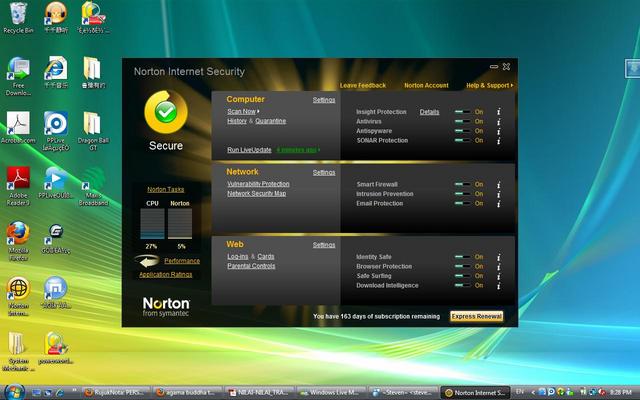
My simple review on NIS2010.

Installation

Installation is a breeze. I'm running it on a AMD Semprom 1.8Ghz with 2GB of RAM and the installation runs smoothly without any hiccups. On screen instruction is very straight forward and very easy to follow.

First Run

It requires the user to create a Norton account, and again it's pretty much a very simple process. Just key in your details and your set to go.

Programs Updates

I manually run the Live Update and it completed in about 5 minutes. Nothing much here.

Scanning

I find scanning time quite acceptable and it also doesn't slow down the PC.

Extra Product Features

After installation, option for Identity Safe, Browser Protection, Safe Surfing are all activated by default. A good move for those not so PC savvy.

Final take

I found that NIS2010 is a very simple program to run thus suitable for all level of computer user. I'm very happy and satisfied with the performance although I'm running it on a very basic PC.

user posted image
tech_frix
post Nov 9 2009, 11:56 AM

Boo Yah!
*******
Senior Member
5,656 posts

Joined: Sep 2007
From: wheres d oil price is higher than condoms..

as i promise...

Installation

It was damn fast. my pc spec is E2140, P35mobo and 4GB rams. and d installation GUI is awesome.

First Run

i just skip d online registration since my firewall refuse to accept it. but will register later.

Programs Updates

I ran d update and it works flawlessly and uber fast. and it downloaded 16mb file like it was a 6mb file. Fast and good. Along d process, my pc working like normal without laggish...

Scanning

Scanning was fast and yet my pc still can run my apps and video. I love it!

Extra Product Features

I love d flipping thingy...kinda refreshing and fun to do. other than that, d performance bar also a new features for AV and it is a good addition to ppls that love to watch their AV performance. tongue.gif

Final take

NIS2010 is really a good and reliable AV since it can immediately detect a few cokies on my line. d beautiful GUI and new dandy look amaze me. Hope d price is right cuz i really want to buy it. thanks thumbup.gif thumbup.gif thumbup.gif

Attached Image
cool.gif

This post has been edited by tech_frix: Nov 11 2009, 12:26 AM
Maapu
post Nov 9 2009, 06:37 PM

Getting Started
**
Junior Member
122 posts

Joined: Mar 2009


Review Of Norton Internet Security 2010
Tested on Core 2 Duo 2.0 Ghz / 2 GB RAM / Windows Vista Home Basic

INSTALLATION

Installation was smooth and easy. The installation took less than second. 58 seconds to be precise.

LIVE UPDATE

Updates was fast. 14.57 MB of updates downloaded.

SCANNING

Scanning ran smoothly and the processor usage of Norton was 15% at the time of scanning.

INTERFACE

The interface was nice and the navigation for other features are easy as all of them are arranged on the main interface.

CONCLUSION

Norton Internet Security has improved a lot compared to the previous version. It is very smooth to run now. No slowing down

(only uses 3-5 % of processor usage during idling). The main interface is eye-catching and displays all the necessary information. Running updates and scanning

went smooth without any hassle.

» Click to show Spoiler - click again to hide... «


This post has been edited by Maapu: Nov 9 2009, 08:07 PM
SUSd3l4croix
post Nov 9 2009, 07:28 PM

Getting Started
**
Junior Member
74 posts

Joined: Jan 2009
i really dun have time for full scan ^^ , ability to run low priority scan or background scan are quite useful.
Norton internet security also don't hog too much of my memory
more, i like the flip effect when performance button is clicked

» Click to show Spoiler - click again to hide... «


This post has been edited by d3l4croix: Nov 9 2009, 08:22 PM
boxer07
post Nov 9 2009, 07:44 PM

Enthusiast
*****
Senior Member
844 posts

Joined: Feb 2007
My little review on NIS 2010

Intel Core Duo E5200 , 250gb HDD , 4gb DDR2 RAM


Installation

Installation is a bit slow for me , maybe bcoz of upgrading process from NIS 2009 t0 NIS 2010 , but nevertheless, it took less than 5mins .

GUI
Its much more prettier and better than the previous NIS 2009 , where its like total transformation to a new version .The effect is fantastic for me

Scanning Process
The scanning process is much more faster , like 12mins to scan all my 250gb hdd , rather than 18mins frm previous version

Extra Protection
Sonar Protection , download intelligent , and Browser Protection protect the user from viruses from internet , and safe surfing too

Conclusion

This version is another success for Norton I.S. . The scanning process , GUI , and the extra features worth for u to get it and protect urself from viruses....

» Click to show Spoiler - click again to hide... «


This post has been edited by boxer07: Nov 9 2009, 08:18 PM
steventan85
post Nov 9 2009, 08:47 PM

Look at all my stars!!
*******
Senior Member
6,447 posts

Joined: Jan 2006
My review

The NIS is load much more faster than previous version.

The user interface is nice and different from NIS 2009

Really no regret using it since NIS 2009.

It can detect and delete the virus very fast

user posted imageuser posted image

This post has been edited by steventan85: Nov 9 2009, 09:02 PM
shredder
post Nov 10 2009, 01:15 AM

Getting Started
**
Junior Member
251 posts

Joined: Dec 2006


My Review:

Installation

Installation is a breeze. My Intel Core 2 Duo E6600 (2.4Ghz) with 2GB RAM install the program easily without any problems. Storage is not a problem as it requires not more than 100MB in the main hardisk. This software also works well in my new windows 7 professional 64-bit.

First Run

User need to register an account to continue the process. I already have an account since Norton Internet Security 2009. Therefore its not a problem to me. Furthermore the registration did not consume a lot of time. After that it is ready protecting my machine.

Programs Updates

The Norton update server is very helpful. It provide better bandwidth and makes the update hassle free. I think it will get better if you had a better internet connection speed.

Scanning

My total Hard disk space is around 2TB and its big. But scanning it using Norton Internet Security 2010 is very pleasant as it did not slow down my machine and obviously did not consume a lot of processing and ram available.

Extra Product Features

Norton Insight, Identity Safe, Browser Protection, Safe Surfing is just some of the extras i get. Personally I really like the Safe Surfing. It really help me when im doing a search on search engine as all of the results will be analyzed for any threats. The Norton Insight also helps a lot when it comes to new downloaded file as it can search for any similarities in the Norton Insight database to make sure it is free from any kind of cyber threats. The Sonar Scanning is also good as it helps to scan file by doing it in background without disturbing the main process of the machine.


Finally

I really hope i can have a copy of this Norton Internet Security 2010 to make sure my system will always protected from any kind of threats. I also recommend all users to try this software and feel the performance and perfection that it can provide you.
» Click to show Spoiler - click again to hide... «


This post has been edited by shredder: Nov 10 2009, 01:25 AM
vickyrao
post Nov 10 2009, 08:05 AM

Regular
******
Senior Member
1,531 posts

Joined: Mar 2005
From: Bandar Sunway


My NIS2010 Review:

Installation
Installation on my Core2Quad Q6600 and 8Gb RAM took only 1 minute and 48 seconds to complete from start till end. End here meaning after logging in to my account as well. Final running product. Best part is, it does not require a REBOOT! Awesome! Running on Windows 7 Ultimate 64-bit.

GUI
This is the nicest GUI i have seen. Although alot of getting used to it is required, but still it is straight forward and easy to catch up to its new style. Love the option to change the theme. Nice feature there. But more themes or custom themes option would have been better though.

Updates
I ran the LiveUpdate and it seems to be completed fast. I am using a 2MB line and it took me only +- 1minute to download and apply the updates.

Scans
QuickScan: took me only less than 2 minutes. WOW Factor!! But how much did it actually scan? Well i will find out more on that later on.
FullScan: Will try it overnight as i need to use it at the moment for some high processing and massive HDD utilisation.

Features
The best feature here i like is the Application Ratings. It seems to monitor the process i am running on and provides a result of it based on norton users. This is done via the Norton Network which i logged on. Really good as malware can be traced based on reports by other users. Network Security is a plus point for me as i use Wifi all the time. Another feature i want to highlight next is the Silent Mode. This you have to try it to find out. I was really curious to find out and i was shocked. It is a good thing btw. So give it a try and shock yourself. smile.gif

Conclusion
I have given up on Norton a long time back, but after trying today the NIS2010, i am impressed. Lots of improvement and better usability. It runs so well and blends in with your programs quietly. It does not bother you like how others does. This is what i want exactly. There are many other features which is not mentioned but what is the point of telling it out? You should find out about it on your own. It is more fun to explore and learn rather than being spoon fed. Anyhow, well done norton. Keep it up. smile.gif

» Click to show Spoiler - click again to hide... «


This post has been edited by vickyrao: Nov 10 2009, 08:06 AM
ghost_301
post Nov 10 2009, 11:14 AM

On my way
****
Junior Member
500 posts

Joined: Nov 2005
From: Setapak Jaya , KL


Is this contest based on the best 5 reviews or the first 5 posts? Doesn't seems fair to me if based on the first come first serve basis ... If it is for best 5 reviews .. Count me in ... I will post my review asap ....
TSjamok-symc
post Nov 10 2009, 12:00 PM

Getting Started
**
Junior Member
56 posts

Joined: Nov 2008


Hello all ,
Thank you so much for the enthusiasm & reviews posted here.


Unfortunately, the bad news is we can only award the prizes to the first 5 submitted reviews cry.gif


The good news: i have an additional 10 keys for Norton Internet Security 2010 (1 year protection) to give away rclxm9.gif !


So, what are you waiting for ? Download and submit your reviews with a screenshot of NIS 2010 on your desktop, right here right now cool2.gif


Be SAFE, Be SMART, Be FAST with Norton 2010 !


Regards,
Jason Mok
Norton from Symantec

ghost_301
post Nov 10 2009, 12:09 PM

On my way
****
Junior Member
500 posts

Joined: Nov 2005
From: Setapak Jaya , KL


QUOTE(jamok-symc @ Nov 10 2009, 12:00 PM)
Hello all ,
Thank you so much for the enthusiasm & reviews posted here.
Unfortunately, the bad news is we can only award the prizes to the first 5 submitted reviews  cry.gif
The good news: i have an additional 10 keys for Norton Internet Security 2010 (1 year protection) to give away rclxm9.gif  !


So, what are you waiting for ? Download and submit your reviews with a screenshot of NIS 2010 on your desktop, right here right now  cool2.gif


Be SAFE, Be SMART, Be FAST with Norton 2010 !
Regards,
Jason Mok
Norton from Symantec
*
10 more key is good but if just given out by first come first serve, I am disappointed. Does that mean that after I installed, I just write a few sentences praising the software, then I am entitled to get a free 1 year key?

Of course the keys are yours, so you have the right to distribute in any ways, but just my opinion that it might not fair enough for those real enthusiast that doing the somehow called 'real' review.

Sorry if I caused any inconvenience. I will still post my review after I used it. Thanks for the contest!
mypg0306
post Nov 10 2009, 01:02 PM

New Member
*
Junior Member
20 posts

Joined: Oct 2009


There are 3 Key Factors to describe the New NIS 2010:

SIMPLE, SYSTEMATIC & FAST

1. SIMPLE

The simplicity of the GUI makes the ease access to the NIS2010 & definitely a user-freindly interface. Each items were controlled by on/off slide bars which similar to swith on/off button on the switch point. Also, the CPU and Norton Usage Bar indicate the useful information about the workload of the system. At idle mode, its only consume approximately 2% only.

2. SYSTEMATIC

All GUI are organize in a very minimal category and sub-menu. Each sub-menu contains with simple and easy-to-use settings with expandable sub-categoty with non-complicated control. Moreover, a quick description of icon 'i' gives the useful infomation and control by disable or enable it. Clicking on each highlited information will expand further details.

3. FAST

Speed is the main factor to what we do in our daily life today. So as the NIS 2010. Every tasks are fast, accurate and quick in respond in action which we can't denied.

Overall, it will be the most reliable antivirus software of the year 2010 and I wish to have it to secure and peace of mind of my daily life.

Attached Image
engseng
post Nov 10 2009, 01:32 PM

Regular
******
Senior Member
1,981 posts

Joined: Jan 2003
From: Malaysia


My Norton Internet Security 2010 review
-----------------------------------------------

Installation

Installation screen was a straight-forward affair, click Agree and Install and it completes in a few minutes.

Features

The amount of options in the Settings screen was mind-bogling at first... It's as if there's a 101 things to check and uncheck.
I made sure I turn on the anti-virus, firewall, anti-phishing and I'm set.

Anti-virus

Scanning took a while due to the amount of files I have on my hard disk. After it completed, it asked me to fix some Tracking Cookies issues.
I noticed that it gave me an option to do Low Priority scanning when I minimised it. With the Low Priority scanning, my computer was still
very responsive and I was able to continue doing my stuff as usual.


Firewall
The Smart Firewall was not instrusive when turned on, although I preferred it let me know when programs are trying to access the Internet


Anti-phishing

NIS 2010 installs plugins in both IE and Firefox. The Norton Site Safety puts a green tick on links to legitimate websites. Nice reminder to
let you know you're looking at a safe website to visit.


Overall
NIS 2010 gave me good impressions on my trial use. I'm happy to recommend it to anyone who's looking for a good anti-virus/firewall software.


Attached thumbnail(s)
Attached Image
exmarquess
post Nov 10 2009, 02:09 PM

New Member
*
Junior Member
24 posts

Joined: Dec 2008


This is a review from a 17 years old casual gamer.

Install Process
User friendly.Just click and wait.

Interface
Simple and clean.

Features
A lot of manual settings and interesting SONAR protection system which I still figuring out how it's work.
I haven't try the anti-phishing system because I haven't run into a phishing site.(I hope I won't).
Most importantly,I truly love the silent mode when I am playing game.

Scanning Process
This the most important in an anti-virus product.Surprisingly,the scanning process faster than my expectation.
I can even scanning for viruses when playing game and cause zero lag.
Impressive and yet different from the rumors.

Overall
Easy to use and more importantly used a little resources.I will recommend to my relatives and friends.


kei18kun
post Nov 10 2009, 09:39 PM

Coconut in the sea(TM)
*******
Senior Member
5,195 posts

Joined: Jan 2003
From: 500 year old rock ADHD™


My review on NIS2010.

Installation

Installation is a so fast and easy. I'm running it on a Intel Atom only with 1GB of RAM and the installation runs smoothly without any hiccups. On screen instruction is very straight forward and very easy to follow. This is totally different than 2007 version onwards which is a great improvement.

First Run

It requires the user to create a Norton account, and again it's pretty much a very simple process and fast.

Programs Updates

I manually run the Live Update and it completed in few minutes. WOW!

Scanning

I find scanning time quite acceptable and it also does slow down the PC maybe because I only have 1GB of RAM on XP. However if I stopped it midway, it hangs abit and take some time to get it closed

Extra Product Features

After installation, option for Identity Safe, Browser Protection, Safe Surfing are all activated by default. A good move for those not so PC savvy but its standard platform.

Final take

I found that NIS2010 is a very simple program to run thus suitable for all level of computer user. I'm very happy and satisfied with the performance although I'm running it on a very basic PC.

» Click to show Spoiler - click again to hide... «


This post has been edited by kei18kun: Nov 10 2009, 09:46 PM
hansc
post Nov 10 2009, 09:46 PM

Getting Started
**
Junior Member
147 posts

Joined: Feb 2006
keep those reviews coming! you are sharing your reviews on the best software that u r using now!
ghost_301
post Nov 10 2009, 10:59 PM

On my way
****
Junior Member
500 posts

Joined: Nov 2005
From: Setapak Jaya , KL


Below is my review after installed the trial:

Installation

Installation of NIS 2010 does impressed me, not only with the simplest installation interface (you can just install it easily by clicking ‘Agree & Install’), but with the time taken for the installation. For my PC (AMD Athlon X2 64 7750, 4GB DDR2 RAM, Windows 7 Professional 64 Bit), it only requires merely two minutes to finish the installation. Of course, it might varies in different computer setups, but I believe it won’t take more than 5 minutes on a few years old computer. Remember, this is a full suite of internet security, not just an anti-virus program or anti-spyware program, so a short two-minutes of installation is totally impressed me. (I had Kaspersky Internet Security installed in my PC more than 5 minutes, and did I mentioned that it require quite a lot of clicks?)

Before the installation, it does allows you to choose other location on your drive for it to get installed if you do not want it to install in the default folder, as well as the option for you to tick whether to join Norton Community Watch (A plugin that allows you to join all the user around the world to fight viruses threat by automatically have the security information sent to Norton server).

After around two minutes, NIS 2010 congratulated me for the completed installation. It claimed that NIS 2010 has better performance, better detection and better web protection. We shall see.

Startup

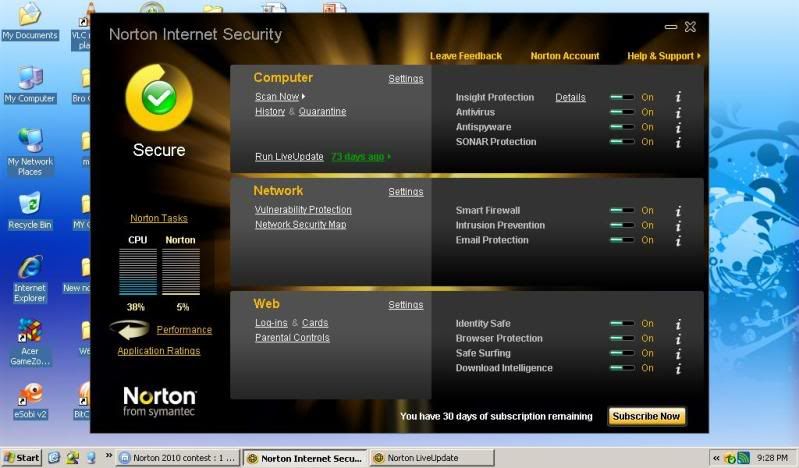
NIS 2010 started up swiftly and it is ready to used within minute after the installation. Another point here. (I had a bad experience with Panda Internet Security 2010 which take ages to get ready to be used after installation.) If you have already eager to see how does the interface of NIS 2010 looks like, check the screenshot below.

Indeed, it doesn’t look simple, but what can you expect from a complete suite of internet security program? The interface looks clean for me though with all the easy-slide option for three main sections: Computer, Network, and Web. 73 days ago? So instead of testing the software right away, I had the LiveUpdate running to update the virus definition etc. (Around 16MB which is still acceptable). Besides that, it does installed a Windows Sidebar Gadget that give you immediate warning if your system is at risk or a green light for your computer. Handy enough?

Features

Performance monitoring

If you have a pair of sharp eyes, you probably noticed that it has a CPU meter at the left side of the main interface. CPU meter shows you how much you processor currently used, and the Norton meter beside it gives you an idea that how much NIS 2010 taken up the CPU. And you probably also noticed a big turning arrow says Performance. Click on it and you will be greeted with a nice 3D flipping to the Performance interface.

So what can the Performance interface of NIS 2010 do for you? As you can see below, besides it give you a system insight of the events happened (related to NIS 2010 of course) each day of the month, it also does have history of CPU and Memory usage for your computer, as well as those used by NIS 2010 itself. I personally find this a nice feature to have, as more and more computer users are concerning about the degradation of the computer performance after getting AV software installed. With this CPU and Memory history feature, one are able to trace how much NIS 2010 has used up the CPU and Memory during the daily usage of computer. Other than that, you also have an option to optimize your computer to improve performance. (I am not too sure how the optimization work, but it should do more good than harm I supposed)

For more advance functions, you can always access Norton Tasks which allows you to turn off the any running process in NIS 2010 when necessary. You can also turn on the silent mode (A mode that Norton Internet Security suppresses all alerts and suspends the background activities for the duration that you specify) from Norton Tasks too.

Application Ratings

Sometimes you had several unfamiliar executable files running when you checked the Windows task manager, but you do not know whether they do good or harm on your system. This is where Application Ratings come to help you. It can help you to rate all the running processes, all the files etc. for their trust level, and of course, it will let you know how popular is the certain file/process used by the Norton Community. If the usage is rated ‘Many Users’, most likely the file/process is safe enough, at least you know you are not alone.

Application Ratings is particularly useful for those who are still new with computer, as most likely they lack of knowledge for differentiating infected files/processes, thus Application Ratings come in handy when they wanted to know more on some suspicious files. All in all, a good feature to have, simple to use, and very straight forward.

Silent Mode

How frustrated you are when you are in the half-way of killing your enemy in GTA IV and suddenly a pop-up tells you that your AV software has been updated? I had this several times with several different AV software and it seems that they never realized those notification or pop-up are just too annoying, when you have a full-screen application running. Not too sure about other company, but for the same concept, I had first experienced it in Norton Anti Virus Gamer Edition. It can automatically detect a full-screen application (usually computer game), and it will suspend everything from disturbing the end user, but still protecting the computer from threat at the same time. Same goes to Silent Mode, with the full-screen application detection turned on by default in NIS 2010. As mentioned before, you can also enable silent mode manual via Norton Tasks, when necessary. I’d say this is a gamer-must-have feature in AV software, so another point here.

Other features

Most of the features in NIS 2010 can also be found in rival software, such as Anti-Spyware, Proactive Defense (SONAR Protection in Norton), Firewall, Email Protection, Safe Surfing, Web Protection etc. Parental Control is available too, except it need to be installed via Norton Add-On pack which can be accessed here.

However, after several testing, I had found something doesn’t work well enough. The Norton Safe Web feature. Upon installation of NIS 2010, Norton Safe Web toolbar is installed in Internet Explorer and Mozilla Firefox automatically. Since the toolbar get installed, I did some testing by accessing some poor rating websites. And what surprises me is that Norton Safe Web tells me that the website I am accessing is rated safe, while my Web Of Trust plugin in Firefox warned me about the poor rating of the website. I am not sure how the Norton safe web works, but apparently it doesn’t rate a website following community rating. I found this can be easily misleading, especially to those who new to internet/computer, as most likely they will trust on the AV software, rather than judge by themselves.


Performance

It runs pretty well and smooth by the time of writing, although I can’t say much since it has been installed not more than a day. But so far so good. A Quick Scan only take less than 2 minutes, with around 6,000 files scanned. I haven’t fully executed Full Scan, as it does cause some lagging here and there during the scanning, but I expect it can be done within 1-2 hours (of course depends on the number of files and the volume size). Under normal condition, NIS 2010 only used 3% of my CPU, just nice.

Conclusion

I am glad that I had tested this latest Norton product, as I am totally impressed with the improvements over the previous products. Although it has a questionable Norton Safe Web feature, but all in all, a very complete internet suite for everyone, easy to use, simple interface, highly customizable, nice gadget on the desktop, and the most important one in my opinion: killing short-installation-time. I’d say it has the potential to win over other AV companies.

Attached Image

I had the full version posted in my blog as well.
http://ghost301tech.wordpress.com/2009/11/...-security-2010/

This post has been edited by ghost_301: Nov 11 2009, 10:25 AM

smallvill3
post Nov 10 2009, 11:00 PM

On my way
****
Senior Member
657 posts

Joined: Jul 2008
From: Bikini Bottom

My personal Review on NIS2010

user posted image

OS: Windows 7 RC Build 7100 (32bit)
RAM: 3GB
Processor: Intel Core Duo 2.0Ghz


GOOD

Installation:
Installing NIS2010 on my machine takes approximately 3 minutes.
I notice there's some windows message telling me that some of the driver from NIS2010 are incompatible with windows 7 RC.
Just run the live-update and the problem is fixed.

Activation:
Activate the product is a very easy and friendly.
FYI, i am using Dual OS (windows xp and windows 7) with NIS2009 (windows xp) and NIS2010 (windows 7) with same product key and both are working fine.

Graphical User Interface:
The GUI for NIS2010 is improved and friendly user. The theme should be added more in future smile.gif (but still i like the default one)

Feature:
The most advance feature in NIS2010 a technology beyond Antivirus, Norton Insight 2.
A reputation for every program running on your PC based on Norton user from around the global.

Virus/Spyware detection:
I've start using Norton since NIS2009, and i do lots of surfing,downloading, online games, online banking with confident.
Frequently using external hdd and pendrive into my machines. And yes, NIS2009 and NIS2010 does a really good job in protecting me.

Scan Speed:
Scan speed is extremely fast because of Norton Insight technology that skip trusted and whitelist file from scanning.

CPU performance:
NIS2010 does not affect (reduce) my PC performance when opening media players, gaming, editing videos, and surfing internet.

BAD

Security history (log) takes times to load.

This post has been edited by smallvill3: Nov 10 2009, 11:29 PM
terrygls
post Nov 10 2009, 11:27 PM

New Member
*
Junior Member
18 posts

Joined: Jul 2008


My review on Norton Internet Security 2010:

Well here it goes, this is my Spec's below:

Intel Centrino Duo P8400
4GB RAM
250GB HD
ATI Radeon HD 3470
Vista Premium OS
and had a External HardDisk of 600GB

Let's start with the Installation first,
Installation on my laptop was smooth from the start till end, and did't need any extra work to complete rclxm9.gif .

GUI
Great improvements from the past and the best i've seen so far, well it is indeed my taste of style and goes kinda well with the windows aero theme and specially like it when it flips over when you click the performance or home button, Good work there Norton notworthy.gif .

Updates
I ran the LiveUpdate and it was so fast that i did't get to catch a thing, and i was like "WOW, that was something"

Scans
Well this is the part is the deciding factor where it decides everything, so first i tried out a Quick Scan and everything was still smooth with a time of roughly 20+mins, and after that i tried the Full System Scan with some load and due to the fact i was busy, by the time it was completed, I WAS UTTERLY SHOCK that it ran smoothly rclxms.gif , so this is a full thumbs UP for me.

Features
Well i'm actually more towards the Performance side so i did't really care what it features, but i took my time looking through and found that the Norton Task, Insight Protection and Application Ratings was very resourceful and the rest like the Performance Chart was indeed a nice feature, but i'll leave the rest your you guys to find out icon_idea.gif .

Conclusion
Actually when i first bought my laptop, it was Pre-install with Norton 2009 and it was Good, but the i wanted to try something different. So it expire i uninstall Norton and switch to brand "X" sweat.gif . And its was one big mistake cry.gif , for the first few scan it was fine but after that it was "F***". Every time when it does a Full Scan, its was like hell and after exactly 7mins, the whole computer freeze and was force to restart, so i began my quest on finding for a solution and i failed to, and it was painful for me to bear with the "Freezing" for the whole year vmad.gif , and believe me when i say its "HELL". So immediately after it expires, i went looking a for one which i can trust and here i was. Its like i'm a 10 year old boy on a sugar rush drool.gif , and when i had what i wanted, i feel like i'm at "Heaven rclxm9.gif ". Anyway this is the one i feel most comfortable with and i'm going to stick with this for a long time thumbup.gif .

Ratings: 100% KICKASS with FULL THUMBS UP
user posted image
zhlee
post Nov 11 2009, 12:43 AM

Getting Started
**
Junior Member
66 posts

Joined: May 2008
Installing NIS 2010 really less than a minute.

It very simple to use.

It will auto delete the virus.

Save a lot time to scan my laptop.

I like it!

user posted image
hansc
post Nov 11 2009, 09:58 AM

Getting Started
**
Junior Member
147 posts

Joined: Feb 2006
hi there!

thanks for the reviews!

can you help us to spread the news for the reviews? get your friends to test it out!!

and Norton 2010 is available on the shelves in the retails!

get it now!~
laucheehon
post Nov 11 2009, 10:26 PM

New Member
*
Junior Member
40 posts

Joined: Nov 2009


QUOTE(jamok-symc @ Nov 10 2009, 12:00 PM)
Hello all ,
Thank you so much for the enthusiasm & reviews posted here.
Unfortunately, the bad news is we can only award the prizes to the first 5 submitted reviews  cry.gif
The good news: i have an additional 10 keys for Norton Internet Security 2010 (1 year protection) to give away rclxm9.gif  !


So, what are you waiting for ? Download and submit your reviews with a screenshot of NIS 2010 on your desktop, right here right now  cool2.gif


Be SAFE, Be SMART, Be FAST with Norton 2010 !
Regards,
Jason Mok
Norton from Symantec
*
See the lowyat.net,
http://www.lowyat.net/v2/latest/review-nis...for-free-2.html

For the whole month of November, Norton will be giving out FIVE copies of Norton Internet Security 2010 (each comes with a 1 year subscription) EVERY WEEK for absolutely free! To stand a chance to win yourself a copy, all you have to do is:

1) Download the trial version of Norton Internet Security 2010.
2) Hop on to this thread (this thread la) in our Lowyat.NET Forums, and submit your comments or short reviews.
3) Pray to god that your comment/review is amongst the five winning posts for the week.
4) Sit patiently and await your spankin new copy of Norton Internet Security 2010 to arrive at your doorstep/in your inbox.

it says every week, now only 4 day then got 15 winners? what it means actually, can you describe clearlier how whole contest run?


youliang
post Nov 11 2009, 10:47 PM

Aficionado
******
Senior Member
1,178 posts

Joined: Oct 2005
From: Sunway / Ipoh


yeah im thinking whether should i do a review on it or not.. if the winners have already been chosen theres no point for us to do a review already
laucheehon
post Nov 12 2009, 12:01 AM

New Member
*
Junior Member
40 posts

Joined: Nov 2009


indirectly mean that, after 15 people downloaded the trial edition, no longer got people go download and try it goodness, and no longer advertising on the product, and doesn't make sales grow, and doesn't make market share increase.
just that simply.
contest end, if really first come first win...
TSjamok-symc
post Nov 12 2009, 01:00 AM

Getting Started
**
Junior Member
56 posts

Joined: Nov 2008


Hello all,
Yes, we are giving away prizes to 5 lucky winners every week for the month of November.

For this week, the contest rule is very, very simple : Be the first 5 to submit your reviews with a screenshot of NIS on your desktop and the prize is yours.

Easy right ?

But since i'm feeling a little generous smile.gif , i'm giving out an additional 10 NIS 2010 keys for the next 10 reviews ....

Contest rules will change every week just to keep things interesting cool2.gif


So if your review didn't make in time for this first round, keep your eyes peeled for the next round as it's just round the corner rclxms.gif


Thanks everyone !


Regards,
Jason Mok
Norton from Symantec


Added on November 12, 2009, 1:09 amLadies & gentleman ....

It's official ! All 5 prizes & 10 NIS keys have been claimed by the fantastic 15 reviewers rclxms.gif

Don't be disappointed just yet if your entry didn't make it; the next round will begin on 16th Nov and this time, it's gonna be a little bit more challenging sweat.gif

So congratulations to all winners; i shall be getting in touch with you very very soon ....

Thank you all for your marvelous reviews !


Regards,
Jason Mok
Norton from Symantec


Added on November 15, 2009, 12:10 pmGood day all biggrin.gif,
The moment that everyone has been waiting for is finally HERE !!!

Congratulations are in order for the following winners of Round 1 :

1 copy of Norton Internet Security 2010 + cash vouchers (5 winners)
1) ammeltz.yokoyoko
2) tech_frix
3) Maapu
4) d3l4croix
5) boxer07

1 Norton Internet Security 2010 key (10 winners)
1) steventan85
2) shredder
3) vickyrao
4) mypg0306
5) engseng
6) exmarquess
7) kei18kun
8) ghost_301
9) smallvill3
10) terrygls

For those unsuccessful entries, keep a look out for Round 2 of the contest smile.gif

For the winners, kindly PM me ASAP so that the prizes can be sent out to you ....

Thank you for your participation & see you in the next round !! rclxm9.gif

Round 2 is at this link : Norton Contest Round 2


Regards,
Jason Mok
Norton from Symantec

This post has been edited by jamok-symc: Nov 15 2009, 01:19 PM
boxer07
post Nov 26 2009, 10:07 PM

Enthusiast
*****
Senior Member
844 posts

Joined: Feb 2007
anyone received the prize d ?
KidAngel
post Dec 26 2009, 04:50 PM

New Member
*
Newbie
2 posts

Joined: Dec 2009
Norton internet security 2010 it run faster then older version.

see the screenshot.


This post has been edited by KidAngel: Dec 26 2009, 04:58 PM


Change to:
| Lo-Fi Version
0.0308sec    0.16    6 queries    GZIP Disabled
Time is now: 7th December 2025 - 03:01 AM