Welcome Guest ( Log In | Register )

Bump Topic Topic Closed RSS Feed

Outline · [ Standard ] · Linear+

 Sony Ericsson XPERIA™ X10, SE 1st Andriod Phone!!!

views
     
rayzrblade
post Dec 1 2010, 01:00 AM

You are nobody in cyberworld
*******
Senior Member
5,040 posts

Joined: Nov 2005


QUOTE(abundai @ Nov 30 2010, 01:18 PM)
2.1 and i'm enjoying it to bits... huge screen...
*
after using it, u wouldnt look at 3.5" to 3.7 " screens

QUOTE(abundai @ Nov 30 2010, 06:45 PM)
i still dont get it..
1- this phone performs great...
2- screen is huge.. lightweight..
3- android 2.1....
4- lotsa great FREE 3rd party games...
5- sleek design..
6- got free GPS...

but still not many people use it....

im glad i didnt get an iphone 3gs or those high end models of rm2K and above...if not, i would have spend so much more for nothing....

next mission, im gonna convert my wife to an X10..hehe...
*
if compare to iphone 4, it certainly does lag a bit..
gaming experience definitely better on iphone 4..
but overall not a bad phone..maybe because of the long awaited 2.1, some got fed up..or even think its outdated. a less than 1k samsung is running 2.2 froyo..

QUOTE(Eugene91 @ Nov 30 2010, 08:29 PM)
Hopefully they'll get multi-touch a.s.a.p. I'm kind of wanting to get myself Xperia X10 as well.. Good specs.. but multi-touch is a big let off I think.. Seems interesting to use for games and web browsing..
*
no multi touch on angry birds a bit hard to play...can see where u aimng..hehe

rayzrblade
post Dec 1 2010, 11:04 AM

You are nobody in cyberworld
*******
Senior Member
5,040 posts

Joined: Nov 2005


QUOTE(sunnyboy @ Dec 1 2010, 01:39 AM)
can la...me still got few level to complete my last golden egg...
*
cant zoom out like iphone versions..make it a bit tougher.
never get to finish the game..always play the first few chapters bcoz..started play in iphone, then start again in ipad, then play again in x10..a bit sick..haha
rayzrblade
post Dec 1 2010, 12:07 PM

You are nobody in cyberworld
*******
Senior Member
5,040 posts

Joined: Nov 2005


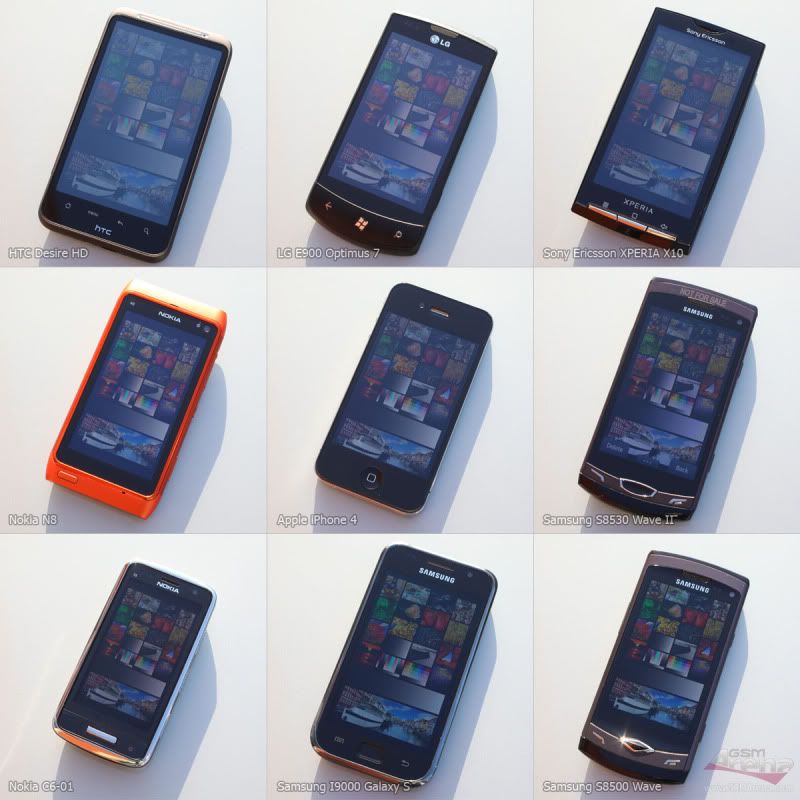
user posted image

http://www.gsmarena.com/display_shootout-review-541.php
rayzrblade
post Dec 2 2010, 09:38 PM

You are nobody in cyberworld
*******
Senior Member
5,040 posts

Joined: Nov 2005


...

This post has been edited by rayzrblade: Dec 3 2010, 12:45 AM
rayzrblade
post Dec 3 2010, 12:46 AM

You are nobody in cyberworld
*******
Senior Member
5,040 posts

Joined: Nov 2005


QUOTE(abgbes @ Dec 2 2010, 11:39 PM)
using astro file manager, navigate to Navisea folder and find Maps folder. Inside the folder create new folder and dump all the extracted files into it. Then Open your papago, setting,software version and choose the latest maps.


Added on December 2, 2010, 11:44 pm
no need to buy.ask your seller to install it together with android 2.1 update. do not believe the seller if he says he can upgrade your GPS whatsoever by topup some money. The maps that he uses is from malfreemaps which is FREE.


Added on December 2, 2010, 11:47 pm
wise choice bro!bet you are going to have lots n lots of androigasm!
*
thanks FOR REPLYING..

I SOLVED it already...
rayzrblade
post Dec 4 2010, 01:37 PM

You are nobody in cyberworld
*******
Senior Member
5,040 posts

Joined: Nov 2005


Root your Xperia X10 and X10 mini in one click

http://www.xperiax10.net/2010/08/07/root-y...i-in-one-click/

Does it work on 2.1 ? anybody? thanks.
rayzrblade
post Dec 4 2010, 03:45 PM

You are nobody in cyberworld
*******
Senior Member
5,040 posts

Joined: Nov 2005


QUOTE(xcxa23 @ Dec 4 2010, 02:11 PM)
u can go to the market. search for z4root.
tis also one click root
*
QUOTE(FallenOut @ Dec 4 2010, 02:14 PM)
tat was for 1.6 only

for 2.1 u may try z4root as suggested by xcxa23
*
thanks guys..

this is my first time rooting..so excited..previously own 4 android phones but never root it..haha..
now using x10 bcos cant stand the lagness here and there..
wanna boost it..


Added on December 4, 2010, 5:13 pmthanks guys. the z4root works.
i downloaded autokiller, set hidden app 150 ,content provider 200, empty app 250
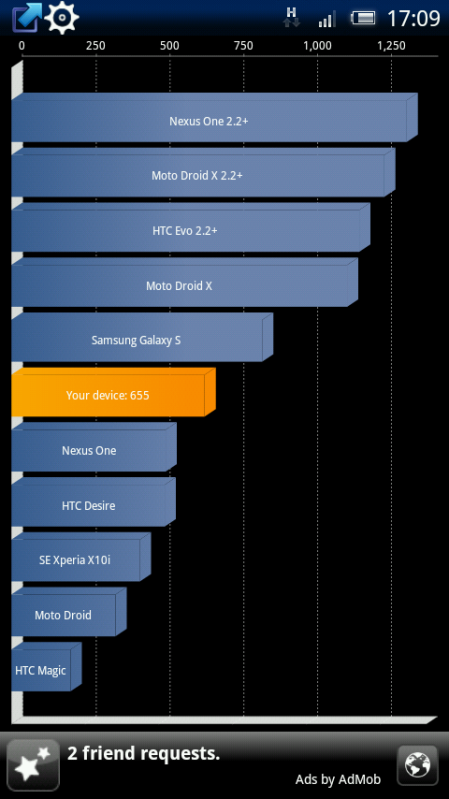
run a benchmark test on quadrant.
i got 509. just i bar above x10i itself..

is it good enough?
need opinions here.
thansk

This post has been edited by rayzrblade: Dec 4 2010, 05:13 PM
rayzrblade
post Dec 4 2010, 05:30 PM

You are nobody in cyberworld
*******
Senior Member
5,040 posts

Joined: Nov 2005


QUOTE(FallenOut @ Dec 4 2010, 05:26 PM)
run a few more tests
the most low u can get after tat is 600+
oh wait
did u jit the phone
*
yeah..downloaded jit.was browsing around where do i need that or not?

do i?
it will boost the speed is it?
oh..for the autokiller..do i need to choose what apps to exclude when killing or is it all totally auto..?

are these the steps to jit it?
haha..i just drag and drop in phone..

To do it you need to have a rooted 2.1 X10

Step One
-Have PC companion open
-Download and extract the file
-Then open the SuperClick folder and run SuperClick as admin
-Then click on shell root
-The steps are the same as the previous root procedure
-Connect your phone then click on charge, then click on usb debugging
-If it doesn't work then unplug, un tick, then plug and tick usb debugging again

Step Two
-Once you have shell root open the 2_jit_enabler.bat file
-Press any key
-You should see some lines of code and when finish your phone will turn off
-Then unplug your phone then start it up
-The initial boot will take a while so wait
-After boot your phone will come back to normal

Step Three
-Now run SuperClick as admin again
-Run the root procedure, click on root...........you should know the rest by now

This post has been edited by rayzrblade: Dec 4 2010, 05:34 PM
rayzrblade
post Dec 5 2010, 12:50 AM

You are nobody in cyberworld
*******
Senior Member
5,040 posts

Joined: Nov 2005


QUOTE(jingle @ Dec 4 2010, 11:31 PM)
thanks man..but i cant figure out the ADB thingy..hehe

just extract the zip file on your sdcard
go into the extracted folder (JiT-toggle-0.1) with a terminal (I use better terminal) on your phone or use adb shell and launch one of the script as superuser.


1: enable JIT (in a termial or adb shell)
EDiT: I'll attach a new build.prop with "debug.sf.hw=1" enabled or you could just edit the line with root explorer
build.prop

Code:
su
cd /sdcard/JiT-toggle-0.1
sh enable_jit.sh
and your phone will reboot with JIT enable.


Q1. i extract tru the phone or i extract on pc and drop into SD card?
Q2. how to " use adb shell and launch one of the script as superuser. "? i got the superuser app though..
Q3. HElp me..
thanks.


This post has been edited by rayzrblade: Dec 5 2010, 01:25 AM
rayzrblade
post Dec 5 2010, 01:56 PM

You are nobody in cyberworld
*******
Senior Member
5,040 posts

Joined: Nov 2005


hey guys..is minfreemanager better than autokiller?
rayzrblade
post Dec 5 2010, 05:34 PM

You are nobody in cyberworld
*******
Senior Member
5,040 posts

Joined: Nov 2005


QUOTE(FallenOut @ Dec 5 2010, 02:19 PM)
for me auto killer is btr cuz it remembers my settings after i restart the phone
while minfree needs me to manually set the settings again after i restart the phone
*
me too..i just switch back from min to autokiller..

QUOTE(jingle @ Dec 5 2010, 02:30 PM)
there are 2 ways to enable the JIT

First is use terminal ( download from market, in case you can't find 'better terminal', use 'terminal emulator' instead of it ) which can download from market for free.

A1 : extract on pc, drop iinto SD card
A2 : it's a SDK tool, I've tried but failed to do so. So, just use the terminal is enough.

Here's the details one

1st step : download the Jit toggle from the link and build.prop, replace the build.prop to jit-toggle-0.1, If I'm not mistaken, got 2 folder inside, and you need replace both of them.
2nd step : download emulator terminal from market, mostly people can't find better terminal (better terminal is the name of the app) not mean a better terminal app.
3rd step : open up your terminal emulator, and type in the code below:

su (allow it after you type this.)
cd /sdcard/JiT-toggle-0.1
sh enable_jit.sh
and your phone will reboot with JIT enable.
*
thanks jingle for the detailed instructions.
i finally figure it out all by myself just now..haha..almost give up..
it seems very easy for pros..but for first timers..need to google around a lot or get help by people like u all..hehe
thanks anyway..

wanna ask : after JIT and autokiller..does it affect any running apps?

i m using whatsapp. and just now it took me 1 hour for the msg to get tru..could it be the phones issue?
thanks.

user posted image

rayzrblade
post Dec 5 2010, 11:21 PM

You are nobody in cyberworld
*******
Senior Member
5,040 posts

Joined: Nov 2005


QUOTE(jingle @ Dec 5 2010, 10:51 PM)
@blade

I using whatsapp as well, sent without 1 second =) might be your connection problem. After enabled Jit, actually, I don't find any difference for me. haha. just the benchmark increase as I know.

@yeohkc

I don't like use casing or pouch for phone, it ruined design XD and this make my phone's value drop very badly.

@sof_600

I got ordered lyn android t shirt, waiting now ^^
*
hey jingle..i think its really my connection problem.its all back to normal now. u are same like me ..after jit and autokiller cant sense much difference except the benchmark test. cant help myself to keep testing it to see how fast is my phone..haha..still can get lag here and there.easily notice with live wallpaper..haha
rayzrblade
post Dec 6 2010, 01:27 PM

You are nobody in cyberworld
*******
Senior Member
5,040 posts

Joined: Nov 2005


QUOTE(jingle @ Dec 5 2010, 11:23 PM)
I got no lag with live wallpaper ^^
*
really.. i was using a snow fall live wallpaper.it hang for a sec when i unlock the screen, after that it went smooth..

and now i m using the nexus, still got a bit here and there..but bearable..hehe

QUOTE(FallenOut @ Dec 6 2010, 12:02 AM)
it depends
some livewallpapers is laggy
some r smooth like static wallpaper
*
u using any?

oh guys.. deleted the moxier mail tru titanium backup but the icon still stuck at the menu..what shall i do?
thanks.

QUOTE(FLyyse7en @ Dec 6 2010, 12:11 AM)
hi i m new here n i jz bought xperia x10 ..i found that that r no file manager app at my phone ..can any1 recommend sum useful app to me??if possible can i get d free link to dwld d apk file?
*
http://www.bestandroiddownloads.com/login.php?logged=no

http://www.coolapk.com/apk/

http://www.appbrain.com/


rayzrblade
post Dec 6 2010, 06:58 PM

You are nobody in cyberworld
*******
Senior Member
5,040 posts

Joined: Nov 2005


QUOTE(Sof_600 @ Dec 6 2010, 06:12 PM)
manage to Jit my Phone with the procedure of better terminal... now i got app2SD and JiT... DAMN my phone so fast like ferrari.. lol.. anything else to do?... i love Applanet too....
*
wow dude..congratulation..
may i ask..how did u do the app2SD ?
i just rooted and jit my phone 2 days ago..but its not fast enough..haha.
thanks.
rayzrblade
post Dec 6 2010, 10:51 PM

You are nobody in cyberworld
*******
Senior Member
5,040 posts

Joined: Nov 2005


QUOTE(FallenOut @ Dec 6 2010, 07:05 PM)
all my wallpapers is live wallpapers
how u del thru titanium
for me
when i del thru titanium
no icons stuck at the menu
mayb u try restart ur phone
timescape can b removed
bt mediascape
dun even remove it
recorded videos n camera pics go there
mediascape is not so laggy
just timescape
mediascape ties in wit a some apps

so just del timescape
how bout dl handcent
free from market
no major problems
2.2 comin soon from xda forum
not official 2.2 through
official got news bt unconfirmed rumours
there is a detailed tutorial from tot31 from mayb 20 to 30 pages back
the most detailed in my opinion
*
yeah that happened to me too at first..
then i restart the phone. the icons seems to disappear..
you can try...i donno whether works on u or not..

QUOTE(Sof_600 @ Dec 6 2010, 07:53 PM)
App2SD guide for u... it works for me!!!!
PREPARATION
Phone must be root.... use z4root..

STEP 1

http://forum.xda-developers.com/wiki/index...rd_partitioning
backup all files in memory card and format using the guide..
recommended to reflash your phone so that u can install all the apps straightaway to your SD card...
STEP 2

http://forum.xda-developers.com/showthread.php?t=800555
download the attachments.

1. App2sd : see attachment
2. adb shell : see attachment

http://www.mediafire.com/?c6symaiuusvapob
Install this in your phone (IMPORTANT)

STEP 3 

Enabling USB Debugging mode on you phone.
Go to Settings -> Applications -> Development -> USB Debugging (check this option).

STEP 4

Installing App2sd.
Create a folder name adb in your pc.. ( i created it In Local Disk C) and extract all the files from adb.zip into this folder.

STEP 5

Connect your phone to your pc and mount the sd card. Extract all the file from app2sd2.1.zip to the root of your sd card. Make sure to unmount the sd card before continue the next step.

STEP 6

Go the start and type CMD ( run as admin)

Type

adb devices [enter]
adb shell [enter]
su [enter - choose 'allow' on your phone screen]
sh /sdcard/app2sd.sh [enter]
what would you to do ?
type 0 (install app2sd)
you'll be presented by this screen...
+________________________________+
********************************
*Welcome To wolfilein's App2sd *
*installing script *
********************************
+--------------------------------+

~this version should be go on any device ~

+___________________+
********************
* Menu *
* *
*[0] install app2sd*
*[1] remove app2sd *
*[2] exit *
********************
+--------------------+
[0]

now just press the enter key & wait.
Important : Make sure to set your phone screen timeout to the max because Superuser will ask for your permission to allow this script to run. If your screen goes blank, you can't see this prompt and the installation will fail.

after a while you'll get this..

busybox is /system/bin/busybox
rm failed for /etc/mount_sd.sh, No such file or directory
+________________________________+
********************************
finished going reboot now
********************************
+--------------------------------+

Don't worry, actually it does not fail. I also got the same message and I also thought it failed but when install all the apps and check using Minitool Partition Wizard and Linux Reader for windows, all my applications are installed into my card
When Reboot u will get BLUE LED.. means.. GOOD job....

I use this guide... The Xda guide seems didnt work for me.....
http://butterflyfair.wordpress.com/2010/11...ria-x10-eclair/


Added on December 6, 2010, 8:16 pmJiT. Here u are..

All Android devices could be getting a noticeable performance boost later this year. We have seen companies like Myriad pushing their Dalvik Turbo compiler which they claim offers “3x faster applications, richer game graphics and better battery life to Android”.

Myriad is working with carriers and handset makers to incorporate their software into their Android builds, but it looks Google might beat them to it.

Google has assembled their own team of engineers that is working on a Dalvik JIT Compiler for Android. JITstands for “just in time” compilation, and allows software to run faster by “compiling bytecode into native machine code at runtime which substantially increases performance”. I’m not going to pretend that I’m an expert on JIT, so I’ll defer to Wikipedia if you want the full scoop.

As some of you already know, JIT is in the Android repository and working right now. I’ve loaded the latest kernel that supports (correction: JIT has nothing to do with the kernel version, but some custom roms include both) it on my Nexus One and saw my benchmark scores go up 250-300%. It was cool to play with, but it was major unstable and the phone would reboot after several hours of use.

It looks like Google’s team might be close to releasing a stable version of the Dalvik JIT compiler. Two of them, Ben Cheng and Bill Buzbee, will be outlining their work at Google I/O in a session called “A JIT Compiler for Android’s Dalvik VM“.

In the session they will outline the design of a JIT Compiler designed for embedded Android devices. Topics of the session will include “an architectural overview, the rationale for design decisions and the special support for JIT verification, testing and tuning”.

*
brilliantly detailed instruction, dude
i just manage to jit my phone the other day..need to wait a while bcos i hate following long instrcutions especially when u dont know what are they talking about.
thanks though..

QUOTE(jingle @ Dec 6 2010, 10:11 PM)
App2sd will make phone even faster? Now left 173mb of memor. Thinking of installing app2sd if it will make my phone faster.
*
definitely will..u try and let me jnow..
173mb still not good enough for you?
rayzrblade
post Dec 7 2010, 12:14 AM

You are nobody in cyberworld
*******
Senior Member
5,040 posts

Joined: Nov 2005


QUOTE(jingle @ Dec 7 2010, 12:05 AM)
There's one full screen caller id. Free download from marker but I didn't try before. Maybe later after I finish work.

@blade
173 is my internal memory card. Not ram. My ram around 130 to 150 only. Haha. Anyway, I don't think move to memory card will make phone faster a lot. I think the main purpose of app2sd is for those having too many apps then have to store inside memory card.
*
oh.. so are you goin to do it?
i temporary not goin to do it..but i cant seems to stop downloading apps...haha

which one are u using? minfreemanager or autokiller?

whats ur setting for hidden app, content provider, empty app.

i m using minfreemanage with 100, 200, 250...why does the nexus wallpaper still jerky... hmm.gif

This post has been edited by rayzrblade: Dec 7 2010, 12:34 AM
rayzrblade
post Dec 7 2010, 01:15 AM

You are nobody in cyberworld
*******
Senior Member
5,040 posts

Joined: Nov 2005


QUOTE(FallenOut @ Dec 7 2010, 12:53 AM)
1 day 2 batt for me
im on data connection 24/7
im usin 7 homescreens
all full of widgets
ouch
hmm
mayb i didnt use the pictures i took to b my wallpaper
i well test it out tmr n get back to u
*
7 pages..i wanted to use that many...currently using 5...dont dare to go 7 ..scared might lag

now everyday use phone first thing to check..is it fast..lag?...why jerky...

damn it...poison by rooting..hha..

bcos previously would just accept the original laggyness...
rayzrblade
post Dec 7 2010, 01:01 PM

You are nobody in cyberworld
*******
Senior Member
5,040 posts

Joined: Nov 2005


QUOTE(jingle @ Dec 7 2010, 02:42 AM)
I'm not going to do anyway since Fallen said it won't increase the speed biggrin.gif

I didn't use both, I use task manager only. I tried before autokiller, but it don't seem work fine with me =( the memory keep dropping until below 60mb. my settings was 200 225 250 that time.
I use when I'm working, around 4 hours last with game, browser, data. Which is not bad for me.


Added on December 7, 2010, 2:44 am

Haha, I just opposite with you. a bit lag would kill me XD

That's why I got 2 pages of homescreen, 1 for clock, 1 for games. Drawer got only 17 apps only.
*
2 pages? 17 apps? your x10 is way under utilized..haha
rayzrblade
post Dec 7 2010, 10:58 PM

You are nobody in cyberworld
*******
Senior Member
5,040 posts

Joined: Nov 2005


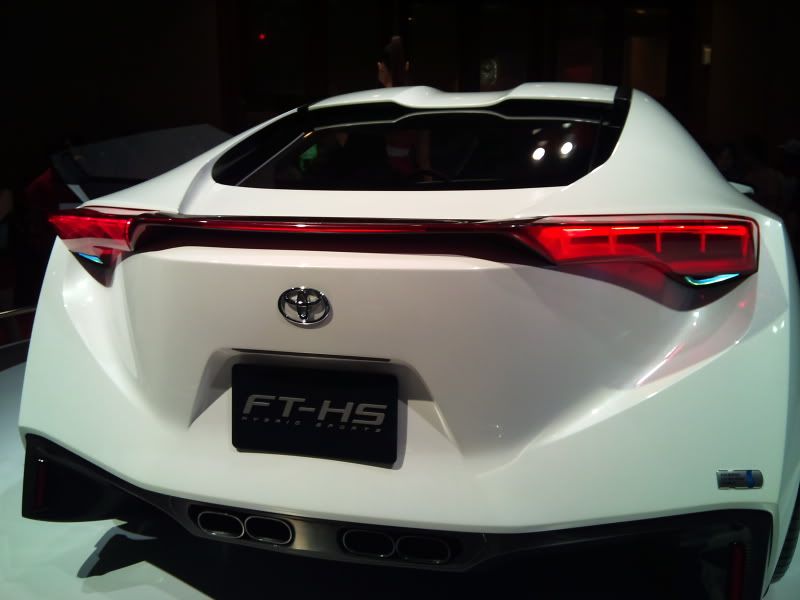
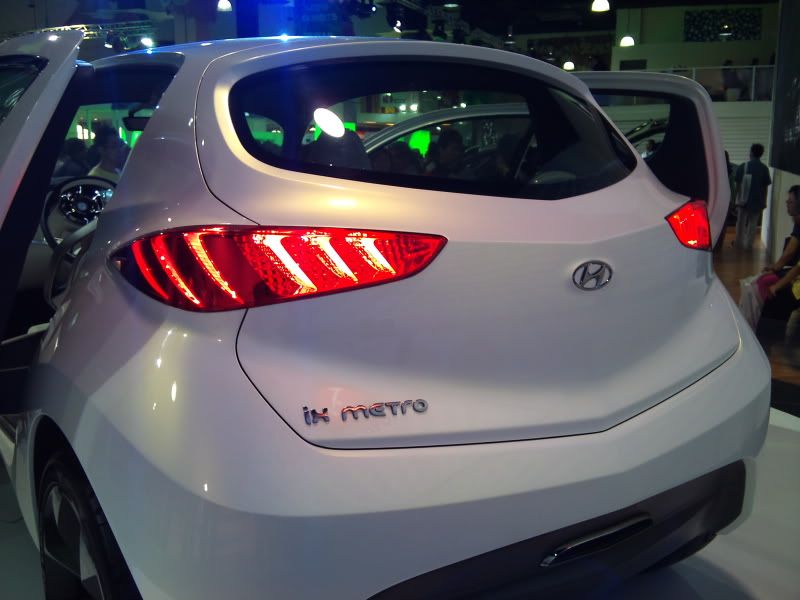
share some photos taken with my x10 @ KLIMS

user posted image

user posted image

user posted image

user posted image

user posted image

user posted image

user posted image

user posted image

user posted image


Added on December 7, 2010, 11:02 pm
QUOTE(-j-t- @ Dec 7 2010, 10:35 PM)
ok i just bought x10 today and now flashing to 2.1.. after that what should i do to improve my phone performance like what u said app2sd and JIT..

not quite understand this 2 though and how to do it?
*
QUOTE


App2SD guide for u... it works for me!!!!


PREPARATION
Phone must be root.... use z4root..

STEP 1

http://forum.xda-developers.com/wiki/index...rd_partitioning
backup all files in memory card and format using the guide..
recommended to reflash your phone so that u can install all the apps straightaway to your SD card...


STEP 2

http://forum.xda-developers.com/showthread.php?t=800555
download the attachments.

1. App2sd : see attachment
2. adb shell : see attachment

http://www.mediafire.com/?c6symaiuusvapob
Install this in your phone (IMPORTANT)

STEP 3

Enabling USB Debugging mode on you phone.
Go to Settings -> Applications -> Development -> USB Debugging (check this option).

STEP 4

Installing App2sd.
Create a folder name adb in your pc.. ( i created it In Local Disk C) and extract all the files from adb.zip into this folder.

STEP 5

Connect your phone to your pc and mount the sd card. Extract all the file from app2sd2.1.zip to the root of your sd card. Make sure to unmount the sd card before continue the next step.

STEP 6

Go the start and type CMD ( run as admin)

Type

adb devices [enter]
adb shell [enter]
su [enter - choose 'allow' on your phone screen]
sh /sdcard/app2sd.sh [enter]


what would you to do ?
type 0 (install app2sd)


you'll be presented by this screen...
+________________________________+
********************************
*Welcome To wolfilein's App2sd *
*installing script *
********************************
+--------------------------------+

~this version should be go on any device ~

+___________________+
********************
* Menu *
* *
*[0] install app2sd*
*[1] remove app2sd *
*[2] exit *
********************
+--------------------+
[0]

now just press the enter key & wait.


Important : Make sure to set your phone screen timeout to the max because Superuser will ask for your permission to allow this script to run. If your screen goes blank, you can't see this prompt and the installation will fail.

after a while you'll get this..

busybox is /system/bin/busybox
rm failed for /etc/mount_sd.sh, No such file or directory
+________________________________+
********************************
finished going reboot now
********************************
+--------------------------------+

Don't worry, actually it does not fail. I also got the same message and I also thought it failed but when install all the apps and check using Minitool Partition Wizard and Linux Reader for windows, all my applications are installed into my card


When Reboot u will get BLUE LED.. means.. GOOD job....

I use this guide... The Xda guide seems didnt work for me.....
http://butterflyfair.wordpress.com/2010/11...ria-x10-eclair/

Added on December 6, 2010, 8:16 pmJiT. Here u are..

All Android devices could be getting a noticeable performance boost later this year. We have seen companies like Myriad pushing their Dalvik Turbo compiler which they claim offers “3x faster applications, richer game graphics and better battery life to Android”.

Myriad is working with carriers and handset makers to incorporate their software into their Android builds, but it looks Google might beat them to it.

Google has assembled their own team of engineers that is working on a Dalvik JIT Compiler for Android. JITstands for “just in time” compilation, and allows software to run faster by “compiling bytecode into native machine code at runtime which substantially increases performance”. I’m not going to pretend that I’m an expert on JIT, so I’ll defer to Wikipedia if you want the full scoop.

As some of you already know, JIT is in the Android repository and working right now. I’ve loaded the latest kernel that supports (correction: JIT has nothing to do with the kernel version, but some custom roms include both) it on my Nexus One and saw my benchmark scores go up 250-300%. It was cool to play with, but it was major unstable and the phone would reboot after several hours of use.

It looks like Google’s team might be close to releasing a stable version of the Dalvik JIT compiler. Two of them, Ben Cheng and Bill Buzbee, will be outlining their work at Google I/O in a session called “A JIT Compiler for Android’s Dalvik VM“.

In the session they will outline the design of a JIT Compiler designed for embedded Android devices. Topics of the session will include “an architectural overview, the rationale for design decisions and the special support for JIT verification, testing and tuning”.


thanks to sof_600


This post has been edited by rayzrblade: Dec 7 2010, 11:02 PM
rayzrblade
post Dec 8 2010, 10:29 AM

You are nobody in cyberworld
*******
Senior Member
5,040 posts

Joined: Nov 2005


QUOTE(FallenOut @ Dec 8 2010, 03:31 AM)
if im not wrong
vanilla 2.3 witout any customizations

n i could b wrong

if im correct
then read on

right now the devs over at xda is tryin to make eclair n froyo
long time nvr went there due to screamyx failure

if there is indeed 2.3 for x10
it will take longer
n since 2.3 is still way new
no news for tat as of yet

@rayzblade
nice pic u got there
some nice close up

ok
i think im the only one who dunno how to take pics
*
QUOTE(pUpUnOOb @ Dec 8 2010, 05:44 AM)
nice pics dude...good hands
*
thanks guys.
i remember the hong kong movie, SNIPER.. they were taught to hold their breathe at the moment they pull the trigger in order not to miss the target or to prevent jerky hands...haha... thats what i did. i stop breathing when i press the shutter.. sweat.gif

3 Pages < 1 2 3 >Top
Topic ClosedOptions
 

Change to:
| Lo-Fi Version
0.0297sec    0.92    7 queries    GZIP Disabled
Time is now: 4th December 2025 - 09:32 PM