

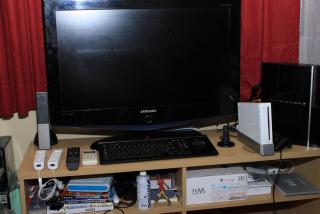

I need to arrange once my house renovation or when that is....

This post has been edited by karasawamk2: May 14 2010, 09:53 AM
PlayStation Gaming Setup | V2, Come & share your setup with everyone!!!
|
|
 May 14 2010, 09:51 AM May 14 2010, 09:51 AM
|
 
Junior Member
180 posts Joined: Jan 2007 From: USJ 9, Subang Jaya   
|
My ugly setup...
I need to arrange once my house renovation or when that is.... This post has been edited by karasawamk2: May 14 2010, 09:53 AM |
|
|
|
|
|
May 14 2010, 11:20 AM
|

Junior Member
194 posts Joined: Jan 2003
|
QUOTE(kianweic @ May 14 2010, 09:39 AM) My current PS3 setup. Yo, you should use the optical output from ps3 to your Z5500. 1. My entire work station setup  2. Added Playstation 3 Slim (front view)  3. Playstation 3 Slim (side view)  Will move the PS3 to the living room once the old big ass CRT TV is finally replaced with a proper LCD / Plasma / OLED TV.  Then you can enjoy 5.1 digital. Hear the difference. Then you can enjoy 5.1 digital. Hear the difference.  |
|
|
May 14 2010, 11:33 AM
|

Junior Member
340 posts Joined: Dec 2007 From: Ipoh 
|
and aslo put your left and right rear behind ur position,
Preferably higher than you ear position so that there is an ambient feel to it |
|
|
May 14 2010, 11:36 AM
|

Senior Member
3,809 posts Joined: Sep 2007 From: Jakarta
|
QUOTE(bads @ May 14 2010, 11:20 AM) Yo, you should use the optical output from ps3 to your Z5500. Tried that, using optical with Z5500 is terrible due to shoddy digital decoder for Z5500. Bass is not as solid and other sound effects are muddy. Then you can enjoy 5.1 digital. Hear the difference. Analogue sounds way better. QUOTE(Jimsee @ May 14 2010, 11:33 AM) and aslo put your left and right rear behind ur position, Not enough space in the room as it is.Preferably higher than you ear position so that there is an ambient feel to it |
|
|
May 14 2010, 11:37 AM
|

Senior Member
1,450 posts Joined: Jun 2008 From: KK
|
QUOTE(kianweic @ May 14 2010, 11:36 AM) Tried that, using optical with Z5500 is terrible due to shoddy digital decoder for Z5500. Bass is not as solid and other sound effects are muddy. Your speaker must have been broken Analogue sounds way better.  |
|
|
May 14 2010, 11:41 AM
|
|
Senior Member
3,809 posts Joined: Sep 2007 From: Jakarta
|
QUOTE(gundamalpha @ May 14 2010, 11:37 AM) Your speaker must have been broken Nah, the reviews of Logitech Z-5500 did mention such issues.Besides, I gonna move the PS3 to the living room in the future where there is a proper Home Theatre system setup. |
|
|
|
|
|
May 14 2010, 11:44 AM
|

Junior Member
67 posts Joined: Apr 2009 From: Ipoh to Kulim
|
QUOTE(kianweic @ May 14 2010, 11:41 AM) Nah, the reviews of Logitech Z-5500 did mention such issues. Besides, I gonna move the PS3 to the living room in the future where there is a proper Home Theatre system setup. HOw much your logitech z 5500? |
|
|
May 14 2010, 11:46 AM
|
|
Senior Member
3,809 posts Joined: Sep 2007 From: Jakarta
|
QUOTE(sammesul81 @ May 14 2010, 11:44 AM) HOw much your logitech z 5500? Got it from Melbourne almost 4-5 years ago, AU$375 or AU$385, around RM1.1k to RM1.2k. |
|
|
May 14 2010, 11:49 AM
|

Senior Member
614 posts Joined: Feb 2009
|
Bro,
Nice setup .. got Minyak Kapak bottle at Z 5500 ^^ Btw you share one Monitor with PC and PS3 right ? Can you teach how to setup it ? and setup like this will damage the Monitor ? Haha nak tiru tiru pula .. |
|
|
May 14 2010, 11:52 AM
|
|
Senior Member
3,809 posts Joined: Sep 2007 From: Jakarta
|
QUOTE(Bibinoob @ May 14 2010, 11:49 AM) Bro, One using DVI the other using HDMI.Nice setup .. got Minyak Kapak bottle at Z 5500 ^^ Btw you share one Monitor with PC and PS3 right ? Can you teach how to setup it ? and setup like this will damage the Monitor ? Haha nak tiru tiru pula .. Should have a button to change where the video signal is coming from. Just do that whenever u wanna switch from PC to PS3. |
|
|
May 14 2010, 11:57 AM
|
|
Senior Member
614 posts Joined: Feb 2009
|
Oh...
This Setup will damage the Monitor ? i worry will damage the Monitor |
|
|
May 14 2010, 12:00 PM
|
|
Senior Member
3,809 posts Joined: Sep 2007 From: Jakarta
|
QUOTE(Bibinoob @ May 14 2010, 11:57 AM) Oh... Don't think so.This Setup will damage the Monitor ? i worry will damage the Monitor No idea how would doing so damage a LCD monitor. |
|
|
May 14 2010, 12:09 PM
|
|
Senior Member
614 posts Joined: Feb 2009
|
Ok ...
Thx for the knowledge .. Thank You Sifu will try later when reach home. |
|
|
|
|
|
May 17 2010, 04:50 PM
|

Newbie
1 posts Joined: Apr 2010 From: KL
|
QUOTE(Mgsrulz @ Nov 14 2009, 12:32 PM) just bought a G27 last night for RM650 Haha. remind me of my room back in form 3. Too busy to clean the room. Been there. new and unused/unopened   @mess on floor: so eager to test it out,didnt bother cleaning up my room-just took away the old tv under my table and linked up the G27  |
|
|
May 17 2010, 05:00 PM
|
|
Newbie
1 posts Joined: Apr 2010 From: KL
|
Here is my simple setup.
 So jealous seeing you guys with big sound system and all. Wait till I get more money to upgrade on my electrical appliances.
Next to it was my old setup for my ps2  This post has been edited by N86: May 17 2010, 05:20 PM |
|
|
May 17 2010, 07:49 PM
|

Junior Member
135 posts Joined: Sep 2007
|
 The little corner in my room to lepas stress. |
|
|
May 17 2010, 08:12 PM
|

Junior Member
331 posts Joined: Jan 2003 
|
QUOTE(incx @ May 17 2010, 07:49 PM) The little corner in my room to lepas stress. |
|
|
May 18 2010, 12:15 AM
|
|
Junior Member
135 posts Joined: Sep 2007
|
Thanks. I'm using Philips. Both the LCD and the Soundbar. I like Philips because its screen is non reflective, so it's suitable for places near the window.
This post has been edited by incx: May 18 2010, 12:15 AM |
|
|
May 18 2010, 02:49 AM
|

Senior Member
656 posts Joined: Aug 2006 From: Kuala Lumpur N' Kajang
|
QUOTE(incx @ May 18 2010, 12:15 AM) Thanks. I'm using Philips. Both the LCD and the Soundbar. I like Philips because its screen is non reflective, so it's suitable for places near the window. like your combination of lcd with a soundbar look nice too. can show the closeup of the soundbar? |
|
|
May 18 2010, 03:01 AM
|

Junior Member
479 posts Joined: Sep 2006 From: Planet Earth
|
@incx - waw, u put yuna in frame
|
| Change to: |  0.0272sec 0.0272sec
 0.18 0.18
 6 queries 6 queries
 GZIP Disabled GZIP Disabled
Time is now: 5th December 2025 - 04:26 AM |
 Quote
Quote