

QUOTE(dlwl @ May 21 2013, 09:35 PM)
How much are they? Thinking of getting cable extensions, still looking around surveying the price 

I saw the 24 pin going for RM49 and the 6-pin PCIe going for RM29  available in red, black & white
Cable Management Thread V2, Share your cabling tricks here
|
|
 May 21 2013, 09:40 PM May 21 2013, 09:40 PM
Return to original view | Post
#41
|
 
Senior Member
8,746 posts Joined: Jul 2010 From: S.A.B.A.H  
|
QUOTE(dlwl @ May 21 2013, 09:35 PM) How much are they? Thinking of getting cable extensions, still looking around surveying the price I saw the 24 pin going for RM49 and the 6-pin PCIe going for RM29 available in red, black & white |
|
|
|
|
|
Jun 22 2013, 09:08 AM
Return to original view | Post
#42
|
|
Senior Member
8,746 posts Joined: Jul 2010 From: S.A.B.A.H
|
honeydewboy very clean... wait.. where is the GPU?? lolz
|
|
|
Jun 22 2013, 09:52 AM
Return to original view | Post
#43
|
|
Senior Member
8,746 posts Joined: Jul 2010 From: S.A.B.A.H
|
QUOTE(hmwgbworld @ Jun 22 2013, 09:48 AM) Looks carefully on the mobo model, its APU. So no need graphic card also no problem I know that  that's why it's so clean (the build) not to criticize, but to some it may looks empty that's why it's so clean (the build) not to criticize, but to some it may looks empty |
|
|
Jul 18 2013, 09:24 AM
Return to original view | Post
#44
|
|
Senior Member
8,746 posts Joined: Jul 2010 From: S.A.B.A.H
|
QUOTE(huzzLEE_82 @ Jul 16 2013, 02:56 PM) worry not bro sooner Bitfenix will release new cases including Prodigy M here the Prodigy M is still in it's prototype phase, they wanna try fitting long GPU and tall HSFs without changing the form factor so it'll take a while to sort out the internal layout but release date not known yet... so far bitfenix prodigy steel thickness among the best..hehehehe bayangkan...bayangkannnnn   I'm expecting the Ronin to arrive to our shores and the Shadow release later on.. the Phenom M looks interesting as well... too many good things coming this time around  |
|
|
Jul 18 2013, 04:21 PM
Return to original view | Post
#45
|
|
Senior Member
8,746 posts Joined: Jul 2010 From: S.A.B.A.H
|
QUOTE(huzzLEE_82 @ Jul 18 2013, 09:35 AM) these 2 case really awesome imo, sleek and simple.... Haha take that note to the BitFenix thread bro» Click to show Spoiler - click again to hide... « crazy ahh Bitfenix..now i'm becoming one of Bitfenix fanboy..hahaha |
|
|
Jul 26 2013, 09:37 AM
Return to original view | Post
#46
|
|
Senior Member
8,746 posts Joined: Jul 2010 From: S.A.B.A.H
|
QUOTE(Lurker @ Jul 25 2013, 05:18 PM) Took me 5 hours to clean up the case and fans, change to a modular PSU whoa 5 hours, what an effort there can see significant improvement there bro did some clean up from this  to this...   TIP, the front panel audio cable should be able to fit behind the mobo tray and come out from the PSU holder, the wire is thin enough to fit between the gaps and the coloured sata cables can be moved slightly behind the HDD so that they don't go down from the Cm-hole did these 2 before I sold my CM690II 1st gen |
|
|
|
|
|
Aug 16 2013, 12:36 PM
Return to original view | Post
#47
|
|
Senior Member
8,746 posts Joined: Jul 2010 From: S.A.B.A.H
|
QUOTE(ValityMental @ Aug 16 2013, 08:56 AM) try these 1-route the small cables behind the motherboard. The HD audio, Sata and the USB 2.0 can all fit there 2-Group together the USB3.0, 6-pin pci-e and 24-pin to come out from one grommet will look nicer alternatively, get sleeved extensions for the 4-pin EPS, 6-pin Pci-e and 24-pin power and route those to the front instead of the Original cables from the PSU |
|
|
Aug 17 2013, 09:44 AM
Return to original view | Post
#48
|
|
Senior Member
8,746 posts Joined: Jul 2010 From: S.A.B.A.H
|
QUOTE(ValityMental @ Aug 16 2013, 02:41 PM) I Re-route the cable you mentioned just now , it's look much more better now ! Glad it worked out well Follow all your step , indeed it look much more better ! Will share some picture later  Really huge improvement ! Took me around 1 hour to re-route and figure how to hide the cable. Totally worth it !  had a CM690II last time and did the same tricks the last time had a CM690II last time and did the same tricks the last time |
|
|
Aug 17 2013, 09:55 AM
Return to original view | Post
#49
|
|
Senior Member
8,746 posts Joined: Jul 2010 From: S.A.B.A.H
|
QUOTE(antaras @ Aug 16 2013, 11:04 PM) Yeah... cable management can be a real pain in the arse but it's very satisfying after all the trouble. Lol your CM looks like mine bro, the back is a total mess... not that anyone could see it though 700W non-modular PSU have lotsa cables.. too many in fact lolz but I'm using the cable extensions from BitFenix, their Alchemy line is really good looking as well I'm using cable extensions from topazzatech, here: cable extender and I got the sleeves from him as well, here: colortrail. A problem with using cable extenders is that you will have to manage that extra cables in the back of your case. It'll be worst if you are using non-modular PSU as well. As my image here will show you... hahaha... [attachmentid=3586006] Then again, it is also the easiest way to make your case look tidy and clean! Just plan on how you want the front part to look like and then only worry how to manage the back. hahaha... XD |
|
|
Aug 19 2013, 03:23 PM
Return to original view | Post
#50
|
|
Senior Member
8,746 posts Joined: Jul 2010 From: S.A.B.A.H
|
QUOTE(Gaia34 @ Aug 19 2013, 02:37 PM) wow nice and neat cable management bro... Nope, they don't... earlier versions of CM chassis don't have rubber grommets, even the original CM690II adv doesn't have it until the revisionjust wondering do cm scout 1st edi comes with the grommet rubber? |
|
|
Aug 26 2013, 11:27 AM
Return to original view | Post
#51
|
|
Senior Member
8,746 posts Joined: Jul 2010 From: S.A.B.A.H
|
QUOTE(ragna @ Aug 25 2013, 11:34 AM) All cables hide behind HDD and SSD hehe   Woo that looks really nice, but where is the intake coming from? should be a fan at the front right?? Woo that looks really nice, but where is the intake coming from? should be a fan at the front right??P/S: anyway do pm me, I believe Your rig is not featured in the BitFenix Malaysia FB yet right? |
|
|
Oct 3 2013, 12:16 PM
Return to original view | Post
#52
|
|
Senior Member
8,746 posts Joined: Jul 2010 From: S.A.B.A.H
|
QUOTE(djlah @ Oct 2 2013, 09:05 PM) only 1 set. NZXT sleeved LED cables wouldn't it be better if the LED cables be mounted onto the side panel instead? that way when you open the side you'd not have the cable hanging in the middle |
|
|
Oct 7 2013, 09:22 AM
Return to original view | Post
#53
|
|
Senior Member
8,746 posts Joined: Jul 2010 From: S.A.B.A.H
|
QUOTE(maxmeon @ Oct 7 2013, 12:16 AM) Coz im looking for a nice budget case.. There r lots of good case i found in trade zone but the price is  This case suits my budget.. Thanks for the suggestion bro |
|
|
|
|
|
Jun 17 2014, 11:21 AM
Return to original view | Post
#54
|
|
Senior Member
8,746 posts Joined: Jul 2010 From: S.A.B.A.H
|
QUOTE(Vigilante98 @ Jun 16 2014, 06:05 PM) Any advice on mine ? Pm me or just leave your opinion Pull every cable out through the back of the mobo tray, tie up in one compact bundle and stuff it below your HDD in the HDD bays, route the wires from there following the skeleton of your mobo tray and use black zipties to secure them.. else can get black velcro straps if you wanna re-use in the future Need help  and a shot of what my Team did for cable management in the Silverstone Fortress 04 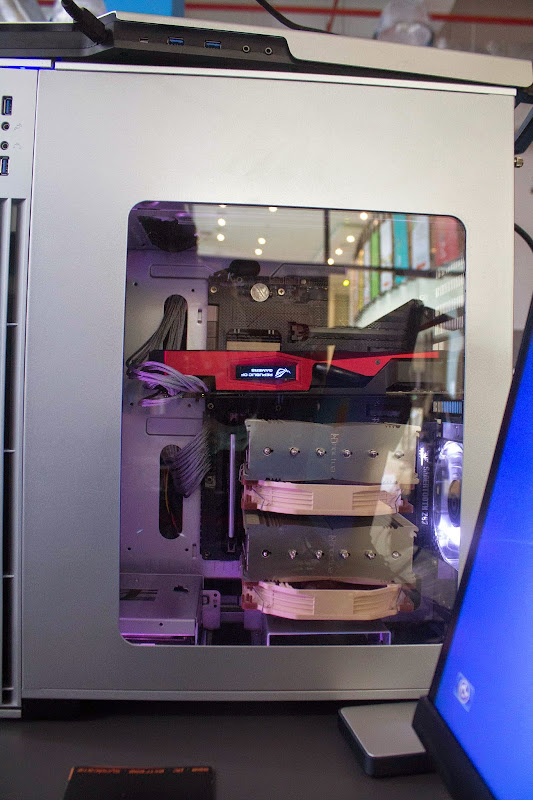 This post has been edited by Clem1982: Jun 17 2014, 11:23 AM |
|
|
Jun 23 2014, 12:11 PM
Return to original view | Post
#55
|
|
Senior Member
8,746 posts Joined: Jul 2010 From: S.A.B.A.H
|
QUOTE(Vigilante98 @ Jun 18 2014, 06:57 AM) This is my new cable management with flash : This is so much of an improvement from what it was bro! nice!Any advice ? Still need help here QUOTE(encikapas @ Jun 20 2014, 03:00 AM) 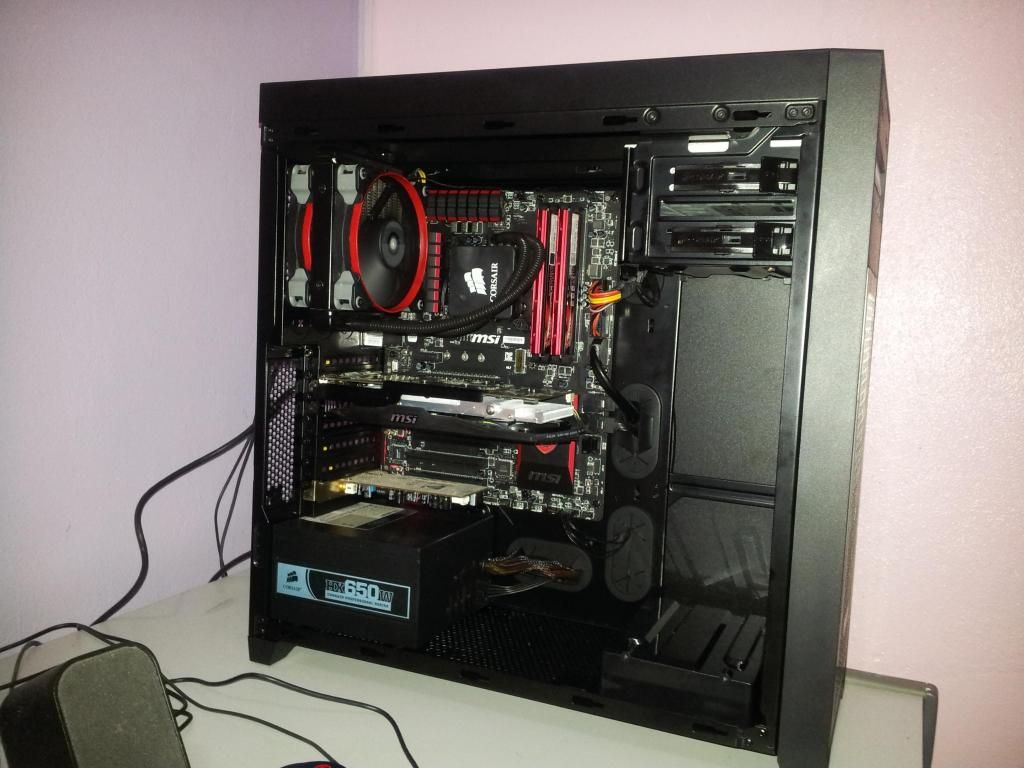 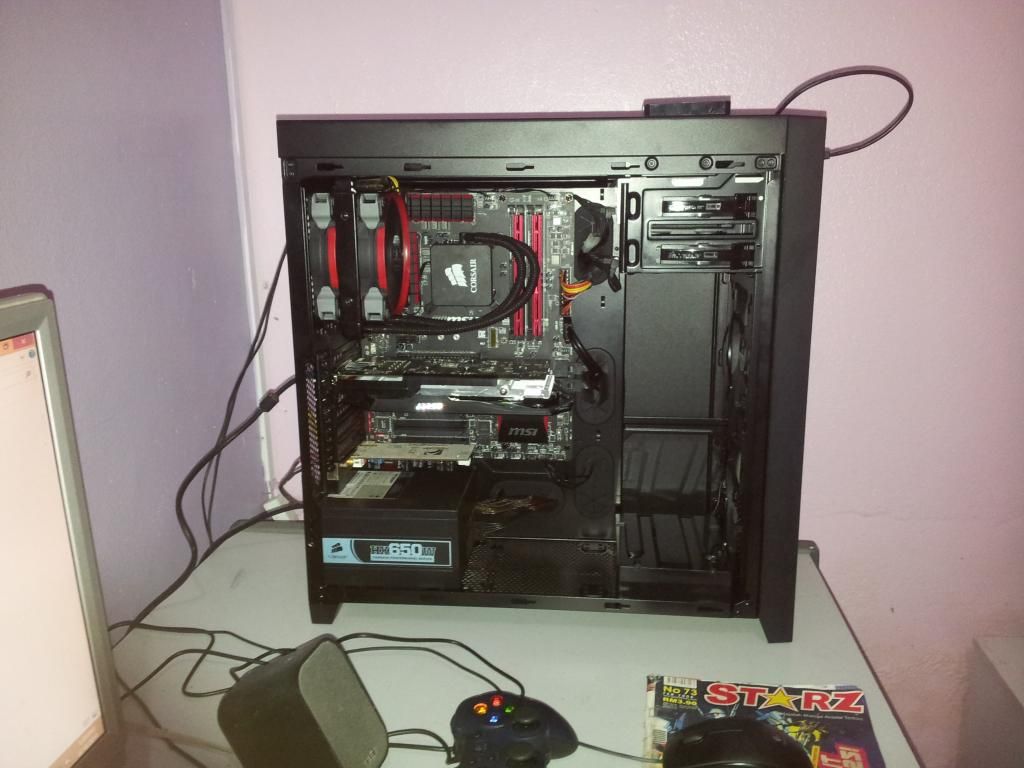 cable management gua yang tak berapa best... why not so good? |
|
|
Aug 11 2015, 11:08 AM
Return to original view | IPv6 | Post
#56
|
|
Senior Member
8,746 posts Joined: Jul 2010 From: S.A.B.A.H
|
QUOTE(jordanjoker @ Aug 4 2015, 03:29 PM) cable management is easy. just make it clean and simple Nice work on the cable management, but not everyone will have it easy like you IMO [attachmentid=4690540] My Build. https://forum.lowyat.net/topic/3669280 Just buy an dremel and mod ur casing by yourself. is fun to mod and is cheap. i brought those tools http://www.lelong.com.my/dremel-rotary-too...7-01-Sale-I.htm RM50. <- from tao bao side window and bottom cover RM30 6 pin sleeve cable x2 and 24 pin sleeve cable below RM40 <- from tao bao 16 color 30cm LED strip with controller RM30 <- from lowyat just to let you all know. moding is cheap and easy. |
| Change to: |  0.0475sec 0.0475sec
 0.38 0.38
 7 queries 7 queries
 GZIP Disabled GZIP Disabled
Time is now: 6th December 2025 - 06:05 AM |
 Quote
Quote