


AMD® Socket AM2&AM3 Overclocking V20, The times moves on..Can AMD Survive?...
|
|
 Nov 4 2009, 10:08 PM Nov 4 2009, 10:08 PM
Return to original view | Post
#1
|
 
Senior Member
903 posts Joined: Dec 2008 
|
just want to show off.
|
|
|
|
|
|
Nov 4 2009, 10:24 PM
Return to original view | Post
#2
|
|
Senior Member
903 posts Joined: Dec 2008
|
QUOTE(ah_khoo @ Nov 4 2009, 10:19 PM) for adik mozart... wanna ask smething how to raise the NB volt??? *just a warm up, mite not gud enuf but i'd say not bad, not bad at all...  [attachmentid=1286246]  Added on November 4, 2009, 10:30 pm QUOTE(kuntawakaw @ Nov 4 2009, 10:15 PM) prime stable? no? nope i saw 1.5vcore there  This post has been edited by BuckRoger: Nov 4 2009, 10:30 PM |
|
|
Nov 4 2009, 11:05 PM
Return to original view | Post
#3
|
|
Senior Member
903 posts Joined: Dec 2008
|
QUOTE(BuckRoger @ Nov 4 2009, 10:24 PM) wanna ask smething how to raise the NB volt??? btw, my HDD fail on long DST not sure whether if it affected prime95, (lazy to send for RMA, this is second time fail. seagate... seagate haihhhhh...)Added on November 4, 2009, 10:30 pm nope Added on November 4, 2009, 11:20 pmNorthbridge Whenever one is talking about the North Bridge (NB) of a Phenom II, it is safe to assume that they are talking about the CPU-NB. The CPU-NB is a section of the CPU that controls the L3, Memory Controller and the Hyper-Transport (HTT). As mentioned before the CPU-NB and the HTT have different multipliers, please remember this. When you overclock your CPU, the higher you go the more likely you will need to stabilize the CPU-NB. What do I mean by this? As the CPU increases its speed to calculate data, so must the speed of which the CPU communicates with other components on the Motherboard: chipset, memory, etc. Let me take the classic example of a 4.0 GHz 940BE and its CPU-NB. If you were to leave the CPU-NB at 1.8 GHz stock then the data calculated by the CPU would create a bottleneck and thus resulting in errata errors or CPU errors. So in order to balance these speeds a CPU-NB clock of 3.0 GHz would be needed. In most cases of high OC’s that result in crashes; the CPU-NB is usually the culprit. I have constructed a table at which your CPU-NB should be at with ‘Y’ CPU Speed. Please note that there is a +/- 200 MHz difference for each step. In order to find your speed without my table, you can use my formula: CPU-NB Frequency (+/-200) = (CPU-Frequency * 2 ) / 3.15. Highlighted areas are the recommended speeds of which to run the CPU-NB As you can see with Table 3, these are the support frequencies of your CPU-NB at X CPU frequency. Of course, as you increase the CPU-NB frequency, you have to increase the CPU-NB voltage. Let me put this in practice, before you start to debate my theorem. Highlighted areas are the recommended speeds of which to run the CPU-NB Now that you have seen actual data charts you can criticize my theorem, do not worry I already do it myself. In practice it does not work 100%. Actually I have Super Pi 1M, 3D Mark 06, PC Mark 05 and Geekbench charts as well showing that the 2800 MHz NB usually is top of the charts rather than the recommended speeds by my calculations. Which to me, is fine. The idea behind the formula is a rough estimate of what you should be at with ‘Y’ CPU Frequency. What you should get from this section is an understanding of the importance of the CPU-NB and how it effects your overclocking process. By all means you should think about looking at the CPU-NB each and every time when try to push for a different CPU Frequency. Can anyone elaborate more abt this?? dont quite understand  This post has been edited by BuckRoger: Nov 5 2009, 01:27 AM |
|
|
Nov 4 2009, 11:48 PM
Return to original view | Post
#4
|
|
Senior Member
903 posts Joined: Dec 2008
|
QUOTE(colinwong89 @ Nov 4 2009, 11:39 PM) In short, he's trying to say that for every MHz you increase on the processor, you need to appropriately increase the speed of the CPU-NB as well. Do keep in mind that raising the CPU-NB increases the Memory Read Latency (known as MRL); the proper way is to keep increasing CPU-NB speeds till you do not see anymore significant gain, then tweak the MAL lower with CPU-Tweaker or AOD. how to increase CPU-NB (its not the HT speed right?) ? & What is stock CPU NB vcore?? (mine show NB vid is at 1.15 in aod) |
|
|
Nov 5 2009, 01:17 AM
Return to original view | Post
#5
|
|
Senior Member
903 posts Joined: Dec 2008
|
ok, now my NB multi (10.00 x) x HTT ref. clock (243.01) = NB Speed (2430.0 +-)
Vimc (what is this ) = CPU NB vidThis post has been edited by BuckRoger: Nov 5 2009, 09:29 AM |
|
|
Nov 5 2009, 09:49 AM
Return to original view | Post
#6
|
|
Senior Member
903 posts Joined: Dec 2008
|
is it Vimc is the Memory vid?? like im using 1066mhz @ 2.2v?? red reflect Vimc?? no...??
|
|
|
|
|
|
Nov 5 2009, 10:45 AM
Return to original view | Post
#7
|
|
Senior Member
903 posts Joined: Dec 2008
|
if my NB Speed = 2430.0 run on vNB = 1.15v, is it normal??
or can anyone advise me what is the suitable vNB ?? & what is the safe range of vNB? Thanks, This post has been edited by BuckRoger: Nov 5 2009, 10:46 AM |
|
|
Nov 14 2009, 12:15 PM
Return to original view | Post
#8
|
|
Senior Member
903 posts Joined: Dec 2008
|
questions :
why does my vcore on am3 keep on going up & down?? Thanks, |
|
|
Nov 14 2009, 12:24 PM
Return to original view | Post
#9
|
|
Senior Member
903 posts Joined: Dec 2008
|
QUOTE(cloudwan @ Nov 14 2009, 12:19 PM) Does the vcore goes up and down with the cpu speed ka? If yes its normal bcoz of ur CnQ.. thanks for the answer, what if the flunctuation is big?? what caused this?? err.. PSU?If no, it could be vdroop, it's normal for cpu to have a bit of fluctuation in its core volt.. Just make sure the fluctuation isn't too big |
|
|
Nov 14 2009, 07:01 PM
Return to original view | Post
#10
|
|
Senior Member
903 posts Joined: Dec 2008
|
reporting!!! x4 - 3.8ghz prime95 stable!!!
 Attached thumbnail(s) 
|
|
|
Nov 14 2009, 10:41 PM
Return to original view | Post
#11
|
|
Senior Member
903 posts Joined: Dec 2008
|
QUOTE(kuntawakaw @ Nov 14 2009, 07:12 PM) gpu is far higher... 59'C i guess may i know which one is ur cpu temp? owh wai...good work there mate... » Click to show Spoiler - click again to hide... « ... how to check the temp?? once turn to x4 the core temp show 0'C (need advice for this, anyone can lead me how to check core temp on the unlock chip  , thanks) , thanks)btw, this is my x2 @ 4.0ghz  
|
|
|
Nov 14 2009, 11:15 PM
Return to original view | Post
#12
|
|
Senior Member
903 posts Joined: Dec 2008
|
QUOTE(Michael_G @ Nov 14 2009, 01:22 PM) okie my spec - what is EC Firmware??CPU - X3 720 BE on stock HSF RAM - DDR3 2x2Gb 1333 KVR MB - MSI 770 C45 PSU - CM PowerExtreme 460W GPU - HD4770 Sapphire HDD - 500GB WD Green and my setting in bios - AMD Cool' n Quiet - Disabled CPU FSB Frequency - 200 (Default) CPU Ratio - x14 (Default) Adjusted CPU Frequency (MHz) - 2800 (Default) Adjust CPU-NB Ratio - Auto (Default) Adjusted CPU-NB Frequency (MHz) - 2000 (Default) EC Firmware - Special ACC - Auto Auto OC Technology - Disabled (Default) Multistep OC Booster - Disabled (Default) HT Link Frequency (MHz) - 2000 (Default) CPU VDD Voltage - Auto (Default) CPU-NB VDD Voltage - Auto (Default) CPU Voltage - Auto (Default) CPU-NB Voltage - Auto (Default) Dram Voltage - Auto (Default) NB Voltage - Auto (Default) HTLink Voltage - Auto (Default) SB Voltage - Auto (Default) Spread Spectrum - Enabled (Default) i only change 3 thing in my bios... AMD Cool and Quiet, EC Firmware and ACC only.. the rest are default... what do i need to change to stable my computer? btw theres one option in bios called "hware monitior" it can be set to shut the pc off when cpu temp goes up to certain temp, mayb u can chek this out (my advise is get a better cooler ) |
|
|
Nov 16 2009, 11:06 PM
Return to original view | Post
#13
|
|
Senior Member
903 posts Joined: Dec 2008
|
QUOTE(antonio @ Nov 16 2009, 08:47 PM) I don't know 1.424 V is the correct one  hehehehe hehehehe Between what???? 0-300? 300-700? Be specific or someone might show you the wrong path....  Btw, lets play guessing game.... What is the actual vcore currently?? [attachmentid=1307189]   . im sure the AOD cant read ur mobo spec . im sure the AOD cant read ur mobo spec errr,, doesnt ur nbvid is quite high?? 1.3v This post has been edited by BuckRoger: Nov 16 2009, 11:15 PM |
|
|
|
|
|
Nov 17 2009, 12:46 AM
Return to original view | Post
#14
|
|
Senior Member
903 posts Joined: Dec 2008
|
QUOTE(antonio @ Nov 17 2009, 12:22 AM) Wrong...teetttttttttttt... What is DMM?? lol..  Also wrong...teetttttt....  The actual voltage for the Vcore is 1.459v (tested with DMM)  The actual voltage for the CPU-NB is 1.429v (tested with DMM) NB VID is the 790FX chip itself...which is 1.3v ( not yet tested wif DMM) ini mobo banyak jahat worrrr...OV tak ingat punye... Added on November 17, 2009, 12:23 am Owh ok...then let me see....  |
|
|
Nov 17 2009, 01:07 AM
Return to original view | Post
#15
|
|
Senior Member
903 posts Joined: Dec 2008
|
QUOTE(antonio @ Nov 17 2009, 12:49 AM) No software bro, just points on the mobo itself... damn!! i got one of those too.. last time i play around with my CCFL inverter, with that thingy & next thing i know.....kabushhhhhhh.. something blow, white & black smoke, with that burn smell.. Hell??? hell is just to boot the mobo!!! wakkakakaka Look below; 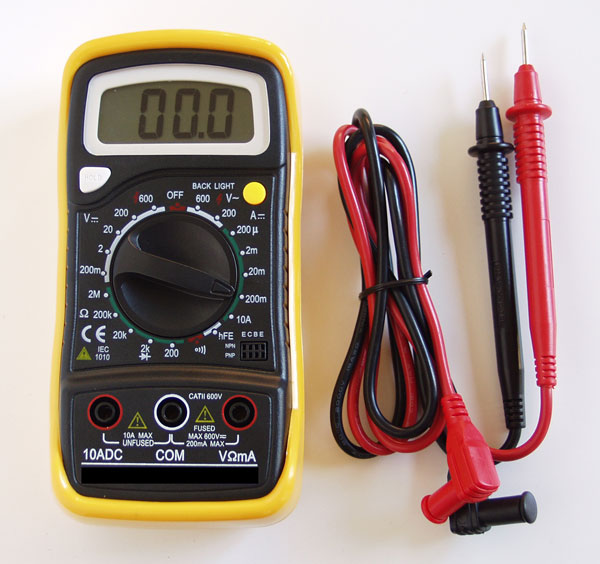 DMM = Digital Multi Meter  lucky im still alive lucky im still alive |
|
|
Nov 21 2009, 01:13 AM
Return to original view | Post
#16
|
|
Senior Member
903 posts Joined: Dec 2008
|
Questions :
2GB vs. 4GB vs. 8GB - Does it make a difference? on a machine that only do Gamming once in a while, no video editting, etc.. |
|
|
Nov 27 2009, 08:59 PM
Return to original view | Post
#17
|
|
Senior Member
903 posts Joined: Dec 2008
|
hmmmm. im kinda missed my 550 be
|
|
|
Dec 8 2009, 08:26 PM
Return to original view | Post
#18
|
|
Senior Member
903 posts Joined: Dec 2008
|
guess its my luck
. bought 550be yesterday & here is the result : |
|
|
Dec 13 2009, 03:20 PM
Return to original view | Post
#19
|
|
Senior Member
903 posts Joined: Dec 2008
|
here it is :


|
|
|
Dec 13 2009, 03:28 PM
Return to original view | Post
#20
|
|
Senior Member
903 posts Joined: Dec 2008
|
i guess so,
bought it on 7 December frm all it .. so!!.... ladies & gentleman..... hurry while stock last ,,,This post has been edited by BuckRoger: Dec 13 2009, 03:31 PM |
|
Topic ClosedOptions
|
| Change to: |  0.0482sec 0.0482sec
 0.55 0.55
 7 queries 7 queries
 GZIP Disabled GZIP Disabled
Time is now: 18th December 2025 - 07:09 AM |
 Quote
Quote
