Welcome Guest ( Log In | Register )

Bump Topic Topic Closed RSS Feed

Outline · [ Standard ] · Linear+

 Recommended iTunes AppStore Applications, News/Short Reviews/Discussion

views
     
david888
post Dec 6 2010, 12:37 PM

Regular
******
Senior Member
1,069 posts

Joined: Jan 2003
From: Batu Berendam, Melaka
Been in the USA "what's Hot" Category ! biggrin.gif

For those who would like to use iphone to keep track of their daily expenses ,Daily Expenses had been in the USA "What's Hot" finance category biggrin.gif .

thank you all lyn members for the support biggrin.gif

Any comment are welcome :-)

Daily Expenses

user posted image

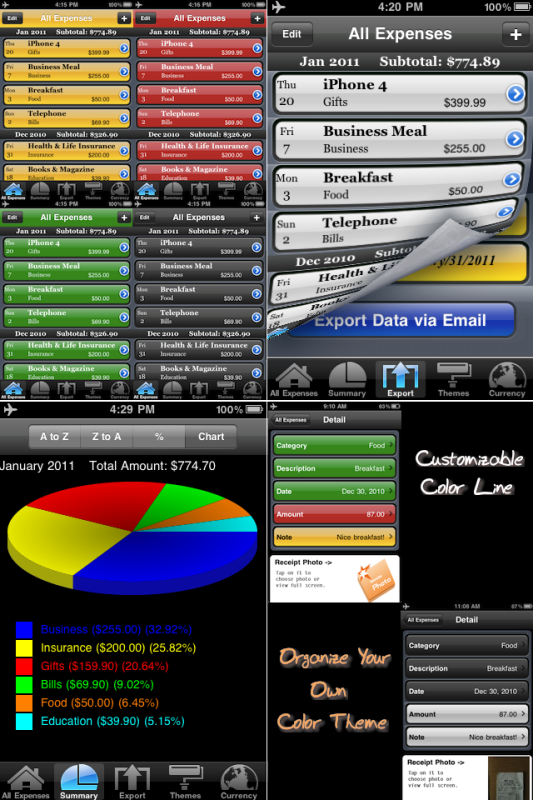
Daily Expenses app exports your daily expenses data into spreadsheet program via email. It is a personal expenses tracking application that allows you to manage your expenses while on the go.

Features:
* Exports your daily expenses data into spreadsheet program via email.
* Summary reports based on categories and months.
* Customizable categories.
* Summary with pie chart and percentage.
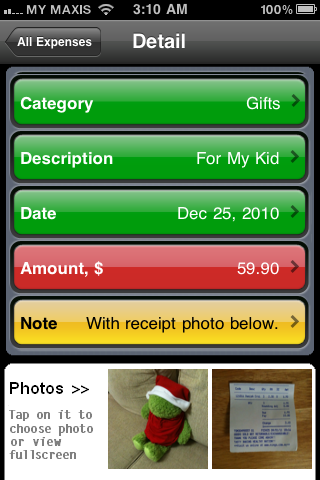
* Added Receipt Photo as proof of purchase.
* Simple and intuitive interface.
* Quickly enter transactions.
* Shows all expenses with monthly subtotal with one page view.
* Supports iOS4.2.1 and above.

user posted image

user posted image

user posted image

user posted image

This post has been edited by david888: Dec 15 2010, 03:37 PM
david888
post Dec 6 2010, 01:40 PM

Regular
******
Senior Member
1,069 posts

Joined: Jan 2003
From: Batu Berendam, Melaka
QUOTE(wan1912 @ Dec 6 2010, 01:28 PM)
alahai.... got take picture for receipt also, =( why lah home budget no have this features  sad.gif
*
biggrin.gif oh, the receipt photo as proof of purchase is optional, without the receipt photo the program is still able to run. maybe i should add something like "Optional Selection" in the next version. thanks for the comment.

david888
post Dec 6 2010, 05:00 PM

Regular
******
Senior Member
1,069 posts

Joined: Jan 2003
From: Batu Berendam, Melaka
QUOTE(hi54ever @ Dec 6 2010, 02:47 PM)
» Click to show Spoiler - click again to hide... «

been looking around for a decent Expense tracker, hope this is a good 1 biggrin.gif
*
biggrin.gif do let me know if there is any problem, any comment is welcome!!! biggrin.gif as this is version 3.0, there are still lots of improvements to be added.


QUOTE(enriquelee @ Dec 6 2010, 02:49 PM)
You might wanna try Money Engine as well.
*

Added on December 6, 2010, 5:02 pm
QUOTE(yeehau86 @ Dec 6 2010, 02:55 PM)
Home Budget do have this feature, just tap on the "Receipt" (the hairpin icon) and you can snap the receipt with the camera.

user posted image
*
thanks for the info, obviously i should try out the app also

This post has been edited by david888: Dec 6 2010, 06:42 PM
david888
post Dec 14 2010, 09:43 PM

Regular
******
Senior Member
1,069 posts

Joined: Jan 2003
From: Batu Berendam, Melaka
deleted smile.gif

This post has been edited by david888: Dec 15 2010, 10:58 AM
david888
post Jan 21 2011, 09:50 AM

Regular
******
Senior Member
1,069 posts

Joined: Jan 2003
From: Batu Berendam, Melaka
hi all,

is it ok if we put our iphone app promotional code free to users here in this forum? is this allowed?
david888
post Jan 21 2011, 11:03 AM

Regular
******
Senior Member
1,069 posts

Joined: Jan 2003
From: Batu Berendam, Melaka
QUOTE(lilster @ Jan 21 2011, 10:57 AM)
yes it is allowed =)
*
smile.gif ok, below are the 10 promo codes of our iphone app, daily expenses for lowyat.net members here, you can redeem it from the itune or your iphone.

How to redeem with promo codes:
in itune, scroll down to the end of the page, there is a manage->redeem. key in the promo code, it will auto downlaod, no charge.
in iphone, tap on App Store, on the feature page, scroll to the end of the page, you will see redeem there.

if you can't get the code, please pm me or reply this post, i will reply if i log in lowyat.net. any comments are welcome :-) . pls note: as long as i still have the promo codes, i will pm, else need to wait next release/update :-)

user posted image

user posted image


How to redeem with promo codes:
in itune, scroll down to the end of the page, there is a manage->redeem. key in the promo code, it will auto downlaod, no charge.
in iphone, tap on App Store, on the feature page, scroll to the end of the page, you will see redeem there.

New promo codes below:

N6LNWH69PFP6
6XT73XRF437P
K6NJ76YW6RM9
TE4P4MY37FEJ
HPY76YJWJ46M
4KXAMKFFYENP
TKJAEEH73JRW
FFWT3MYN3HAF
3TFR6P74JJ6X
WRPXX3PXFWEM

This post has been edited by david888: Jan 22 2011, 10:50 AM
david888
post Jan 21 2011, 12:29 PM

Regular
******
Senior Member
1,069 posts

Joined: Jan 2003
From: Batu Berendam, Melaka
QUOTE(zerko @ Jan 21 2011, 12:16 PM)
Can anyone help ? I am also lost as to how to redeem the code.
Thanks.
*
in itune, scroll down to the end of the page, there is a manage->redeem. key in the promo code, it will auto downlaod, no charge.
in iphone, tap on App Store, on the feature page, scroll to the end of the page, you will see redeem there.


Added on January 21, 2011, 12:32 pm
QUOTE(ally9970 @ Jan 21 2011, 12:09 PM)
how to redeem the code? Mine when i clicked buy, it automatickly charge my acc... sad.gif
*
hi there, you can get back your money, check link below:
http://www.iphonefootprint.com/2009/04/how...p-store-refund/

This post has been edited by david888: Jan 21 2011, 12:41 PM
david888
post Jan 21 2011, 03:03 PM

Regular
******
Senior Member
1,069 posts

Joined: Jan 2003
From: Batu Berendam, Melaka
QUOTE(ally9970 @ Jan 21 2011, 02:45 PM)
FYI, Apple has changed their purchase policy. All sales are final, no cancellation or refund, once you hit the BUY button sad.gif
*
hi there, i'm sorry for that coz i thought everyone knew how to redeem itune code, pm me your cimb or maybank account, i will bank in the $1.99 (RM6.20) into your bank account tonight.
david888
post Jan 22 2011, 10:49 AM

Regular
******
Senior Member
1,069 posts

Joined: Jan 2003
From: Batu Berendam, Melaka
QUOTE(ally9970 @ Jan 21 2011, 03:25 PM)
Hi David, you are kind enough to share the redeem code here  smile.gif
and you are really kind to offer the refund  biggrin.gif
However, I don't think it was your fault that I hit that "BUY" button  cry.gif

Worries not, I just take what happened as a lesson.. doh.gif

Hope it won't discourage you from sharing more redemption code  rclxms.gif

cheers mate  rclxm9.gif
*
thanks. sure, i will post more promo codes later as long as i have enough codes. smile.gif

ok, i will paste it below and on the previous post:

http://itunes.apple.com/us/app/daily-expen...d396381921?mt=8

N6LNWH69PFP6
6XT73XRF437P
K6NJ76YW6RM9
TE4P4MY37FEJ
HPY76YJWJ46M
4KXAMKFFYENP
TKJAEEH73JRW
FFWT3MYN3HAF
3TFR6P74JJ6X
WRPXX3PXFWEM

How to redeem with promo codes:
in itune, scroll down to the end of the page, there is a manage->redeem. key in the promo code, it will auto downlaod, no charge.
in iphone, tap on App Store, on the feature page, scroll to the end of the page, you will see redeem there.

if you can't get the code, please pm me or reply this post, i will reply if i log in lowyat.net. any comments are welcome :-) . pls note: as long as i still have the promo codes, i will pm, else need to wait next release/update :-)

user posted image

This post has been edited by david888: Jan 22 2011, 10:52 AM

Topic ClosedOptions
 

Change to:
| Lo-Fi Version
0.0215sec    0.32    7 queries    GZIP Disabled
Time is now: 2nd December 2025 - 01:19 AM