Welcome Guest ( Log In | Register )

Bump Topic Topic Closed RSS Feed
126 Pages « < 43 44 45 46 47 > » Bottom

Outline · [ Standard ] · Linear+

Photography [PIC-A-Day Thread] Post your daily shots here! V4!, A Pictar A Day Keeps Da Fungus Away! XD

views
     
Uzumaki NaruTo
post Nov 10 2009, 03:58 PM

oro?
*******
Senior Member
4,187 posts

Joined: Jan 2003
From: sleepy melati


QUOTE(mizivincible @ Nov 10 2009, 03:24 PM)
Into macro now ?  brows.gif

Mating season goes frenzy now !
*
Still noob sweat.gif and still itching from the mosquito bites laugh.gif . Raining season ma really cold so need to do something to warm it up laugh.gif

This post has been edited by Uzumaki NaruTo: Nov 10 2009, 03:59 PM
e3_1990
post Nov 10 2009, 05:13 PM

New Member
*
Junior Member
11 posts

Joined: May 2008


QUOTE(lwliam @ Nov 10 2009, 02:24 AM)
not sure if i shared this here before or not, but i like light trails too...

user posted image

Camera Model - Sony Alpha A700
Lens - SAL 1870 @ 18mm
Exposure - 1/30s, f/16 @ 320ISO

*
nice pic...
how do you make it looks so blue?
ReeNz
post Nov 10 2009, 05:35 PM

Glory Glory!
******
Senior Member
1,467 posts

Joined: Dec 2004
From: Petaling Jaya/Melaka/USA


user posted image

Camera Model: Canon S90
Exposure: 1/30 sec
Aperture: f/2.0
Focal Length: 28 mm
ISO Speed: 640

achew
post Nov 10 2009, 05:47 PM

Photolithography Engineer
*******
Senior Member
3,807 posts

Joined: Jan 2003
From: Masking


QUOTE(e3_1990 @ Nov 10 2009, 05:13 PM)
nice pic...
how do you make it looks so blue?
*
if u dont like to do post processing..u can always tune ur white balance to make it bluish.. biggrin.gif
adioz88
post Nov 10 2009, 06:33 PM

Enthusiast
*****
Senior Member
791 posts

Joined: Nov 2007


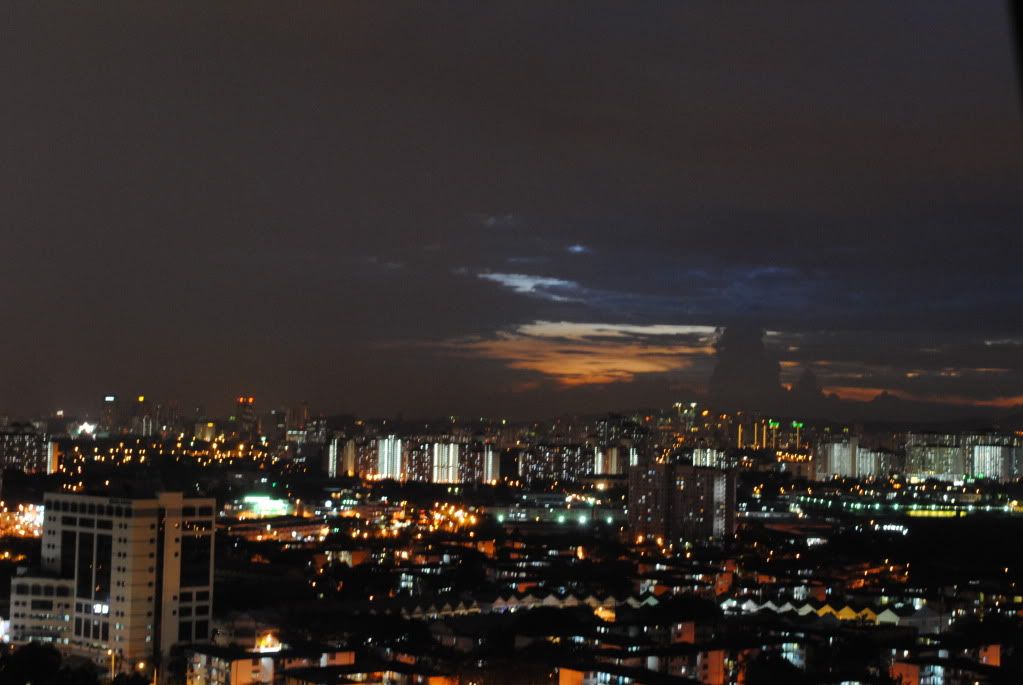
user posted image
Overnight smile.gif
Cwz90
post Nov 10 2009, 07:40 PM

Getting Started
**
Junior Member
132 posts

Joined: Apr 2008
user posted image
Camera Model: Nikon D3000
Exposure: Auto
Aperture: f/13
ISO Speed: 800
I'm newbie... this is my first shot...
give some comment so i can improve it... thanks....

This post has been edited by Cwz90: Nov 10 2009, 07:51 PM
Sp00kY
post Nov 10 2009, 08:56 PM

Look at all my stars!!
*******
Senior Member
3,366 posts

Joined: Oct 2005
QUOTE(Cwz90 @ Nov 10 2009, 07:40 PM)
» Click to show Spoiler - click again to hide... «

Camera Model: Nikon D3000
Exposure: Auto
Aperture: f/13
ISO Speed: 800
I'm newbie... this is my first shot...
give some comment so i can improve it... thanks....
*
pic looks blur, camera shake?
Cwz90
post Nov 10 2009, 09:07 PM

Getting Started
**
Junior Member
132 posts

Joined: Apr 2008
QUOTE(Sp00kY @ Nov 10 2009, 08:56 PM)
pic looks blur, camera shake?
*
er, may be... coz i take a few also same like this, but this one better...
any suggestion??
thanks~~~
Sp00kY
post Nov 10 2009, 09:15 PM

Look at all my stars!!
*******
Senior Member
3,366 posts

Joined: Oct 2005
QUOTE(Cwz90 @ Nov 10 2009, 09:07 PM)
er, may be... coz i take a few also same like this, but this one better...
any suggestion??
thanks~~~
*
use a tripod, use a remote shutter, if u dun have a remote shutter then u can set a timer lo smile.gif
Cwz90
post Nov 10 2009, 09:19 PM

Getting Started
**
Junior Member
132 posts

Joined: Apr 2008
QUOTE(Sp00kY @ Nov 10 2009, 09:15 PM)
use a tripod, use a remote shutter, if u dun have a remote shutter then u can set a timer lo smile.gif
*
oic... thanks a lot... smile.gif rclxms.gif
TSTechnoDude94
post Nov 10 2009, 10:45 PM

Happiness Advocate
*******
Senior Member
6,738 posts

Joined: Dec 2006
From: Kuala Lumpur, Malaysia | Eau Claire, Wisconsin


QUOTE(e3_1990 @ Nov 10 2009, 05:13 PM)
nice pic...
how do you make it looks so blue?
*
You can use Photoshop and increase the blue channel color.

QUOTE(Cwz90 @ Nov 10 2009, 07:40 PM)
» Click to show Spoiler - click again to hide... «
Camera Model: Nikon D3000
Exposure: Auto
Aperture: f/13
ISO Speed: 800
I'm newbie... this is my first shot...
give some comment so i can improve it... thanks....
*
QUOTE(Cwz90 @ Nov 10 2009, 09:07 PM)
er, may be... coz i take a few also same like this, but this one better...
any suggestion??
thanks~~~
*
It looks quite blur.
No offense, just my 2 cents.
Since it was taken at night.
I assume that your DSLR automatically chose a slow shutter speed (your didn't post it).
Utilizing a slow shutter speed will capture the vibrations/camera shake and present it in the photo hence causing a blurred picture.


Added on November 10, 2009, 10:47 pm
QUOTE(adioz88 @ Nov 10 2009, 06:33 PM)
» Click to show Spoiler - click again to hide... «
Overnight
*
Picture is overexposed (too bright).
I assume that you're using a slow shutter speed with a high ISO.
You shouldn't use a high ISO when you're using a slow shutter speed.
Please decrease your ISO level... Just my 2 cents...

This post has been edited by TechnoDude94: Nov 10 2009, 10:47 PM

Cwz90
post Nov 10 2009, 11:10 PM

Getting Started
**
Junior Member
132 posts

Joined: Apr 2008
QUOTE(TechnoDude94 @ Nov 10 2009, 10:45 PM)
You can use Photoshop and increase the blue channel color.
It looks quite blur.
No offense, just my 2 cents.
Since it was taken at night.
I assume that your DSLR automatically chose a slow shutter speed (your didn't post it).
Utilizing a slow shutter speed will capture the vibrations/camera shake and present it in the photo hence causing a blurred picture.


Added on November 10, 2009, 10:47 pm
Picture is overexposed (too bright).
I assume that you're using a slow shutter speed with a high ISO.
You shouldn't use a high ISO when you're using a slow shutter speed.
Please decrease your ISO level... Just my 2 cents...
*
oic...thx...
then is should i set to manual or aperture priority to take a good photo like this?
TSTechnoDude94
post Nov 10 2009, 11:45 PM

Happiness Advocate
*******
Senior Member
6,738 posts

Joined: Dec 2006
From: Kuala Lumpur, Malaysia | Eau Claire, Wisconsin


Set it to Shutter Priority.
Put it on a tripod.
Set to about 4 secs.
Select "Timer".
Select ISO of about 400 (play around and see the result).
Enjoy yourself and don't forget to post it here! icon_rolleyes.gif
Cwz90
post Nov 10 2009, 11:52 PM

Getting Started
**
Junior Member
132 posts

Joined: Apr 2008
QUOTE(TechnoDude94 @ Nov 10 2009, 11:45 PM)
Set it to Shutter Priority.
Put it on a tripod.
Set to about 4 secs.
Select "Timer".
Select ISO of about 400 (play around and see the result).
Enjoy yourself and don't forget to post it here! icon_rolleyes.gif
*
thanks... i try it out.... thanks a lot... thumbup.gif
rclxms.gif smile.gif
tun
post Nov 11 2009, 12:07 AM

Casual
***
Junior Member
441 posts

Joined: Sep 2008
just sharing some

user posted image

user posted image
achew
post Nov 11 2009, 12:13 AM

Photolithography Engineer
*******
Senior Member
3,807 posts

Joined: Jan 2003
From: Masking


QUOTE(TechnoDude94 @ Nov 10 2009, 10:45 PM)
Picture is overexposed (too bright).
I assume that you're using a slow shutter speed with a high ISO.
You shouldn't use a high ISO when you're using a slow shutter speed.
Please decrease your ISO level... Just my 2 cents...
*
lets not talk about the photo...but when we increase the ISO..the shutter would compensate the exposure by increasing the speed..so imo high ISO does not cause over expose that much if ur shutter havent reach its limit..in this case..its taken at night..so i dont think it reaches the limit shutter speed yet...


anyway..another random shot from me...

user posted image

iso200
F1.4
50mm
TSTechnoDude94
post Nov 11 2009, 12:47 AM

Happiness Advocate
*******
Senior Member
6,738 posts

Joined: Dec 2006
From: Kuala Lumpur, Malaysia | Eau Claire, Wisconsin


QUOTE(Cwz90 @ Nov 10 2009, 11:52 PM)
thanks... i try it out.... thanks a lot...
*
No problem mate, glad to help.

achew:
Then how come the picture looks overexposed?
I thought a slow shutter speed + high ISO = Overexposure? blink.gif
Care to enlighten me, I'm also a beginner. rolleyes.gif
shinjun
post Nov 11 2009, 12:54 AM

Look at all my stars!!
*******
Senior Member
2,247 posts

Joined: Jan 2007


QUOTE(TechnoDude94 @ Nov 11 2009, 12:47 AM)
No problem mate, glad to help.

achew:
Then how come the picture looks overexposed?
I thought a slow shutter speed + high ISO = Overexposure? blink.gif
Care to enlighten me, I'm also a beginner. rolleyes.gif
*
I think what Achew means here is IF the camera is let alone in semi auto mode, then when you push up the ISO higher, the shutter or aperture will adjust accordingly to get an evenly expose photo.

If it's in manual mode, then it's different story as the photog is the one who control the exposure.

This post has been edited by shinjun: Nov 11 2009, 12:55 AM
mizivincible
post Nov 11 2009, 12:57 AM

"They'll be singing que sera sera"
******
Senior Member
1,633 posts

Joined: Oct 2007
From: Cheras, Selangor


QUOTE(TechnoDude94 @ Nov 11 2009, 12:47 AM)
No problem mate, glad to help.

achew:
Then how come the picture looks overexposed?
I thought a slow shutter speed + high ISO = Overexposure? blink.gif
Care to enlighten me, I'm also a beginner. rolleyes.gif
*
Not necessarily slow shutter and high ISO is overexpose mate. If u know how to compensate between ss, ISO and aperture. Higher ISO resulting in losing some details comparing to lower ISO but as long as like Achew mentioned "shutter havent reach its limit" then it wont be overexposed.


For the meantime enough with bug for a while, wishing a very happy birthday to our current unpaid model Asrul Affendi who is celebrating his 22nd Birthday today (11/11/09). May all ur wishes come true, in pink of health, all the best in future undertake, live long and prosper.

Owh, any guy or girl interested with him can let me know, price can be discussed ! Hahaha !

user posted image

http://www.flickr.com/photos/mizivincible/4092457355/

1/250|f/5|ISO400
TSTechnoDude94
post Nov 11 2009, 01:20 AM

Happiness Advocate
*******
Senior Member
6,738 posts

Joined: Dec 2006
From: Kuala Lumpur, Malaysia | Eau Claire, Wisconsin


QUOTE(shinjun @ Nov 11 2009, 12:54 AM)
I think what Achew means here is IF the camera is let alone in semi auto mode, then when you push up the ISO higher, the shutter or aperture will adjust accordingly to get an evenly expose photo.
If it's in manual mode, then it's different story as the photog is the one who control the exposure.
*
QUOTE(mizivincible @ Nov 11 2009, 12:57 AM)
Not necessarily slow shutter and high ISO is overexpose mate. If u know how to compensate between ss, ISO and aperture. Higher ISO resulting in losing some details comparing to lower ISO but as long as like Achew mentioned "shutter havent reach its limit" then it wont be overexposed.
*
I see, thanks for clarifying. icon_rolleyes.gif

126 Pages « < 43 44 45 46 47 > » Top
Topic ClosedOptions
 

Change to:
| Lo-Fi Version
0.0296sec    1.10    6 queries    GZIP Disabled
Time is now: 22nd December 2025 - 09:22 PM