Welcome Guest ( Log In | Register )

Outline · [ Standard ] · Linear+

 AMD® Socket AM3 Unlocking 4th CORE Thread ~, Those Who Have Tried,Please List it HERE

views
     
angrysnail
post Apr 6 2011, 09:10 PM

SuperStars
******
Senior Member
1,413 posts

Joined: Aug 2009
From: Damansara


QUOTE(prestigio @ Apr 5 2011, 07:03 PM)
which 1 are better.. ONLINE BIOS UPDATE or M-FLASH ?? hmm.gif
M-FLASH are better i think..

I ody check CPU support on MSI web
http://www.msi.com/product/mb/740GM-P25.ht...?div=CPUSupport

Im phenom ii x2 be 555.. I wanna try once..
Have any idea or advice?? laugh.gif

Rely fraid mobo crush... cry.gif
*
myb u misunderstanding me.. nod.gif
what i mean is this one,using THIS method for flashing MSI mobo..
those M-Flash is useless as for me,keep popup the ROM mismatch and lead to dead MOBO if u force to flash..

This post has been edited by angrysnail: Apr 6 2011, 09:10 PM
angrysnail
post Apr 10 2011, 11:17 PM

SuperStars
******
Senior Member
1,413 posts

Joined: Aug 2009
From: Damansara


QUOTE(deep_hunter @ Apr 10 2011, 12:47 PM)
» Click to show Spoiler - click again to hide... «

any luck by updating BIOS?..
mine b4 just unstable after unlocking,after done bios update.
the process just flow nicely with all four cores unlock.. thumbup.gif
angrysnail
post Apr 18 2011, 09:05 PM

SuperStars
******
Senior Member
1,413 posts

Joined: Aug 2009
From: Damansara


QUOTE(egorain @ Apr 17 2011, 08:19 AM)
Some tips for tweaking performance for dual core or quad core cpu at Window 7;
*Using MSCONFIG:
(1) Go to the “Start Menu“, type “MSCONFIG ” in the search box and press Enter. The Windows system configuration tool will start. It might ask you for Administrator password before continue.
(2) Click the “Boot” (2nd) tab
(3) Click “Advanced Options” button
(4) Select the number of processors you have and the amount of memory available. For example, if you’re using a Dual Core processor then you should select “2″ from processors drop down menu, if you have a Quad Core processor, you should select “4″ from the processor drop down menu, etc.
(5) Select your numbers of memory ram also '4gb' (4096) or '8gb' (8192) etc.
(6) Now Press “Ok“, then “Apply“, MSCONFIG might ask you to re-boot your computer.  rclxms.gif
*
is the number of processors and number of core is the same thing?.. hmm.gif
angrysnail
post Apr 19 2011, 10:02 PM

SuperStars
******
Senior Member
1,413 posts

Joined: Aug 2009
From: Damansara


QUOTE(saturn85 @ Apr 19 2011, 09:48 PM)
oh, like that oh, the name change is permanent. unsure.gif
*
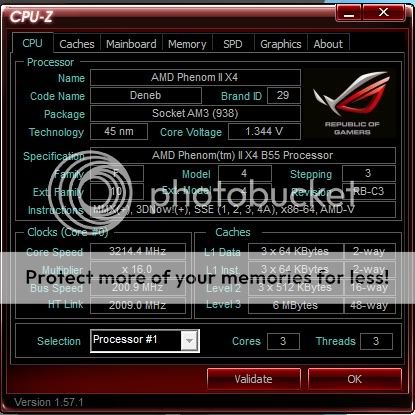
mine when lock will become 555,unlock be B55 but when i OC to high,play2 with NB,HT it become engineering sample K10..LOL.. laugh.gif


Change to:
| Lo-Fi Version
0.0334sec    0.65    7 queries    GZIP Disabled
Time is now: 4th December 2025 - 02:31 PM