

does anybody know how to open maxis easyaccess on iphone..
i used it for cinema ticketing..
This post has been edited by siqplus: May 30 2009, 03:53 AM
[wta]Maxis easyaccess in iPhone, NO SIM APPLICATION.. plz help
[wta]Maxis easyaccess in iPhone, NO SIM APPLICATION.. plz help
|
|
 May 29 2009, 12:09 PM, updated 17y ago May 29 2009, 12:09 PM, updated 17y ago
Show posts by this member only | Post
#1
|
 
Junior Member
81 posts Joined: Nov 2008   
|
does anybody know how to open maxis easyaccess on iphone..
i used it for cinema ticketing.. This post has been edited by siqplus: May 30 2009, 03:53 AM |
|
|
|
|
|
May 29 2009, 12:19 PM
Show posts by this member only | Post
#2
|

Junior Member
173 posts Joined: Jun 2006
|
Setting - Phone - Sim Applications
|
|
|
May 29 2009, 09:35 PM
Show posts by this member only | Post
#3
|
|
Junior Member
81 posts Joined: Nov 2008
|
does anybody know how to open maxis easyaccess on iphone..
i used it for cinema ticketing.. thx for hades answer in the previous thread.. but as i followed ur instruction : setting>phone>sim aplication.. the sim application is just not there.. my setting>phone only have: 1.call forwarding 2.call waiting 3.show my caller id 4.sim pin 5.maxis service here's some pic 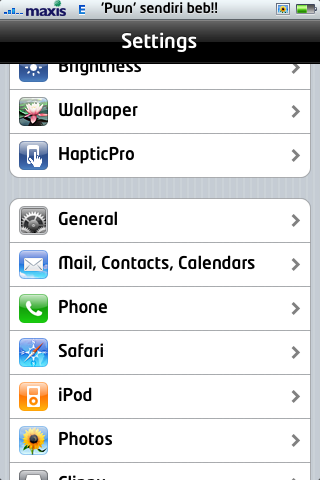 , , 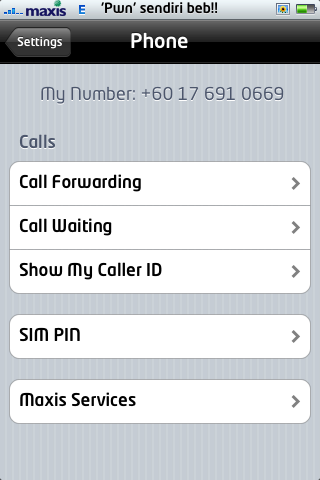 , , 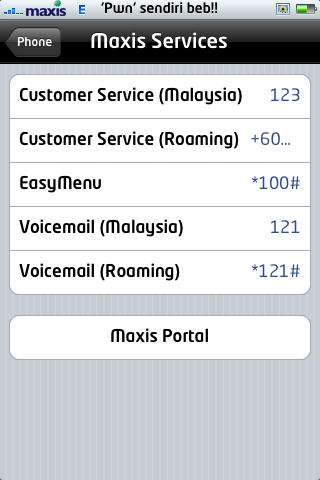 , , under maxis service only provide call shortcuts to maxis center n *100# n Voicemail anyone know why? im currently on os 2.2.1 n there were no probs on any app except swirlymms till this day i dont know why.. hope u have a solution for me.. because i really need the easy access function thx in advance This post has been edited by siqplus: May 29 2009, 10:18 PM |
|
|
May 30 2009, 01:06 AM
Show posts by this member only | Post
#4
|
|
Junior Member
173 posts Joined: Jun 2006
|
as u requested...my screenshot
  |
|
|
May 30 2009, 12:25 PM
Show posts by this member only | Post
#5
|

Senior Member
3,612 posts Joined: Jan 2009
|
QUOTE(siqplus @ May 29 2009, 09:35 PM) does anybody know how to open maxis easyaccess on iphone.. i used it for cinema ticketing.. thx for hades answer in the previous thread.. but as i followed ur instruction : setting>phone>sim aplication.. the sim application is just not there.. my setting>phone only have: 1.call forwarding 2.call waiting 3.show my caller id 4.sim pin 5.maxis service here's some pic , , , under maxis service only provide call shortcuts to maxis center n *100# n Voicemail anyone know why? im currently on os 2.2.1 n there were no probs on any app except swirlymms till this day i dont know why.. hope u have a solution for me.. because i really need the easy access function thx in advance  This is just a wild guess on my part. Could it be that you activated the iPhone by yourself and it was not done by Maxis when you bought it? If so, that could be the reason why you do not have SIM Application. If my assumption is correct, perhaps taking your phone back to Maxis may help sinceyour direly require the Application. But do remember to restore your unit before doing that lest hte warranty be voided. |
|
|
May 30 2009, 02:59 PM
Show posts by this member only | Post
#6
|
|
Junior Member
81 posts Joined: Nov 2008
|
QUOTE(PeeEl @ May 30 2009, 12:25 PM) This is just a wild guess on my part. Could it be that you activated the iPhone by yourself and it was not done by Maxis when you bought it? If so, that could be the reason why you do not have SIM Application. mine is an unlocked iphone.. i dont think thats the reason..If my assumption is correct, perhaps taking your phone back to Maxis may help sinceyour direly require the Application. But do remember to restore your unit before doing that lest hte warranty be voided. Added on May 30, 2009, 3:02 pmdoes anybody knows how to determine wether a sim card is 64k or not? This post has been edited by siqplus: May 30 2009, 03:02 PM |
|
|
|
|
|
May 30 2009, 03:26 PM
Show posts by this member only | Post
#7
|

Senior Member
5,786 posts Joined: Nov 2007 From: VIC - The Place To Be
|
QUOTE(siqplus @ May 30 2009, 02:59 PM) mine is an unlocked iphone.. i dont think thats the reason.. a simple test is to check if 3G or HSDPA is detected via a compatible handset. if it is detected, then the sim card ought to be 64K version.Added on May 30, 2009, 3:02 pmdoes anybody knows how to determine wether a sim card is 64k or not? however if you are getting a mere GPRS/EDGE, then it is the vice versa. for this to work, you have to in a known 3G/HSDPA coverage area of course |
|
|
May 30 2009, 03:51 PM
Show posts by this member only | Post
#8
|
|
Senior Member
518 posts Joined: Jan 2003
|
QUOTE(nokia2003 @ May 30 2009, 03:26 PM) a simple test is to check if 3G or HSDPA is detected via a compatible handset. if it is detected, then the sim card ought to be 64K version. i doubt on it nokia, i am using super ancient 16k simcard and i still can use 3g network?however if you are getting a mere GPRS/EDGE, then it is the vice versa. for this to work, you have to in a known 3G/HSDPA coverage area of course |
|
|
May 30 2009, 03:59 PM
Show posts by this member only | Post
#9
|
|
Senior Member
5,786 posts Joined: Nov 2007 From: VIC - The Place To Be
|
QUOTE(Shock @ May 30 2009, 03:51 PM) i doubt on it nokia, i am using super ancient 16k simcard and i still can use 3g network? i'm only basing my claim on the fact that i switch between hotlink and maxis sim cards regularly i.e. hotlink uses the inferior sim card and vice versa.same thing with the celcom network, i have the xpax sim card (to use the daily, unlimited broadband package) and i have to pay to upgrade the sim card to the 64k (for me to enjoy the 3G network) furthermore, i have read on the OZ forum, that many users experience unsatisfactory 3G speeds previously. however upon upgrading their sim cards, the speeds have then improved tremendously. This post has been edited by nokia2003: May 30 2009, 04:00 PM |
|
|
May 30 2009, 04:22 PM
|
|
Senior Member
3,612 posts Joined: Jan 2009
|
QUOTE(siqplus @ May 30 2009, 02:59 PM) mine is an unlocked iphone.. i dont think thats the reason.. Officially unlocked sets need to be activated as well. I was trying to establish whether when you bought the unit from Maxis, you took the box intact, went home and did the activation yourself or like in most instances, allowed the Maxis personnel to open the box and activate the phone. If it is the former, there is a likelihood the SIM Applications 'software' was not installed.Added on May 30, 2009, 3:02 pmdoes anybody knows how to determine wether a sim card is 64k or not? Trust you comprehend now. |
|
|
May 30 2009, 05:27 PM
|

Senior Member
3,657 posts Joined: May 2005
|
Actually looking at TS problem, it got nothing to do with activation or anything. It's just that TS is using the custom carrier bundle (referring to the "Maxis" logo for the carrier part). Why Hades86 have it and TS don't because in the custom carrier bundles have an option to show what setting to show and what not (hope people understand this).
@TS What you can do is temporarily disable/delete the custom carrier bundle and see if the "Sim Applications" appears on your settings. Added on May 30, 2009, 5:35 pm QUOTE(PeeEl @ May 30 2009, 04:22 PM) Officially unlocked sets need to be activated as well. I was trying to establish whether when you bought the unit from Maxis, you took the box intact, went home and did the activation yourself or like in most instances, allowed the Maxis personnel to open the box and activate the phone. If it is the former, there is a likelihood the SIM Applications 'software' was not installed. The SIM Applications 'software' is not installed on the phone but its in the SIM itself. Activation can be done by anyone and anywhere given its a maxis set or not. Maxis activates the phone for you so you can straight use it when you purchase it. Look it this way ... I purchase a RM2k++ phone and it's still wrapped in the plastic. I go out hopping with my new phone, open it and turn it on and found that I need to connect to itunes first and activate before i can use. I would be furious that I need to go back, plug in the phone to itunes just to use the phone. So Maxis does this for you so you can be a happy camper and start using the phone.Trust you comprehend now. p/s - this is just to straight things up and not trying to pick a fight with anyone.  This post has been edited by frozzbyte: May 30 2009, 05:35 PM |
|
|
May 30 2009, 10:38 PM
|
|
Junior Member
81 posts Joined: Nov 2008
|
QUOTE(frozzbyte @ May 30 2009, 05:27 PM) Actually looking at TS problem, it got nothing to do with activation or anything. It's just that TS is using the custom carrier bundle (referring to the "Maxis" logo for the carrier part). Why Hades86 have it and TS don't because in the custom carrier bundles have an option to show what setting to show and what not (hope people understand this). how to do that? how to delete the custom carrier bundle?@TS What you can do is temporarily disable/delete the custom carrier bundle and see if the "Sim Applications" appears on your settings. Added on May 30, 2009, 11:49 pm QUOTE(siqplus @ May 30 2009, 10:38 PM) how to do that? how to delete the custom carrier bundle? just restored my fon.. sim application still not thereThis post has been edited by siqplus: May 30 2009, 11:49 PM |
|
|
May 31 2009, 08:57 PM
|
|
Senior Member
3,657 posts Joined: May 2005
|
@siqplus
Why did you restore your phone? This can be easily done without restoring your phone (unless you have all the time to redo back everything). After you restore the phone, did you restore the backup from iTunes? If you do, then it will restore back the carrier bundle and you are back to square one. How did you change the "Maxis" logo in the first place, using the IPC (izzit correct?) file or manually copied the carrier bundle folder to /System/Library/Carrier Bundles? |
|
|
|
|
|
Jun 1 2009, 12:23 AM
|
|
Junior Member
81 posts Joined: Nov 2008
|
QUOTE(frozzbyte @ May 31 2009, 08:57 PM) @siqplus i used IPC.. i didnt restore backup.. i setup new iphoneWhy did you restore your phone? This can be easily done without restoring your phone (unless you have all the time to redo back everything). After you restore the phone, did you restore the backup from iTunes? If you do, then it will restore back the carrier bundle and you are back to square one. How did you change the "Maxis" logo in the first place, using the IPC (izzit correct?) file or manually copied the carrier bundle folder to /System/Library/Carrier Bundles? |
|
|
Jun 1 2009, 04:32 PM
|
 
VIP
4,903 posts Joined: Jul 2008
|
@siqplus
Have you ever thought of maybe heading to Maxis Centre and upgrade your Maxis simcard or your simcard is already updated to the latest? I have tested an old Maxis simcard and it does not have the Sim Application. My currrent updated Maxis simcard has the Sim Application. This post has been edited by davidgary73: Jun 1 2009, 04:35 PM |
|
|
Jun 1 2009, 10:35 PM
|
|
Junior Member
81 posts Joined: Nov 2008
|
QUOTE(davidgary73 @ Jun 1 2009, 04:32 PM) @siqplus yes.. i thought so.. that is the only solution i hv... Have you ever thought of maybe heading to Maxis Centre and upgrade your Maxis simcard or your simcard is already updated to the latest? I have tested an old Maxis simcard and it does not have the Sim Application. My currrent updated Maxis simcard has the Sim Application. just visit maxim site.. easyaccess is only applicable if ur simcard is 64k.. thats y i asked earlier.. kinda buzy.. ill be heading klcc on wednesday..maybe i should drop by |
|
|
Jun 1 2009, 10:41 PM
|
|
VIP
4,903 posts Joined: Jul 2008
|
QUOTE(siqplus @ Jun 1 2009, 10:35 PM) yes.. i thought so.. that is the only solution i hv... As i have thought so. Such easy solution isn't it than cracking your head over and over again, restoring your fimware etc. just visit maxim site.. easyaccess is only applicable if ur simcard is 64k.. thats y i asked earlier.. kinda buzy.. ill be heading klcc on wednesday..maybe i should drop by Anyway, do get your simcard updated and you're good to go. Cheers |
|
Topic ClosedOptions
|
| Change to: |  0.0164sec 0.0164sec
 0.95 0.95
 5 queries 5 queries
 GZIP Disabled GZIP Disabled
Time is now: 23rd December 2025 - 05:23 AM |
 Quote
Quote