Welcome Guest ( Log In | Register )

Outline · [ Standard ] · Linear+

 WMWifiRouter can't work?, Windows Vista the culprit?

views
     
TSxcen
post May 17 2009, 08:30 PM, updated 17y ago

Munch munch... Uh oh!
*******
Senior Member
2,602 posts

Joined: Jun 2008
From: Meow...


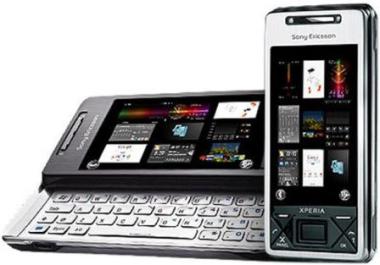
Hello. I am having a Sony Ericsson Xperia X1 WM6.1 Device. Recently, I've tried using WMWifiRouter but it doesn't seem to work. My idea is to use my phone as a Wireless Router so that my laptop is able to have internet via WiFi from my ADSL connection which is from my main PC.

When I switch on WMWifi's 'USB to WiFi', my Windows Vista Internet Sharing Center will have 2 networks displayed. (1 is from my main internet connection, 1 more from my phone.)
According to Windows Vista Internet Sharing Center, my phone's network access is 'Local only' as apposed to my normal LAN connection which is 'Local and Internet'.

I've searched for a solution and I came to this link but it still does not work.


I found a rather interesting message whenever I connect the 'USB to WiFi' mode. A pop up box with the tile 'Pocket PC Networking' will say ' cannot obtain a server assigned ip address. try again later or enter an ip address in network settings'.

Can anyone share with me the proper IP address for WMWifiRouter on my PC and on my WM device?

Anyway, just to describe the problem I'm facing when I'm using WMWifiRouter.

1. I connect 'USB to WiFi', everything seems to work fine, the status is ready.

2. I can see my own network name on my laptop.

3. I click on it, and the message shows connected.

4. Tried to access the internet but it won't work.

So, the main problem now is...
1. There's something wrong with Vista causing any device that wants Internet Sharing to only connect to 'Local'

2. There's something wrong with my IP configuration.

Thank you all very, very much in advance for helping me out.

This post has been edited by xcen: May 18 2009, 03:04 PM
Baronic
post May 17 2009, 10:37 PM

Problem?
Group Icon
Staff
7,533 posts

Joined: Sep 2005
From: Lowyat.net Malaysia Sex: Yes please


When u say internet sharing, do u mean u actually using the "Internet Sharing" application on your windows mobile?

Here's what i know with XP Knowledge.

To use your phone as a modem = connect phone to USB cable to PC. Run INTERNET SHARING application on PDA.

To go online using your pda, using your PC's connection instead = connect phone to usb cable to pc, let active sync run, and connect. thats it. surf.

so i would surmise that for VIsta, try using whatever connection that helps u sync with your PC. Shudnt be Internet Sharing. Then try to go online once its synced and connected
TSxcen
post May 17 2009, 11:04 PM

Munch munch... Uh oh!
*******
Senior Member
2,602 posts

Joined: Jun 2008
From: Meow...


QUOTE(Baronic @ May 17 2009, 10:37 PM)
When u say internet sharing, do u mean u actually using the "Internet Sharing" application on your windows mobile?

Here's what i know with XP Knowledge.

To use your phone as a modem = connect phone to USB cable to PC. Run INTERNET SHARING application on PDA.

To go online using your pda, using your PC's connection instead = connect phone to usb cable to pc, let active sync run, and connect. thats it. surf.

so i would surmise that for VIsta, try using whatever connection that helps u sync with your PC. Shudnt be Internet Sharing. Then try to go online once its synced and connected
*
For Windows Vista, we use Windows Mobile Device. However once synced, it doesn't naturally connect internet to my phone.
marauderz
post May 18 2009, 09:33 AM

Windows Tablet War Veteran
*******
Senior Member
3,390 posts

Joined: Feb 2005


If you connect both the phone in modem mode, and a normal internet connection to the desktop, windows will flip a coin in deciding which one to use to go online.

First of all you should check if your dataline is working
- Can you browse internet on the phone?
- Disconnect the streamyx on your desktop, turn on internet sharing on phone, then plug to PC. Is internet workign on PC? Bare in mind the first time you connect the device it takes a while to install the RNDIS device driver.
rkwan67
post May 18 2009, 01:17 PM

Look at all my stars!!
*******
Senior Member
2,455 posts

Joined: Feb 2005
From: --Hidden--


btw, i really confused bro.. u wan to have streamyx connection on your xperia is it? or the other way round?

either u wan streamyx connection on ur phone or u wan to have ur edge on ur pc?

if u wan have streamyx connection on ur phone, run WMDC then let it run. you will be able to surf straight away 1. (remember to change to flight mode to confirm it suft using streamyx). if u cannot surf. then open ur WMDC, check da settings -> connection settings. remember to tick some thing. i will update u when i get back home. u tick to allow phone to use ur internet. da other something like "allow data connection on phone" is not important.

anyway, im using wmwifirouter last few days, by using 3g-> wifi. my ip on my pc is 192.168.0.2. while default gateway is 192.168.0.1.

if u still having problem, i will instal wmwifirouter on my pc again to help u diagnose. no worry.
TSxcen
post May 18 2009, 02:57 PM

Munch munch... Uh oh!
*******
Senior Member
2,602 posts

Joined: Jun 2008
From: Meow...


Sorry all for the confusion! I have edited my post a little.

I have tried using WMD to connect and my phone is able to surf the net. Hmm, weird that last time it was not able to.

And Rkwan, your help will be very much appreciated!
rkwan67
post May 18 2009, 09:11 PM

Look at all my stars!!
*******
Senior Member
2,455 posts

Joined: Feb 2005
From: --Hidden--


wss bro. do such advance thing using xperia ka. torturing ur xperia ker? hahaa

anyway, let me finish my homework in 1hr time then i will help u carry out on my xperia too. haha.... let me torture mine too huh?


TSxcen
post May 18 2009, 10:40 PM

Munch munch... Uh oh!
*******
Senior Member
2,602 posts

Joined: Jun 2008
From: Meow...


QUOTE(rkwan67 @ May 18 2009, 09:11 PM)
wss bro. do such advance thing using xperia ka. torturing ur xperia ker? hahaa

anyway, let me finish my homework in 1hr time then i will help u carry out on my xperia too. haha.... let me torture mine too huh?
*
WinMo ma, very torturable ^^

But I'm not going to use the function for too long la, sometimes my mom/sis want to fight for the computer just for surfing website. I can set up my xperia then everybody is happy lo biggrin.gif
rkwan67
post May 18 2009, 11:45 PM

Look at all my stars!!
*******
Senior Member
2,455 posts

Joined: Feb 2005
From: --Hidden--


QUOTE(xcen @ May 18 2009, 10:40 PM)
WinMo ma, very torturable ^^

But I'm not going to use the function for too long la, sometimes my mom/sis want to fight for the computer just for surfing website. I can set up my xperia then everybody is happy lo biggrin.gif
*
haha.. tat true.. windowsmobile good..!!

anyway, update back with the status.. i tried few times too.. doesnt work for me either. i use my laptop wifi to get wifi from my linksys. then use da USB to wifi function of wmwifirouter. then i 169.xxx ip which is wrong while i set ip range must be in 10.0.0.x. and i cannot find my own wmwifirouter wifi broadcasting while wifi status ther keep on sau searching but it should b searching but to create a ad-hoc network.

bro, how u use ur lappy to online then? since u said u nid to create wifi n u dont have wifi at home? ur laptop use lan cable ar?

if not, why dont u create ad-hoc from ur pc if ur lappy is using lan cable?

btw, i tried using wifi to usb.. it works and get 10.0.0.x ip..
TSxcen
post May 18 2009, 11:48 PM

Munch munch... Uh oh!
*******
Senior Member
2,602 posts

Joined: Jun 2008
From: Meow...


My connection idea is this:

PC(with streamyx) ->WMWifiRouter -> laptop.

This is all because I don't have a wireless router.

As for the 10.0.0.x ip, do you mean WMWifiRouter's IP range? What about your PC's IP? What about your X1's Network Adapter's IP?

Sorry, it's late now. I will reply to you tomorrow yea. smile.gif

Thank you very much!


Oh, and I noticed you used WiFi to USB, is it possible if you try USB to WiFi? It doesn't matter if you don't have a 2nd WiFi device to detect it, the important thing is the Network Sharing Center in Windows Vista show 'Local and Internet' for the X1's connection.

This post has been edited by xcen: May 18 2009, 11:54 PM
rkwan67
post May 18 2009, 11:51 PM

Look at all my stars!!
*******
Senior Member
2,455 posts

Joined: Feb 2005
From: --Hidden--


QUOTE(xcen @ May 18 2009, 11:48 PM)
My connection idea is this:

PC(with streamyx) ->WMWifiRouter -> laptop.

This is all because I don't have a wireless router.

As for the 10.0.0.x ip, do you mean WMWifiRouter's IP range? What about your PC's IP? What about your X1's Network Adapter's IP?

Sorry, it's late now. I will reply to you tomorrow yea. smile.gif

Thank you very much!
*
i mean normally how ur laptop online then?

btw, when using usb to wifi... da ip range get from my pc is 169.x.x.x... while xperia wmwifirouter keep on searching for wifi. i dont noe why wmwifirouter searching for wifi.. instead it should create a ad-hoc connection.

is ok to reply 2mr.. no nid rush oso...
TSxcen
post May 18 2009, 11:58 PM

Munch munch... Uh oh!
*******
Senior Member
2,602 posts

Joined: Jun 2008
From: Meow...


Ok, when you use USB to WiFi, the phone's network in Vista's network sharing center is 'Local only' or 'Local and Internet'?

If it is 'Local and Internet' means it should be working. May I know what IP did you put in your:

1. ADSL Network connection.
2. Phone's network connection in the PC.
3. Phone's Network adapter in Start ->Settings -> Connections -> Wireless Networks -> Network Adapter -> Remote NDIS Based Host
4. WMWifiRouter software.


Tomorrow exam, but don't care lah biggrin.gif

Oh and normally my laptop online by either using my home's streamyx (Which means no internet for PC) or go out use hotspot.

This post has been edited by xcen: May 18 2009, 11:59 PM
rkwan67
post May 19 2009, 07:41 AM

Look at all my stars!!
*******
Senior Member
2,455 posts

Joined: Feb 2005
From: --Hidden--


QUOTE(xcen @ May 18 2009, 11:58 PM)
Ok, when you use USB to WiFi, the phone's network in Vista's network sharing center is 'Local only' or 'Local and Internet'?

If it is 'Local and Internet' means it should be working. May I know what IP did you put in your:

1. ADSL Network connection.
2. Phone's network connection in the PC.
3. Phone's Network adapter in Start ->Settings -> Connections -> Wireless Networks -> Network Adapter -> Remote NDIS Based Host
4. WMWifiRouter software.
Tomorrow exam, but don't care lah  biggrin.gif

Oh and normally my laptop online by either using my home's streamyx (Which means no internet for PC) or go out use hotspot.
*
ok. my win7 show local due to wrong ip given. from wm device.

adsl ip is 192.168.1.1 for linksys wireless. then 192.168.1.x for client

phone with pc get wrong ip. supposed to be 10.0.0.x but i get 169.x.x.x

phone i didnt check due to late nite.

wmwifirouter i put 10.x.x.x... but how to check wat ip im using?

anyway, good luck in ur exam.
TSxcen
post May 19 2009, 02:11 PM

Munch munch... Uh oh!
*******
Senior Member
2,602 posts

Joined: Jun 2008
From: Meow...


QUOTE(rkwan67 @ May 19 2009, 07:41 AM)
ok. my win7 show local due to wrong ip given. from wm device.

adsl ip is 192.168.1.1 for linksys wireless. then 192.168.1.x for client

phone with pc get wrong ip. supposed to be 10.0.0.x but i get 169.x.x.x

phone i didnt check due to late nite.

wmwifirouter i put 10.x.x.x... but how to check wat ip im using?

anyway, good luck in ur exam.
*
Which means something needs to be done with the IP? I'm not sure also... sweat.gif

Thanks for the luck, today's exam was smooth. thumbup.gif
rkwan67
post May 19 2009, 03:38 PM

Look at all my stars!!
*******
Senior Member
2,455 posts

Joined: Feb 2005
From: --Hidden--


QUOTE(xcen @ May 19 2009, 02:11 PM)
Which means something needs to be done with the IP? I'm not sure also...  sweat.gif

Thanks for the luck, today's exam was smooth.  thumbup.gif
*
hoho.. glad to hear that ur exam was smooth.. hmm.. but i dont think is ip problem for me..

as i mention b4, that my wmwifirouter is keep on searching for wifi rather than creating a ad-hoc network its own.. so i pretty sure that wmwifirouter program got problem or bug.. how bout email them about this?
TSxcen
post May 19 2009, 04:52 PM

Munch munch... Uh oh!
*******
Senior Member
2,602 posts

Joined: Jun 2008
From: Meow...


QUOTE(rkwan67 @ May 19 2009, 03:38 PM)
hoho.. glad to hear that ur exam was smooth.. hmm.. but i dont think is ip problem for me..

as i mention b4, that my wmwifirouter is keep on searching for wifi rather than creating a ad-hoc network its own.. so i pretty sure that wmwifirouter program got problem or bug.. how bout email them about this?
*
Hmm weird. I do not have that problem. At first the WMWifiRouter will activate WiFi and then it will automatically create an ad hoc connection.

If I can't find a solution in xda and here then I will email their support already. smile.gif

Thanks for your help yea! notworthy.gif


Change to:
| Lo-Fi Version
0.0190sec    0.88    5 queries    GZIP Disabled
Time is now: 20th December 2025 - 12:37 AM