Thank you for sharing this info. You saved yourself and others RM 300 worth of repairs that may be unnecessary.
PS3 Hardware Defect Problem, discussion on YLOD, lense problem, etc
PS3 Hardware Defect Problem, discussion on YLOD, lense problem, etc
|
|
 Apr 3 2008, 09:35 PM Apr 3 2008, 09:35 PM
Return to original view | Post
#1
|
 
Senior Member
2,149 posts Joined: Jan 2003 From: Behind you! Look!   
|
Thank you for sharing this info. You saved yourself and others RM 300 worth of repairs that may be unnecessary.
|
|
|
|
|
|
Apr 3 2008, 11:08 PM
Return to original view | Post
#2
|
|
Senior Member
2,149 posts Joined: Jan 2003 From: Behind you! Look!
|
actually its not LENSE. it's LENS. a little painful to the eyes to read lense actually V_V
|
|
|
Jun 9 2008, 10:46 AM
Return to original view | Post
#3
|
|
Senior Member
2,149 posts Joined: Jan 2003 From: Behind you! Look!
|
40GB here bought during december 2007. No problem with lens.
|
|
|
Jun 9 2008, 11:23 AM
Return to original view | Post
#4
|
|
Senior Member
2,149 posts Joined: Jan 2003 From: Behind you! Look!
|
QUOTE(samurai20 @ Jun 9 2008, 10:54 AM) Me already 3rd time buy PS3.. never have lens problem.. why would u want to buy so many PS3s? I hope They didn't spoil ... 1st one 20g Japanese Version, 2nd one 40g Asian Version & 3rd one 80g US..hmm now miss only EU version... ... 1st one 20g Japanese Version, 2nd one 40g Asian Version & 3rd one 80g US..hmm now miss only EU version...  ...... ......  ... ... |
|
|
Jun 19 2008, 07:31 PM
Return to original view | Post
#5
|
|
Senior Member
2,149 posts Joined: Jan 2003 From: Behind you! Look!
|
someone posted a similar thread on the gametrailer forums... how curious!
http://forums.gametrailers.com/showthread.php?t=430634 it seems like it's not that widespread, otherwise popular gaming blogs would have covered it. You sure u guys didnt shove in pirated DVD ar? or marathon dvd movie/bluray movie? here is a possible solution. QUOTE it's your internet connection. it's happened twice to my 40gb. i got one of the new models now where the cd spins while going in. if ya not playing online then disable your internet connection. if it happens DONT QUIT GAME. eject the disc and turn the console off from the standby button. i heard that should stop the lens from dying. haven't tried it yet since i got the recent model but alot of people have suggested it This post has been edited by slickz: Jun 19 2008, 07:48 PM |
|
|
Jun 27 2009, 03:11 AM
Return to original view | Post
#6
|
|
Senior Member
2,149 posts Joined: Jan 2003 From: Behind you! Look!
|
you guys sure ikut all the precautions in the manual tak? Some of them are :
1. Jgn letak atas carpet dan sejenisnya 2. bagi 10cm dari vent belakang. 3. letak in environment tak panas. Jgn tunggu sampai nak blinking red baru igt ada heating problem, aku punya XMB start crash2 lepas sejam main atas carpet. Lepas sejukkan balik baru ok. Problem is aku sedar lepas aku reformat ps3.... SF IV takleh backup savegame. !!!! |
|
|
|
|
|
Jul 9 2009, 06:53 PM
Return to original view | Post
#7
|
|
Senior Member
2,149 posts Joined: Jan 2003 From: Behind you! Look!
|
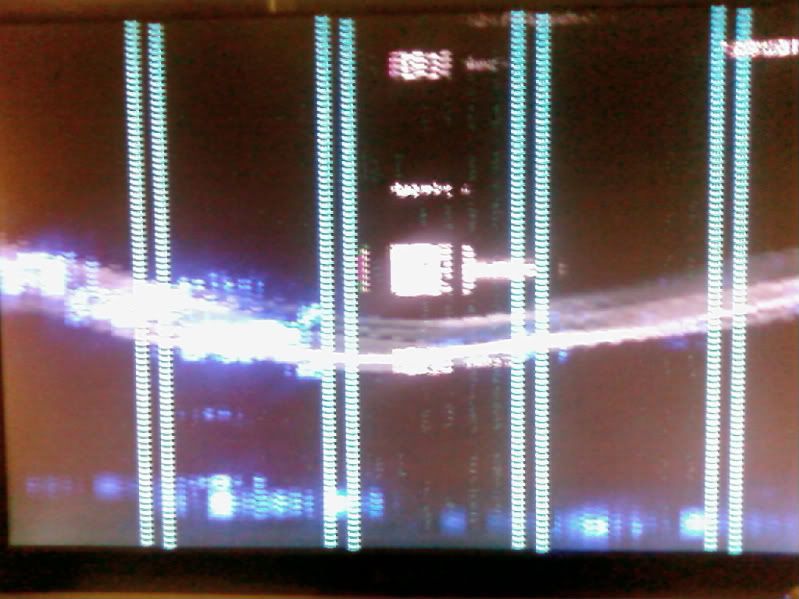
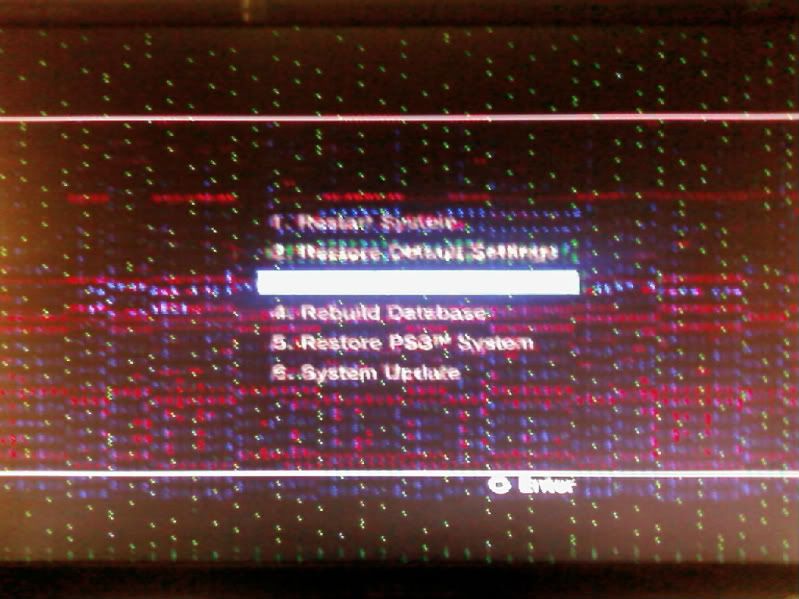
Help! What's wrong with my PS3?! I get corrupted XMB when I boot it up.
» Click to show Spoiler - click again to hide... « Going into recovery mode doesn't do much either... » Click to show Spoiler - click again to hide... « It happened before and I restored my ps3 to get rid of the problem. I used to be able to wait for 10 mins and then it would be back ok. But it kept coming again and with alarming regularity. I took care of my ps3 like a baby! Should I use a vacuum and suck out the dust? perhaps it's due to heating problems caused by dust? I'm sad.  it definately has ventilation. If this isn't enough ventilated then I don't know what is.  This post has been edited by slickz: Jul 9 2009, 07:18 PM |
|
|
Jul 9 2009, 09:23 PM
Return to original view | Post
#8
|
|
Senior Member
2,149 posts Joined: Jan 2003 From: Behind you! Look!
|
thanks for the feedback man. I'll seriously consider it.
Well it still can boot up ok after a while but damn, it can come up randomly! The most frustrating time was when I was 50 metres away from the finish line in GRID. I was leading the race and it was in serious difficulty pro mode. then it froze. URRRGHHHH. Added on July 9, 2009, 9:34 pmused a vacuum to suck out the dust from the vent holes. So far so good. Added on July 9, 2009, 9:59 pmnope.. problem still there... great. just great. This post has been edited by slickz: Jul 9 2009, 09:59 PM |
|
|
Jul 10 2009, 11:30 AM
Return to original view | Post
#9
|
|
Senior Member
2,149 posts Joined: Jan 2003 From: Behind you! Look!
|
good idea. Will try that too. But I kind of doubt it since if it's just the HDMI cable then I can still hear the 'tick tick' sounds when I navigate the XMB. Not this one. I route my sound through the SCART cable too.
In any case I waited a but more and it became ok again. This time I played around with the graphics settings ( turned RGB colors to Full instead of limted ). Loaded up GRID and got away with an hour or two of uninterrupted gameplay. Then I went to sleep. Hopefully it'll go away. and as for the link that you gave, that one had corrupted icons instead of the entire screen. I think that one could be solved with a firmware reinstall. I might even retry that too. I've done that before and it didnt help it. This post has been edited by slickz: Jul 10 2009, 11:36 AM |
|
|
Jul 11 2009, 06:02 PM
Return to original view | Post
#10
|
|
Senior Member
2,149 posts Joined: Jan 2003 From: Behind you! Look!
|
update : So far since changing the RGB dynamic range (HDMI) to full, the problem never came back. funny! got to play GRID nonstop for a couple hours (main sampai puas) with no interruptions. I decided to just leave it at that. It would be embarassing (and also kind of pointless) if I were to take it to the sony store and it just ran fine there.
Other settings I left it at include : Super White HDMI : Off Cross Colour Reduction Filter : On The problem really started when I played it downstairs about a week ago. I played a couple of hours downstairs connected to the family's 32 inch sharp aquos. Then suddenly the PS3 froze. Checking the manual made me realize the PS3 cannot be put on carpet. I guess that may have affected the ps3 in some ways. While playing downstairs I just set it on the carpet.... T_T Baka! Didn't realize. Top of PS3 was cool all the time. But at the bottom of the unit, it was a different story. Added with the fact it was resting on heat trapping material like carpet, the temperature can rise to damaging levels. This post has been edited by slickz: Jul 11 2009, 06:03 PM |
|
|
Jul 12 2009, 11:10 AM
Return to original view | Post
#11
|
|
Senior Member
2,149 posts Joined: Jan 2003 From: Behind you! Look!
|
it SEEMS to be ok. It pretty much held up to everything I did to it. Once it permanently can't start without that screen coming up again I'll bring it to sony. Thank god they are accepting outside PS3s now.
My warranty is long gone. Checked my receipt and I bought it on 8th Dec 2007. |
|
|
Jul 12 2009, 07:29 PM
Return to original view | Post
#12
|
|
Senior Member
2,149 posts Joined: Jan 2003 From: Behind you! Look!
|
of course it isn't good if u keep force restarting your ps3 but what other choice do you have in that situation? The only way would be to shut down, wait for a while and then turning it back on.
|
|
|
Jul 13 2009, 12:28 AM
Return to original view | Post
#13
|
|
Senior Member
2,149 posts Joined: Jan 2003 From: Behind you! Look!
|
QUOTE(snipersnake @ Jul 12 2009, 11:17 PM) personally I prefer a Sony rep working on my machine, cost more? Yes, but I will pay. Makes my heart easier. quoted for truth.Added on July 13, 2009, 12:31 am QUOTE(jebon 007 @ Jul 12 2009, 07:35 PM) do u has through this problem??? obviously I have went through a crash before. Several times in fact.This post has been edited by slickz: Jul 13 2009, 12:31 AM |
|
|
|
|
|
Jul 13 2009, 10:00 PM
Return to original view | Post
#14
|
|
Senior Member
2,149 posts Joined: Jan 2003 From: Behind you! Look!
|
looks like my problem is starting to come baaaaaaaaaack
This guy on the PSN board has pretty much the same problem from what I see. He even has videos. Mine looks almost the same as that, close, but not exactly. Link seems like there's quite a number of submitted videos on youtube showing roughly the same kind of problem. AAAAAAAAAAAAAAAAGGh This post has been edited by slickz: Jul 14 2009, 01:55 AM |
|
|
Jul 18 2009, 01:04 PM
Return to original view | Post
#15
|
|
Senior Member
2,149 posts Joined: Jan 2003 From: Behind you! Look!
|
I've had it with my ps3. It keeps hanging after so every few rounds with killzone. I'm going to open it up as soon as I get hold of some thermal paste (maybe today). I'm cleaning the sucker up nice and good inside. I think it's overheating the graphics chip, if I keep leaving it like this it may be damaged permanently. I also noticed the airflow from the vent is not as strong as it used to be when I bought it. Dust must have built up on the huge fan inside the ps3 making it not cutting air as it used to.
|
|
|
Jul 18 2009, 08:11 PM
Return to original view | Post
#16
|
|
Senior Member
2,149 posts Joined: Jan 2003 From: Behind you! Look!
|
good luck mr iron monkey. Hope it works
 A little teaser pic of what I'm about to do tonight. 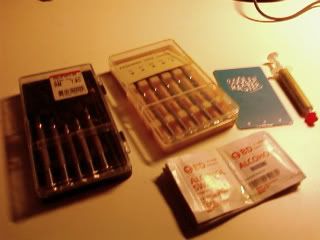 |
|
|
Jul 19 2009, 10:35 AM
Return to original view | Post
#17
|
|
Senior Member
2,149 posts Joined: Jan 2003 From: Behind you! Look!
|
QUOTE(monyetbesi @ Jul 19 2009, 08:26 AM) its for the PS3 exhaust fans koh3... thanks. Yeah the ribbon cable took some time to figure out how to open the tab because it was sooo small! I posted my attempt in a separate thread. mods...updates: 1 of 4 fans burns LOL, over voltage...  fry out less than 5 minutes fry out less than 5 minutes  gotta find where did i put 6 inch blade one...haih, malas nyer aku nk msuk stor  Added on July 19, 2009, 8:37 am hohoho...gubluck slickz do mind da small thingy while in da proses...careful with the ribbon cable, its didn't mean to pull off juz like that, there was small lock clip at the connection port you need to pay attention with http://forum.lowyat.net/topic/1101265 lots of pictas. |
|
|
Jul 21 2009, 12:25 PM
Return to original view | Post
#18
|
|
Senior Member
2,149 posts Joined: Jan 2003 From: Behind you! Look!
|
thermal paste.... well I don't think I got the best bargain for that so aim for a lower price. I got mine for RM 19 cooler master premium.
Torx driver I think in the RM X-teen RM or so. Size T10. Look for a big handle since that one screw is VERY tight. The rest inside is just regular sized philips screw drivers. Careful with the blue one holding the HDD. That one is plastic and easily stripped. Make sure the philips fits it well. Dunno what size but regular also. They don't seem to sell isopropyl alcohol that commonly. This is used to clean old thermal paste.I went to the big DIY store in centrepoint but didn't find. This one was the hardest to find. I suddenly thought of pharmacies and found that it's sold in cotton swabs for RM 1.25 for a pack of ten. Then again since a forumer here mentioned that Sony used Shin-Etsu paste which is superior to other thermal paste I doubt that I should open up the heatsink now. Problem is it's still crashing and the it has symptoms of coming back again. |
|
|
Jul 22 2009, 12:25 AM
Return to original view | Post
#19
|
|
Senior Member
2,149 posts Joined: Jan 2003 From: Behind you! Look!
|
the symptoms from my ps3 is starting to get more and more pronounced. I think its time is running out....
sob sob.... crap lah! |
|
Topic ClosedOptions
|
| Change to: |  0.0500sec 0.0500sec
 0.42 0.42
 8 queries 8 queries
 GZIP Disabled GZIP Disabled
Time is now: 2nd December 2025 - 06:33 AM |
 Quote
Quote