

I've tried MiniMoni on my Tour, data usage was not captured even it's run on background.
The Hidden Command in a BlackBerry, Check ur Up Time, Voice/Data Usage, etc
The Hidden Command in a BlackBerry, Check ur Up Time, Voice/Data Usage, etc
|
|
 Nov 3 2009, 10:21 PM Nov 3 2009, 10:21 PM
|
 
Senior Member
1,766 posts Joined: Jan 2003 From: Klang Valley  
|
I've tried MiniMoni on my Tour, data usage was not captured even it's run on background.
|
|
|
|
|
|
Nov 15 2009, 12:09 AM
|

Junior Member
17 posts Joined: Nov 2009
|
QUOTE(R4yMoNd @ May 1 2009, 03:00 AM) Hi Guys... I tried what you suggested and got the following results for my 5-days-old BB Bold 9000 supplied by Digi:Perhaps some of you already know theres a built in hidden command shortcut in a blackberry which can check your uptime, voice/data usage, etc For who didn't know it i share it with you here. and i hope it will be usefull To Check Your Device General Information: At the home screen of your Berry press: alt + shift + h this is what gonna appear  Your PIN will be shown, but If the PIN: Suspended, means u can't use BlackBerry Internet Service. Don't Buy it!!! To Check Your Device Voice/Data Usage: A Brand New item should not exceed the limit Go to: Options > Status > Type: BUYR (for qwerty KeyPad) Go to: Options > Status > Type: BUZR (for qwertz KeyPad)  Definitely Brand New Device 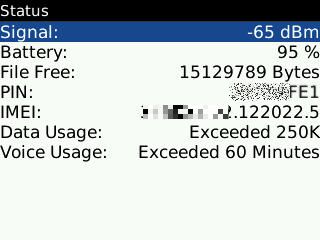 Not Brand New If The usage not exceed, perhaps is just for testing purposes To Check Your Device Locked or Unlocked: Go to: Options > Advanced Options > SIM CARD > Type: MEPD  Device Locked by Provider  Device Fully Unlocked  Well I hope it will be usefull for you guys... Happy Berry Hunting Well I hope it will be usefull for you guys... Happy Berry Hunting   1) Data Usage: Exceeded 250k 2) Voice Usage: Exceeded 60 Minutes What do these results mean? Added on November 15, 2009, 12:20 am QUOTE(R4yMoNd @ May 1 2009, 03:00 AM) Hi Guys... I tried what you suggested and got the following results for my 5-days-old BB Bold 9000 supplied by Digi:Perhaps some of you already know theres a built in hidden command shortcut in a blackberry which can check your uptime, voice/data usage, etc For who didn't know it i share it with you here. and i hope it will be usefull To Check Your Device General Information: At the home screen of your Berry press: alt + shift + h this is what gonna appear Your PIN will be shown, but If the PIN: Suspended, means u can't use BlackBerry Internet Service. Don't Buy it!!! To Check Your Device Voice/Data Usage: A Brand New item should not exceed the limit Go to: Options > Status > Type: BUYR (for qwerty KeyPad) Go to: Options > Status > Type: BUZR (for qwertz KeyPad) Definitely Brand New Device Not Brand New If The usage not exceed, perhaps is just for testing purposes To Check Your Device Locked or Unlocked: Go to: Options > Advanced Options > SIM CARD > Type: MEPD Device Locked by Provider Device Fully Unlocked Well I hope it will be usefull for you guys... Happy Berry Hunting 1) Data Usage: Exceeded 250k 2) Voice Usage: Exceeded 60 Minutes What do these results mean? This post has been edited by franktee: Nov 15 2009, 12:20 AM |
|
|
Nov 17 2009, 09:21 PM
|

Newbie
3 posts Joined: Jun 2009 From: Singapore
|
Thanks for the information Raymond!
Gonna try it as soon as I get the chance~ |
|
|
Nov 18 2009, 08:25 PM
|

Junior Member
100 posts Joined: Sep 2007
|
just a quick question, how can we check whether a blackberry storm 2 is the 9550 or 9520 version... from the outside looks exactly the same.
---scrap that, found out already---- This post has been edited by FaLLeN-786: Dec 1 2009, 11:23 AM |
|
|
Dec 5 2009, 07:02 AM
|
|
Junior Member
32 posts Joined: Dec 2009
|
Well hey guys,I have a sorta complicated problem here with bb bold.So my gf brought back a bb bold from Australia and its locked.She sent it to a phone shop to unlock and the phone dealer said its sorta unlocked already but when put in sim cannot detect,but he returned the phone without charging my girlfriend anything.(but he did change the original battery to a local msian battery,such cheap ass phone dealer right)
So my question here is it as long as the network there says active its still locked?or is there anything I need to take notice?Cause I've heard if we try to unlock the phone twice it might cause damage to the phone and also my gf got the unlocking pin from her service provider already so she can do it herself.Anyway,her phone says network : active and the rest is : disabled , does it mean the phone is still locked?and I can ask her go ahead with unlocking her phone using the unlocking code sent by her service provider? Thanks for the help in advance! |
|
|
Dec 16 2009, 08:57 AM
|

Senior Member
829 posts Joined: Apr 2006
|
I once had this problem. I sent in my phone to unlock, but when i get back my phone..the network still shows as active.
However, the shop did ask me to do a few things: 1) Set the network to 3G & 2G (mine is Storm) 2) call ##000000, and set the number to your local number And then i could call and sms and so on..but it still shows network as active, hence i upgraded the firmware to OS 5.0 and the network shows as Inactive now...no idea why thou. |
|
|
|
|
|
Dec 19 2009, 05:48 PM
|
|
Junior Member
280 posts Joined: Jan 2003
|
I key in BUYR and the voice usage is
8: 14: 29 : 24 So means 8 hours or 8 days or 8 minute? |
|
|
Jan 12 2010, 08:33 PM
|
|
Newbie
2 posts Joined: Jan 2010
|
I planning to buy Blackberry Storm,
Any comment for it? I am the first new user for it. Need help. Thanks. |
|
|
Jan 12 2010, 08:35 PM
|

Senior Member
2,587 posts Joined: Oct 2008 From: Malysia 
|
u need to subscribe a data plan if not ur bb is like normal phone de lo
|
|
|
Jan 14 2010, 11:42 AM
|

Junior Member
33 posts Joined: Oct 2007
|
QUOTE(beyond @ Dec 19 2009, 05:48 PM) I key in BUYR and the voice usage is Bro, it is 8 days.8: 14: 29 : 24 So means 8 hours or 8 days or 8 minute? |
|
|
Jan 26 2010, 12:12 AM
|

Junior Member
40 posts Joined: Apr 2009
|
|
|
|
Jan 26 2010, 12:38 AM
|
 
Staff
10,928 posts Joined: Jan 2003 From: United Kingdom
|
QUOTE(kchow24 @ Jan 26 2010, 12:12 AM) I've pinned that as well, with that thread focusing more on BES. |
|
|
Feb 1 2010, 08:50 PM
|
|
Senior Member
1,353 posts Joined: Nov 2007 From: Brum, United Kingdom
|
data usage - 9000.5k means in kb or bytes?
|
|
|
|
|
|
Feb 2 2010, 10:21 AM
|
|
Junior Member
32 posts Joined: May 2008
|
great info... thanks for sharing Raymond. I also found great cellphone accessories here : www.accessorygeeks.com. Great looking accessories with low price and free shipping. You can also get free giveaways, just check this out: www.youtube.com/user/thegeekshere
|
|
|
Feb 2 2010, 11:41 AM
|

Senior Member
2,560 posts Joined: Jan 2003 From: behind you 
|
ALT + RIGHT SHIFT + DEL this command to reboot ur device to gain back your memory
|
|
|
Feb 6 2010, 12:47 AM
|

Junior Member
40 posts Joined: Mar 2009
|
Sweet info!
Thanks for sharing!  |
|
|
Feb 11 2010, 03:19 PM
|
|
Junior Member
24 posts Joined: Jun 2009 From: Petaling Jaya
|
1. ALT-L-G-L-G shows a log file press bb button clear log to free memory space.
2. On the home screen, u can press ALT+NMLL and it will show you signal strength in decibel instead of the bars. |
|
|
Feb 13 2010, 01:49 PM
|

Junior Member
49 posts Joined: Apr 2009
|
Can pin suspended solved? Kalau boleh macam mana ya?
 |
|
|
Feb 19 2010, 10:26 AM
|

Junior Member
329 posts Joined: Jun 2007 From: behind you 
|
QUOTE(calmshot @ Feb 2 2010, 11:41 AM) ALT + RIGHT SHIFT + DEL this command to reboot ur device to gain back your memory my question... how to press those button if im on storm? |
|
|
Feb 21 2010, 11:43 PM
|
|
Junior Member
23 posts Joined: Mar 2009
|
QUOTE(calmshot @ Feb 2 2010, 11:41 AM) ALT + RIGHT SHIFT + DEL this command to reboot ur device to gain back your memory hi there,question...when u say gain back your memory means, will it reformat the sd card? thanks.  |
| Change to: |  0.0285sec 0.0285sec
 1.09 1.09
 6 queries 6 queries
 GZIP Disabled GZIP Disabled
Time is now: 19th December 2025 - 06:21 AM |
 Quote
Quote