

 Nov 15 2009, 12:09 AM


QUOTE(R4yMoNd @ May 1 2009, 03:00 AM)
Hi Guys...
Perhaps some of you already know theres a built in hidden command shortcut in a blackberry which can check your uptime, voice/data usage, etc
For who didn't know it i share it with you here. and i hope it will be usefull
To Check Your Device General Information:
At the home screen of your Berry
press: alt + shift + h
this is what gonna appear

Your PIN will be shown, but If the PIN: Suspended, means u can't use BlackBerry Internet Service. Don't Buy it!!!
To Check Your Device Voice/Data Usage:
A Brand New item should not exceed the limit
Go to: Options > Status > Type: BUYR (for qwerty KeyPad)
Go to: Options > Status > Type: BUZR (for qwertz KeyPad)

Definitely Brand New Device
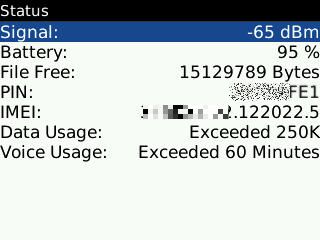
Not Brand New
If The usage not exceed, perhaps is just for testing purposes
To Check Your Device Locked or Unlocked:
Go to: Options > Advanced Options > SIM CARD > Type: MEPD

Device Locked by Provider

Device Fully Unlocked
 Well I hope it will be usefull for you guys... Happy Berry Hunting

I tried what you suggested and got the following results for my 5-days-old BB Bold 9000 supplied by Digi:Perhaps some of you already know theres a built in hidden command shortcut in a blackberry which can check your uptime, voice/data usage, etc
For who didn't know it i share it with you here. and i hope it will be usefull
To Check Your Device General Information:
At the home screen of your Berry
press: alt + shift + h
this is what gonna appear
Your PIN will be shown, but If the PIN: Suspended, means u can't use BlackBerry Internet Service. Don't Buy it!!!
To Check Your Device Voice/Data Usage:
A Brand New item should not exceed the limit
Go to: Options > Status > Type: BUYR (for qwerty KeyPad)
Go to: Options > Status > Type: BUZR (for qwertz KeyPad)
Definitely Brand New Device
Not Brand New
If The usage not exceed, perhaps is just for testing purposes
To Check Your Device Locked or Unlocked:
Go to: Options > Advanced Options > SIM CARD > Type: MEPD
Device Locked by Provider
Device Fully Unlocked
Well I hope it will be usefull for you guys... Happy Berry Hunting 1) Data Usage: Exceeded 250k
2) Voice Usage: Exceeded 60 Minutes
What do these results mean?
Added on November 15, 2009, 12:20 am
QUOTE(R4yMoNd @ May 1 2009, 03:00 AM)
Hi Guys...
Perhaps some of you already know theres a built in hidden command shortcut in a blackberry which can check your uptime, voice/data usage, etc
For who didn't know it i share it with you here. and i hope it will be usefull
To Check Your Device General Information:
At the home screen of your Berry
press: alt + shift + h
this is what gonna appear
Your PIN will be shown, but If the PIN: Suspended, means u can't use BlackBerry Internet Service. Don't Buy it!!!
To Check Your Device Voice/Data Usage:
A Brand New item should not exceed the limit
Go to: Options > Status > Type: BUYR (for qwerty KeyPad)
Go to: Options > Status > Type: BUZR (for qwertz KeyPad)
Definitely Brand New Device
Not Brand New
If The usage not exceed, perhaps is just for testing purposes
To Check Your Device Locked or Unlocked:
Go to: Options > Advanced Options > SIM CARD > Type: MEPD
Device Locked by Provider
Device Fully Unlocked
Well I hope it will be usefull for you guys... Happy Berry Hunting
I tried what you suggested and got the following results for my 5-days-old BB Bold 9000 supplied by Digi:Perhaps some of you already know theres a built in hidden command shortcut in a blackberry which can check your uptime, voice/data usage, etc
For who didn't know it i share it with you here. and i hope it will be usefull
To Check Your Device General Information:
At the home screen of your Berry
press: alt + shift + h
this is what gonna appear
Your PIN will be shown, but If the PIN: Suspended, means u can't use BlackBerry Internet Service. Don't Buy it!!!
To Check Your Device Voice/Data Usage:
A Brand New item should not exceed the limit
Go to: Options > Status > Type: BUYR (for qwerty KeyPad)
Go to: Options > Status > Type: BUZR (for qwertz KeyPad)
Definitely Brand New Device
Not Brand New
If The usage not exceed, perhaps is just for testing purposes
To Check Your Device Locked or Unlocked:
Go to: Options > Advanced Options > SIM CARD > Type: MEPD
Device Locked by Provider
Device Fully Unlocked
Well I hope it will be usefull for you guys... Happy Berry Hunting 1) Data Usage: Exceeded 250k
2) Voice Usage: Exceeded 60 Minutes
What do these results mean?
This post has been edited by franktee: Nov 15 2009, 12:20 AM
 Quote
Quote
 0.0173sec
 0.77
0.77
 7 queries
 GZIP Disabled