Welcome Guest ( Log In | Register )

Outline · [ Standard ] · Linear+

 Compaq Presario CQ40 AMD Series V2, Turion X2 2.2Ghz, HD 3450 512MB, RM2k!!!

views
     
iRonTech
post Mar 16 2010, 01:15 PM

Access Denied
*******
Senior Member
8,621 posts

Joined: Nov 2004
QUOTE(fcuk90 @ Jan 24 2010, 06:07 PM)
i m using 32bit version , so far so good
*
biggrin.gif tested x64, much more efficient for cq40, faster on AMD CPU/GPU, more reliable broadcom wifi

QUOTE(iq_myst @ Feb 24 2010, 10:50 PM)
guys, wanna ask if the battery is covered under the warranty. mine can last about 10 minutes only. warranty ends this april..
*
should go claim one new
iRonTech
post Mar 26 2010, 04:34 PM

Access Denied
*******
Senior Member
8,621 posts

Joined: Nov 2004
QUOTE(tictac @ Mar 17 2010, 01:43 PM)
i format and fresh install win 7. problem solved smile.gif


Added on March 17, 2010, 5:48 pm

i install on my cq40 3450 512mb also just now. no problem...  rclxms.gif
*
is the ATI Display 03/02/2010, 8.712.0.0000 really installed properly from 10.3 ccc ? Can u plz verify this?

mine HD3200 wouldn't allowed to install the display driver, forced mode doesn't work either.. the rest like ccc, ATI HD Audio ok.. unsure.gif

ATI has forgotten older HD... cry.gif cry.gif


trying another 10.3 version for mobility radeon.. tongue.gif

done with the Mobility Radeon 10.3 tongue.gif haven't test performance

This post has been edited by iRonTech: Mar 26 2010, 08:21 PM
iRonTech
post Apr 9 2010, 03:25 PM

Access Denied
*******
Senior Member
8,621 posts

Joined: Nov 2004
cq42 like this? http://www.ncs.com.my/index.php?productID=1990
iRonTech
post Apr 15 2010, 01:03 PM

Access Denied
*******
Senior Member
8,621 posts

Joined: Nov 2004
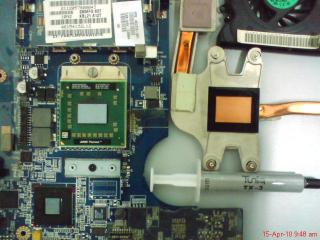
biggrin.gif NBTD, clean up entire CQ40..

cq40 naked..

» Click to show Spoiler - click again to hide... «

» Click to show Spoiler - click again to hide... «


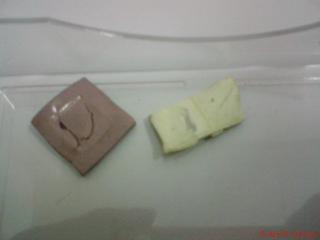
original cheap phailed useless glue removed sweat.gif

» Click to show Spoiler - click again to hide... «

» Click to show Spoiler - click again to hide... «

» Click to show Spoiler - click again to hide... «


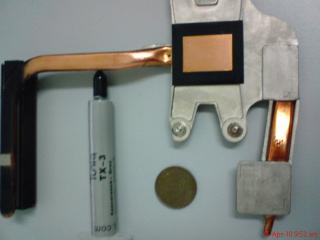
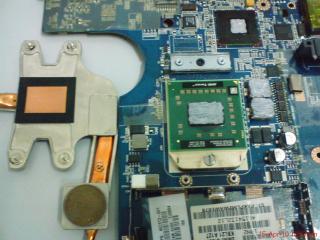
DIY, by year 1958 1 cent + TX3 tongue.gif

» Click to show Spoiler - click again to hide... «

» Click to show Spoiler - click again to hide... «


after clean up done + applied TX3 on AMD CPU & ATI 3200, temperature now:-
» Click to show Spoiler - click again to hide... «


* Ya, the temperature drop much faster once flash stuff closed. biggrin.gif


temperature before:- doh.gif
1) ACPI - btw 60-85dc
2) Turion X2 btw 70-95dc
3) hdd btw 45-55 dc
(most of the time reach max)

This post has been edited by iRonTech: Apr 15 2010, 01:22 PM
iRonTech
post Apr 15 2010, 10:18 PM

Access Denied
*******
Senior Member
8,621 posts

Joined: Nov 2004
QUOTE(allenultra @ Apr 15 2010, 08:00 PM)
Well, I not bought this laptop for gaming.....as I dun gaming at all.

Bought it because of the pricing and warranty. Also the built quality, especially the keyboard smile.gif
*
ya, cheap enough if compare to intel

QUOTE(nevland @ Apr 15 2010, 09:30 PM)
irontech, u did it yourself??
*
ya, follow the disassemble service manual by HP
iRonTech
post Apr 19 2010, 08:48 AM

Access Denied
*******
Senior Member
8,621 posts

Joined: Nov 2004
QUOTE(nevland @ Apr 16 2010, 03:32 PM)
where to get the service manual? tq
*
here u go

http://h10032.www1.hp.com/ctg/Manual/c01531211.pdf

QUOTE(banks @ Apr 18 2010, 06:12 PM)
@iRonTech : is it difficult to take apart the laptop? you use the paste on the gpu and cpu only? sorry for the questions.
*
not difficult, just need patience as certain parts are tight. can't hard forced to avoid the cover plastic broken.

yes. cpu only can apply thermal paste, but the gpu original lousy glue replaced by 1 cent coin + thermal paste applied


now quite satisfied the temperature, it won't go high as previous, yet it cool down much faster rclxm9.gif (without any cool pad aid)


the heat shield for left palm rest place. it doesn't reduce much heat feel from top left palm rest place, but the HDD's temperature did go down faster than before biggrin.gif also apply it beneath keyboard, I wanna make sure the fan flow go better & smooth.

material - aluminium foil

» Click to show Spoiler - click again to hide... «

» Click to show Spoiler - click again to hide... «

» Click to show Spoiler - click again to hide... «

» Click to show Spoiler - click again to hide... «

iRonTech
post Apr 19 2010, 12:45 PM

Access Denied
*******
Senior Member
8,621 posts

Joined: Nov 2004
laugh.gif mine still under 2nd yr extended warranty period..really cannot stand the heat so mod em up. its much much more efficient than using those cool pad
iRonTech
post Apr 20 2010, 10:33 AM

Access Denied
*******
Senior Member
8,621 posts

Joined: Nov 2004
QUOTE(banks @ Apr 19 2010, 10:55 PM)
@irontech: Thanks for the answers! 1 more question, the gpu paste. Did you apply it like this way --> paste, 1 cent coin, paste, gpu?

I'm gonna take it apart when holiday arrives! Can't stand the 100c temperature when both core are under load. even undervolting doesn't help much == perhaps now my tx2 can remedy that~
*
ya, i applied both sides, different just gpu part less & coin to heat sink part more. its hd3200, so can't tell the actual temperature. if u guys using 3450, pls share the temperature b4 & after smile.gif


By right should as what allenultra said, one side would do. but...haha... doesn't matter anymore one or both, as long solve the problem efficiency

story apply paste between GPU only & both sides coin:-

On the Pavilion TX1000 Nvidia blank screen issue, 5 weeks ago I applied paste just one side btw GPU & Coin, TX1000 awake from blank screen no response problem BUT only works out one week, went blank screen again. After heat up method the Nvidia GPU, applied both sides on the coin, the blank screen problem is working fine until now.


iRonTech
post Apr 20 2010, 03:45 PM

Access Denied
*******
Senior Member
8,621 posts

Joined: Nov 2004
no lapping as the gap size on cq40 doesn't allowed, you may do that if its allow, clean up yes
iRonTech
post Apr 26 2010, 09:53 AM

Access Denied
*******
Senior Member
8,621 posts

Joined: Nov 2004
QUOTE(banks @ Apr 23 2010, 11:06 PM)
Hmm.....can't really say for sure. I've been using for around 5 months now after sending for warranty. So far there's no problem.

Around 2~3 days.


Added on April 23, 2010, 11:33 pmIce Ice Baby~ with Tuniq TX2

user posted image

Result is 15 minutes of gaming in Guild Wars. Without TX-2 it will surely climb up to 90 degrees!
*
90 vs 78...its quite a big gap temperature biggrin.gif
iRonTech
post May 21 2010, 10:44 AM

Access Denied
*******
Senior Member
8,621 posts

Joined: Nov 2004
50-60 ++ dc is normal for this model, if with flash, easily hit up 7x ++ dc.

the restart matter, what error show from the event viewer ?
iRonTech
post Sep 7 2010, 05:34 PM

Access Denied
*******
Senior Member
8,621 posts

Joined: Nov 2004
QUOTE(tictac @ Sep 4 2010, 09:09 AM)
no... send to ganabathi. mine having same problem. fixed it for cheap only... smile.gif
*
QUOTE(tictac @ Sep 5 2010, 08:48 AM)
less than rm 200 smile.gif

GPU Problem
*
Hi tictac,

Does ganabathi mention how he fix it? any parts changed? curious to know biggrin.gif Thanks


My CQ40, before that the blank boot (with cap & num blinking once continuously) problem happened intermittent, but after I left it abt a week plus totally power off, now the problem seem went away : hmm.gif

This post has been edited by iRonTech: Sep 7 2010, 05:37 PM
iRonTech
post Sep 8 2010, 09:03 AM

Access Denied
*******
Senior Member
8,621 posts

Joined: Nov 2004
QUOTE(yimingwuzere @ Sep 7 2010, 10:48 PM)
My buddy's laptop has a new CPU. However after fixing it in for him I get a new error: plugged in charger and power LEDs are lit, press power button the LEDs go off and the laptop doesn't start. Any ideas?
*
try connect to external monitor, then plug in ac adapter & turn on the nb, see what's result.
iRonTech
post Sep 21 2010, 05:35 PM

Access Denied
*******
Senior Member
8,621 posts

Joined: Nov 2004
QUOTE(tictac @ Sep 11 2010, 09:30 PM)
yup... i have exactly same problem as yours... then 1 day it decide not to boot up anymore. He said it is the GPU graphic problem. The hot air from the processor causing this problem. Better fixed it. Last time i keep delaying. Cause it will boot up again if we leave it fro sometimes. I just afraid the data from HDD corupt due to bad boot up.
*
HP replace the AMD CPU for my CQ, instead the GPU with entire mobo, pretty fast their service, within 3 working days biggrin.gif

Love the Presario CQ series internal speakers built, with superb solid & deep bass, its real Altec Lancing. Not like some other brand just print a JBL/Altec name but really poor louzy speakers actually tongue.gif


Change to:
| Lo-Fi Version
0.0213sec    0.75    7 queries    GZIP Disabled
Time is now: 5th December 2025 - 12:57 PM