


This post has been edited by Skylinestar: Jan 26 2010, 10:51 PM
Your Home Theater Setup, Let's share
|
|
 Jan 26 2010, 09:27 PM Jan 26 2010, 09:27 PM
Return to original view | Post
#1
|
 
All Stars
10,475 posts Joined: Jan 2003 From: Sarawak 
|
that's not very big if you've seen houses in sabah and sarawak.
This post has been edited by Skylinestar: Jan 26 2010, 10:51 PM |
|
|
|
|
|
Jan 28 2010, 02:59 PM
Return to original view | Post
#2
|
|
All Stars
10,475 posts Joined: Jan 2003 From: Sarawak
|
@kevinboey86
your sony avr no need to breathe? |
|
|
Mar 12 2010, 02:39 PM
Return to original view | Post
#3
|
|
All Stars
10,475 posts Joined: Jan 2003 From: Sarawak
|
@ TrynRex
the tv looks small compare with the center speaker. is there anything like a small center speaker stand that we can place behind the tv, and with angle adjustment for tilting downward when the speaker is located above the tv? |
|
|
May 10 2010, 11:03 PM
Return to original view | Post
#4
|
|
All Stars
10,475 posts Joined: Jan 2003 From: Sarawak
|
how do you guys place your AVR in the tv cabinet with tight space? how much gap do you guys give your avr for "breathing"?
(accs_centre pic as reference) 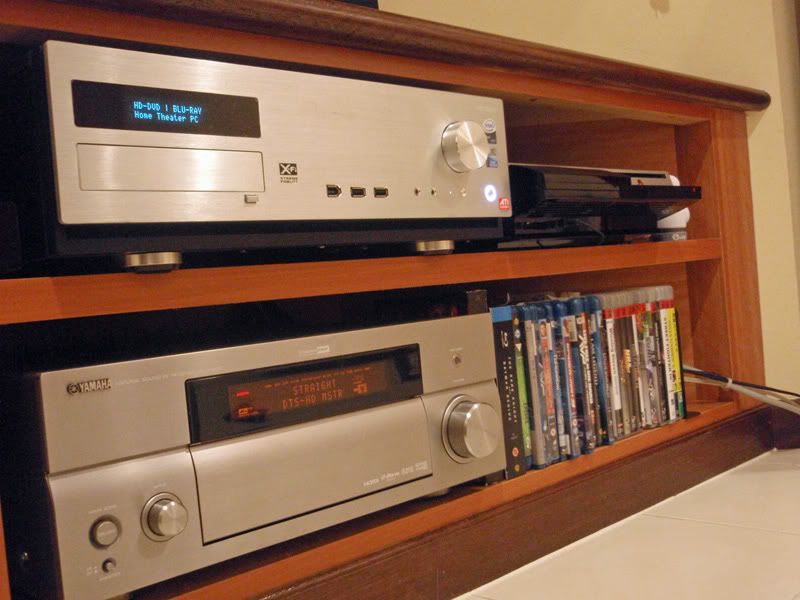 This post has been edited by Skylinestar: May 10 2010, 11:05 PM |
|
|
Jun 27 2010, 12:33 PM
Return to original view | Post
#5
|
|
All Stars
10,475 posts Joined: Jan 2003 From: Sarawak
|
@ mpyw
in the second pic, what type of speaker mount/bracket do you use to mount those front presence speakers? |
|
|
Jul 22 2010, 10:23 PM
Return to original view | Post
#6
|
|
All Stars
10,475 posts Joined: Jan 2003 From: Sarawak
|
Horizontal Center Channel Speakers and Why They Should Be Avoided
 http://forum.blu-ray.com/speakers/89614-ho...ld-avoided.html http://www.audioholics.com/education/louds...channel-speaker what do you guys think? anyone here tried placing their center speaker vertically? QUOTE To get the best performance out of the center channel, use a speaker that is identical to the two main speakers.  how many of you do this? how many of you do this? This post has been edited by Skylinestar: Jul 23 2010, 10:01 AM |
|
|
|
|
|
Aug 7 2010, 01:44 PM
Return to original view | Post
#7
|
|
All Stars
10,475 posts Joined: Jan 2003 From: Sarawak
|
@ shankar_dass93
why cramp all the speakers together at the front? why hide the center speaker at the bottom? This post has been edited by Skylinestar: Aug 7 2010, 01:45 PM |
|
|
Aug 12 2010, 11:07 PM
Return to original view | Post
#8
|
|
All Stars
10,475 posts Joined: Jan 2003 From: Sarawak
|
@ stanleysi
is that a dedicated HT room? if yes, why don't go for fix screen? |
|
|
Aug 14 2010, 09:29 PM
Return to original view | Post
#9
|
|
All Stars
10,475 posts Joined: Jan 2003 From: Sarawak
|
QUOTE(senoqc @ Aug 14 2010, 09:01 PM) no remote control This post has been edited by Skylinestar: Aug 14 2010, 09:30 PM |
|
|
Aug 16 2010, 11:22 PM
Return to original view | Post
#10
|
|
All Stars
10,475 posts Joined: Jan 2003 From: Sarawak
|
QUOTE(WildChai @ Aug 16 2010, 10:37 PM) Now that is the answer i was looking for. thanks. Gotta read up on the positioning then. SMPTE recommends a 30º viewing angle, while THX recommends a maximum 36º viewing angle for a more involving image, and a minimum of 26º. |
|
|
Sep 5 2010, 12:11 AM
Return to original view | Post
#11
|
|
All Stars
10,475 posts Joined: Jan 2003 From: Sarawak
|
QUOTE(SpenceWarren @ Sep 4 2010, 10:53 PM) HTPC connected to a LCD TV means the Windows will shown up on the screen, right ? Then are we controlling the cursor with our mouse when we tend to choose the movies etc ? yes. or you can use keyboard or remote control for windows media center. |
|
|
Sep 5 2010, 07:49 PM
Return to original view | Post
#12
|
|
All Stars
10,475 posts Joined: Jan 2003 From: Sarawak
|
QUOTE(SpenceWarren @ Sep 5 2010, 10:30 AM) Wouldnt it be inconvenient if we are controling with mouse and keyboard ? I mean if the highest resoulution was set on the TV, the fonts etc would be too small for us to view if we are sitting at the back, isnt it. Let's say if I would like to make changes, I means setting or playing, forwarding videos etc, does that mean we have to move forward to our TV rack to move the cursor by mouse ? It isn't that practical or you guys are doing it using some other method ? I have my HT system recently but still considering either to build a HTPC or a simple HDD media player will do the job ? Thanks for your advices, will post up my set up soon. Thank You. there's wireless technology  |
|
|
Oct 5 2010, 10:22 PM
Return to original view | Post
#13
|
|
All Stars
10,475 posts Joined: Jan 2003 From: Sarawak
|
QUOTE(mikapoh @ Oct 4 2010, 08:56 AM) Thanks bro how to prevent vibration from plaster ceiling? care to describe more on this fiber injection thingy? . . Any particular color paintings you recommend? But the next thing I wanna do is to treat the plaster aluminum beams right above the SVS sub. There are some rattling sound. Might get somebody to inject fiber on the aluminum to mitigate the vibration sound. |
|
|
|
|
|
Oct 19 2010, 07:29 PM
Return to original view | Post
#14
|
|
All Stars
10,475 posts Joined: Jan 2003 From: Sarawak
|
@ arremie
is that center speaker placed on top of a drawer? so desperate? time to change tv cabinet  |
|
|
Nov 24 2010, 08:18 PM
Return to original view | Post
#15
|
|
All Stars
10,475 posts Joined: Jan 2003 From: Sarawak
|
QUOTE(boreclub @ Nov 24 2010, 02:15 PM) dear sifus, below is my approximated room dimension. May i know how can i setup my AV room? Means my tv/projector should located at which wall? and how far should i sit from the screen? some guides copied from the internet I'm currently at kluang, johor, may i know is there any good av shop at johor that can help setting up? thanks for any suggestion. 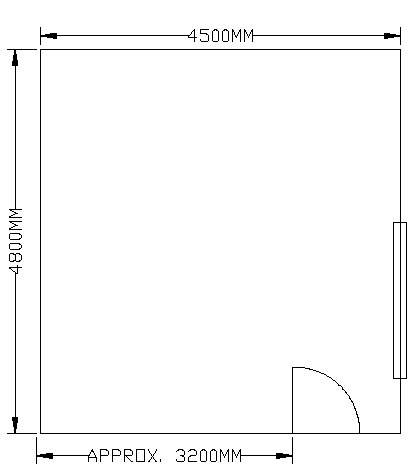 Custom Installer: Calculating HDTV Viewing Distances Handy formulas for TV buying or watching. By John Sciacca March 2010 People are generally either good with numbers or good with words. Pretty early on I discovered that my destiny lay with words. I don’t hate math, but I don’t really go out of my way to seek it out, either. However, even for a custom installer, basic math skills can really help out. This is especially true when recommending screen size or calculating viewing distances. Unfortunately, many formulas are complex and difficult to remember: basically, all the reasons you dropped out of high school calculus. (Which I did. In a blaze of, “I will never use calculus. Never!” And, guess what, Mr. Fee? Twenty years later, I’m still not regretting that decision!) If cosines, tangents, coefficients, and hypotenuses anger up your blood, then read on for some simple tips that might help out on your next TV purchase. FIND THE WIDTH (AND HEIGHT) When making the switch from 4 x 3 to 16 x 9, knowing how wide your new set can be is paramount, especially if cabinetry is involved. But since manufacturers only give you the diagonal measurement, what to do? Math. Figuring the width on a 4 x 3 set is as easy as multiplying the diagonal measurement by 0.8. So, a 50-inch-diagonal 4 x 3 set is 40 inches wide. (Note: This is the screen size only, not including any frame.) If you need to know the height — important in the next section — multiply the diagonal measurement by 0.6, meaning a 50-inch-diagonal 4 x 3 set is 30 inches tall. The width of a 16 x 9 set can be determined by multiplying the diagonal measurement by 0.87. So, a 50-inch-diagonal 16 x 9 set is 43.5 inches wide. To find the height, multiply the diagonal measurement by 0.49. So, a 50-inch-diagonal 16 x 9 set is 24.5 inches tall. Easy, right? 50 INCHES, 4 x 3 SET SCREEN HEIGHT 30 INCHES SCREEN WIDTH 40 INCHES TOTAL SCREEN AREA 1,200 INCHES 50 INCHES, 16 x 9 SET SCREEN HEIGHT 24.5 INCHES SCREEN WIDTH 43.5 INCHES TOTAL SCREEN AREA 1,066 INCHES THE DOWNSIZING FROM 4 x 3 TO 16 x 9 I can’t tell you how often I hear, “Boy, that set doesn’t look as big as I thought” or “I wish I’d gone larger.” Ever wonder why everyone is having size issues? It’s due to the shrinkage from 4 x 3 to 16 x 9. While we gain some width, we’re losing a ton of height; that’s why the new set doesn’t look as big. In the above switch from a 50-inch 4 x 3 set to a 50-inch 16 x 9 model, we lost 5.5 inches of height and 134 square inches of screen real estate. So, yes, your new TV is smaller. A good starting point for picking a new screen size is matching the old set’s height. This replaces the “Wow! That looks small!” reaction with “Man! Check out my sweet new TV!” To find a 16 x 9 set’s matching height, divide the 4 x 3 set’s height by 0.49. Keeping with the 50-inch example, dividing 30 by 0.49 equals 61, meaning that it takes a 61-inch-diagonal 16 x 9 set to retain the screen height. That’s why 60 is the new 50. (A) 50 INCHES DIAGONAL VIEWING DISTANCE = DIAGONAL x 1.63 = 50 x 1.63 = 81.5 INCHES (6 FEET-10 INCHES) (B) 100 INCHES DIAGONAL = 87 INCHES WIDE MINIMUM VIEWING DISTANCE = WIDTH x 1.54 MIN (36° ANGLE) = 154 INCHES MAXIMUM VIEWING DISTANCE = WIDTH x 2.2 MAX (26° ANGLE) = 220 INCHES WHERE TO SIT? Groups like SMPTE (Society of Motion Picture and Television Engineers) and THX have developed guidelines for seating distance based on subtended viewing angles, or how much your field of view is occupied. SMPTE recommends a 30º viewing angle, while THX recommends a maximum 36º viewing angle for a more involving image, and a minimum of 26º. But even with the formula and a scientific calculator, deciphering subtended viewing angles is, frankly, a real pain. Instead of hateful trigonometry, use these simple formulas. For 16 x 9 screens, multiply the screen diagonal by 1.63 or the width by 1.9 to determine your SMPTE-recommended seating distance. With a 50-inch-diagonal screen, multiplying by 1.63 and then dividing that result by 12 (converting inches to feet) suggests sitting 6.79 feet from the screen. Know how far away you’re sitting and want help choosing the ideal screen size? Divide the seating distance in inches by 1.63 for the screen diagonal or by 1.9 for the width. So, 12 feet away equals 144 inches divided by 1.63 equals a recommended screen size of 88 inches. As a general guideline, technical editor Al Griffin suggests multiplying the screen width by 1.54 for 36º viewing, and the width by 2.2 for maximum distance. So, an acceptable seating range for a 100-inch-wide screen would be 154 (12.83 feet) to 220 inches (18.33). THX’s Master Jedi, John Dahl, suggests multiplying the viewing distance by 0.84 for max screen size and dividing the screen diagonal by 0.84 for optimal distance. Armed with these simple formulas, you can use the calculator in your cellphone for some quick figuring in a store and determine the set size that’s perfect for you. ------------------------------------------------------ Hanging your TV above the Fireplace? Yes, No? The experts at THX believe that you should have a clean line of sight to the display, without looking up more than 15 degrees or down more than 7 degrees. In a dedicated home theater, a good rule of thumb is to mount your TV in a direct line of sight from the primary seating positions. It should be high enough so those sitting behind you can see over or between those sitting in the front row. --------------------------------------------------- THX Seat-to-screen Viewing Distance Calculations How do you calculate the best seat-to-screen distance for a plasma, LCD TV or projection screen? Divide the size of your screen by .84 (screen size is measured diagonally). For example, a 65-inch TV divided by .84 equals a 77-inch viewing distance (6.5 feet). If your HDTV is going in a living room with limited space, THX recommends the following: 35 inch class TV = 3.5-5 feet away 40 inch class TV = 4-6 feet away 50 inch class TV = 5-7.5 feet away 60 inch class TV = 6-9 feet way It might seem that THX is recommending a very large screen size for your room. But, it’s important to note two things: 1) THX screen size recommendations are based on recreating an immersive cinematic experience, and 2) the biggest complaint among TV buyers is that they wish they had bought a bigger set. |
|
|
Apr 23 2011, 04:20 PM
Return to original view | Post
#16
|
|
All Stars
10,475 posts Joined: Jan 2003 From: Sarawak
|
QUOTE(th8 @ Apr 23 2011, 01:29 AM) Dear WereWolf, If your BD player has coaxial or optical out, hook it to your AVR and let the AVR to do the decoding.I already have a DVD using coaxial cable and I'm thinking of getting a plasma tv and a blu-ray player. Kind of wondering if I shud use the same to get the DTS sound from blu-ray? Just to make sure I can still get the DTS sound b4 investing the $. Thanks! |
|
|
Jul 16 2011, 12:08 AM
Return to original view | Post
#17
|
|
All Stars
10,475 posts Joined: Jan 2003 From: Sarawak
|
@ tim_1335
really kesian the center speaker hiding in the left "shack". should put it higher and closer to the screen. anyone here with DSX setup? i've read some mixes reviews regarding DSX wide. some say it's very good...some say it gives weird sound (http://homecinemaguru.com/?p=1182).. what do you guys think? is it worth to spend extra cash on an AVR with DSX? really dilemma here. |
|
|
Jul 20 2011, 10:52 PM
Return to original view | Post
#18
|
|
All Stars
10,475 posts Joined: Jan 2003 From: Sarawak
|
I'm hoping that DTS Neo:X will be the norm. Can't wait for reviews of Onkyo 1009. Wanna know how it fight with DSX.
This post has been edited by Skylinestar: Jul 20 2011, 10:53 PM |
|
|
Jul 25 2011, 08:43 PM
Return to original view | Post
#19
|
|
All Stars
10,475 posts Joined: Jan 2003 From: Sarawak
|
QUOTE(ClericKilla @ Jul 25 2011, 12:40 PM) Anybody here in LYN here is expertise in making a good home theater when I give a budget? Mind to PM me? look for htkaki |
|
|
Jul 28 2011, 10:40 PM
Return to original view | Post
#20
|
|
All Stars
10,475 posts Joined: Jan 2003 From: Sarawak
|
screen size calculation:
http://myhometheater.homestead.com/viewing...calculator.html THX recommends a maximum 40-36º viewing angle for a more involving imageº looks like your angle is 44 degree...too wide for comfort. This post has been edited by Skylinestar: Jul 28 2011, 10:47 PM |
|
Topic ClosedOptions
|
| Change to: |  0.0606sec 0.0606sec
 0.40 0.40
 7 queries 7 queries
 GZIP Disabled GZIP Disabled
Time is now: 8th December 2025 - 06:26 PM |
 Quote
Quote