Welcome Guest ( Log In | Register )

Bump Topic Topic Closed RSS Feed

Outline · [ Standard ] · Linear+

 Your One Stop iTunes Troubleshooting Centre, How-to-do guides, backup, tips & tricks!

views
     
boringpig
post Aug 9 2009, 03:16 PM

Regular
******
Senior Member
1,344 posts

Joined: Jan 2003
From: somewhere in the galaxy *~o~o*-*
I can't transfer .mp4 movie into my iPhone.
I've checked [Manually manage music and videos] on the Summary tab.. after that all the existing music in my iPhone are gone..

I checked on [Sync all...] on Video tab, that [Manually manage music and videos] will be automatically unchecked..

In iTunes' Movie library, I can see the list of my video..

Anyone help? Thanks!

iPhone Generation : 3GS
Unlocked? (or Part Number): Officially unlocked from Maxis MC134MY
Current Firmware : verion 3.0 (04.26.08)
iTunes Version : 8.2.1
PC/MAC : PC
Jailbreaking software : redsn0w 0.8
Problem Encountered : "There are no rented movies in ur Itunes Library
that can be transferred to your iphone."
Steps Taken So Far : As below
Screenshot of Problem(if applicable) : N/A
Other Information/Remarks : N/A

I've searched through the thread for similar issue but no solution found.

I've done:
1. Checked [Manually manage music and video]
2. Converted my video into .mp4 and .m4v
3. Added into the Movie library
4. Click on "Sync all..." in Video tab

I can't see the Movie section but I can see "Rented movie" and "TV Shows" on Video tab..
boringpig
post Aug 9 2009, 09:57 PM

Regular
******
Senior Member
1,344 posts

Joined: Jan 2003
From: somewhere in the galaxy *~o~o*-*
QUOTE(nokia2003 @ Aug 9 2009, 07:39 PM)
@ boringpig

a screen shot?
*
i managed to get it uploaded and able to watch it on my iphone d..
thanks! notworthy.gif

This post has been edited by boringpig: Aug 10 2009, 12:09 AM
boringpig
post Aug 11 2009, 03:55 PM

Regular
******
Senior Member
1,344 posts

Joined: Jan 2003
From: somewhere in the galaxy *~o~o*-*
I'm asking on behalf of my friend. He can't launch iTunes on his laptop.. It's giving DEP error whenever he launch iTunes.

Laptop OS: Vista Home Premium
iPhone OS: 3GS (3.0)
iTunes version: 8.2 (downloaded from Apple website)

We have attempted on the following:
1. Turned on DEP for essential Windows programs and services
2. Turned on DEP for all programs and services except those I select - unable to select iTunes.exe - getting error
3. Uninstalled iTunes and run CCleaner to clean the registry traces and reboot
4. Reinstalled iTunes - same
5. Followed the instructions here - http://www.realtime-vista.com/administrati...ution_preve.htm

We are able to run iTunes on his desktop using Vista Ultimate.

Any idea how to fix this? Thanks!


Added on August 11, 2009, 7:47 pmOkay.. I think I've found the solution.. Managed to installed and run it on that particular laptop.

The steps:

[1] Enable show hidden files and folders
[2] Uninstall iTunes, QuickTime, iPod, etc.
[3] Exit from any Apple programs on the system tray
[4] Go to services.msc and stop iPodService and iTunesHelper (if any)
[5] Delete all iTunes, QuickTime, iPod shortcuts on desktop
[6] Delete iTunes, QuickTime, iPod folders in C:\Program Files
[7] Uninstall QuickTime, iTunes, Bonjour, or any other Apple products using Windows Installer Cleanup Utility
[8] Go to C:\WINDOWS\System32 and remove QuickTime.qts and QuickTimeVR.qt
[9] Performe a search for any other *.qts and *.qt files - remove
[10] Search for quicktime.msi - remove
[11] Run a registry scan using CCleaner and remove the registry keys
[12] Delete the following:

In Windows XP:
C:\Documents and Settings\All Users\Application Data\Apple Computer\iTunes
C:\Documents and Settings\All Users\Application Data\Apple Computer\QuickTime
C:\Documents and Settings\<username>\Application Data\Apple Computer\iTunes

In Windows Vista
C:\Users\<username>\AppData\Roaming\Apple Computer\iTunes
C:\Users\<username>\AppData\Roaming\Apple Computer\QuickTime
C:\ProgramData\Apple Computer\iTunes
C:\ProgramData\Apple Computer\QuickTime

[13] Go to registry and remove HKLM\SOFTWARE\Microsoft\Windows\CurrentVersion\Run\QuickTime Task
[14] Remove C:\Program Files\QuickTime
[15] Reboot the computer
[16] Reinstall iTunes 8.2
[17] Launch iTunes

QUOTE


Hope this help to those getting DEP error while attempting to launch iTunes.. smile.gif

This post has been edited by boringpig: Aug 11 2009, 07:50 PM
boringpig
post Aug 12 2009, 04:12 PM

Regular
******
Senior Member
1,344 posts

Joined: Jan 2003
From: somewhere in the galaxy *~o~o*-*
QUOTE(Claudio @ Aug 12 2009, 03:43 PM)
Find this one very annoying. After added all the desired music file to the itune library, all the music files will gone missng the next time i launch the itune and same to the applications, after downloaded from the app store, the next time I launch the itune all the apps will be gone in the itunes and need to do a transfer from iphone to itune. very much to me annoying is that, each time i sync, all the music file in my iphone will be gone I have to re-adding the music again to itune library!!
Can anyone here help how to retain the music file and stay there?
*
do u sync ur iphone on more than 1 computer?
boringpig
post Sep 10 2009, 05:03 PM

Regular
******
Senior Member
1,344 posts

Joined: Jan 2003
From: somewhere in the galaxy *~o~o*-*
i'm using iTunes 9 now..
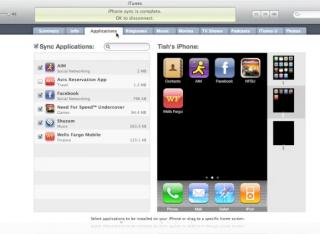
wondering why i can't see my iPhone home screen (see below):
Attached Image

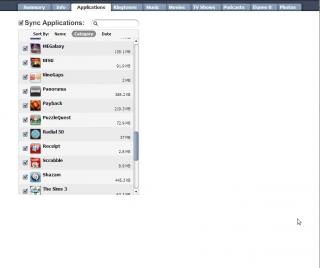
all i can see in my iTunes is just the list of apps I have (as below):
Attached Image

Any idea? Thanks!
boringpig
post Sep 11 2009, 07:52 PM

Regular
******
Senior Member
1,344 posts

Joined: Jan 2003
From: somewhere in the galaxy *~o~o*-*
QUOTE(nokia2003 @ Sep 10 2009, 08:33 PM)
not too sure in your case, but i first updated my firmware to 3.1 using the then, previous version of iTunes.

once the first synchroinisation & backup has been completed, only i proceeded to install the latest iTunes 9.

following that sequence, every feature advertised, works like a charm.

iPhone-iTunes synchronisation time has definitely improved vastly and the iTunes on an XP boot camp MBP, is more responsive compared to the previous version
*
if this is the case.. i cna't jailbreak my phone then.. i guess.. sad.gif

Topic ClosedOptions
 

Change to:
| Lo-Fi Version
0.0394sec    0.67    7 queries    GZIP Disabled
Time is now: 3rd December 2025 - 03:58 AM